Koldov
-
Posts
5,084 -
Joined
-
Last visited
Content Type
Forums
News
20th
EduGeek EDIT Conference
Blogs
Everything posted by Koldov
-

One of England's largest school academies to go phone-free
Koldov replied to 6Foot2's topic in General Chat
My $deity... way to make me feel old! I can't stand much more than scrolling through FB or occasionally searching the internet for something specific on a phone, let alone having to do anything even slightly work related like using an office app! -
For me it only shows when running CMD as an admin... It's also restricted to admin going through the 'Network and Sharing Centre' > Connections > Wireless Properties > Security > Show Characters - Can you see it there on Win 11...? EDIT: Windows 10 though and not an InTune device, so is that the problem...?

-
One of England's largest school academies to go phone-free
Koldov replied to 6Foot2's topic in General Chat
Not to mention the content they may already have saved to their phone and the trends like filming teachers and peers without consent and posting the content online. From the Schools Week article: https://schoolsweek.co.uk/why-and-how-ormiston-is-joining-the-phone-free-movement/ "The success of ‘banning’ phones from some of our schools has convinced us it’s not just right but has broad community support, so we’re taking it trust-wide" "Phones are handed in by students at the start of the day, kept in a locked box and then returned when school ends." "It’s been a huge success." I wonder if anyone has any more up to date statements from the Trust on whether it has proved successful in it's wider Trust rollout. -
One of England's largest school academies to go phone-free
Koldov replied to 6Foot2's topic in General Chat
Yeah, absolutely and I think that @mavhc is correct when saying it's all a bit new for it to have been fully integrated into any kind of curriculum. Unsurprising really, I mean from a school's IT staff perspective, we wouldn't have any trouble taking a child's school owned and provided Chromebook and locking it down, filtering it, monitoring it, even setting appropriate usage times etc. We know when they logged in, how long for, what they searched for on the internet, if anything untoward happened... Then you've got personal mobile phones (which none of us want to touch with a bargepole)... you can't get involved with their personal device any more than as you say, put it on a filtered Wi-Fi (which they can turn off and use their mobile data instead)... -
And a backup of your backup... Ours is set through Group Policy and the recovery passwords recorded in AD (we set the below, to ensure it checks this is recorded before it runs). "Require BitLocker backup to AD DS - Enabled If selected, cannot turn on BitLocker if backup fails (recommended default)" I was in a similar position to you when I enabled it many years ago when we stopped using Truecrypt so I won't share as some of the settings are, how shall I put it... 'not exactly best practise' and I haven't had the time/inclination/guts to mess about with it (for example we didn't have compatible TPMs in all of our laptops at the time so I went for a password)... and although we have a complicated password system to the uninitiated it's not actually complicated, it's just very basic l33t, so when you get the hang of it, it's actually pretty easy to remember your p455w0rd (and not stick a label with it on to your laptop... yes Miss. Smith, I'm looking at you!)... You might need to access the recovery passwords a fair bit in the beginning, if for some reason this is a new endeavour and your users have never had encrypted drives, be prepared for a few to lock themselves out on a regular basis. I have to unlock a new teacher's device at least two or three times before they get the hang of it. I also teach them about the INS key to show what they've typed before they hit enter (even though it tells them underneath, you know what they're like)....
-
One of England's largest school academies to go phone-free
Koldov replied to 6Foot2's topic in General Chat
You could reduce it by 8 hours a day. -
One of England's largest school academies to go phone-free
Koldov replied to 6Foot2's topic in General Chat
Is it though? That's my point, why is it a school problem? There's no phones in school = not a school problem. Sure, replace phones with cigarettes/vapes, alcohol, drugs, p0rn, or whatever the issue is... it's not THE answer, but imho it's part of the answer. You can't tackle an addiction whilst the user is actively using. -
One of England's largest school academies to go phone-free
Koldov replied to 6Foot2's topic in General Chat
No, just add it in to the Computing Curriculum, which I imagine has a slightly less intense 'scheme of work' at KS2. I mean, I'm not sure how far down the 'CIA mind control de-programming' road @mavhc was proposing, but I think they could afford the odd lesson being given over to the 'dangers of the internet' etc. I doubt missing programming a 'sprite' to go round a maze occasionally will impact their prospects of a future career in rocket science. -
One of England's largest school academies to go phone-free
Koldov replied to 6Foot2's topic in General Chat
Use it, don’t abuse it? Everything in moderation? It can be an aid to education, enhance experiences, vast amounts of information at your fingertips (like books… but without having to buy them)… but it can’t be the destination (just yet) as we are a product of what ‘they’ want us to be. Imagine Ofsted looking at things like poor SATS results in reading, writing and arithmetic and being told ‘that’s ok, they don’t need that… they can do it all on their phones these days’… -
One of England's largest school academies to go phone-free
Koldov replied to 6Foot2's topic in General Chat
I’ll check, but I’m not sure if our kids have any lessons like that. I think I’d envisaged it being introduced slightly before A level… something like, say KS2… -
One of England's largest school academies to go phone-free
Koldov replied to 6Foot2's topic in General Chat
Maybe they should bring back Grange Hill (a la Zammo's heroin addiction)... Just say no, kids! That'll work... 🙄 To be fair though, you wouldn't have to drop anything, it could/should be incorporated into the general IT/Computing Curriculum somewhere. -
One of England's largest school academies to go phone-free
Koldov replied to 6Foot2's topic in General Chat
When did an academic/educational establishment that was designed to teach children what 2+2= become a replacement for parental control and the failing moral and ethical standards in society...? We need to cater for an ever growing SEN provision, an increasing EAL provision, family workers doing Social Workers jobs, increasing poverty, providing wrap-around care, food parcels, home visits, off-site (at home) safeguarding, 1-2-1 device provision... now WE need to teach THEM that scrolling through Tik-Tok for 10 hours a day is bad... m'kay....? Don't forget we also need to teach kids how to brush their teeth, use the toilet, how to hold cutlery... No, but removing the phones means then at least for 8 hours at school they get some respite. If they get home and are on them solidly for the next 8 hours that's not a school problem, that's a parental control problem. Because the parental responsibility of creating a well rounded, good natured, functioning human being = zero these days...? -
LGfL Freedom2Roam - Cisco AnyConnect
Koldov replied to Koldov's topic in London Grid for Learning (LGfL)
Thanks Paddy, Yeah it happens every time. We have more and more staff working in other schools that remote back, IP sources at least would be pretty random. IIRC I asked for an update a few years ago due to finding out there was a CVE... Looks like the web is a bust for us then, we do have NLA enabled... isn't NLA for RDP a key step in meeting Cyber Essentials requirements... and RDP only recommended for internal networks. -
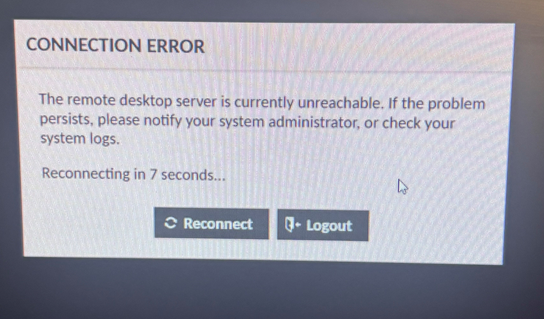
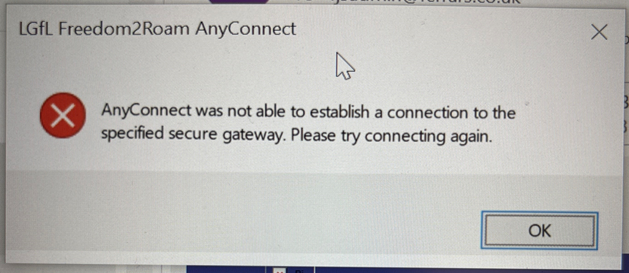
I have 2 issues that I need sorting out urgently as remote workers cannot log in (see screenshot). Firstly, Cisco AnyConnect has updated again... and failed again... so that's left my remote workers with a broken install that cannot be remedied. I have previously asked for this feature to be removed, or allow it to be a manual process, or at the very least for us to be informed when this is going to happen as it always breaks the install if not done by an administrator. Secondly, I have asked my staff to try the web access but we just get an error that the RDP server is currently unreachable. I've looked through the settings but cannot see what's wrong. I'm really concerned with opening RDP access anyway via the web, even with 2FA/OTP so I'd rather not have to use this option, but currently nobody can work remotely. @PaddyNewman - Ref 654373 (if you're about?) ☺️
-
What you are doing sounds fairly complicated but I guess if it's possible with other backup software it should be possible with Veeam, but I don't have Veeam doing anything with remote backups, so the following could be complete rubbish... So, to be clear... You are backing up a remote MSP hosted VM file sever, to an onsite local VM running Veeam. Two jobs, 'entire computer' and 'storage/data (files)' These jobs/backups will go to your Veeam repository on the local onsite VM Then you want a 'copy job' to copy that backup, from the local onsite VM to cloud storage. My thoughts are... 1st job should be 'OS Volume' not 'Entire Computer' 2nd job should be the Data Disk/Files ensuring 'Guest Files' is enabled. These will backup to the onsite local VM to a Veeam repository 3rd job would be to copy those from the repository to your cloud storage Any file restores would come from the onsite local VM Veeam repository anyway, there shouldn't be any need to restore individual files from the cloud storage as you will have the same data in both places. For DR, you would probably be restoring entire computers/VMs anyway. I guess the above is bandwidth intensive and will take a long time as you are basically downloading it all just to upload it again... You will probably get someone who knows Veeam to give you better options... If you want to bypass this, it looks like it's possible to backup your MSP VM directly to Peasoup utilising some form of Veeam Cloud Connect: "To back up a cloud VM using Veeam, you'll typically utilize Veeam Agent for cloud machines and configure a backup job pointing to a Veeam Cloud Connect repository or a cloud storage provider. You can also use the Veeam Backup & Replication product with the Cloud Connect option to back up VMs to a service provider's cloud. Steps to Back Up a Cloud VM to Cloud Storage using Veeam Agent: Install Veeam Agent for cloud machines: Install the agent on the target cloud VM. Configure a backup job: In the Veeam Backup & Replication console, create a new Agent backup job. Select the cloud machine: Add the cloud VM you want to back up to the job. Choose the backup mode: Select the appropriate backup mode (e.g., full backup, incremental backup). Specify the backup destination: Choose the Veeam Cloud Connect repository or specify the details for the cloud storage provider. Configure advanced settings: Adjust backup schedule, compression, encryption, and other settings as needed. Run the backup: Start the backup job to back up the cloud VM to the specified destination. Steps to Back Up a Cloud VM to Cloud Storage using Veeam Backup & Replication (Cloud Connect): Configure a Veeam Cloud Connect service provider: Add the details of the cloud service provider in the Veeam Backup & Replication console. Create a backup job: Create a new virtual machine backup job. Select the VM: Add the cloud VM to the job. Choose the cloud repository: Select the Veeam Cloud Connect repository associated with the service provider. Configure advanced settings: Adjust backup schedule, compression, encryption, and other settings as needed. Run the backup: Start the backup job. Additional Considerations: Security: Ensure that the cloud storage provider is configured with appropriate security measures (e.g., encryption, access control). Performance: Consider network bandwidth when backing up to cloud storage to avoid slow backup speeds. Cost: Be mindful of storage costs associated with cloud storage, as these can vary depending on the provider and usage. Restore: Understand how to restore data from the cloud storage location in case of a disaster
-
Not a Veeam expert at all, so the below may all be complete gibberish... Is it the type of backup you are creating then? Possibly if you are creating a 'volume level', or 'file level' they still produce an image based backup, so you'd have to download the whole image. Unless you can explore the image somehow...? Is there some sort of option in your backup job to enable something like 'Guest Processing' I think it's 'Guest File System Indexing'... that may be the option you're looking for...? EDIT: Just checked ours... Search for the backup through the console, select it and see the top ribbon for Guest Files (Windows).
-
Yes, thanks that's fine I do get that option (though I really need an immediate delete as I tend to write a lot of rubbish and post before I think about it)! I didn't see it as I didn't go into that menu as it wasn't intuitive... and I didn't want to go any further into reporting myself!
-
Can you post a screenshot of the option showing for you...?
-
No, I don't get the option in the drop down menu (this is immediately after posting). Or in the edit menu.
-
TEST
-
Any advice on how to delete a post (within permitted time period and unanswered)? I just can't see the option!
-
I'm going to get another large coffee....
-
Oooops, you're too quick.... I just realised my mistake but couldn't work out how to delete my post! Yes, I eventually saw they must be pinned. I'm guessing they were much easier to differentiate on the old site?
-
How do I delete a post?
-
That's a good question! Where does the scope of a SAR end? How much can you redact? Pretty heavily I'd hope. I could foresee all sorts of negative things happening with records from a safeguarding platform being accessed by the 'wrong' person... Is it 'On this date, Pupil A has an entry recorded in MyConcern for behaviour' OR is it the actual record verbatim 'Pupil A did (or said) this to pupil B' , or...? If a certain type of parent has a certain type of child, I'm sure they wouldn't need much ammunition to start making trouble for the other child involved or their parents, even redacted they'd know who it was. I'm guessing the SAR was put in because they know the school has recorded information about them and various incidents...