Koldov
-
Posts
5,084 -
Joined
-
Last visited
Content Type
Forums
News
20th
EduGeek EDIT Conference
Blogs
Everything posted by Koldov
-
Yeah, my initial knee-jerk reaction was to push back, but I do really want them to find a workable solution and it not cost them any more than my wages (as we all know small budgets just aren't stretching as far as they used to). Also, I like my job really and working here, these days it doesn't bode well if you say you 'can't do something' and alternatively, if I posed that solution, I can see it being more like "well how about we just let you go and get in a 3rd party support company for half that"... I do quite often drop the hint that they wouldn't be around to 'plug your whiteboard in to make it interactive' at 08:30 before your first lesson, or todays blinder... Windows key + P to make your projector and laptop screen work as duplicates (supply teacher to be fair but others had tried) - think I might have that tattooed across my forehead... maybe they'll be in on Wednesday afternoon... and only if they get round to it in that half-day you've purchased... But I'm not sure how long that's going to last...
-
Sure... and that's the thing... really I don't have a 'vision'... I've never really looked into it enough to make any sort of MS vs. Google vs. Apple ecosystem comparison. I was originally employed as a 'Technician' and have only risen to the dizzying heights of 'Network Manager' by default (as I'm the only IT expert in the building - although 'expert' might be pushing it)... In the land of the blind... etc. But essentially I'm a break/fix kind of guy (which I'll admit is where I'm happiest) and that's a good job too as we're creaking along on 12+ year old hardware/network infrastructure and that in itself creates a lot of firefighting along with trying to keep up with everything they want to do (you know getting shiny new iPads, isn't just as simple as ordering a shiny new iPad. right?). I'm on my own so doing everything I.T. related (a.k.a. anything with a plug), from changing toner to creating a Google Workspace. The last thing I really need is to try and get involved with SLT decisions even though I know you're right, as in it's the only way I'll be able to have any say. But I really don't mind what platform they use, or why. I've got no preferences or allegiances and I'm sure we can all agree you can't go 'wrong' with any of the big 3 (grabs popcorn).
-

Firewall - Cumulative or Overwrite? Multiple Firewall GPO's...
Koldov replied to Koldov's topic in Windows Server 2019
Apologies for the late response, but I've only just got a round to dealing with this because it reared its ugly head again as I've been messing around moving VMs and OUs about... It seems to work so many thanks! -
Our 'I.T. subject leader' has had a vision.... and it appears to be Microsoft... We are a very small Junior School and as such don't really have a massive I.T. infrastructure, we don't use very much in the way of Cloud services (apart from Learning Platforms and websites). What we do have is a couple of small servers for print/file share/AD/SIMS etc. Windows 10 on all admin machines/teacher laptops with Microsoft Office 2016 (a pretty standard/typical/average set-up of every Junior/Primary school which hasn't changed much in the last 10 years or so). We don't have a particular preference either, we use a bit of everything... a bit of Google (Classroom) over lockdown (so that is all set-up), we have a load of iPads (mainly used for web browsing) so Meraki/ASM and an email/Learning Platform that was set-up by the LEA which uses O365 as a back-end (which we have no control over and we don't own the domain name used for email addresses). Now, I say 'subject leader' but as we are a small school (and only Junior at that) we don't really have any really skilled/enthusiastic/subject specific teachers as you would further up the KS levels (and certainly nobody really interested in teaching I.T.), this is just a teacher that got landed with the role and the task of planning some Purple Mash lessons (which I think are pretty much planned within the platform for you anyway)... Unfortunately they have had a meeting with an I.T. support company (well known to the school as it is led by an ex-LEA employee who was made redundant and came back as a consultant) and have come away with a head full of Sharepoint/Surface Tablets/O365/setting-up and taking on our own full O365/email set-up, (instead of Google Drive/iPads/Office 2016/managed email), and now they've had a meeting with the Head, so I'm just waiting for the 'get it done' email... Obviously they have no concept of the time/money/resources this will take (for me of course) to set-up/manage/maintain/secure, but this is supposed to streamline T&L, planning, training etc. So, whilst I can see some benefits and obviously it's not up to me to get involved (as such) in the school's I.T. provision/planning, I'm just daunted by the amount of work this is going to create and how I'm going to realistically manage their expectations (like the email I got over lockdown to set-up Google Classroom/G-Suite - and the email the very next day asking if I had done it yet)...
-
Probably best if I link the page... https://www.catapultsystems.com/blogs/automating-hyper-v-host-vms-startup-shutdown/ I guess this is the problem with trying to use random bits of code from the internet... a little knowledge as they say, can be a dangerous thing... I mean we are probably by now as the simple approach from @Steve21 worked and all VMs started this morning.
-
Yeah, sorry I was out and answering on my phone. Had to edit the host name to redact.... It's correct in the script (as it works through pasting it into a PS instance or PS edit window).
-
Consider myself kicked... I tried the 'simple' approach and it worked... Here is the script in case anyone knows what was wrong (apart from being too complicated), I think it was part of a large set-up where they wanted to do multiple/individual VMs (hence the 'notes' on each 'prod' server instead of a list of names)... [cmdletbinding()] Param($vmhost = ‘HOST-SRV') $VMtoStart = Get-VM -ComputerName $vmhost| where notes -contains 'WINDOWS-10-VM' foreach ($cn in $VMtoStart) {Start-VM $cn.name -asjob}
-
If it's that simple I'm going to be kicking myself.... I spent 2 hours on it (in between doing other thing on the server) last night! Maybe it was the script as it looked slightly more complicated than that... I was using domain\admin, but I think I tried 'system' too (most of the other scheduled tasks are setup as 'system' though I must admit). Strange thing though was every time I set the task up (using domain\admin), when I went back in to edit it, it was running as just ' admin' (local I presume) and I had to re-enter domain\admin every time, couldn't seem to get it to stick. Might be just a display thing but I couldn't then be sure if it was running under domain or local admin...
-
Yeah, that's pretty much it, just like the screenshot! I didn't see anything in my research that said you couldn't.... just that when it wouldn't work they needed to put the full Powershell path, or different arguments (no profile, execution policy etc.), or quotes (or not), then it worked and I tried all those things.
-
TL;DR - Powershell won't run from Scheduled Task Not sure if this is a Server issue or purely a coding problem. I have a number of VMs which for various reasons I have now decided to shut down during the evenings and over the weekend. This is obviously easy to accomplish as all our physical machines have a GPO that creates a scheduled task, so once that is applied it works as it should. The problem is how to start the hem all up. I'm not sure if there's any other way to do this, but a search didn't turn up very much (which is understandable as there aren't many reasons to bother shutting down VMs). One of the few results was a Powershell script and once I'd tested it in a Powershell instance, I saved it as a .ps1 file and created a scheduled task to run it. All the usual settings run as admin, logged in or not, highest privileges, etc. I've tried moving the script file, adding/removing quote marks and all sorts of 'file', 'execution policy', 'noprofile', arguments, full path to Powershell... everything I could find. Nothing in event viewer, sometimes the task runs and finishes, sometimes it just runs/hangs, but it never seems to get to starting the VM. I don't really have any experience of running Powershell from scheduled tasks, it's usually bat, cmd, so troubleshooting this is beyond me. Any suggestions on where to start, or any other way to accomplish the job?
-
Mosyle - iPad - Passcode - locked out from device
Koldov replied to TwistedHelixis's topic in Mobile Devices & Tablets
Or (again if you have a Mac) internet sharing...? http://www.edugeek.net/forums/netbooks-pda-phones/230734-ac2-profile-error.html#post1977772 -
Could be that's the issue then...? I see ours is still activated... Then I clicked on 'Manage'... Just the 'Premium Features' have expired. EDIT: The serial number quoted isn't our 'ver.11' one (so nothing special going on there), I guess it came with the 'free/basic' version of 19 - which doesn't explain why some people are having it 'expire' and some aren't... maybe it will catch up with us all at some point...?

-
Mosyle - iPad - Passcode - locked out from device
Koldov replied to TwistedHelixis's topic in Mobile Devices & Tablets
Does it have a Wi-Fi connection at this point? If not your MDM won't be able to get any messages through. This... or a 'Mac' with AC on it if you have one, I keep our old Mac Mini around for just such occasions. Edited for spelling... -
Strange how divisive this subject is on here... it's like all of a sudden we all love Microsoft and must stick to what they say (haven't ever 'bent' any of their 'rules' and haven't spent the last 30+ years trying to find workarounds to use Windows how we want/need in our environment)... With the caveat that, yes, Microsoft have apparently said LTSB/LTSC were developed with 'critical infrastructure' devices in mind (personally I feel that any 'live/production' environment relies on a steady, consistent state for the users so they can focus on 'the job' and not the tools.... if you have the time, resources and knowledge to provide that with SAC versions, good luck to you). So, the arguments are with SAC (or whatever they're called - I stopped trying to keep up) or other versions there is obviously a constant cycle of OS 'upgrades' in terms of development, security and other 'improvements'. I agree this can only be a good thing, but quite often I see the posts on here asking what the latest update has broken, so YMMV... I was quite a fresh I.T. tech when 7 eventually went fully and officially E.O.L. I had taken on a whole school (albeit small) with zero support, just me... So to say a complete site-wide OS upgrade was daunting and to say it fired up my imposter syndrome into overdrive is an understatement... Then I started reading the hundreds of posts saying that Windows 10 (yes even 'Education' ) came with massive amounts of bloat (a.k.a. The Candy Crush issue) and that you need to run scripts, mess with WIM files etc. Then the posts started that said each 'update' completely broke various parts of the network... My already low confidence was finally shattered and I spent some sleepless nights wondering how I would accomplish this with minimum disruption and loss of respect for the I.T. dept... in fact, me... Then I stumbled across LTSB! Eureka! I looked at the original advantages such as long term stability and 'support', minimum updates to the 'extra' parts of the OS, zero bloat etc... Then I looked at the 'disadvantages' (if you can call them that), such as no store, no UWP apps and found that very little of them really would make any difference to us. So I rolled out LTSB (now upgraded to LTSC) and never looked back. I've been able to focus on improving other parts of I.T. instead of constantly firefighting what should be a stable, reliable, base operating system. I manged to get a couple of 'essentials' to start with for the teachers (Windows Photo Viewer, Sticky Notes) with a reg hack and a WinAero install respectively and tried just for my own amusement to get various bits of software with varying degrees of success (although I haven't looked at it in a long time). I'm currently sitting at my work PC (LTSC) and have the Store, Calculator, Edge (which was surprisingly difficult to install on LTSC back in the day), Paint 3D, Photos, Sticky Notes (Windows Version), Video Editor (not the 'new' version). Not sure if any of them actually work properly, I don't really use any of them and certainly haven't done so in anger... one or two of them are a bit flaky but we have other software that does most of these tasks. Anyway, back then there was some messing about with "Get-AppxPackage" iirc... Then I came across this on Reddit (which apparently came from 'My Digital Life' forum): Guide: Activate/install Windows Store without an external script on LTSC 2021 Open Windows Powershell as an admin wsreset -i (run this command) wait a few seconds (i waited 15 sec) - *sometimes you need to do this twice or wait longer* profit fully working Windows Store on LTSC 2021, tested on IoC and Enterprise. Command Breakdown: wsreset = Windows Store Reset -i flag = Install Credit: Mydigitallife forums https://www.reddit.com/r/Windows10LTSC/comments/s88jre/guide_activateinstall_windows_store_without_an/ I only tried it on a couple of my own work and home machines, it worked on some computers but didn't seem to work on others, then did but didn't connect to the store and then did, so it was really hit and miss (not something I would roll out confidently to the whole network and I don't want users downloading random stuff from the store - or have to set up a 'Business' store) and I didn't really take the time to work out if anything could be improved upon.
-
We don't use it much here, but one or two teachers are on 19 Basic (always used the 'free' version) and most of the others are still on 11 (which we had a license for back in the day) because either they don't use any newer features or they just don't use it at all. Anyway, I just fired up my old laptop with ver. 19.1.2790.0 and it opens fine with no prompt... However, I've just noticed I'm not even signed in to it (we use Google), there is a watermark notice to tell me to attach it to a SmartBoard and it says 'You're using SMART Notebook basic version'... Previously I didn't think it even let you open SMART Notebook without signing in...? So, that's confusing... maybe it's the opposite. How about getting your teachers to sign out?
-
BLACK HOLE SUN - SOUNDGARDEN CLUBCARD - TESCO
-
[sims] HELP!!!!! SIMS/FMS/DISCOVER migration.... fail!
Koldov replied to Koldov's topic in MIS Systems
I really don't want to copy over the old S:\ drive... I know it's probably the easiest/most comprehensive method of not missing anything, but it's an absolute mess and full of useless stuff, it's been going for longer than I've worked here! The Capita engineer must have done that when he migrated it last time from the original server to this one... Does anyone know if there are any 'must have' folders in there other than the ones SIMS has produced from installing (for continuity/history)? -
[sims] HELP!!!!! SIMS/FMS/DISCOVER migration.... fail!
Koldov replied to Koldov's topic in MIS Systems
Thank you @ALittleFish Well, you're a big fish in my pond... -
[sims] HELP!!!!! SIMS/FMS/DISCOVER migration.... fail!
Koldov replied to Koldov's topic in MIS Systems
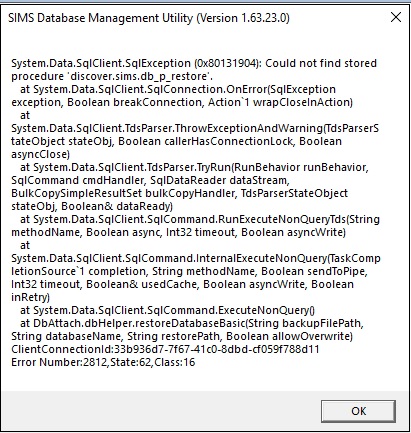
Does anyone know where I might find this file...? I've searched both the current SIMS server and the new (test) one for 'DiscoverBackupGui' but can't find it anywhere... SIMS, FMS and SOLUS are now up and running on the test server (not used in anger yet though), but Discover just won't play ball! Opening Discover gives an error about being 'unable to load the catalogue' and the transfer says it's unable to contact the database. Attaching the database with dbAttach gives an error too, but attaches it anyway...
-
I wonder if my server was the machine they were raging against? I certainly feel like it today! When you see it...
-
[sims] SIMS server VM (S: drive etc.) best practises
Koldov replied to Koldov's topic in MIS Systems
Thanks, unfortunately no such luck! I'm not too worried about write speeds unless being a VM adds a noticeable amount of latency. We're a small school, all I'm really doing is going through the process of moving everything off the physical server into VMs (for resiliency, ease of backup, DR) the physical server then just becomes a host (host needs to go from 2012R2 > 2019). As it stands the physical server has a 2 disk Raid 1 array (Virtual Disk 0) for the C:\ drive and a 4 disk Raid 10 array (Virtual Disk 1) for the 'Data' - this is split into 4 drives, D:\ SIMS and E:\ everything else (mainly file share), V:\ HyperV and Y:\ Archive. Although the old original SIMS server was migrated to the current one by Capita it seems as if there has been some confusion, the D:\ drive has SQL installed (in D:\Program Files), the SIMSROOT folder (plus a SIMS folder and a SIMS$ folder inside which is the S:\ drive - The installers are a bit manic I think, if you create a SIMS folder and point the installer to it, it creates a sims folder inside and then a setups folder inside that!), the DOCSTORAGE folder, SISMBSCKUP repository, but the C:\ drive has the SOLUS install I think. Anyway rather than the 'physical' disks question, I was just wondering if there was a benefit of creating a new VM disk and adding it to the VM as a D:\ drive to install SQL, the SIMS server and SOLUS on etc. Or maybe just running the whole thing from a one disk (C:\) VM or split it into C:\SYSTEM and D:\SIMS as I can't give anything it's own dedicated disk. -
Looking to finalise the SIMS migration to a new VM from the physical server possibly in the Easter holidays. Although I've done the majority of the ground work, I have a niggling feeling it isn't quite set-up correctly. On the old server the majority of SIMS files (SIMSROOT, DOCSTORAGE, S:\ drive) and the SQL installation was done on the D:\ drive, although there is a fair amount of crossover with files on the C:\. On the new VM I have just done a basic Server 2019 installation on one disk C:\ and installed SQL, SIMS server, etc. This meant sharing a folder on the C:\ drive as an S:\ drive, I wonder if this is part of the reason I had such a struggle getting it done and if it might cause me issues at a later date... Should I have added another disk and created a separate D:\ drive on this VM and mirrored what was on the old physical server, or does anyone run a SIMS server just on a one disk (C:\ drive) system...?
-
[ms office - 2016] Duplex Printing slightly out of alignment from Word.
Koldov replied to Koldov's topic in Office Software
Yes, Word, Publisher, PDF and on 3 different printers... Thanks, yeah it's a rubbish screenshot I think. Strangely enough, when the grid in word is set to 'every 1 (mm)' 0 margins, 0 indent on a page (A4), the right hand square does look slightly smaller than the others. No need for a demo file, it's quicker to create your own. All I did was open Word - Insert > Shapes > Rectangle (insert blank page and repeat). Then select each shape - Layout > Align Centre + Align Middle Print (Duplex) obviously, flip long edge (or short - it shouldn't make a difference, all things being equal)... Hold up to the light and see the mm difference. After a bit more testing, I don't think it's going to be possible to get that level of accuracy (even though these are a bit better than home-grade inkjet printers), it might not even be the printers.... The paper measures 21.1 cm across (A4 = 21 x 29.7 cm), so that's a variable to start with and the paper run through an MFD has lots of guides and rollers that could be 1mm out... but if the paper isn't sized exactly, the printer isn't going to know what the dead centre of the page is anyway. Making the grid 1mm and moving the second shape over by trial and error seems to get it to an acceptable variance. -
Really basic question, but just wondering if I am doing this the easiest way? I have created a new shared folder on the server - SLT eyes only, permissions done and everything else all sorted (as they are all members of the SLT security group).... apart from mapping it to the users. Complicating it slightly is the fact that 2 members of SLT are teaching (luckily in the same year group) and 1 is the Business Manager. I created sub-OUs, moved the users in AD and added the GPO into each of them, I've done it this way and it works, but it's a bit of a long way round and I wondered if there is a better way.
-
Not sure if this is software or hardware, but I can't work out what the issue is! Our admin are printing a small card with information on both sides to be laminated and handed out, but when using automatic duplex (or even manual) the second print on the reverse is a few mm out of alignment. I thought it would be easy to sort, maybe even an error somewhere on the document, but didn't want to mess with it too much so even created my own to test. I made a very simple 2 page Word document and inserted a shape in the middle on each page. I looked at everything I could think of to ensure it was dead centre on both pages and tried all the alignment, text wrap, margin, snap options I could find. I tried printing on long-edge and short-edge, but every time the image on the reverse was a few mm out of alignment with the one on the front.