Koldov
-
Posts
5,084 -
Joined
-
Last visited
Content Type
Forums
News
20th
EduGeek EDIT Conference
Blogs
Everything posted by Koldov
-
Yeah, I think I did that too but not music, I had a Nokia phone for many years and when I switched to an iPhone and needed an alarm I found the Nokia alarm tone and used that. Of course that annoyed me as being Apple you needed to get the audio into the iPhone which meant going through adding it via iTunes on a computer... This was my go to alarm (Nokia - Dawning): Luckily (?) I haven't needed an alarm for a long time now as we have Greyhounds who have their own particular brand of 'whining alarm' starting about 05:30 - 06:00....
-
Does anybody know which options to choose to just do a full backup every night?
-
Anyway, answered a couple of my own questions... You can safely remove AWS, Azure, Google, Mac, Linux plug-ins etc. https://helpcenter.veeam.com/docs/vbgc/vbr_integration/uninstall_plugin.html?ver=30 This should stop the error in the Server's Event Viewer (Veeam.GCP.PlatformService.WebApi.Framework.Common.Middleware.CUnhandledOperationsMiddleware). You can move the location of the VBRCatalog: https://www.veeam.com/kb1453 So, just the weird folder (7230c5c96a3aa8856644b7) and the ProgramData ones to find information on... When I click on 'Files' nothing appears in the 'working area' no .VBK files, but maybe because I haven't enabled "guest file system indexing" or something, so I'm a bit lost. However, I did go through a partial restore and it does at least show the other 'no label' partitions, so I guess it is backing them up in the job. EDIT: ProgramData folder holds the IRCache folder which is for Instant Recovery for VSphere VMs: https://helpcenter.veeam.com/docs/backup/vsphere/install_vbr_data.html?ver=110 So not needed for HyperV I think. EDIT 2: It looks like the random letters and numbers folder may have been created during install as it seems to hold a lot of setup, x64, redist, resources, SQL folders.
-
There was no backup done that needs moving, the issue came when I first went to create a job and I noticed VEEAM wanted to use the 'default' backup repository which it decided was going to be on the D:\ drive... But I ignored that and I found out how to create my own (let's say on the X:\ drive) and that all completed OK (I think), but when I looked I found it must have created a few folders on the D:\ drive during the install... If VEEAM thought I was going to put the backup on the D:\ drive, did it put all those folders on there for that reason? If I take my backup repository drive (X:\) away and try to test restore it on another computer, will it say 'can't find xyz file in folder VBRCatalog', or 'can't start restore because setup.exe is missing from folder 7230c5c96a3aa8856644b7'...?

-
I worked out how to add a repository and I created a job which points to it, all of that is OK. What I mean is that I'm wondering if any of those files that were originally installed onto the D:\ drive in the server should actually be on the disk that is actually holding the repository to enable a restore? Because it seems to me that VEEAM installed them there for a reason instead of C:\ (VEEAM was thinking that D:\ was where my repository was going to be - as it decided to create the default one there as well as the folders below). To put it simply, should these folders be on the disk that holds the repository? Will that show the volumes/partitions? I wasn't actually looking for individual file restores, these aren't really servers that I think I'll need to do that on (VM Host and just a VM Print Server and a VM DC). But I can't even tell whether it's actually done a back-up of all the volumes/partitions for the OS drive just by looking at the console (WSB has an issue where it fails to backup the OEM & Recovery partition as they don't have drive letters (although they might not be important for a full restore I don't want to chance it).
-
As a lot of people on here seem to rave about VEEAM, I thought I'd drag myself into the 21st and see what all the fuss was about (especially as I now have a few VMs)... Obviously it's a lot more complicated and involved than WSB and as a result I think I've probably made a couple of schoolboy errors. 1. On the install it seems to be installing a lot of unnecessary stuff for Linux, Mac, and also Azure, AWS, Google cloud services, even though I was generally pressing 'next' and accepting the defaults I don't remember seeing if these were choices or not. Is it OK to go into 'uninstall a program' and get rid of these as I don't see anywhere in the console to remove them (or just leave them)? 2. Whilst accepting the defaults it seems to have decided that my D:\ drive was the best place to install certain items (namely the following folders): 7230c5c96a3aa8856644b7 ProgramData VBRCatalog I found out later when trying to create a job that this was also where VEEAM decided it was best to set the default 'Backup Repository' but I wasn't aware what this meant at the time and I didn't see anywhere to change them in the install. Unfortunately the D:\ drive is the DATA drive for the VMs and is a fixed drive on the server and not the actual 'Backup Repository' I wanted which I added in later. Do these files need to be on the 'Backup Repository' disk as I'm wondering that if in a DR scenario if I don't have access to these files restore will fail...? 3. After the first back-up job ran I checked the VEEAM console which stated success, but the Windows Server event viewer showed a few errors: Volume Shadow Copy Service error: Unexpected error querying for the IVssWriterCallback interface. hr = 0x80070005, Access is denied. Discussed here with no solution: https://forums.veeam.com/servers-workstations-f49/event-vss-8194-error-querying-system-writer-access-denied-t83412.html I am also now getting the following errors (which I wasn't before installing VEEAM): ID: 1000, Severity: Error, Source .NET Runtime Category: Veeam.GCP.PlatformService.WebApi.Framework.Common.Middleware.CUnhandledOperationsMiddleware EventId: 0 ConnectionId: 0HMNJBBM6GFP0 RequestId: 0HMNJBBM6GFP0:00000002 RequestPath: /api/v1/proxies/configurationBackupProperties SpanId: |3bbbf5ad-4633af528e259818. TraceId: 3bbbf5ad-4633af528e259818 ParentId: Resource does not exist. Path: [/api/v1/proxies/configurationBackupProperties] This is discussed here... something about disabling the Google service (so may disappear if I uninstall that - in point 1)... https://www.reddit.com/r/Veeam/comments/t6qand/event_viewer_errors_about_api_call_after_upgrade/ Microsoft Windows Server has detected that NTLM authentication is presently being used between clients and this server. The Open procedure for service "ISAPISearch" in DLL "C:\WINDOWS\system32\query.dll" failed with error code The specified procedure could not be found. The Open procedure for service "ContentIndex" in DLL "C:\WINDOWS\system32\query.dll" failed with error code The specified procedure could not be found. The Open procedure for service "ContentFilter" in DLL "C:\WINDOWS\System32\query.dll" failed with error code The specified procedure could not be found. This is the first day after install, so I'm not sure if these will be recurring errors or not at the moment.... 4. Is there any easy way to actually see what has been backed up? The disk now just shows a VEEAM .vbm & .vbk file and the job details in the console just show a nice graph with 'TIME, DATA processed and STATUS'... With WSB I'm used to seeing a GUI with volume letters and details of each individual volume, with the volume name, data transferred and backup type.
-

HYPER-V move the folder and Virtual Disks (temporarily)
Koldov replied to Koldov's topic in Windows Server 2019
It's on a separate data disk to the OS. Maybe there is a point in-between that doesn't involve completely reinstalling the Server OS, but also doesn't actually cause me to feel slightly hot and dizzy when neither VM starts due to errors.... Bit of a close call... turns out you should choose a copy/move method that retains all permissions on the VHDx! https://learn.microsoft.com/en-US/troubleshoot/windows-server/virtualization/hyper-v-virtual-machine-not-start-0x80070005 -
Thanks for the suggestions. Printing is fine, there are no missing lines. Colour and B&W are both affected (originally issue was brought to my attention by a teacher that had printed a colour page which was OK and then scanned it to produce copies). I've narrowed it down to the 'scanning' system as it appears even when choosing the preview and viewing it on the LCD screen (same both on the glass and the feeder).
-
Yes I have sorry forgot to mention, it appears on the photocopy when taken from the glass or the feeder in the same place which is strange. So I'm guessing it's not a problem with the actual glass or scanner under the glass...?
-
We have an older Kyocera MFD (TASKalfa 5052ci) which has for some reason started missing strips/bands/lines when photocopying (2 thin strips near the top of the document). It isn't in the actual toner to paper subsystem as it prints the same document fine, so I'm hoping all the internals are OK (toner/drum/fuser). I don't normally deal with the printers so I'm not sure where else to look... and trying to research on the internet is a waste of time as 99.9% of the posts are about printers even when specifying 'photocopy'. Yes, I've cleaned the glass!
-
It occurs to me that although what we do is specialised for many reasons, the main factor limiting a temp/agency solution is the uniqueness of our own individual set-ups... and the depth of knowledge needed to run them (at least effectively/efficiently). I know that there is the argument for a 'server is just a server' and 'Windows is just Windows' and obviously there is some truth to that, but honestly I think we all know that we have configurations, policies, scripts and who knows what else running on our networks that would trip anyone else up and mean a lot of wasted time figuring out why something isn't working. Some of the stuff posted on here makes me dread having to ever look for another job. I've been in a very secluded bubble for over 11 years now and although I obviously know my network like the back of my hand, but going into some of the schools that you guys run would have me looking like a junior tech/apprentice again. I'm not putting teachers down but temp/supply teachers use their teaching skills to deliver lessons that are pretty much fully planned for them. Sure I could walk in and get a basic overview of what does what.... "that's a server (damn it's a blade rack), oh and there is an AP (oh no it's a UniFi), that's an I.T. suite (hell no, it's filled with Macs)... "... But much deeper than that and I wouldn't be actually any real help for days (and in reality possibly weeks)... And then the inevitable conversation... "sorry what were you saying... do you mean the I.T. tech looks after the SIMS administration/Auditorium & Sound and Video production/Portable Appliance Testing and general maintenance of anything with a plug?" Sorry, lots of imposter syndrome kicking in there, but I think the point is still valid...
-
HYPER-V move the folder and Virtual Disks (temporarily)
Koldov posted a topic in Windows Server 2019
Just wanted to check how involved this might be... I want to format the VM Host's data disk from MBR and switch it to GPT... there isn't much else on the disk luckily, but it does have the Hyper-V folder. Am I going to get away with shutting down the Hyper-V machines, copying the whole folder somewhere else, wiping and formatting the disk into GPT, copying the folder back and starting the machines...? Or does there need to be something more involved such as detaching disks, stopping services etc? -
OK, narrowed it down to PCL_XL (PCL6) or PCL5... anyone have any preference (and reasons for that preference)? Next part... I just choose the 'original' printer on the print server and in the advanced properties choose the new driver...? Then I have the GPP set to 'update' and that should change it automagically, yes?
-
Thanks, good shout, that will probably do it... don't know why I keep forgetting this stuff! Oh well, only about 12 years until retirement... Next question (and I know it's a bit of a horses for courses type thing)... PCL, PS or XL...(on the CD) or PCL_XL or PCL5 from the downloads...?
-
Feeling quite foolish for having to ask this but... Over the holiday our BM arranged for a new printer to be installed. Unfortunately it is a completely brand new manufacturer and model so we don't have the drivers (and Server 2019 doesn't have them as standard). Anyway it has been many, many years since I've had to do this but I've got this far: 1. Open Print Management. 2. In the left pane, click Print Servers, click the applicable print server, and then right click on Drivers. 3. Click "Add Driver.." 4. The "Add Printer Driver wizard" will open, click Next. 5. Pick the processor architecture for the driver - x64, click Next. 6. Click "Have disk.." and locate the *.inf file associated with the driver. However, the downloaded drivers are just .exe files and the drivers on the supplied CD are .msi This is the way to do it, right? I don't actually run the 'set-up' and install the printer to the print server do I (as I don't want it to start installing 'helpful' apps or to even actually print from the server), I thought it just held the driver in a repository to serve to the clients.
-
Let us know how you get on and the steps you took @Sheridan as I seem to have a similar problem (not the same but can't 'expand' to the left). Unfortunately on a physical VM host I in-place upgraded from 2012R2 > 2019 and it made a bit of a mess of the disk... Not sure if GParted works from within Windows or if it has to be a boot disk thing (but then will it cope with RAID)...?
-
IIRC correctly there are certain animals which have a basic physical need to eat meat (I'm thinking cats for some reason, but there maybe others)? Yes, the loss of predators in the food chain will lead to some others becoming over populated and then might require culling if you are into messing about with nature to that degree. On the reproduction side of things there is only one animal we really need to stop breeding... It's a ridiculous concept really, but that doesn't stop these types of people coming up with bonkers ideas and you can't argue with stupid... I still wish every flat-earther could be sent up in a rocket! For the most part they can only be dangerous to themselves and I'm not sure how any of it could be put into practise, but it's like saying I don't believe in atoms because I can't see them... that doesn't really affect anyone (although then someone saw them and decided to see what would happen when they split them and we know that didn't end well)... If they want to believe the Earth is flat good luck to them, it doesn't really matter. If they actually want to start messing about with animal genetics and actually manage to do it, that won't end well either!
-
Technical consultancy for Migration of SIMS Servers
Koldov replied to cathycolless's topic in MIS Systems
Still looking at doing this maybe in the next half-term. Unfortunately I didn't get enough answers in my other post to confidently install SQL 2016 though. However, I now have the documentation and application files from ESS to proceed... For those that have done this can anyone answer the following: 1. It says in the documentation that during the process it will "...install SQL Server 2016 Express, if required...." and that is the only mention of it I can find in the whole document. We have a license for the Standard Version so should I let it install Express and then try to upgrade that afterwards? But then confusingly in the document there is a FAQ and this states "Please note that the SIMS SQL 2016 Migration Utility does not include Microsoft SQL Server 2016 Express edition. Before migrating your SIMS, FMS and Discover databases to SQL Server 2016, you must first install Microsoft SQL Server 2016 or Microsoft SQL Server 2016 Express and create a SIMS Instance." 2. There is also a mention of then having to do all the redirection "The SIMS, FMS and Discover Redirection Services cannot run when you are moving to a new server. You must now carry out the redirections and remap the Document Server manually". Am I to take it the this SIMS server migration is actually just moving the databases and attaching them them on the new server and that nothing else gets moved over at all, because it also mentions copying and pasting the Documents folder...? Although in the FAQ it states: The migration itself will, if possible, modify: the Document Server Storage Structure (the folder system is arranged by Instance name and database name). scheduled tasks for SIMS applications, such as AutoReports, VLE, SIMS Scheduled Tasks, B2B, DBAttach, and SOLUS, which contain correctly formatted server and database parameters in their command line parameters. If you subscribe to the redirection service during the migration, the SIMS/FMS clients will automatically update the CONNECT.INI/FMSCONNECT.INI files with the location of the migrated database. It then seems to suggest in the document this won't happen if moving to a new server...? 3. I can't find any application to migrate SOLUS mentioned in the document but it says "SOLUS 3.12.n.n is scheduled for release in July 2017 and will fully support SQL 2016; it contains functionality that enables you to migrate your SOLUS3 system to a new server and enables the SOLUS 3.12.n.n agents to redirect to the new server with minimal intervention." I haven't seen this in SOLUS...? -
Looks like some kind of visual 'touch-screen' feedback... or mouse cursor 'show location' setting. If you have a touch-screen then it will need to be recalibrated, if you don't maybe Windows has been set to tablet mode or the computer is connected to an IWB (maybe Smartboard software), or the screen has been incorrectly identified as a touch-screen, there will be settings to remove it (mouse settings, screen settings, or something like remove it in device manager/or tablet settings in Windows components). I have a laptop that thinks it has a touch screen (it doesn't) but I've never had anything like this so I can't be more specific... someone here will know hopefully. Something like this: https://www.howtogeek.com/427293/how-to-disable-the-touch-feedback-circles-on-windows-10/ https://www.thewindowsclub.com/remove-ghost-touch-bubbles-from-windows-10-tablet
-
Interesting as the link quotes: "This will truncate the .LDF file and set the recovery model to 'Simple'." Does anybody know which it is actually meant to be as as default? EDIT: Also iirc isn't this meant to be part of the backup process or something?
-
Read the meter for our gas to work out how much keeping the house at 18 degrees since setting it at the beginning of December (recommended for our damp/condensation problems) is costing extra! Worked out the units into £s... SEP, OCT & NOV = £75 DEC = £118 September we only used 3 units at the old rate and October & November we used 44 units at the newer rate. December we used 100 units at the newer rate, but we don't use gas to cook and there wasn't really anything different in terms of hot water usage, so that is all heating . Now January will be at the newest rate I guess, not sure if we'll get another couple of really cold weeks but then I'm not sure I can justify that amount for another month either... Might have to do a little test to see what temperature the house actually drops to during the day without heating, because at the moment of course it is kicking in every time it drops below 18 degrees C which seems to be quite often as it obviously drops below that quite quickly. Or whether it's worth the extra units used to heat it to a higher initial temperature means it will use less to then keep it above 18C... Someone did put a calculation up for heat loss, but I need real world figures/examples, or for someone to actually just decide which is best... everything I read contradicts the last thing I read. Plus I know it's not good for the fabric of the house to be heated and cooled and the damp/condensation is a big problem...
-
Thanks, but this is like pulling teeth! There's at least another 5 or 6 sections to complete and I doubt I'll know what to do so I think I'll wait until everybody is back from their holiday or I can get into work and contact ESS.
-
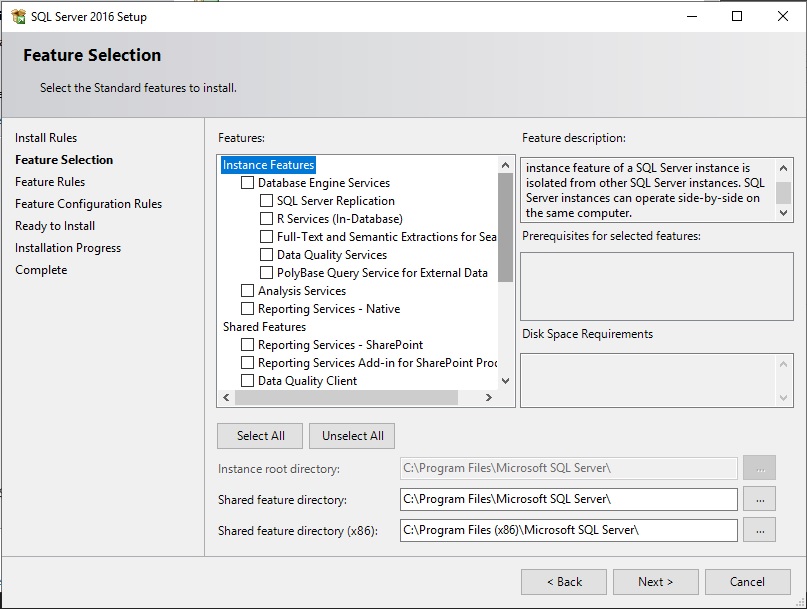
So, does anyone have a link to the SQL Server installation guide for SIMS please...? I've searched a few posts here but they are contradictory about accounts to use and which options are needed...
-
Yeah I get that, but the way I see it is this, it's only a VM, it's only for SIMS, it's only in production for that purpose and 2016 may be old (although that being said it's supported until 2026). I only chose SQL 2016 from reading the latest roadmap from ESS... so, (although there's no reason SQL 2019 wouldn't work) if that's what they want they might as well get it for us to remain supported... then there is the option of SQL 2016 > SQL 2019 when required, unless there is a compelling reason NOT to use it? The other reason I need to stay supported is that I may well need to use ESS for the transfer... or even if I attempt it myself it's them I will have to call if it all goes wrong...
-
..."download the ISO from your Microsoft Open License Portal and run it... The product key is pre-filled from your specific license"... So, that answers that part... the rest still stands, I imagine most here have plenty of experience of SQL server, so any advice would be gratefully received.