Chunks_
-
Posts
104 -
Joined
-
Last visited
Content Type
Forums
News
20th
EduGeek EDIT Conference
Blogs
Everything posted by Chunks_
-
Not sure what you mean by non-viable. I dont have access to the email server as we are part of a wider group and that has been relocated to the head oriface!!!
-
Thanks for your replies.... Yeah sorry should have added more information. If you use the software as an admin it works fine. The two peices of sofware are Burconix password changer and wisesofts password control. (both suggested on edugeek ) I have also put my computer and the test user into an OU and blocked inheritance to check for issues with gp .. still doesnt work so dont think its that now. Also there is no password policy except larger than 6chars so the one im entering would be fine.
-
Hi All Sorry to bring up a old topic. But im having problems allowing teachers to change students passwords. I have 2 lots of software which is supposed to do this. However neither is working. When you type in the username it auto completes for you. Suggesting it has access to the OU of which i have delegated permissions. However when it goes to change the password one software says access denied the other says something about a except of a target of an invcation. Anyone have any suggestions. Im thinking some kind of group policy stopping it ? but dont know where to start. Cheers for any help.
-
Is there a script or GPO setting to clean out local profiles?
Chunks_ replied to speckytecky's topic in Windows 7
This may be of some help to people Its vb script to delete the xp user folder on the computer. You can add exceptions in there too so it doesnt delete certain folders. In our case the students have numbers in from of their usernames so we added exceptions to say if there is a number as the fisrt character we allow it to be delete. This stops it deleting staff profiles as they start with letters. -
Yeah, you can use batch file that you put in a schedule task to shutdown the computers Each night
-
\\\UserProfile$\\profile Maybe \\\UserProfile$\\profile\
-
Hi, This page might be of use to you .... delete desktop ini. Shows how to delete it using batch command. You can then attach it to a scheduled task to run occasionally. I tend to add the filename in the view column myself although have used the script in the link above.
-
Yes the adm is all good and well pointed out. But he did say in the first post that he wanted to use a script and not group policy to deploy it due to his "server guy".
-
here you go : Remove Libraries from Navigation pane. At the top it shows how to use group policy to make the change. But i suggest to you to look at the bottom. It provides vbs script for altering the permissions of the registry key and then changing the registry key so that the libraries icon is hidden. I assume that will then solve your issues. I would suggest doing thorough testing before deploying though. I really hope that is what you require....
-
We use network scripts that reads what OU the computer is in and assigns the printer dependant on that. You can also read the name of the computer/laptop and declare a printer per name if you wish using script. heres a webpage that basically shows and explains the script if anyone is interested. We tried it various otherways but with the mix this seemed to work the best for us.
-
Hi All, Anyone else had this problem. Where you have a report in Sims it aims to give for instance, forename, surname and dob. You look at the preview and its all looks fine the students date of birth is in the format of something like 27/09/1996 yet when it gets put into work or excel (Office 2010) it puts it in the format 27 September 1996. Anyone know how to stop it doing this ? it may just be a word/excel setting but i cant find it ... Edit : I found this for excel > Options -> Advanced -> (check box on) Transition Formula Entrys (all the way down at the bottom). however that does actuive sheet and not the ones that come out of sims.... although this option doesnt exist in word. Cheers
-
Moodle Installation. Ldap Authentication
Chunks_ replied to Chunks_'s topic in Learning Network Manager
ok sorted it now ... stupid darn thing ... added sAMAccountName to the user attribute to change the way it searched for the usernames - didnt think it was nessacary as it was "optional" so glanced over it - classic rtfm Thanks for your help -
Moodle Installation. Ldap Authentication
Chunks_ replied to Chunks_'s topic in Learning Network Manager
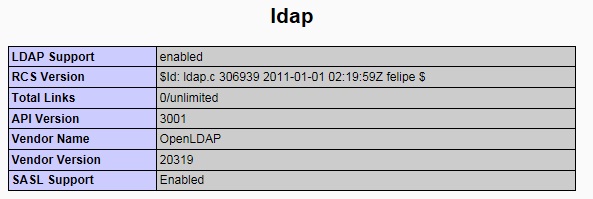
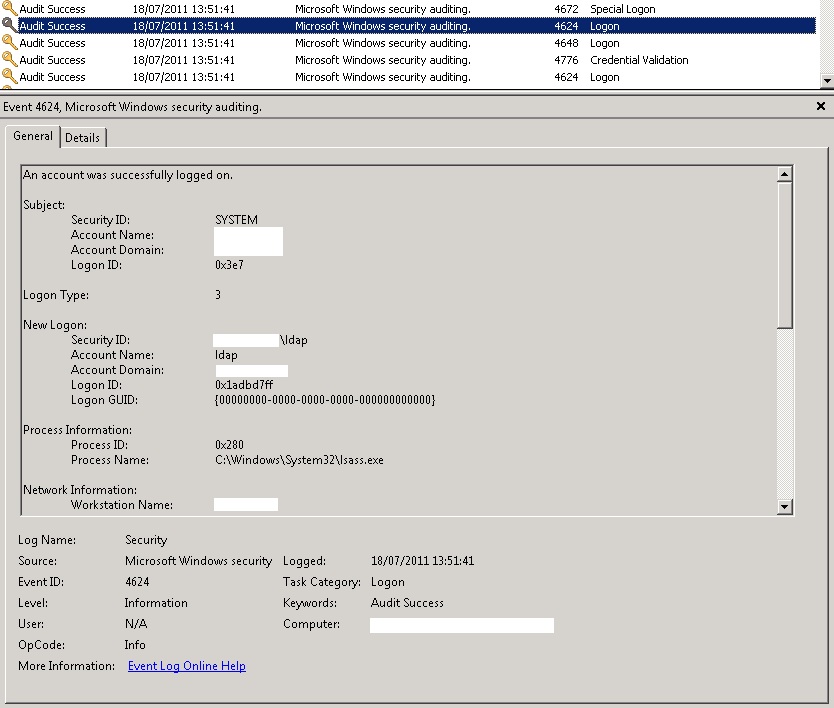
Just to confirm .. PHPinfo gives me this info: here is a screen shot of the event viewer showing that the ldap user is trying to logon to the server with sucsess... There are no local users in moodle other than the first administrator account.
-
Moodle Installation. Ldap Authentication
Chunks_ replied to Chunks_'s topic in Learning Network Manager
Hi Bart21, Thanks for your reply ... i was on leave so only just got this... yes ldap is enabled in the php.ini -
Hi, Wondering if anyone could help me. I have installed moodle once before and i managed to get it working with ldap authentication. With some tweeking and help from people on the forum. Im rebuilding it on another server, but unforunately the original installation has died on me. i cannot boot to windows to check configurations etc. I know my ldap must be working cos i can use the ldp.exe tool and i can connect to the server and bind the User. When i try and login in to moodle i get invalid user or File not found error 404. If i check the dc's system logs it shows that the bind user i setup actually logs in. So that side must be working. Im 100% sure im pointing it to the right organisational units to find the users etc. I can only think its something to do with configuring the URL rewrite in IIS7 I have entered - RewriteRule ^([^\?]+?\.php)(\/.+)$ $1\?file=$2 as the rule from the moodle support pages. But not sure what the pattern should be, whether the rule needs the "rewriterule" at the beginning and or have [qsa] at the end as it suggests on the moddle pages..... Any help would be great. Its also weird becuase i get a mixture of the 404 error and invalid logon..... so really not sure whats going on and its really beginning to frustrate me.
-
I found this really helpful.. Has the same adm as above (plus the way you were trying using the reg edit to do it)..... But also has additional links to items you may wish to remove for school computers like removing the library icon and couple of other bits.
-
If you dont wish to run a different script on each of your OU's you can add the printer deployment to your logon script, it picks up what OU the computers is in and uses a case statatement to deploy the printer. Maybe of some help to people so here is a link - Printer deployment script - Works with Windows 7 server 2008 / windows xp 2003. Not sure about the windows 7 - 2003 combo though.
-
Copy it into a notepad but you need this : Windows Registry Editor Version 5.00 At the top. Save the file as .reg then double click to merge it into the registry .....
-
Hi, I dont know if this is any good. Remove the library icon from the navigation pane Might be worth having a play ..... i think you have have to remove the network icon manually as well. The webiste has that in there too.
-
Was wondering if there is an auto log off feature for Sims if its left idle for a while (doubt there is) or anything out there that does this job. Dont want teachers forgetting to log out and putting data at risk. Thought about making windows lock itself but thats not ideal becuase depending on the timing it will start doing it when videos are playing etc. Any ideas would be great otherwise i might have to program something myself .....
-
Hi After making a nice fluffy policy i had a few problems with certain aspects. i found this useful. Its got things like removing network and library icons and a couple of other bits. Maybe useful to you.
-
Hi, I hit the jackpot..... changed it to the display name and then tried to login with a test student account and Viola...... ! Really appreciate all your help.
-
Hi My username that im using is CN=ldap-User,OU=Service Accounts,OU=myschoolname,DC=domain,DC=domain,DC=domain,DC=domain I read somewhere you should use the display name for CN= is that correct ?? becuase here im using the actual username. Thanks for all your help so far
-
Dont think so ... tried one ..... i got this error...... i have tried this before and all i got was invalid username and password.... now i more recently im getting this ... LDAP-module cannot connect to any servers: Server: 'my server ip' Connection: 'Resource id #49' Bind result: ''
-
This is what phpinfo reports ... the extension is enabled in the php.ini and the server has been restarted. ldap LDAP Support enabled RCS Version $Id: ldap.c 306939 2011-01-01 02:19:59Z felipe $ Total Links 0/unlimited API Version 3001 Vendor Name OpenLDAP Vendor Version 20319 SASL Support Enabled Directive Local Value Master Value ldap.max_links Unlimited Unlimited The thing is i cannot find any errors anywhere in regards to why this isnt working..... in moodle Host is the ip of my ad server with I used a program to check the Ldif of my users etc so thats fine. I checked the configs against your attached all seems pretty hunky dory so im at a loss.