Steve21
-
Posts
9,168 -
Joined
Content Type
Forums
News
20th
EduGeek EDIT Conference
Blogs
Everything posted by Steve21
-
Looks like you might be using an old website link as it's redirecting to another page for me, which would explain any SSL errors Try https://interactions.signin.education.gov.uk ? Steve
-

Creating your own brochures/display/signs/posters (Vector Images?)
Steve21 replied to Steve21's topic in How do you do....it?
Thank you both, Canva looks good but again, getting end users to do the updates would be a pain I think. Hopefully once setup it was a kind of leave it to them to sort idea Yep, the end goal being a template for users to be able to create/update things yep, but not just digital signage, things like classroom posters/displays/leaflets but formatted in the "proper school way" (One file/setup that works for all was the ideal) Originally I had thought about just premaking an Office template with jpeg/png etc for the standard sizes, but then instantly someone asked about a different size poster etc and it falls apart. Thus the vector/scaling thoughts. Haven't tried putting any SVG/ESPs etc into Office yet tbh, was wondering about how others did similar before testing the approach Thanks, Steve -
Good Evening All, Couldn't really think of a better forum to stick this in than How To, but just wondering what peoples thoughts are on the best/easiest way to create physical displays/signage within a school that's also easy for people to edit on their own. Obviously a nice pre-designed background/layout for the poster based upon a department or school design etc, making it vector based so it can easily be scaled for any size display etc, but as soon as I think about giving an end user a vector image to work with the idea falls apart in my mind. Even the basics of adding text/pictures to it I feel will get confusing when an end user has to start using photoshop etc (insert other software packages) Would be amazing if you could just like setup a Word/Publisher..ew… file that has a vector based background, but a user could easily add text/images to without requiring manual changes to any vector work etc Anyone got any hints or tricks they've used before? Or ideas as to whether I'm barking up the wrong tree... Thanks, Steve
-
From conversations in the past it seems it's a combination of: Work as a team not alone (As in use department offices etc) and/or staff room = social time and work doesn't get done (Or a free room if you need to expand etc) Personally, ours changed their mind and kept it in the end which to me makes more sense Steve
-
Desktop only (PE teachers have laptops instead) Couple of bank laptops to borrow for home use/meetings etc Steve
-
Guessing it's cheaper to link their own into "BritBox" than it is to pay Amazon? (Sceptical much!) Steve
-
Cabling issue at home
Steve21 replied to BentleyMiller86's topic in Network and Classroom Management
The order shouldn’t make a difference as long as they’re the same on both ends, but have you checked to see if both faceplates follow the same standard? Like A/B wise? If one side is A and one B you could be crossing the cable Steve -
Any reason you can’t just change them in Windows settings? There’s option for dual resolution under the advanced settings Steve
-
Any reason you can't just move the VM to the new host? At least it would ensure there's no issues in the short term until you get time to have a proper look etc Steve
-
Am I the only one who is reminded of this as gemtree desktop destroyer?! That's memories! Steve
-
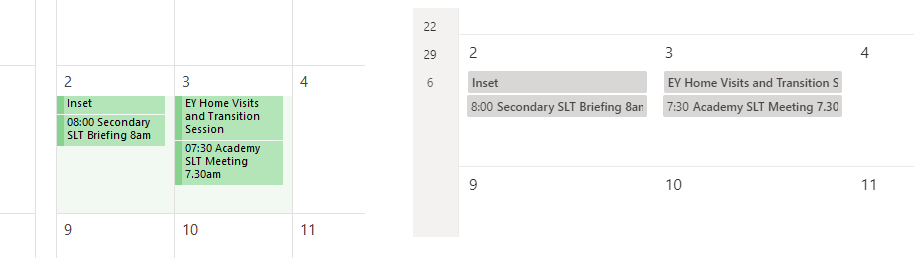
365 Shared Calendar – all day events showing a two days
Steve21 replied to ozydave's topic in Cloud Services
Very strange, and your PC is deffo on the same timezone? You don't have something silly like daylight turned off etc? or just standard UTC? If it's working via the web it must be something local to your pc Steve -
365 Shared Calendar – all day events showing a two days
Steve21 replied to ozydave's topic in Cloud Services
Doesn't seem to be any issue with the import as working fine on two accounts here, imported via latest outlook, and both viewed online: You got an example test calendar you can share a link to? (As in so I could load it up and see how it looks) Edit - I assume you are using latest Outlook rather than 2010 etc? From your comment about 365 calendar? Steve
-
365 Shared Calendar – all day events showing a two days
Steve21 replied to ozydave's topic in Cloud Services
You got an example line of your CSV file you're importing it from? Will have a play Steve -
365 Shared Calendar – all day events showing a two days
Steve21 replied to ozydave's topic in Cloud Services
I'll ask the obvious one here, but I assume whoever is viewing it on outlook web has the right timezone set? By design if the user viewing the calendar has a different timezone it'll shift the events to show "their" version as such Steve -
There's a thread on here about Win10 starter GPOs that has a copy of a few schools GPOs in their entirety attached to it, might be worth having a read through that one Steve
- 1 reply
-
- 1
-

-
You could try doing it via commandline and see what it says in regards to it e.g. manage-bde –off D: Sometimes had external USBs that would work doing it that way, even though it thinks it wasn't fully encrypted as it's still provisioning Edit - There is more "forceful" commands too but might be worth trying that before forcing it into recovery etc Edit 2 - Might have to do it with an unlock password too via commandline, but try that and see if it even thinks its encrypted first Steve
-
Last time I used a dongle in that regards you had to manually run software that was installed on it to get it to connect (Now this was a few years back so maybe it's better now), but if that is still the case you'd need something to plug the dongle into in the middle in that regards. Steve
-
Microsoft to introduce new ‘Windows 10 Pro for Education’ SKU
Steve21 replied to dblight's topic in Windows 10
It’s available here too just normally called TAP. If you have a search on here there was a thread about how to sign up. We did it with Stone but VeryPC etc had the option when we were quoting etc Steve -
Microsoft to introduce new ‘Windows 10 Pro for Education’ SKU
Steve21 replied to dblight's topic in Windows 10
The only way I’ve seen them is via the OEM edu discount plans (things like shape the future/national academic etc) They did say originally you’d be able to get it added to volume licensing on request but never tested that route Steve -
Out of curiosity, how many of you who have them so far actually change colours etc? (After the initial ooooh that's pretty stage) Was looking at some of these before and like the idea of dimming them on command/settings, or being able to control on/off etc, but struggling to see where the colours will actually be used a lot (Unless you like the idea of changing your house colours etc when a goal is scored according to the adverts ) Steve
-
Providing SAR results digitally
Steve21 replied to sidewinder's topic in Data Protection & Information Handling
In my mind as long as it's protected in some way, a link to downloading it is no more risky than posting/sending something by paper etc. Make it a stupid path to download (when we do something like that the folders we name it (webserver wise) are like myschool.co.uk/eirjerijiaerjaer/download.zip etc, then it's not like a random person would find it without the link during the 1 day download period, and even if they did find it they need passwords to decrypt etc Or gsuite/onedrive etc as people mentioned, same principle. Just not giving it to a random website to host imo Steve -
Providing SAR results digitally
Steve21 replied to sidewinder's topic in Data Protection & Information Handling
Can’t you just password zip it up and provide a link from your website for them? (Assuming you have some kind of website to host that is) If it’s a one off job anyway Steve -
You don't By XML it's limited to 2 columns (or fullscreen) (Unless it's been changed in the latest update): Steve
-
I mean it kind of depends on what the purpose is etc Dell drives are always priced above normal range, but then you can claim on warranties etc with them normally (and "fully supported" if you want all the monitoring reporting etc) You can use other drives like Intel data centre etc (generally require firmware updates on older servers), and there are some people even on here who use non-enterprise SSDs under the assumption the price difference, but depends if this is critical servers etc? *Edit - ninja'd Steve
-
You got the full version of XML you're trying to use with the shortcuts in? Doesn't look like anything is different in your top post from what we use, and it's running fine The only thing we did notice, is for papercut you also need to add a link to pc-toast-notify.exe into "Programs" within the start menu, as the client refers to it and will wobble without it unless they've fixed that in a newer version Edit - Just noticed on ours we're using shutdown /l rather than logoff.exe? Might be worth a shot Steve