Darylrese
-
Posts
592 -
Joined
-
Last visited
Content Type
Forums
News
20th
EduGeek EDIT Conference
Blogs
Everything posted by Darylrese
-
Had this exact problem few weeks ago, you need to add your domain to the proxy exceptions list Either locally or make a GPO
-
The adobe removal tool fixed it, cheers
-
it doesnt appear in the list Get a different error running the msi now too:

-
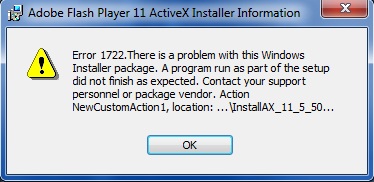
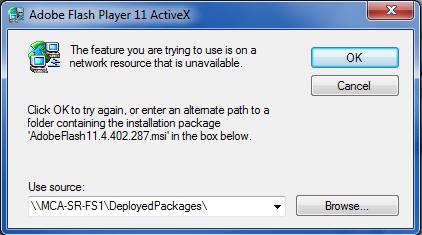
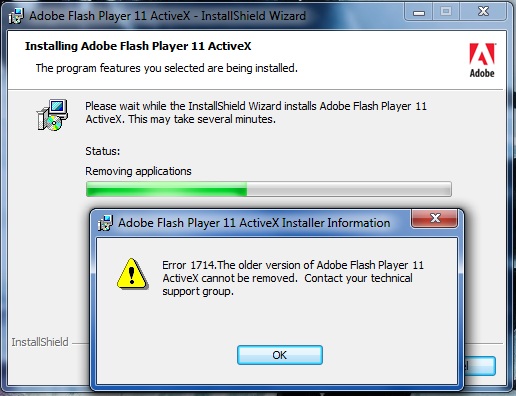
This is driving me nuts! I allocated out a GPO to all workstations with the lastest version of flash, all work fine except mine. It failed to install with error 1603. I have tried running the .msi directly from the share and it failes to remove the old version of flash saying its missing: I have tried downloading the msi for the version its asking for and pointing it to that msi but it says it doesnt contain the correct version and fails with this error: This msi retrys every 10mins or so to install and fails and everytime i reboot i have to wait for it to try and install again. I have managed to install flash from the .exe online manually but i'd rather get the MSI on successfully and stop the delays and errors in eventviewer. How can i get this working? The GPO is allocated at top level for all machines to pick up, mine included so i cant remove it for the sake of my machine.
-
CHEERS, ive replaced it with 10.160.2.6:80 as the port is 80. What do i change the "10.* to?
-
 haha the computers shall not win
 -
I'm glad creating a new GPO fixed it for you. Remember for the future, some GPO's just don't work for whatever reason so deleting & recreating usually fixes things and is much less hassle. Another useful tip i find is to hit refresh a couple of times in Group Policy Management once you make changes to the GPO or change security permissions. This way the GPO should be applied straight away without the need for a gpupdate /force on machine or wait for replication I have only just started to use AD / Group Policy myself but the above has happened 3 times to us, once with our printer server driver install GPO, a second with our staff drive mappings and a third time with proxy settings. The GPO i screenshot for you actually says our homepage shoud be google but its still our website, why im not sure because we dont have it specified anywhere. I'll probably just create a new GPO with that one setting in it instead
-
Let us know how you get on If not, could be a user permission
-
still no luck in a new GPO?
-
We have actually had this issue where the original GPO didnt apply propperly, second one identical worked OK. No real reason, its happened to drive mappings too. Just delete old and create new. Proxy settings are a pain , not sure why. Do you want your users to be able to delete the proxy server settings? Are the server details populated or is the greyed out box empty?
-
2 of our servers are updating also but only 2
-
Nope, they all display as 'Not yet Reported' so i dont think they are reporting atall
-
Sorry about that Dave, it seems to have gone missing! Here it is again:
-
Thanks as always Dave! Cheers for the script alan. I am getting the following error in event viewer still: I tried it on the one workstation that is reporting and working with WSUS and its given the same error
-
Is your GPO populated with your proxy server credentials? GPO: User configurations > policies > windows settings > Internet Explorer Maintenence > connection / Proxy settings? Pop your proxy details in there and allocate to all staff users. Sometimes if they dont apply correctly, try and make a new policy
- 20 replies
-
- 1
-

-
- active directory
- gpo
- (and 2 more)
-
Many thanks, will try this script now. In the line netsh winhttp set proxy SERVERNAME:8530 "10.*" is this the proxy server for sername or wsus server? Ive tried it as netsh winhttp set proxy 10.160.2.6:8080 "10.*" (which is our proxy server) but it says access denied EDIT: Not to worry, it has to be elevated to run as administrator. Should this now pull down updates as soon as the script has finnished?
-
there are 2 clients that are reporting to WSUS and recieving updates, one server and one workstation. Checked and the proxy settings on those 2 are the same as the others on the network that arnt working
-
Nope, heres our proxy settings GPO, do i need to make changes to this?
-
oh and here's the group policy in place on all workstations. Its linked at the top level under establishments [ATTACH=CONFIG]16111[/ATTACH]
-
Hi, Our WSUS server has been running for a few weeks now but none of our workstations seem to be getting updates. The WSUS console states none of the computers have reported yet, all updates have been approved to the correct groups and are ready to go. We have a group policy in place for workstations to pull down updates from WSUS at 16:00 each day. As far as i can see the group policy is working, however we get the following error in event viewer on workstations just after 16:00hrs: The company that put it in have been pretty useless so far telling us its just taking a long time to replicate, however i find it virtually impossible that it should take 3 weeks to do so! Any ideas? None of the clients / servers have been getting updates since the summer
-
Hello, Our students can't save downloads to their 'Downloads' folder. They get the following error. I cant see where in group policy you can allow access to the folder?? The file does download and will save to another location if the user selects save as on the download but will also show this error before allowing you to change the folder. We need to either allow access to the downloads folder OR change the default location in which downloads go? Any help appricated
-
This doesnt seem to restore apps using this method?
-
I cant get the profile to install onto an ipad, plug it in, create a profile and hit install and it does nothing??
-
Thank-you. How do you use the software? Do you just configure the settings you need then plug in the ipad to sync the settings? Do you need itunes for anything?