talksr
-
Posts
1,565 -
Joined
-
Last visited
Content Type
Forums
News
20th
EduGeek EDIT Conference
Blogs
Everything posted by talksr
-
Well spotted. Thanks, that is perfect, it works just as I needed.
-
Thanks very much for the help with this. I followed through what you put, here are my settings, but this doesn't seem to be working. Have I put it in wrong somehow? The only thing I couldn't see was the Hexadecimal or Decimal radio buttons. They were not visible on my Group Policy. I am on a 2016 server.

-
Hi there, Has anyone managed to set their client Windows 10 systems to open My Computer in Explorer by default rather than Quick access? On a standalone computer, you would open Explorer, click View>Options and then change Open File Explorer to: This PC from Quick access. I found the following online, however, when adding new registry properties to a new group policy, I am unable to find the CLSID folder within the HKEY_CLASSES_ROOT\ Would be grateful of any help on this.
-
Perfect, thanks very much! Shame on Adobe, is it really that hard to write instructions like you have?! I have spent so long trying to find a document that explains how best to do it. Thanks again. Next...Adobe Reader... might leave that for another day!
-
Hi there, I am trying to deploy Adobe Air via Group Policy for my Windows 10 systems, but I am really struggling to find a working MSI of the software. I applied for the licence from Adobe, which I now have, but the link they gave me gives me access to: An installer file - no good as it is an executable Documentation - no good It also gives me access to Download Installer Files - tried this. Download Installer Documentation - useless, takes me to this page which does not work I get a zip with an Adobe Air Installed exe and a setup.msi file, along with some adobe files and an Adobe air folder. I have tried to use the msi within this zip, but it doesn't seem to work. After running through an installer, it brings up the error: Adobe Air Could not access the network location (computed). Does anyone know if it is possible to deploy this software via MSI?
-
Ok, so maybe I could try a .cmd script in the startup GPO director which as you rightly say, can be found by clicking show files. I could make the CMD file contain the following: powershell.exe –ExecutionPolicy Bypass "\\fty-sr-001\applic$\DotNetFix\DotNetFix.ps1" How does that sound?
-
Thank you so much for the explanation, it all makes sense. Hmm, tried restarting a test system.... it still is not working, and the system does not have it installed. I have looked through the Application Windows log and can't see anything. Maybe I should try your suggestion of using a .cmd file. If I were to go down this route, where would be best to save the .cmd file and link to it in the policy? Could it be done as a startup script through the Active Directory?
-
If you went with that option, would you then not need to replace the HDD, but rather put an SSD into this caddy and install the OS onto this?
-
Ok, thank you, that makes sense. In terms of adding to a machine startup policy under the PowerShell section, I think this is what I have already done... Will this not just bring up the same error I get when running manually on Powershell ISE when it says running of scripts is disabled? If I manually run your new code on ISE, it brings up the same error I got before. Running your command prompt line works a treat though, but I don't think I can add that to Group Policy (powershell.exe –ExecutionPolicy Bypass "\\fty-sr-001\applic$\DotNetFix\DotNetFix.ps1)
-
Ok thank you, very helpful. Would I still make the script a .ps1 file?
-
Thanks, that has worked perfectly on my test machine and now Kinovea works on my test computer. The question now is how can I apply this to all computers in the ICT suite?
-
Thanks, I must have missed that earlier. Have made the changes, but still getting the same error again: PS Microsoft.PowerShell.Core\FileSystem::\\fty-sr-001\applic$\DotNetFix> \\fty-sr-001\applic$\DotNetFix\DotNetFix.ps1 File \\fty-sr-001\applic$\DotNetFix\DotNetFix.ps1 cannot be loaded because running scripts is disabled on this system. For more information, see about_Execution_Policies at https:/go.microsoft.com/fwlink/?LinkID=135170. + CategoryInfo : SecurityError: ( [], ParentContainsErrorRecordException + FullyQualifiedErrorId : UnauthorizedAccess This was the new line of code in the script: DISM /Online /Enable-Feature /FeatureName:NetFx3 /All /LimitAccess /Source:"\\fty-sr-001\applic$\DotNetFix"
-
Frustratingly, same problem again. I used your version of the script: DISM /Online /Enable-Feature /FeatureName:NetFx3 /All /LimitAccess /Source:"\\fty-sr-001\applic$\DotNetFix\microsoft-windows-netfx3-ondemand-package.cab" And I get the following error o the ISE: PS Microsoft.PowerShell.Core\FileSystem::\\fty-sr-001\applic$\DotNetFix> \\fty-sr-001\applic$\DotNetFix\DotNetFix.ps1 File \\fty-sr-001\applic$\DotNetFix\DotNetFix.ps1 cannot be loaded because running scripts is disabled on this system. For more information, see about_Execution_Policies at https:/go.microsoft.com/fwlink/?LinkID=135170. + CategoryInfo : SecurityError: ( [], ParentContainsErrorRecordException + FullyQualifiedErrorId : UnauthorizedAccess I have tried restarting the machine to see if it worked, but no, same as before, it has not gone on.
-
Yup, it seems to be squeezing it onto two, but it is just one in the script.
-
Interestingly, if I run the script on PowerShell ISE on any system, I get the following: I tried changing the script to this to get around the execution policy, but same error again: Set-ExecutionPolicy -ExecutionPolicy Unrestricted dism /online /add-package /packagepath:\\fty-sr-001\applic$\DotNetFix\microsoft-windows-netfx3-o ndemand-package.cab Set-ExecutionPolicy Undefined
-
Hi there, I have tried, but it seems this is not working. The Group Policy is going through, I have verified this with gpreport /h However, when I attempt the run the software, it is saying the .Net is not there. I have manually run the PowerShell script on a system, bounced it and the software works so I know it can't be the actual command. This is where and how I have added the script to Group Policy (this is currently an enforced policy): This is the configuration of that policy: These are the edit script options: And this is what is in the actual script: Any help or suggestions would be great. I am wondering if what 3s-gtech's suggestion of execution policy issues may be causing this problem?
-
Ok, makes sense. I put it under Windows Settings>Scripts (Startup/Shutdown)>Startup>PowerShell Scripts So it should be in the correct place. Is there any way I can easily check if it has been installed? I have some systems which I know don't have it. It may be easier to bounce them and then see if they have it on them after they boot up.
-
Ok, have put it on a policy, bounced the test system after gupdate /force, and it took a while to log in. What can I look for in Computer Management>Windows Logs to see if it was a success or not?
-
Thanks for the clarification. Wouldn't be so sure on the power shell execution policy. This is a 2016 server running Ranger 8.... not sure why Ranger is on it, but not really with the times. What would be the best way to check if the policy allows it? I am not on site, can do remote logins via RDC. Could I not save the script like this.... Set-ExecutionPolicy -Scope Process -ExecutionPolicy Unrestricted dism.exe /online /enable-feature /all /featurename:NetFX3 /Source:"\\servername\applic$\DotNetFix\microsoft-windows-netfx3-ondemand-package.cab /LimitAccess If I run the above from a test system logged in as administrator with an elevated PowerShell window, it comes back with an error saying Error: 87 The limitaccess option is not recognized in this context. For more information, refer to the help. If I take off the /LimitAccess it works.... PS C:\WINDOWS\system32> dism /online /add-package /packagepath:\\servername\applic$\DotNetFix\microsoft-windows-netfx3-o ndemand-package.cab Deployment Image Servicing and Management tool Version: 10.0.16299.15 Image Version: 10.0.16299.15 Processing 1 of 1 - Adding package Microsoft-Windows-NetFx3-OnDemand-Package~31bf3856ad364e35~amd64~~10.0.15063.0 [==========================100.0%==========================] The operation completed successfully. PS C:\WINDOWS\system32>
-
Thank you both for your posts. @alfatec the line you added in your comment, would I add this as a Group Policy elevated PowerShell command as 3s-gtech suggested? If so, what format would I save the script in? I have never made a PowerShell command to execute over Group Policy before. I am assuming it would be a .ps1?
-
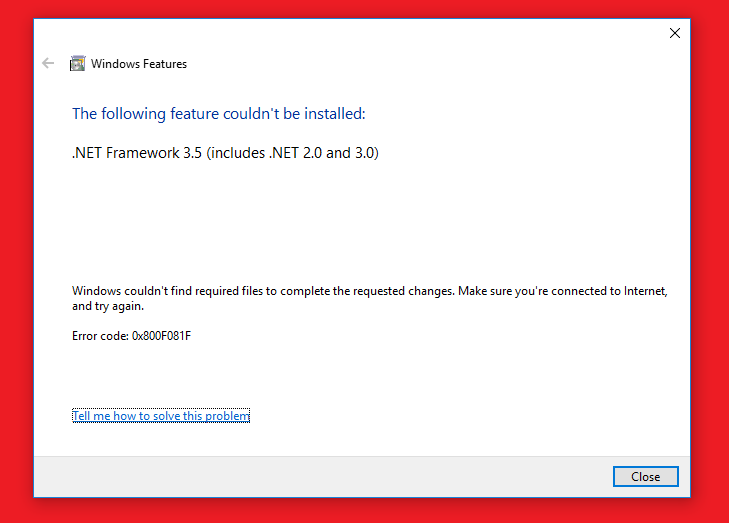
Hi there, I have been having real issues installing .Net Framework 3.5 (includes .NET 2.0 and 3.0) on our Windows 10 systems. We have been trying to install some software called Kinovea. Once the software is installed, it helpfully brings to my attention that the computer needs .NET framework 3.5. It is able to download and install it which it does, but always returns the following error: This is happening on multiple computers, and the ONLY way I have managed to overcome this issue is to run the following command on an elevated PowerShell window: dism /online /add-package /packagepath:"\\servername\applic$\DotNetFix\microsoft-windows-netfx3-ondemand-package.cab" This Windows cab file appears to work but only when run through PowerShell. Does anyone have any ideas on how I can apply this .Net framework to all stations in our ICT suite (currently 32)? Any help would be very greatly appreciated!
-
Hi there, I am looking to set up our first VM Ware system to host a couple of Server 2016 installations. Initially, these will be serving around 20 users, so I expect the following spec will more than accommodate what we need. Just wonder what people's thoughts are on the hardware: HP ML350 G9 2 x PSU 2 xE5-2620V4 CPU 64GB RAM 4 x 2TB drives LTO5 drive 1 x Academic Vmware vSphere 6 Essentials for 3 hosts (max 2 processors per host). Can anyone suggest a good raid configuration for a setup like this?
-
Thanks so much for taking the time to write this. I got as far through your instructions as above. Not sure if I am going mad, but I can't find Applications anywhere. Tried checking options in case it was hidden or unticked. Am I in the right place? This is a 2012 server.
-
Ok, I should think that would do the job. We could always use an external HDD if needed. Would this SSD replace the existing HDD or would it be in addition to it?
-
Thanks everyone for your help on this. Any suggestions on the best SSD to get? Never done an iMac before, usually get the 256gb ones for HP systems, but that seems maybe too small.