talksr
-
Posts
1,565 -
Joined
-
Last visited
Content Type
Forums
News
20th
EduGeek EDIT Conference
Blogs
Everything posted by talksr
-
It is 100% installed as if I go on as Administrator, it comes up straight away. Not using MDT at this site, just Ranger 8 which is getting pretty long in the tooth. They don't have the budget to do anything else at the moment. Windows 10 version 1803 on the system I am testing with.
-
Hi there, I am trying to allow access to Paint 3D for staff and pupil users on our Server 2012 system with Ranger, but it seems that an icon for Paint 3D on Windows 10 does not exist. If I log in as administrator, I don't even need to download it from the Store, it just opens and works. However, when I do it as a pupil or teacher user, I get the following: # Does anyone have any ideas on how I can get around this?

-
Hi there, this is an isolated issue just on my own work computer. I am running an HP EliteDesk computer with the following drives: 128gb SanDisk SSD Plus 120GB Seagate 500GB HDD The SSD runs Windows 10 and the conventional HDD is used solely for My Documents redirection. The majority of the software installed on the computer, is installed to the SSD, as it is mainly just work things, Office etc. I would like to switch the 128 sold state drive for a larger model. I happen to have a SanDisk SSD Plus 480GB drive going spare. Can anyone give me some advice on the best way to take everything that is on my 128gb SSD and transfer it over to the 480gb SSD, such that when I plug it in, it just continues working as it was? I don't have bitlocker or anything running. Thanks in advance.
-

How to save Chrome bookmarks on local profiles rather than roaming?
talksr replied to talksr's topic in Windows 10
Hi all, me again. Still having trouble finding the part of Chrome Group Policy that allows me to set the profile location? Does anyone know where it is? I have updated the definitions for Chrome as mine seemed outdated, but I am still struggling to find the part that allows me to change the profile location. Any help would be great. -
How to save Chrome bookmarks on local profiles rather than roaming?
talksr replied to talksr's topic in Windows 10
Thank you. No I understand you can't have both options running, just interested to see what you had done with the scrips as never really thought about that. Thanks, have updated the definitions. I am getting a couple of Google Folders in the policy now which is odd. Not looked for the profile path setting yet.
-
How to save Chrome bookmarks on local profiles rather than roaming?
talksr replied to talksr's topic in Windows 10
Thanks for taking the time to reply. Interesting, I had never thought about log on and log off scripts. That is very interesting. Is there any chance you might be able to share some with me? Would be very interested to see how you set that up. In terms of Chrome Profile and User data, ok, I will try your suggestion of ${roaming_app_data}\Google\Chrome\Profile and ${local_app_data}\Google\Chrome\User Data respectively. My only question is where on the policy do you insert the profile path? I only seem to have Set user data directory on mine? (as below)
-
How to save Chrome bookmarks on local profiles rather than roaming?
talksr replied to talksr's topic in Windows 10
@bknaggs, if you could, that would be great. I have found the following setting within Group Policy, not sure if this might help me: I have looked the setting up in more detail https://www.chromium.org/administrators/policy-list-3/user-data-directory-variables and it seems you could put in ${documents} as a variable which would point it to the Documents folder for the current user. This might work, though may look a little untidy to have user data in their My Docs.
-
How to set Default File Location for Office 2016?
talksr replied to talksr's topic in Office Software
Perfect, thank you, that worked just as expected. -
Hi guys. I configured the RAID 1+0 and have reinstalled the VMware software. This is what I am getting when I view the storage on the server. Does this look right? I have 4 x 2gTB SAS DS drives. Will try and get an array screenshot tomorrow.
-
How to set Default File Location for Office 2016?
talksr replied to talksr's topic in Office Software
Thanks very much. I don't seem to have these templates. I have found them online here: https://www.microsoft.com/en-us/download/details.aspx?id=49030 Do you know where abouts in the central store they need to go? -
Hi there, I am deploying Windows 10 via Microsoft Deployment Workbench. It is rolling out well and includes Office 2016,but I am noticing that both the AutoRecover and Default File locations are local paths. Is there any way in Group Policy I can change this such that it points to the user home folder N:\
-
How to save Chrome bookmarks on local profiles rather than roaming?
talksr replied to talksr's topic in Windows 10
Thanks guys, that sounds like a good idea. Do you know where within Group Policy this setting would be? I am using local profiles for everyone, but with in User Config>Windows Settings>Folder Redirection>AppData (Roaming), I have this set to point to AppData within the user's home folder, such that this follows them from computer to computer. Maybe it would be possible to point the Chrome file into here? Also, any ideas on how I could make this AppData folder hidden so the user can't see if in their home folder? -
Thank you. Just raided it now!
-
Hi there, just getting round to sorting the RAID out. It doesn't look like RAID 10 will be an option. These are the options it gives me:
-
Hi, I have a new server 2016 and I am trying to redirect Windows 10 Documents, Music, Pictures, etc folders to the user home drive. I am using local profiles and finding that the redirect is just not working. I have been to User Config>Windows Settings>Folder Redirection and Documents as example in Group Policy, where I have selected: Basic - Redirect everyone's folder to the same location. I have then selected Create a folder for each user under the root path Path: \\server\homefolders$ I have also tried Redirect to the user's home directory Nothing seems to be working. When I log into the testing station, I can see that documents is just pointing to the local profile. Pictures, Videos, Music and are redirecting perfectly using the "Follow Home Folder" option. This option is not listed for Documents and Downloads and these are the two I am having issues with. Here you can see all of the folder locations with just Documents and Downloads not behaving. Any help would be great
-
How to save Chrome bookmarks on local profiles rather than roaming?
talksr replied to talksr's topic in Windows 10
Good idea, I had not thought about that. Is there no way to point the Chrome info at their my documents folder which would follow them from computer to computer instead? -
Hi there, I have given up using Roaming profiles on our Windows 10 systems using our 2016 server as we had constant one drive and start menu redirection issues. I am looking at using local profiles but I am finding that this then means, when a user logs into a new station for the first time, they will not have their Google Chrome bookmarks. Is there a way to get around this? This is just an admin office deployment so under 10 computers and users.
-
@mikkydoos good news, I have the software installed. Would be really grateful if you could give me any tips to save time.
-
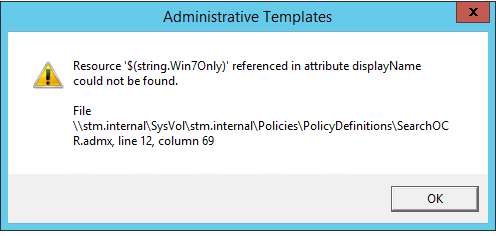
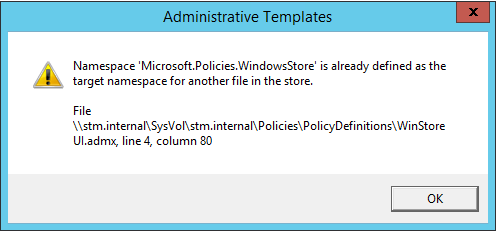
Also, the error I get when I open Group Policy seems to have changed. I only get it if I open up a policy and browse to either Administrative Templates folder:
-
Yes I do have other language folders, I think there is a GB one for Chrome. Would this be a problem? I tried what you said re taking the Policy Definitions folder from a working 2016 server and putting it on this faulting one, but it just kept refusing saying there were permission issues, even though I am on as administrator. Not sure what else I can do to get around it.
-
Thank you. I didn't know this existed. Will give it a try in a few minutes.
-
Hi there, I have a 2012 FRDC which every time it does a Windows Update and needs a reboot, gets stuck for days on the Restarting screen. Users still seem able to access network services etc, but it can't be healthy. Can anyone give me some tips on what to look for here, as getting a little worried that it keeps doing this.
-
Glad they look ok, sorry I meant 3 VMs
-
Thanks, that is really helpful. I have ordered two of these: https://www.amazon.co.uk/SanDisk-Extreme-microSDHC-Memory-Adapter/dp/B06XYHN68L/ref=sr_1_3?ie=UTF8&qid=1527079902&sr=8-3&keywords=SanDisk+Extreme+PRO+microSDXC+Memory They should be here by tomorrow. I have got 48gb of RAM which should be more than enough for 3 potential hosts. ... Just saw your edit. Thanks very much, I will let you know, that would be really helpful.
-
Thanks everyone for your help. RAID 10 it is then. I have asked VMware if they can point me in the right direction re the correct HP image - thanks for that, I was not aware there were specific ones. Thanks, you're right. There is a micro-SD slot. Just found it now. What sort of micro-sd card would you recommend going for? I don't think I have any spare, so can order one from Amazon.