talksr
-
Posts
1,565 -
Joined
-
Last visited
Content Type
Forums
News
20th
EduGeek EDIT Conference
Blogs
Everything posted by talksr
-
Thanks. Very helpful. Do you use two mirrored USB drives or two mirrored standard hard drives?
-
Yes, though I am still waiting to hear back from VMware. I have paid for vSphere 6 Essentials Kit but still waiting for it to show in my downloads part of the site. Have been waiting for over a week now. Do you think it will be an issue installing esxi onto the USB?
-
These are my two options... The 16GB is larger, but does do USB 3.0. Not sure if that would make much difference if it just loads to RAM as you mention?

-
Ok, thanks that is very good to know. The drive is a USB 2.0. I am just going to have a look and see if I happen to have a 3.0 as might as well make the most of it if I have.
-
Thanks, that's really helpful. Ok, I will crack on and put one in. Such a pain you can't raid the USB drives, just in case the flash ever fails!
-
Thanks very much. What would you say is reliable? I have a large selection of 16gb SanDisk ones, otherwise Kingston ones but I think they are 8gb.
-
Hi, I have just purchased a new HP ML350 Gen 10 to run vSphere 6 Essentials. It comes with 4 x HP 2tb 7.2k SAS drives. Can anyone best advise me on the most suitable RAID config for this system? I have never installed vSphere onto a server, so this is all completely new to me. Presumably, one of the drives is going to need the vSphere OS on it, or would it be worth me purchasing another drive to put the OS on? There are two internal USB 2.0 and 3.0 ports on the motherboard, so I may be able to run the OS from a USB key? Not too sure? Any advice would be greatly appreciated.
-
Thanks Steve, have just updated the xml. Will give it a test after a gpupdate.
-
Hi there, I am running Server 2016 for our Windows 10 clients. I am noticing that when users click on email address hyperlinks in websites, they are presented with the following: As you can see, it opens up the Mail app and then asks to add an account into it to start using it. Does anyone know if it is possible to turn this feature off within Windows 10 and have the station either open up the default browser (as we use OWA) or Outlook?
-
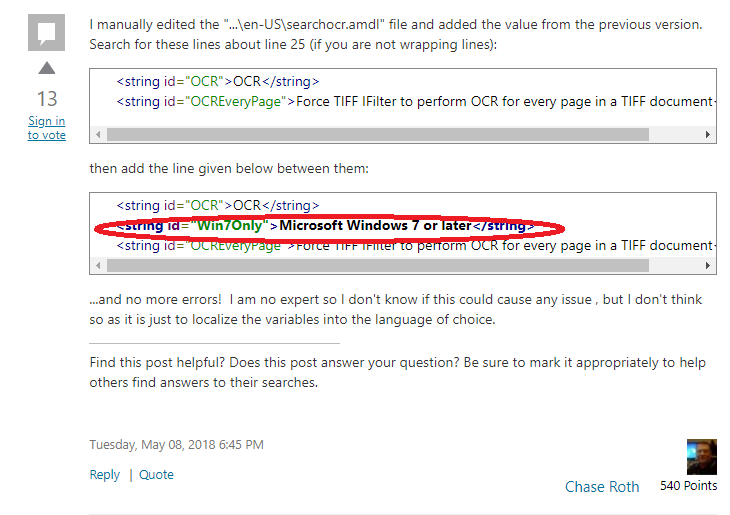
 Thanks, that was helpful. I have taken a look but it already has the part the guy is suggesting - I have highlighted it in red. Not sure what-else I can do? I didn't expect it would have all have already been in there.
-
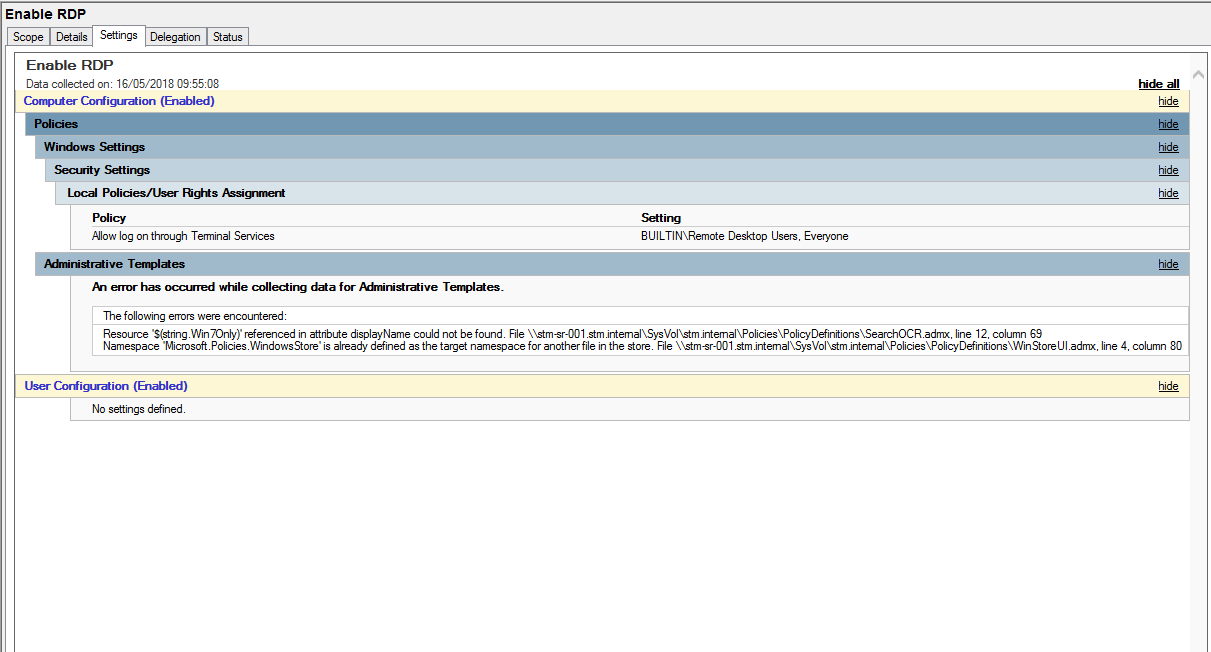
Have you had any issues with the templates @mrwoberts? I am getting the following when opening up any policy on my Group Policy..... This has only started happening since I added the new admx templates to my central store.
-
Hi there, I have the following policy set up for enabling Remote Desktop Connection on my Windows 10 and 7 systems. I recently updated the central store with the new group policy templates for Windows 10 1803. I have noticed that new systems I connect to the domain, whilst having RDP enabled, seem to have the following box ticked. Is there any way I can get around this? Secondly, since updating my central store, I am noticing the following in the policy it's self...see under Administrative Templates: Does anyone have any ideas as to what this means? It was fine before I updated the admx templates.
-
Forget that last post. User logged out for lunch, came back and they now get this again Have rebooted computer several times, even deleted their profile and rebooted, but no, start menu tiles broken again.
-
Thanks so much for your help on this. I really appreciate it. Ok, I have done what you said, and it now works. So start menu is now working as expected.
-
Hi, sorry I meant just the tiles, that is all I have configured. I configured the server with desktop redirection and start menu tiles. What I am finding is the computer I used to test with works perfectly, but any other one on the domain gets no tiles for the start menu and blank icons on the desktop which don't work. It was a very basic start menu layout (with the tiles). Mainly just links to all office shortcuts and Chrome. I had never got far enough to consider the actual start menu. That would have been something maybe for the future. This is the start menu tile layout I am currently getting as a user, this is not what should be coming up based on my XML. These systems are just for use by admin users, so I am not fussed about locking things down which is why I left the main start menu alone, so they could manually search for anything else they wanted, just leaving my start menu tiles for important things like office and chrome on the main part of the menu.
-
No, I am using XML: Does this also need linking to my users OU like the desktop redirection?
-
Hi, same software installed, exactly the same processor architecture, in fact, identical HP computers in every way. If I login as admin, Word shortcuts point to identical locations on both computers. I am now not even able to find them in start menu. It is as though they don't exist when logged in as a user. If I go on as admin, they are all there on start menu. And to top things off, randomly, Tight VNC will totally freeze up when I log in as a user like this: I am unable to do anything, if I close VNC and re-open, I am presented with a black screen. Just seems to be problem after problem.
-
Ok, interesting. I am afraid, I am still having issues. Now, I am getting the desktop, which is great. But, the icons are only working for the computer I copied the icons from originally to put in the desktop icons folder that each computer looks at to get the shortcuts. If you use any other computer, you now get this, which is useless: So I have now made the issue even worse as users are now unable to access anything. Do you suggest I forget about the roaming profiles as I do also want to use Smart Menu XML layouts? The problem is that some users have quite large profiles due to using MS Outlook and having mailboxes over 1gb in size.
-
..... I think it has done the trick.....
-
Ah right ok, ok. Thank you everyone. Sorry, I was missing the point re the policy being in an OU with actual users. It isn't. I have just linked my Desktop Redirection policy into my Admin Users OU, which contains all of the users. Just rebooting a machine and I will re-test. I don't believe we have loopback enabled. Is this in the Computer Config or User Config Group Policy folder within the policy? Lastly, we are using roaming profiles.
-
Furthermore, for some reason, for any login, on any computer is displaying a C:\ folder on the desktop. When you click on it, it takes you to what looks like C:\users on the local computer. Don't know how, or where this is coming from. If I delete it, it just keeps coming back. It is doing it for normal office users, admin users, anyone. What I have found is that if you click on users, there is only an administrator folder within this folder which is not right. Look at the properties for the folder, it isn't C:\users, it is a folder within the profile.
-
Hi there, just to clarify, it is configured under User Configuration: Apologies Liam, I have not had a chance to get back to you yet, it has been so busy here, just a nightmare. We are also now getting issues whereby the user logs in and gets a black screen, no icons, no taskbars etc. Got to say, for my first Vanilla Windows 10 system, I am far from impressed. Nothing seems to be working. Have checked event viewer and we seem to have a couple of failed GP MSI installs:
-
Thanks so much!
-
Thanks, will check this, though interestingly, when Chrome crashes, I have now also noticed that Edge doesn't work. Could this be some sort of DNS issue? I am able to ping using CMD. DNS flush has not helped
-
Yeah, it has the latest version, but to be fair, it was doing exactly the same before this new update. It has been going on for weeks now and is driving me mad.