talksr
-
Posts
1,565 -
Joined
-
Last visited
Content Type
Forums
News
20th
EduGeek EDIT Conference
Blogs
Everything posted by talksr
-

HP Storage Server Storage Configutation
talksr replied to talksr's topic in Learning Network Manager
Thanks for your reply. Good point re putting windows on an SD card. I had not thought about that. This will be a shared file server. I guess I could use one of the drives for the OS but not sure how I would do the rain that way. Or do I buy another, smaller drive (or two) just for the OS? I have four more available slots. -
HP Storage Server Storage Configutation
talksr replied to talksr's topic in Learning Network Manager
Sorry, should have mentioned, either server 2016 or 2019. Our current one has Storage Server 2008R2 which is now too old and Microsoft no-longer do Storage Server versions. -
Hi there, I have a new HP ProLiant DL380 Gen10 server which we are to use as a storage server. It comes with 8 x 1TB 7.2k SAS drives and 4 x 7.2k 2TB drives. Our current storage server has the same amount of storage space but had an additional in-built drive for the OS. This does not, but it does have a micro SD slot. Can anyone suggest to me the best way to set this server up. The old one had a mirror raid. Would I be best off mirroring everything this server has in it's drives and buying a micro SD card for the OS. If so, can anyone recommend the best micro SD for the job? Thanks in advance.

-
Hello, I am trying to update the image I use for Windows 10 on WDS. When I have tried this at other sites, it has not always worked correctly. Does anyone know if there is a guide which walks you through how to upgrade the images on WDS? We have Windows 10 1803 x64 bit. I would like to put on 1909. We literally use WDS for the Windows 10 image and that is it, there are no additional programs or things to be installed, so hopefully, this should be easy. On WDS, I have in Install Images, one image group called Windows 10 1803 x64 In Boot Images, I have one image: Light Touch Windows PE (x64) Any help would be greatly appreciated as I have new systems to be built and would rather give them the very latest version of Windows 10.
-
Thanks both, very helpful.
-
Haha! It is such a commonly asked question! Never seen it just in this corner though. Does anyone know if it is economical to replace? It is a half decent i5 Lenovo L460
-
Thanks everyone. I thought it was pretty likely to be pressure, but just wanted to check! Thanks again!
-
Hi there, Teacher says they have not dropped the laptop or put pressure on it, but I am not so sure, I am pretty sure this has been damaged and is not a ribbon issue. Any ideas?
-
Hi, Has anyone ever come across this error when a user logs in? As far as I am aware, it is just one particular user. I have tried logging in as other users, and they log in with no issues. I have tried logging on to various different computers as the problem user, and I am getting the same error. We have Server 2012 and Windows 10 clients.
-
Hello, I am afraid not. The issue is still there which is really frustrating.
-
Microsoft InTune for Education: Linking to On Prem Server
talksr replied to talksr's topic in Cloud Services
Thanks, When I search for Azure AD Basic, all I am finding is lots of articles saying it is being phased out from August 2019. I have been able to download Azure AD Connect no problem, although it is showing this error when I try and install it. Has anyone had this before?
-
Hi, Does anyone know if it is possible to link our Microsoft InTune account to our on prem server 2016? This way, we could join users and computers on our domain to InTune. I had a look on Azure, and it looks possible on there but it keeps asking me for a subscription, so assuming as we have only purchased InTune Open Faculty, we don't get the full feature set of Azure? Thanks in advance.
-
Hmm interesting. We do have CCTV in the room, but nothing has been detected.
-
As far as I can see, no one has moved it or done anything to it as the wires are all cable tied in under the desk so they wouldn't have even been able to put it on it's side as they are so tight. Maybe, but they must have hit it quite hard. I am surprised they have not damaged their fingers!
-
Hi there, Does anyone know what could have caused this? This is an infant ICT suite so it won't have been children throwing things at the screen. There is no surface damage, changed cables etc, can't quite work out what the cause could have been. It isn't an issue as I have spares, just curious as to what on earth would cause such a thing!
-
The problem I have is that as far as the head is concerned, the school has paid for the boards and the accompanying software, and the school wants it all to be working. They want to use all of the software Clever Touch proudly exhibited in the sales pitches. It has put us in a very difficult and extremely frustrating position as the software just isn't working as it should be, not our fault, not the school's, but the school's stance is, we paid, we want it working.
-
I am sorry to say, but in my opinion the software is just junk. It does not do as explained in instructions, we have spent over six months now trying to get their software to work. It is a shambles. At the end of the day, the real people losing out here are the children as staff are unable to use the software as it simply doesn't work correctly. A prime example... We have given up trying to deploy Clever Touch software via our server as it just doesn't work. Yes, we followed the guide, yes we have logged calls, it just doesn't work. I have the latest version of SnowFlake 7.20 as provided to me by Nuiteq in December 2019. Every single time I attempt to install it on a brand spanking new laptop, it installs Bonjour and then I get this... Doesn't matter what I do, have rebooted FIVE times now, closed all apps, checked Windows 10 isn't updating in the background, even tried it on a pre-existing computer which is not new and doesn't have Snowflake already installed. It simply doesn't work. I have come in today to get some new laptops set up and installed. I have just a few hours left as the site is not open all day and a stack of laptops I have not even been able to get out of the box yet as I am faffing around, spending far too much time on this broken software. Every other piece of software I have installed, perfect, no problems. Every single time we encounter issues, Snowflake or Lynx. End result is that these teachers will not get the software as I just don't have the time to keep messing around with this and more importantly, the school does not have the funds to keep paying for us to go round and round in circles on this software. I think that is quite sad as in this day and age where money is tight and we have to justify every penny we spend, I really think we are being let down here. The hardware is good, but the software, in my view is utter tosh.
-
Just so frustrating that we get the stress and agro from everyone, it isn't our fault! We didn't make the order, we are just there trying to help make sure everything works and the staff are able to do their job effectively!
-
Hi there, Sorry for the delay in replying, my thread update went to spam. To be honest, it has all been a real headache. We are currently having issues deploying Lynx over Group Policy. It deploys no problem at all, but when staff open it, it is asking for licencing info. We followed the install guide exactly and it just doesn't work. I have tried it at a couple of other sites, exactly the same problem. So frustrating as it seems ok software, but simply doesn't work as per the install instructions. I am able to deploy lots of other software via the server Group Policy, Clicker 6 as an example, which also has licencing info, and it deploys perfectly. So we know this isn't an issue with our Group Policy. Snowflake has been an ongoing frustration. I believe it has finally been resolved, but a colleague of mine has been dealing with this as I was losing the will to live in dealing with this every week. We were finding that it just wasn't working despite going over and over the guides they provided, we were just going round and round in circles and ended up giving the school a considerable amount of free support time to try and help them resolve this issue. We had several very frustrated staff saying "We have paid a fortune for this technology, why isn't it working?" and we were just sat in the middle trying our best to make things work that just didn't work! If it helps you, I can ask my colleague what the outcome was for Snowflake? Also, just so you are aware, for some reason, SnowFlake related issues have to be dealt with by Nuiteq, not Clever Touch. If you log a call with Clever Touch, they will ask you to get in touch with Nuiteq as I am assuming a different company licences it to them.
-
Best way to clone a Windows 10 HDD to a larger one
talksr replied to talksr's topic in Learning Network Manager
It worked! Thanks everyone for your help. @3s-gtech don't worry about the recovery disks and biscuits. I am sorted! -
Best way to clone a Windows 10 HDD to a larger one
talksr replied to talksr's topic in Learning Network Manager
Wow, looks like the software has done it. I am about to reboot it to test. If I don't reply, please send help with Windows 10 recovery disks, and a box of biscuits.
-
Best way to clone a Windows 10 HDD to a larger one
talksr replied to talksr's topic in Learning Network Manager
Thanks, have just downloaded a program called Mini Tool Partition Wizard Free which is allowing me to do what you suggested. Just waiting for it to apply the changes I put through. -
Best way to clone a Windows 10 HDD to a larger one
talksr replied to talksr's topic in Learning Network Manager
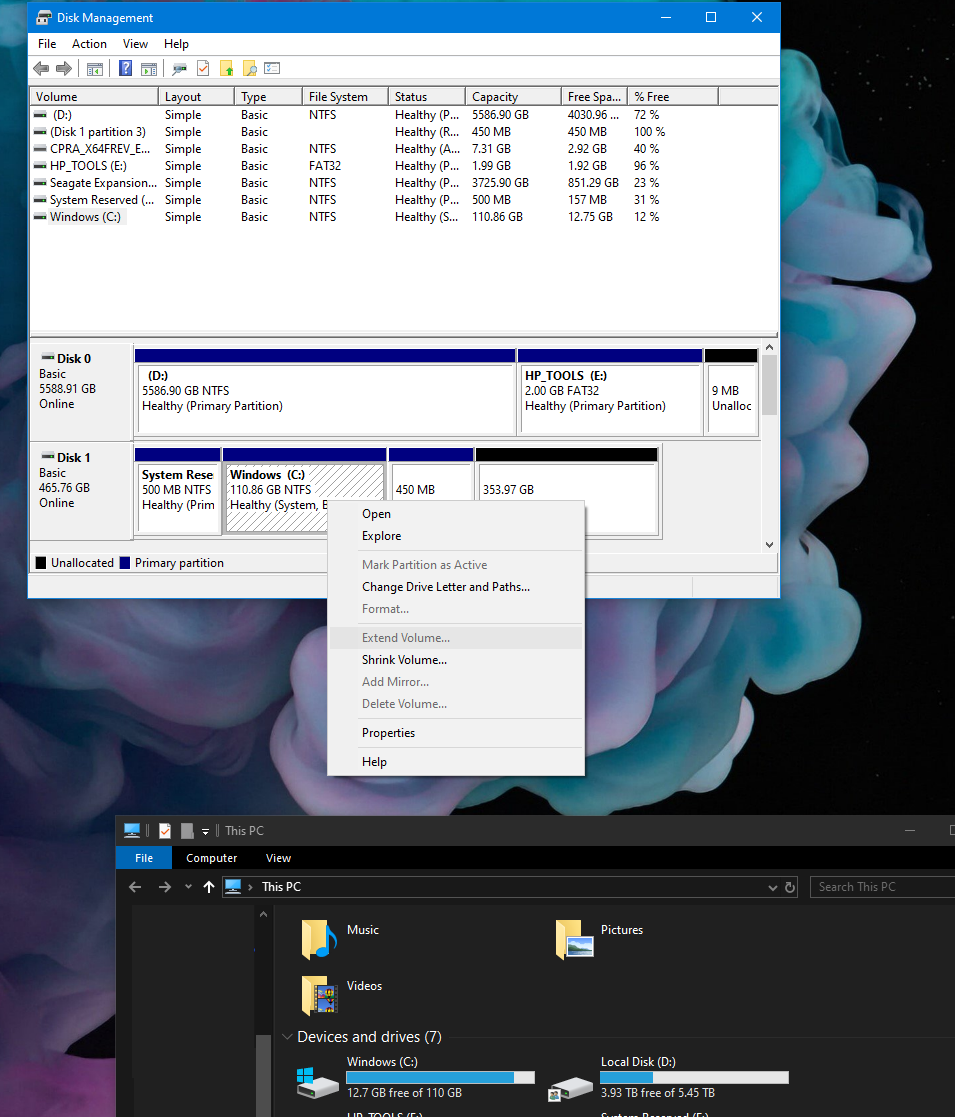
It wont' let me. If I right click, it just says help. There is no option to delete it. System Reserved can be but not Healthy (Recovery) -
Best way to clone a Windows 10 HDD to a larger one
talksr replied to talksr's topic in Learning Network Manager
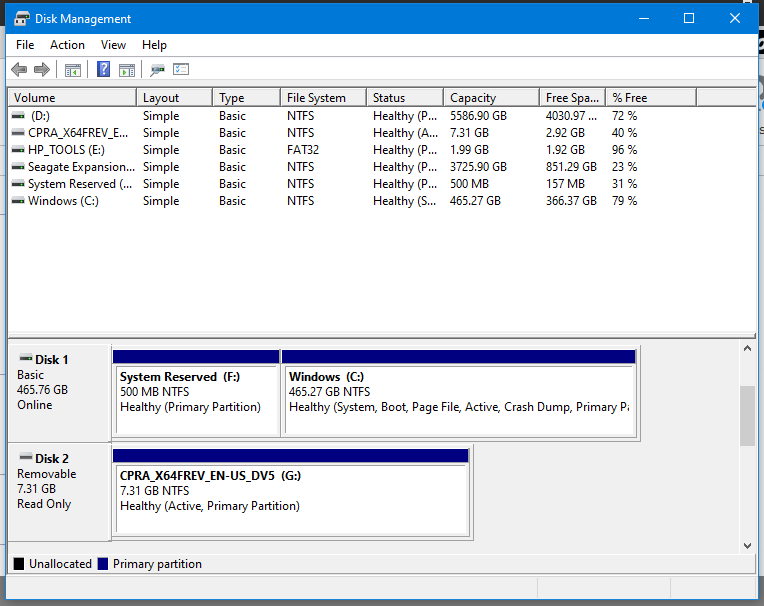
Thanks everyone, I had already got a replacement SanDisk one so couldn't use Samsung. I have used Clone Zilla and done drive to drive copy. The issue I have now is my new 500gb drive has replaced the 128 but my C: partition is still 128 in size, so I am in exactly the same situation as before, a very full C drive. I have 353gb of unallocated space on the new diskdisk, but if I right click on C, Extend Volume is greyed out so I can't use the extra space. I have tried creating a partition with the unallocated space, but it doesn't make any difference, Extend Volume remains greyed out. Any ideas? This system is Windows 10 1903
-
Ethernet Routing: Home Network Best Network Route
talksr replied to talksr's topic in Learning Network Manager
Thank you. I wondered if this would be the case. In that case, it would make sense to connect via the switch in the loft for a more direct connection.