talksr
-
Posts
1,565 -
Joined
-
Last visited
Content Type
Forums
News
20th
EduGeek EDIT Conference
Blogs
Everything posted by talksr
-
Thanks for your reply. I have not been through everything you list. But did just run a sfc /scannow and got the following result. I have had a look through the log, not spotted anything yet but it is quite large. I have also tried to troubleshoot several times, but there is no facility to troubleshoot the Windows Updates. Just tried again to make sure I didn't miss anything and there is literally no way of troubleshooting... From Upate History, if I click on Troubleshoot problems with installing updates, I get this which is useless: If I go via Control Panel>Action Center>Troubleshoot Computer Problems>System and Security, once more, I get this utter nonsense: Everything I try, is a dead end. Will try and work through some of the other things you mentioned on Monday.

-
The thought had crossed my mind several times, but unfortunately, the school in question does not have the funds to do so and had really been hoping we could do an inplace upgrade to 2016 as this is the max the server could support, however, it would be futile to implace upgrade when it is refusing to take any updates. Are there any other options available?
-
Hi there, Thanks for your post and sorry for the long delay. I tried what you suggested several times and this was the result when installing the KB5009624 MSU: And here is a view from Event Log: I decided to extract the CAB from the MSU. I ran it using DISM in elevated CMD. As usual, error yet again: DISM log attached to this post. dism.txt I have an extremely long list of failed updates in Windows Update History now which is very worrying. Can anyone advise? Win Server 2012 R2 Version 6.3 Build 9600.
-
Hi everyone, Another option is PDQ. We have a subscription and Google Drive can be deployed using PDQ. I have not tried it yet but will give it a go at a later date.
-

Loaning IT Equipment System
talksr replied to SoyCanalla's topic in Network and Classroom Management
Hi, I have been reading this with interest as I am sick of all of the paperwork generated by loaning of equipment. I have made a quick Google form for staff to fill in...name...email... device type...asset number. I would quite like to embed into the form our agreement document which says what they are agreeing to i.e.. I won't use device for non-work stuff, I won't drop it in the toilet etc. Has anyone found a way to embed a Google doc into a form or any other way to display this info so that when they click submit, they are effectively confirming that they agree to what has been shown to them on the form? Thanks in advance. -
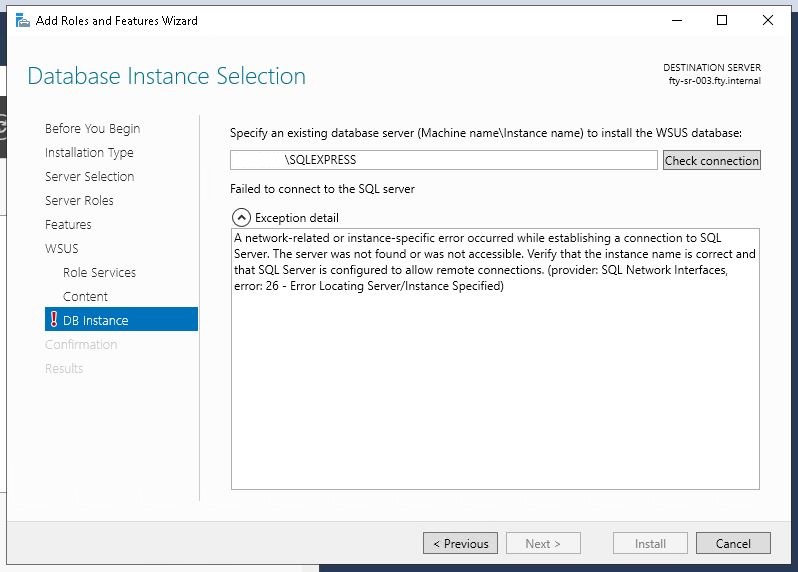
I had not, thanks for the tips, I have never messed around with SQL. I re-ran the installer and added it back in. All working perfectly now. Thanks very much:D
-
Hi there, We have a WSUS server which is constantly crashing. After spending a considerable amount of time trying everything already covered on these forums, it just wouldn't work, so we have uninstalled it, cleared all previous files and now we are trying to re-install. Rather than use WID, we are trying to use SQL. We are unable to proceed through the WSUS installer as it can't connect to our local SQL server instance. If I try and connect to SQL Server Management Studio, I am getting errors stating that the server was not found when trying to connect to \\server\SQLEXPRESS I have not changed any default instance names for SQL and it was showing SQLEXPRESS before I removed WSUS. If I open SQL Server Configuration Manager, this is what I am seeing: Can anyone tell me what I can do to rectify this. The server has Backup Excel which is what the two names are at the top of the list. I don't really want to mess the backups up. Thanks in advance.
-
Good morning, My trusty HP desktop computer is sadly on the way out and also not Windows 11 compatible. It is time for an upgrade - it is about 8 years old and has done well considering it has been on that entire time, only rebooting for updates:). I need a new powerful workhorse work computer. I had been looking at the HP Z series and in particular the HP Z2 G8 with i9 processor. The system is used on a daily basis quite heavily and would need four NICs and quite a lot of storage for virtualisation. I have had issues in the past with unreliable DELL hardware and can’t afford to have this system out of action for any amount of time as I look after a number of schools from it. As I use this system every day, sometimes remotely, I just need it to work and have excellent reliability and warranty, hence my thinking of going for an HP Z. Does anyone else have any experiences recommendations? The only downside as far as I can see is the Z2 G8 only has room for two conventional sized HDDs and one 2.5inch SSD. But I was thinking of getting 2 x 6tb or 2 x8tb HDDs which should give me more than enough for virtualisation etc. Any suggestions or recommendations would be very much appreciated.
-
Has anyone else had this odd problem... Windows Server 2012 R2 Windows 10 20H2 Stations I have had staff come to me reporting that some or all shared drives are missing. Of the shares, all but one are hosted on the FRDC server. The other is a NAS share. No permissions have been changed in years and this has worked reliably for years. I have had some difficulty in replicating this but have just seen it happen myself. It makes no sense to me at all. We are running server 2012 R2 - (waiting for the ok to do an Inplace Upgrade on it). Stations are currently on 20H2 Windows 10. Mapped drives are mapped through a batch script which has worked with no issues for years. Stations can ping server, and is obviously able to talk to it as it can log in and sometimes gets some of the mapped drives, sometimes none, sometimes all as it should. I have never ever had an issue like this, and not really sure what it could be. We can't upgrade from 20H2 yet as we have WSUS issues (does anyone not have WSUS issues), currently rebuilding wsus server. If anyone else has had experience of this, do let me know. I am stumped.
-
Good to know you are also running 21H2. The UAC issue makes no sense particularly as you say you have two identical printers and one is fine, the other is not. This really has been the takeaway for me from this Printer Nightmare is the fact that nothing seems to make any sense at times. The only thing you could maybe try is taking drivers off and back on if that is possible? It sounds like your workaround as logging in as admin might be easier than messing with drivers but still a headache. What a mess this whole thing has been for so many.
-
Thanks for the posts everyone, very helpful.
-
I feel your pain. Must be so frustrating. I am sure you have already checked but if you compare a working computer that can print with one that is not, do they both have the same Windows versions? When I first started encountering issues some time back, I found that some were running 21H2 and others were on 21H1 or even 20H2 & 1909. The 1909 ones were on RM and wouldn't get higher than that at the time. But from my vanilla selectin, I did find that getting them all to the same version helped.
-
Hi all, I have a stack of HPE MM1000JFJTH 1TB SAS HDDs. I need to wipe the data from them, however, the appliance they came from is an active server (the drives were too small so were replaced with larger ones). I have portable USB HDD adaptors which I would usually use to read a disk rather than insert it into a computer, however these HDDs don't have the usual notches for SATA and power. Does anyone know if there are adaptors that can be purchased so I can connect these to a regular computer to get the drives totally wiped? Thanks in advance. Connectors in question: Normal connectors:
-
All I did in the end was downloaded the latest driver from the Canon site, ran the setup wizard on the print server, it found all of the printers we have and identified that they needed a driver update. I deselected all but one to test, updated and it started working straight away. Did a few more, then a few more until all were working. I have not made any driver changes on client systems, just on the print server. Driver type is showing as Type 3 - Usermode. On the first printer I driver updated, I had also changed the Printer Properties>Advanced from 'Spool print documents so program finishes printing faster' to 'Print directly to the printer'. But found that on other printers, they still worked with this mode not changed, so it doesn't seem to make any difference for my setup. In terms of the Privacy Regedit, I had never had it before in any of my OUs. When this problem kicked off on Wednesday, I added it in the first OU I tested with, and it made no difference. Since I have established that the print drivers being out of date was the cause, I have not added the Privacy regedit to other OUs and they are all printing no problem so the Privacy reg edit was not needed for this particular setup. But I do however have the RestrictDriverInstallationToAdministrators regedit on all machines as well as the Point and Print Restrictions setting enabled and configured. We have other servers on this site for other parts of the school on different networks and different but identical model number Canons, they are running the old printer drivers, but server 2012 rather than 2016, with no issues at all. So maybe server version also has something to do with this, maybe not, maybe it is moon phase, weather conditions or outside temperature as this whole saga seems to differ from server to server, place to place. So far, everything all working. Unbelievable that all of a sudden, all printers would need a driver update.
-
Thank you. I have managed to get it working and all I did was update the printer driver which was only recently updated anyway. We had a several Canon iR-ADV C5560 and also a few iR-ADV C256. I noted that the current driver was Canon Generic Plus PLC6 version 2.30.0.0. I downloaded the latest from the Canon site and now they have Canon Generic Plus PCL6 V260 version 2.60.0.0. Immediately, the printing has worked and I have not even rebooted the server yet. Never know a situation where a simple driver update would solve things. Clearly a recent Microsoft update has meant that we have needed the very latest drivers. Thanks for your help. I am going to continue going through the GPOs as different OUs have different configs now where I have been testing but all OUs are able to print regardless.
-
Thanks for your post, I added mine manually too, but I see you have: Key path Software\Policies\Microsoft\Windows NT\Printers\PointAndPrint But also: Key path SYSTEM\CurrentControlSet\Control\Print What does the second one do? I have never seen this one before? We have only ever had the Software\Policies path, not a System\CurrentControlSet path. I cannot understand what is going wrong here as I am not even able to print to a printer if it is installed on a machine locally. It makes no sense as locally installed printers have never ever been an issue in the past and would prove to be a really helpful workaround whilst I spend yet more time on this issue.
-
Hi everyone, Update from my end. Thanks for this, I did work though it, but most of the guidance on those KBs for the SHA-2 update were showing as for Windows server 2008 or 2012 in the Microsoft Update Catalogue. We have Windows Server 2016 so they would not install on. The current situation is was we have just two computers that were able to print as of this morning. I had advised the users not to do any windows updates just in case. For the head and other senior members of staff, we have had no choice but to manually install the printer on their system as an administrator, directly and not via a print server. So we have added the printer by it’s respective IP address and ensured that the correct Canon drivers are installed as their computers had already stopped printing. This solution has worked very well for them. To try and resolve this whole nightmare, tried to update the GPOs within our AD and made a few changes today. Currently, we have a small number of around 4-5 printers, and 4 offices, so it is nothing too complicated. I have ensured that each OU has it’s own specific printer GPO, which has been more work, but gives for greater control at least and means when a user logs into a specific location, they only get hose printers. I have checked and gone through each OU giving it the following: Under Computer Config>Policies>Administrative Templates>Printers>Point & Print Restrictions, I have configured the following: Users can only point and print to these servers: Enabled Enter fully qualified server names separated by semicolons: all three FQDN server names included here. Users can only point and print to machines in their forest: Disabled. Security Prompts: When installing drivers for a new connection: Do not show a warning or elevation prompt. When updating drivers for an existing connection: Do not show a warning or elevation prompt. In addition to this, I have made the following changes under Computer Config>Preferences>Windows Settings>Registry>New reg policy: RestrictDriverInstallationToAdministrators. Action: Create Hive: HKEY_LOCAL_MACHINE Key path: SOFTWARE\Policies\Microsoft\Windows NT\Printers\PointandPrint Value name: REG_DWORD Value data: 0x0 (0) Since doing this, we now appear to have lost the ability to print from any device. Even the head’s which was a manually installed printer. This makes no sense whatsoever. How can a system with a directly installed printer lose the ability to print just because of the above. We are now in an even worse position and I have a furious head unable to print, she can’t delegate her print jobs to anybody else in the office as they too cannot print. Does anyone have any advice on what we can do next? I remember a while back, guidance on updates we should insure do not get installed to the server or Windows 10 client stations. Is this still the case and if it is, what were these updates so I can double check they are not present on the 2016 server or Windows 10 client stations. That still does not explain to me why it would be that a system with a locally installed printer on it cannot print. There are no warning messages, no errors, it just isn’t printing anything. Contrary to Darylrese’s last post, we have printers listing on client systems, they are just printing nothing. We have ensured we have all of the latest Canon print drivers, but have never had issues with printers not listing that are deployed via GP. All printers on the print server are added based on their IPs, all of which are static. Before the print nightmare situation came along, we never had any issues. I am so, so fed up with all of this.
-
Hello, sorry for the slow reply, my school is closed over Easter so I was unable to see if it was still not working. **Update.... still not working, same problem as before. I have tried to contact Microsoft several ways and I have had no responses which as always is really, really helpful - thanks Microsoft, I would wholeheartedly not recommend your software to any schools I work with moving forwards, Google Workspace Admin FTW.** We have had issues with WSUS not working - again, massive thank you to Microsoft, a month and a half later and guess what, WSUS is....still not working. They are now asking me to remove it and re-install it all over again, even though we have already done that twice. I was worried that the client computers would not be getting the latest updates thanks to Microsoft's non working WSUS solution, so I took some out of their OU and placed them in one with no WSUS configurations in Group Policy, so they are now fully up to date and still cannot print. 1.We don't have SCCM here, just Server 2016 with print server installed. We ensured to add the PointAndPrint registry changes as per the Microsoft guidance that said you shouldn't do this (for security), but if you need to, make this registry change. - Still not working. 2.We added the Point and Print Restriction GPO configurations such as 'Users can only point and print to these server' enabled and then the print server. - Still not working. 3.We added the 'printer connections' in the print GPO as paths such as \\printserver\Printer1 - Still not working. 4.Print server fully updated, still the problem is there. So we added a second print server, moved over all of the GPOs to point to that. - Still not working. 5.Updated the printer drivers - Still not working. 6. Ensured client computers are fully updated - You've guessed it, still not working. The only thing that is working here is me and my colleagues, double time so once again, thank you to Microsoft for leaving so many schools in this dire situation.
-
Hi there, we have a G Drive with USB C connector. It is a 10TB drive. I installed the formatter tool for Windows and formatted it, but I am seeing two drives when we plug it in. Is this normal? We get: G-Drive USB-C (E:\) 9.09TB G-Utilities (G:\) 3.79TB I am not great at maths but 9.09+3.79TB does not = 10TB?! Is this normal for these drives? I have never used one before?
-
Glad I am not the only one, but I 100% agree with your sentiments: When you say you are allocating via TCPIP, do you mean you are manually adding the printer on each machine so it is effectively a local printer by logging in as an admin>control panel>add printer> add printer by IP>select drivers from have a disk>install printer? I have done this for the head and bursar as they have their own printers, but it is not feasible to do this for office staff as they use a multitude of printers. Also, are you finding that your users get any kind of error? Mine get nothing, the job goes through as expected, no errors regarding drivers or job not printing. It just never comes through to the printer. The same happens even if I am administrator doing it. My printers are deployed in Group Policy with the path names so as an example: Computer Config>Policies>Windows Settings>Printer Connections>Path> Printer 1: \\servername\printer1 There is a different GPO within each OU so that depending on where the computer is, it will be given a particular list of printers. Same with reg key for me as you state, it has made no difference, though it did before when we used to get the driver error messages a few months back. I am so upset that Microsoft have left us in this situation, it is has and is still putting an incredible amount of strain on my IT services and I haven't done anything to cause this.
-
Further to my last post, I am not sure which server version you have, we have 2016 1607. Our Windows 10 systems are all running Windows 10 21H2. I am finding that if I go to Print Management on the server in question, I am not even able to print directly from the server to a printer. No errors show, the job just never arrives. Same if I use Notepad or similar on the server. This is also the case on client machines now which are not showing any kind of error, they just don't print. If I look at the server installed updates, the only recent two updates are: KB5011495 and KB5011570. I have a growing number of pi$$ed off users who are unable to print and absolutely no resolution I can give them as we have multiple printers in various locations. Microsoft need to sort this out, it is a total mess.
-
Hi, I am afraid not. I found that one started to work after I installed another Windows Update. Sadly, we now have five other office computers that are still doing it. I have wasted so much time on this, I have given up for now and asked staff to use alternative computers due to Microsoft's lack of assistance on this issue and their products subsequently not working as they should. Very frustrating and another reason we are starting the move to Google Workspace for Education.
-
Thank you everyone, that is really helpful, I will pass this info on today
-
Hi there, I have had a member of staff come to me with their iPad stating that lines are showing at random times. iPad is quite old being a Mini 2, no damage anywhere, screen all good, no damage. Fully up to date. It took some time to get it to exhibit the issue, I managed to trigger it by turning down the brightness. I am assuming this will need a new screen. I don't really feel it is economical to repair, this one is not owned by the school, but by the teacher themselves. Has anyone had this issue happen before? She is only using it for basic internet browsing, so although it is an old model, it is serving a purpose, but I am just conscious that to replace the screen might be half or more of the entire value of the device. Any suggestions and thoughts would be great.
-
@ass17 thanks very much, that has done the job.