talksr
-
Posts
1,565 -
Joined
-
Last visited
Content Type
Forums
News
20th
EduGeek EDIT Conference
Blogs
Everything posted by talksr
-

Alternative Sophos Central Protection for 2012 R2
talksr replied to talksr's topic in Windows Server 2012
Thanks Lee, We get our Sophos Central as part of LGfL. I contacted LGfL three times noless over the course of several months to get a quote. Nobody bothered to respond until less than a week before the support coverage would elapse. Really disappointing result. The head was so frustrated by this and a couple of other LGfL failings she asked me not to persue the quote so we never extended it. -
Office 365 Unable to print from Word and Powerpoint
talksr replied to talksr's topic in Cloud Services
Thanks for your reply and no need to apologise, you might be right. I never use the app for printing, I have Office 2016 installed and whilst I do use the online versions to work on, I have never printed from them myself so maybe this is the way it works after all. -
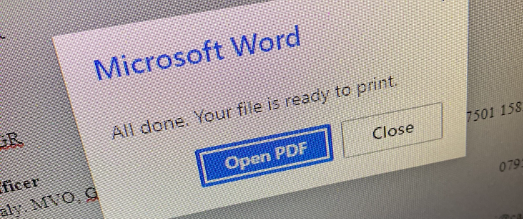
This is a strange issue, Users are reporting being unable to print when using Word or Powerpoint from their browsers. The school has an M365 tenancy. Users in question have Office 365 A1 for Faculty licences. When using any browser, on any system, if they open a Word or Powerpoint document and go to File>Print (win the webpage, not the browser), they are presented with this: There is no way for them to print. The default printer is an actual printer and not a PDF, it doesn't matter which system they use, and even as Administrator, I am getting the exact same problem on my account. I have tried assigning an Office 365 A1 for Faculty licence to a test user, but same thing. We have tried different systems, browsers, makes no change. Does anyone have any ideas on what would be causing this?

-
Thank you, will give that a try
-
Thank you both. Hmmm, I wonder what would happen if you connected a USB ethernet adapter to the charge port. My iPad happily uses wired ethernet when I plug it in. But I am assuming after a reboot, it will not connect to anything until the passcode has been entered.
-
Thank you, I will have a browse and see what I can find which is similar. Very good idea about the velcro. @chazzy2501 had a good suggestion of using the monitor hub, unfortunately, these ones don't have them but I could maybe switch the monitors out. Will have a look. And again, web cams are logitech so chazzy2501 is spot on there! Thanks guys.
-
Thank you! Good to know it can work. Which powered hub did you use? Would something like this be similar to what you have?... amazon.co.uk/TP-LINK-UH700-7-Port-Adapter-USB3-0/dp/B00P115F4E/ref=sr_1_3?adgrpid=53949105060&hvadid=259051566714&hvdev=c&hvlocphy=1002316&hvnetw=g&hvqmt=e&hvrand=6944716297188002623&hvtargid=kwd-1059405108&hydadcr=28150_1821052&keywords=powered%2Busb%2Bhub&qid=1701257141&sr=8-3&th=1 Everything we have is non-powered, so I am going to have to get something ordered.
-
Hi, can anyone recommend high speed, good quality USB extension cables? We are running into an issue with some of the sit stand desks in the offices staff use. They have a tray under the desk. Currently, we run a long Amazon USB A male from back of PC to tray under desk (cable is 4m I believe). From there, there is a small (not mains powered) USB 4 port hub. The female from the USB extension plugs into here and then from the hub there is one connection going to KB, another to mouse and a third going to the monitor on the desk. From there a web cam is connected but the webcam is malfunctioning. If we run webcam directly from hub, same issue, but not if it is direct from the PC, but then, the web cam cable is not long enough if the desk is in stand mode. I had been expecting that the monitor might boost the speed as it is mains operated but doesn’t seem so. Just wondering if anyone else has had this issue and what the best way forwards is? I am wondering if the USB extension cable is poor quality or if a powered USB hub might help? Thanks in advance
-
Quick question…If you enforce the policy and the user forgets the passcode - which is highly likely in my work environment, is there a way this can be reset from Lightspeed or would the entire device need to be wiped and set up again?
-
Apple School Manager & LightSpeed Zero Touch Deployment for iPads?
talksr replied to talksr's topic in Cloud Services
Ah thanks. Where abouts in LS would I find this? Particularly the assigning automatically part? -
Apple School Manager & LightSpeed Zero Touch Deployment for iPads?
talksr replied to talksr's topic in Cloud Services
Thank you, it was. Just waiting for the devices to show in ASM and I will give it a try. It can take a few hours for them to show once the supplier has put them on. -
Hi there, Does anyone know if it is possible to achieve ZT deployment with Apple School Manager and Lightspeed? Currently, we purchase our iPads from our approved supplier, they add the devices to our Apple School Manager so they are activation locked to our organisation. We then download our Apple Bulk Enrollment profile for Apple Configurator from Lightspeed. We load this into Apple Configurator on our Macbook and then plug in the devices and apply the profile to each device along with a WiFi profile. We can then set up the iPads and they hold the Lightspeed profile which enables them to recieve all of the Apps we purchase on ASM and approve on Lightspeed. Problem is the Macbook is dead and the school doesn't have the funds to replace it. So I was wondering if there is a way of bypassing the need to have a Macbook or any device to set them up. I was wondering if there was a way to just do it all through Apple School Manager so the profile will be automatically installed to each device when you sign into it with your administrator account?
-
Thanks guys, I will check the original cable but I am assuming it will have been a basic Amazon one. Another thing I have noticed which was not an issue with the temporary Dell system but is with this HP one is that Windows Hello does not work on the web cam. The cam works, can do zoom etc, the IR lights come on when you try and log in but it says there was an error with the camera. I have traced a long USB from the back of the system to a non-mains powered USB splitter which splits to kb, mouse and up to monitor, then from monitor, web cam is plugged in. If I directly plug in the web cam to the PC, no issues, so clearly it also does not like the length of the USB lead, but as I say, worked fine on the temporary Dell system. Very odd.
-
This really is a new one on me, just wondering if anyone else has had this. HP Z4G4 - a powerful system, complete with an i9 processor and 32gb of RAM. One Nvidia Quadro P2200 with two monitors. One connected from the system to the first monitor with DP cable, then mini dp to DP on second monitor. This type of system has no on board graphics, so you have to have something on the PCIe port. The system has been causing the user repeated issues whereby Windows fails to boot and goes into recovery mode. If you use DISM to remove the Nvidia drivers, it solves the issue but as soon as Windows Update installs the graphics driver again, same issue. The reason we know it is GPU related is before the Windows recovery situation, the GPU shows as having a driver error on Dev Man. As soon as you try and update, as it installs, the system cuts off, reboots and goes into recovery. What has been done.... Replacement Nvidia Quadro P2200 - same issue Replacement SSD and version of Windows 11 - same issue OS Restore image supplied from HP to put on specific version of Windows 10 for this system - same issue Special Nvidia Drivers from HP for this particular MB GPU combination - same problem again. Different GPU plugged into computer - fixed the issue for a day, then same problem again. Tried Windows 10 rather than 11, no change there. Next option on the list....replacement motherboard. I brought the computer into my office, totally wiped the SSD (this had been done multiple times before but didn't help). It worked fine. Plugged in a second montor still fine. Ran some CPU and GPU intensive software on it. No issues again. Fully updated the system, ensuring the GPU drivers were all up to date. Still no problems. Ran an extensive HP hardware test - no issues reported. Returned the system to the room in question, it worked for long enough to install Windows 11 and again, went to recovery mode. It HAS to be something in the room. Tried connecting directly to monitor 2... no help. Tried using a DP to HDMI converter and then HDMI into monitor 1 and then 2, no good either. Tried a shorter DP to DP lead into monitor 1....................... IT WORKED. Has anyone had this issue before? I cannot believe all it was, was a cable. The issue is that replacement computers have been plugged into this cable and had NO issues. So the cable does not appear to be faulty. I am assuming, the issue here is the GPU and cable length combination. The second GPU that was used to try and fix the issue was also an Nvidia. I am assuming these Nvidia cards must struggle if your DP is slightly longer than usual? The desk is a sit stand so has either a 3 or 5m DP cable. I cannot tell you how much time has been wasted on this so would be keen to hear if anyone else has encounered a similar plight. :mad: :mad: gahhhhhhhhh!
-
I have a couple of 27 inch non-usb hub monitors at home. They are Dell UP2716D. Not bad, but two next to eachother is a lot of screen space. It is perfect for RDC etc, but I think I prefer my 24 inch arrangement at work. The extra screen space is lovely, but they take up almost all of the desk and I am not sure it is great for your posture as you have to turn your head a lot to go from one corner of one screen to the other corner of the other. I must say, I am quite tempted to get a couple of P2422's for me at home and get rid of the 27 inch ones!
-
Never been taken by Viewsonic. Not sure why. We used some NEC a long while back and they were good but well before the age of USB C hub monitors. Just having another browse on the Dell site and I see they also do Dell UltraSharp 24 USB-C Hub Monitor – U2422HE. What is good with this model is it can do the 90w power delivery without having a built in webcam and soundbar. I prefer to add webcams as they are removable if anything goes wrong with them.
-
Thanks guy. How interesting as the P2722HE is exactly what I was looking at, just the 24 inch one! I quite like the 24inch QHD but when you select that, it won't allow a power delivery option which would be really useful for the laptop/macbook. You can get the correct options with FHD, so maybe I should go for that. If you are running dual, would you recommend 2 x P2422HE or as you suggest, a P2322HE and a P2422H?
-
Good to kow it is possible and yes, I can imagine! I have two right here, which is what I am using to type this. Work like a dream to daisychain DP but can't do HDMI. They don't have USB C, Dell same as you mention. Thanks for your help.
-
Thanks for the clarification. That is really handy to know. We have some situations where a desktop computer is in use using Display Port but if a user brings in their laptop, it would be handy to connect that to the screen. The ethernet would be a helpful feature, though it would mean I would need to ensure there is one port for the PC and one for the monitor/laptop. Do you know if these sorts of monitors can daisy chain using a USB C input? I know it could be manufacturer specific, but just wondering if that is possible? So a user could have dual monitors for both PC and then USB C input?
-
Hi there, Can someone fill me in on the benefits of monitors with ethernet ports? Is it so that you can dock a laptop to the monitor using USB C and it will not only display the laptop to the monitor but the laptop will get via passthru, power to keep it charged and hardwired ethernet, all via the USBC?
-
Alternative Sophos Central Protection for 2012 R2
talksr replied to talksr's topic in Windows Server 2012
Thank you, that might just do the trick. I will take a look. -
Alternative Sophos Central Protection for 2012 R2
talksr replied to talksr's topic in Windows Server 2012
Hi, thanks for your reply. I am licenced for 2016 R2 and 2019 but an in place upgrade will not work. The server is on its last legs and hasn't installed updates in over a year. I have been battling with SLT for over two years to get funding for a new server. I am wondering if AVG or anything free might suffice just for the next few months until we are on the new one. -
Hi there, We have Sophos Central as part of our LGfL package. Sadly, 2012 R2 Sophos AV support ended on 1st November 2023. Despite me chasing LGfL for a quote for Extended Sophos Support three times, I didn't get the quote until last week when the school was closed for holidays. As a result, we now have no working AV on our server. The quote is for £1800. We are going to be replacing the server with a brand new HP in early 2024 - I already have the new server, but no suitable holiday time to sort it all out. Can anyone recommend anything else as a temporary measure? Are there any alternative (free) solutions just to tick the box to say we have working and up to date AV? All the desktop computers are covered with Sophos Central agents, it is just the actual server. £1800 seems far too much for a few months, but it seems you have to pay for 12 months worth of cover or nothing. 12 months is far too much for us.
-
Thank you very much!
-
Hi there, On a domain connected device, if you clicked on the sign in button below username and password on the login screen, it would always show you the hostname of the device in the example of how to log in locally. I am not finding this is the case to devices joined to M365. Is there any way to enable something that would allow the device to show it's hostname on the sign in screen?