talksr
-
Posts
1,565 -
Joined
-
Last visited
Content Type
Forums
News
20th
EduGeek EDIT Conference
Blogs
Everything posted by talksr
-
Hi there, Does anyone know how you would go about removing any Quick Access Sharepoint Libraries from a user's OneDrive Quick Access area? We have several Sharepoint sites which have now been deleted, however they are still showing in the Quick Access area of user's OneDrive login. If they click on any of the libraries in question, as the lib is no longer in existence, they get the following error: In the interests of keeping areas as clear and unambiguous as possible, does anyone know a way to remove these old libraries as it is causing confusion and frustration for users barely able to log in, let alone navigate OneDrive.

-
Hi there, Is it possible to configure M365 so that a user who has permission to access the documents/libraries in a Sharepoint site, automatically gets them in their OneDrive? I know this is possible for them accessing OneDrive on a computer, this can be done automatically by copying the library ID and adding it on Intune Endpoint Manager as a profile using the Administrative Templates and the option: Configure team site libraries to sync automatically. But is it possible for users who are working on their own comptuers at home, systems which are not part of our M365 tenancy? Currently, if a user opens their One Drive on a web browser at home, it is blank: I am just wondering if there is a way to automatically make thei documents/libraries show for any users accessing OneDrive via a web browser without them having to visit the Sharepoint site? Thanks in advance.
-
I might give Trading Standards a ring, thanks for the suggestion. Thanks for the posts everyone and yes @Davit2005 you are exactly right... this is public money and could have been a charity or other organisation who wouldn't have such experienced staff. The total cost was around £2000 with the vat hence my not giving up on this. I am sure if we had continued with HP, it would have been sorted but after in excess of a month without the system and HP not responding to emails or calls and their 'support' site being down for that entire period, we had no choice but to get something else as it was really affecting the workload. This has cost us massively both in time and money and I will be looking to get it all recovered through the credit card company - I have made this very clear to them and also made it clear how furious I am at how we have been given the run around both by HP and now the credit card company. Needless to say, I have shifted to using Dell across all of my sites as a result of this really, really poor experience. Dell offer much more flexible and personalisable warranty options depending on the end user. As and when our remaining HP systems become obsolte, they will not be replaced with HP, it will be Dell or Lenovo from now on. Other than for server infrastructure, I won't be using HP moving forwards.
-
Slightly different from the usual hardware related issue here.... We are trying to send a computer back as not fit for purpose. Both the support we purchased for the system and the system its self have not done what was expected of them. The bank we purchased the system through are asking for an independent report from an engineer who works on computers. We submitted our own but of course, as we purchased the unit, our report could be biased. Has anyone ever obtained one of these reports and if so, could you recommend anyone? If you want the backstory, here is a summary... We purchased one HP Z series system direct from HP towards the end of lockdown for WFH use - maybe you can remember, hardware was really hard to get hold of due to everyone working from home. We got a Z as it had an i9, lots of RAM and storage for running VMWare. Within the first six months, one of the HDDs had failed causing the RAID to show a fault. We contacted HP support (we had purchased the 5 year extended support package), who were not very helpful at all. Normally, I deal with HP for our ML line servers, and the support is excellent but for this Z series, despite it being a 'premium' product, the support was anything but. Eventually, they sent out a replacement HDD. There was very little info on their support site for replacing an HDD on a software based RAID. Again, the support was poor, the support staff had no clue. The above resulted in the system being out of action for almost a month. In February this year, the system kept attempting to boot and stating that the OS was preparing automatic repair. This would fail and any of the recovery options we tried, also failed. We completely wiped the system, rebuilt the OS using the official HP Z Series Recovery ISO, it worked for around 24 hours, same thing. We replaced the hard disks and once again rebuilt, same issue again. Using CMD in recovery and DISM, I removed individually drivers installed to the system and rebooted to see if this helped. I identified that when I removed the NVidia drivers, it rebooted and booted up. I went to Dev Man and disabled the NVidia card. This solved the issue, but meant the card would not do multiple screens. This Z Series has no built in GPU, so it came with an NVidia card. There are zero on board slots for graphics so you cannot use on-board graphics. We had to repeatedly chase HP to get a resolution on the matter, it took in excess of a month, no updates, then excuses that HP were having technical issues. Eventually a new graphics card was sent, it was installed, graphics card re-enabled and updated in Dev man, worked for around 24 hours, same problem yet again with Windows going into preparing automatic repair. Again chased HP to say, it must be the motherboard at this stage as we have tried EVERYTHING and had zero support from HP. We even checked capacitors to ensure none were bulging or loose, couldn't see anything visually. Zero responses from HP yet again, at this point we are 1.5months down the line with a non-working system. We had paid using a credit card, so sent one last email to HP stating if we don't get a response within 7 days, we will be doing a section 75 chargeback on the credit card. Still no response so initiated a sec 75 charge back. The bank have been equally as useless as HP. We have supplied around 60 pages of evidence of the problem, how many emails and calls were made to chase HP and we never got a resolution. The bank are now asking for an independent report to show that the system is not as described and has the faults we allege.
-
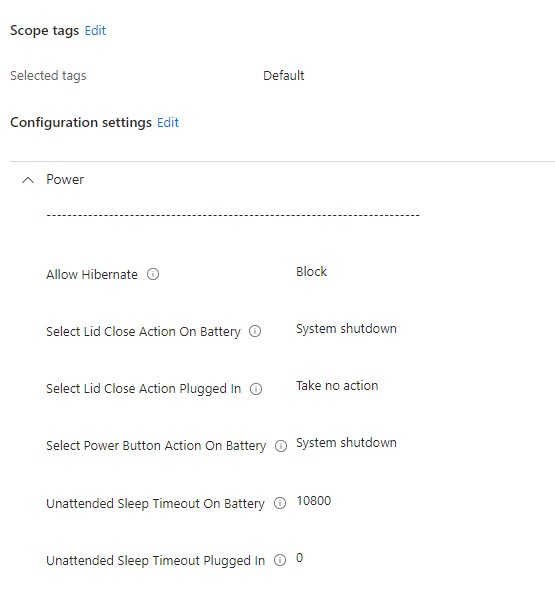
Hello, Can someone tell me where I am going wrong here? I have set a Device Powermanagement Profile in Configuration profiles within Devices in Intune Admin Center for my devices so that go to sleep when plugged in. I have verified that the profile has delivered as a success to all devices which is good. Here are the settings: Note the last one: 'Unattended Sleep Timeout Plugged In' is set to 0. If we see the Microsoft documentation: https://learn.microsoft.com/en-gb/windows/client-management/mdm/policy-csp-Power?WT.mc_id=Portal-fx#unattendedsleeptimeoutpluggedin .... it sates that: If you specify 0 seconds, Windows doesn't automatically transition to sleep. However, the system seems to be going to sleep after around 15 mins. If I log into it and view the Power Options, this is what I am seeing: Any ideas on what is going wrong here?
-
Hi there, I am really keen to push my school fully to the cloud by getting everything onto M365. We use LGfL as our ISP and make use of LGfLMail, though I understand from LGfL, that this can be migrated to 365. Can anyone recommend some good Microsoft 365 training courses I could take so I am fully proficient in managing the 365 platform? I am able to set up provisioning, update rings etc but all from threads and posts on here. I feel like it might be best to do some proper initial training to fill in any of the blanks, as I am bound to come across things I don't know what to do. Any recommendations would be very much appreciated:)
-
Thanks, I took a look and compared this to a tenancy without these issues and the tenant security was identical. We logged a call with Microsoft and it seems there was an issue with the MDM though I am not convinced this would have caused this issue. The call is still open and Microsoft are investigating. There are some really fishy issues with the tenancy in question like the total inability to log a call with Microsoft. The button just isn't there, but it is with any other tenancy I have. We will see. I will try and update with any resolutions in case anyone else has the same issue in the future.
-
Hi there, Does anyone know where in Endpoint Manager / Intune we would turn off whatever keeps making this come up? It is happening because OneDrive is now signed out just 24 hours after it was last signed in with no issues. It now says it want's an additional layer of securty to be added to the account in question. I appreciate this is for an extra layer of security, but this tenancy currently has just two users on and it is causing no end of issues, as I went through all the training with the staff on Friday, all working lovely, all signed into OneDrive, now it is showing this and they don't have phones to put apps on. I can make a new group for just these users if necessary but just wondering what setting is causing this as I have not configured any security related components as the tenancy is relatively new. Thanks in advance.
-

OneDrive - Being able to see Sharepoint Shared Library
talksr replied to talksr's topic in Cloud Services
This seems to be working perfectly, thanks for your help! -
OneDrive - Being able to see Sharepoint Shared Library
talksr replied to talksr's topic in Cloud Services
Thanks for your post. The options we get seem slightly different...... I am assuming 'Add shortcut to My files' will do the same job. I will give it a try and let you know if it works
-
Does anyone know if it is possible for users to be able to see shared libraries within Sharepoint on the OneDrive Windows 10/11 application? I can see it is possible on a web browser, but I don't seem able to get them access using the OneDrive application. We have RM CC4 so we have to use the One Drive Package rather than the one in the Microsoft Store. When a user logs into OneDrive, they get their own personal files, but the Sharepoint share they are a member of does not show. The only way they are able to view this is if they are viewing Onedrive via a browser and they navigate to Quick Access, More Places and they can then see any of the Sharepoint Shared Libraries they are members of. Thanks in advance
-
Hi, I would appreciate any help on this. SLT have asked me to make a word document of a school report template for them editable only in certain areas as they would like the format of the report to be locked, and staff to only be able to edit certain areas. I worked through the document and made it an editable PDF. Everything worked perfectly and this took some time to lock down so that only the areas the SLT wanted could be edited. This isn't good enough as it is a PDF and that relies on every staff member having Adobe PDF software on their computer. If they open it on Chrome, it can't be edited. So they asked, can I do the same but to the Word Document. I spent some time last week doing the same but to a Word document. This now is also not good enough as in the editable fields I have created, staff cannot insert bullet points or use spellchecker to ensure they have not made spelling mistakes - the staff in question are teachers, so if they can't spell, god help us. I am working on this Word Document using Review Tab>Protect>Restrict Editing>Editing Restrictions>Allow only this type of editing in the document: Filling in forms. Does anyone know if using Word, it is possible to allow the text boxes to have bullets inserted and for Spell Check to be used?? I have the developer tab enabled in Word and I had been inserting Rich Text Content Control into the areas where SLT wanted staff to be able to enter in text. I notice there is an option in developer under Controls for Legacy Tools>Legacy Forms>Text Form Field. Does anyone know if the Text Form Field would be a better choice? Thanks in advance.
-
It is working a treat. Some of the options mentioned in your link didn't work, but I found this YouTube video which explains it perfectly, I hope this helps for when you do it: Thanks again
-
Thanks so much! I did a lot of searching on Google, but I couldn't find anything. I will give that a try and let you know if it works for your own reference.
-
Hi, Does anyone know if there is a way to pre-set part of our username login onto each device. Example: if our domain is school.sch.uk, I want the devices to remember the part after the @ So if we had a user called user1, rather than having to type into the login box [email protected], they could just enter user1 and then their password and it would automatically sign them in to our Intune Active Directory. It is possible with Chromebooks, but I have never looked to see if it can be done on Intune and Windows 11. We have quite a long domain name so trying to make it easier for staff. It would also mean that users can’t sign in with personal outlook or Hotmail addresses as the system would be locked to only allow signons from our domain. Thanks in advance:D
-
Windows 10 system on Azure Unable to Update to Windows 11
talksr replied to talksr's topic in Windows 10
Thanks very much, I made one and almost immediately, the system found a Windows 11 upgrade installer and it was downloading and installing it when I left. I will have a look in the morning and see if it completed. I am still quite new to this so wasn't aware you had to set these up, but it makes sense. I am used to using WSUS on local networks. Thanks again -
Windows 10 system on Azure Unable to Update to Windows 11
talksr replied to talksr's topic in Windows 10
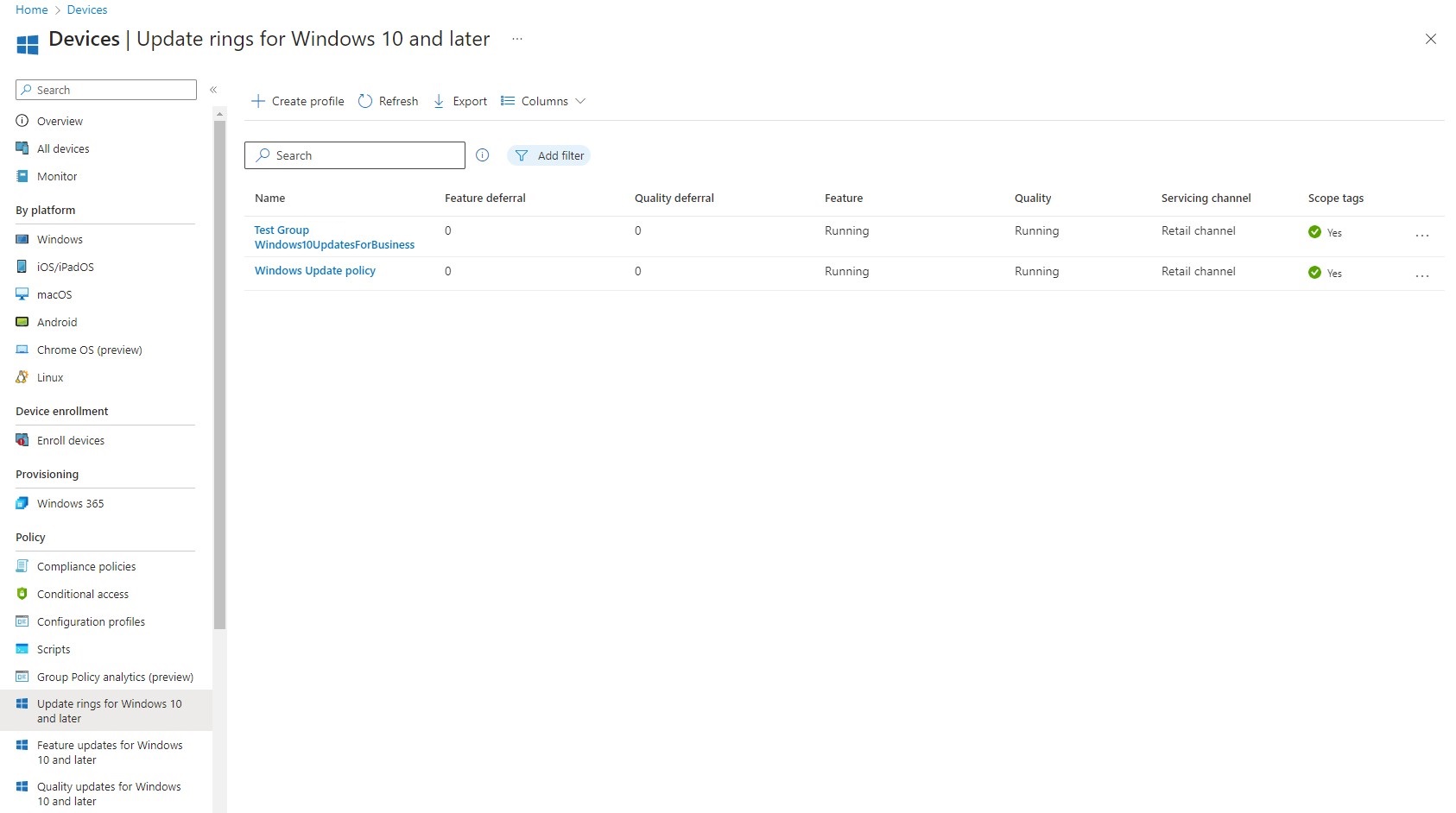
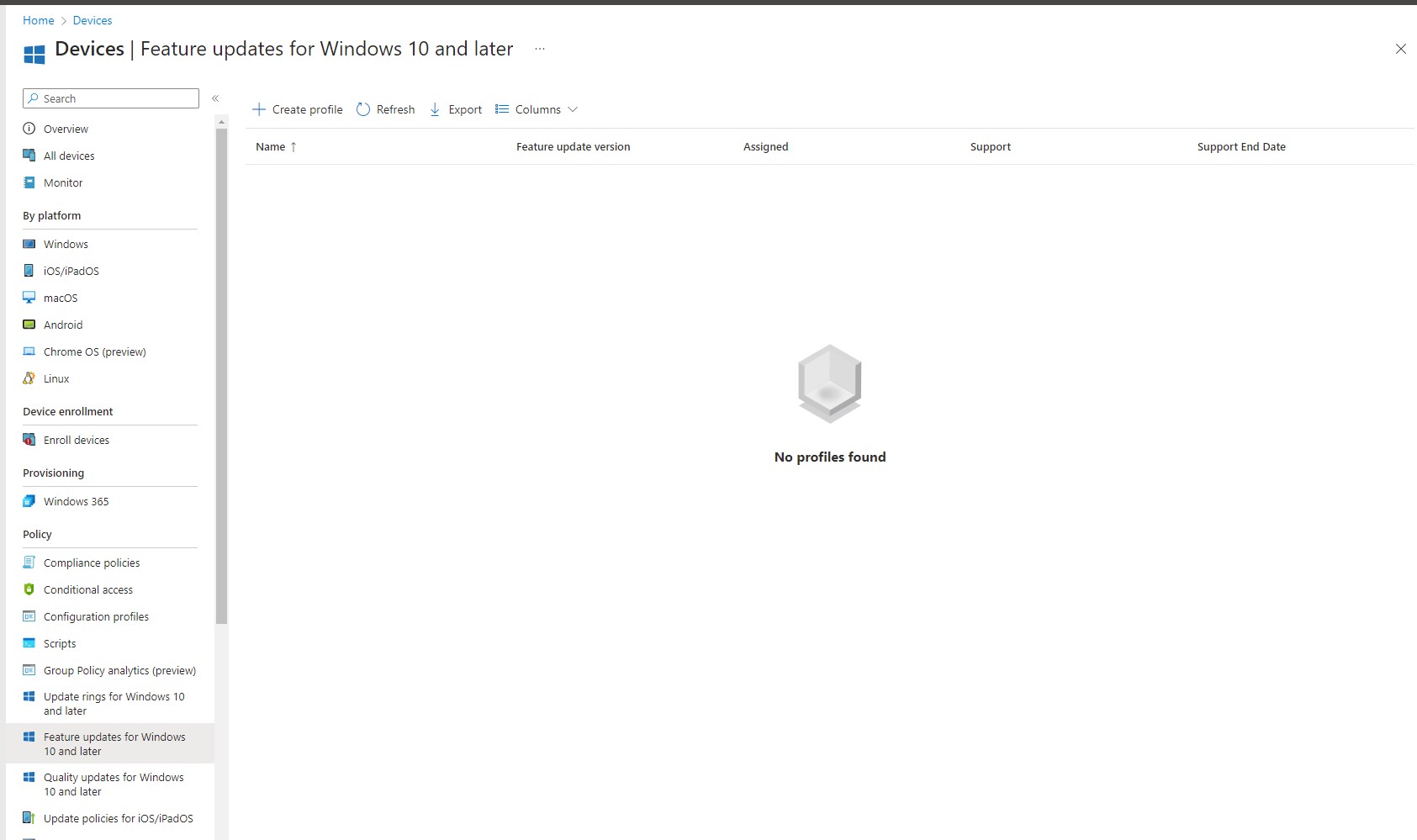
Thank you for the prompt reply. I have never set these, if I browse to this area, this is what I have: It is just a case of me creating some profiles in these areas and then applying them to my groups?
-
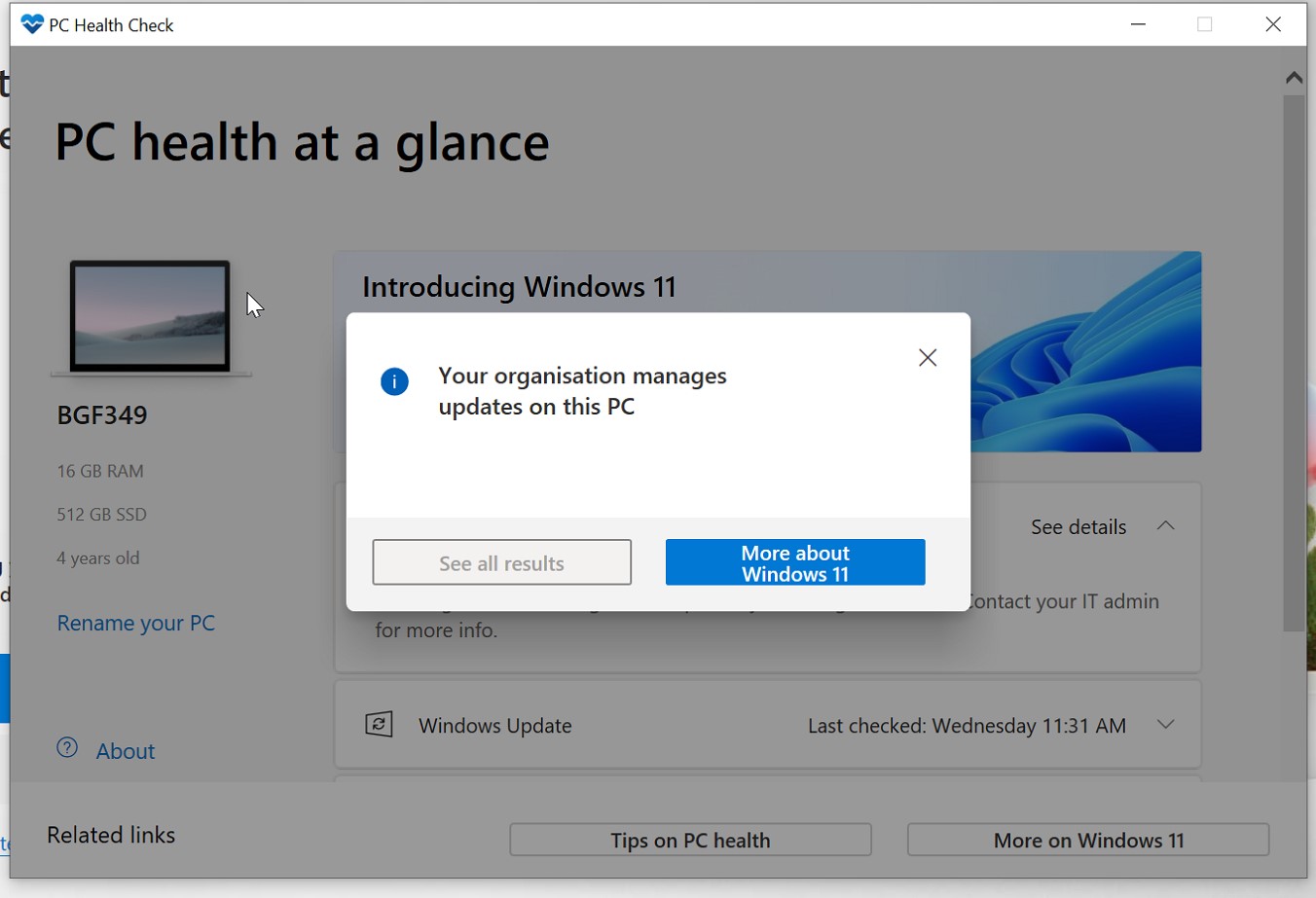
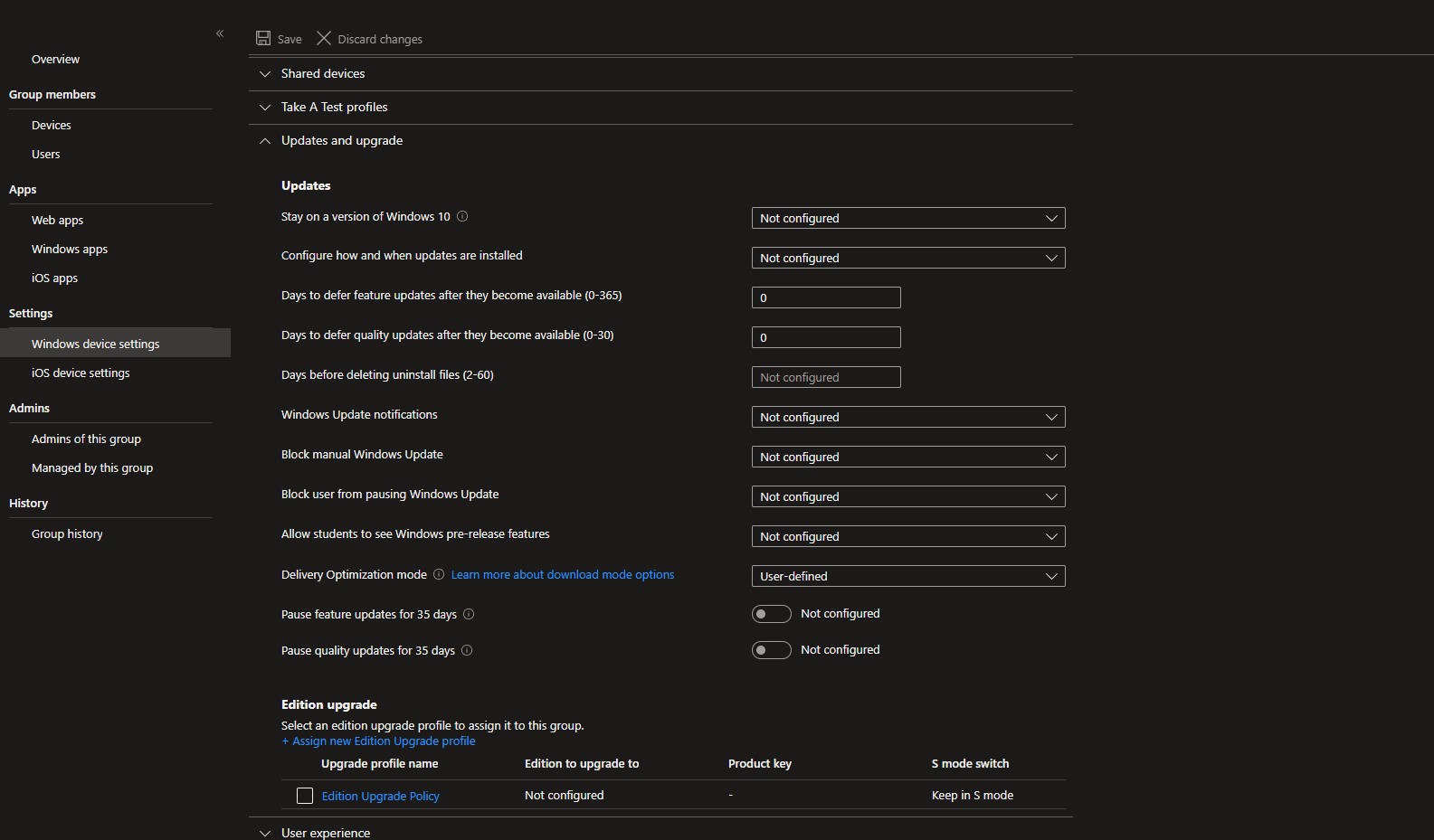
Hi there, We are in the process of starting to move to Intune for Education. I am still in the early testing stages but I am finding if I take a fresh Windows 10 station, log in using an Azure account, it adds the system to Devices in the InTune dashboard. I am then able to put the device in a Group of choice. I wanted to see if the system was capable of taking Windows 11, so I installed PC Health Check, but it says the following: I am signed in as the InTune Administrator on the device in question. I enabled the local admin account and tried again, same thing. If I look at the Windows Device Settings and in particular the Updates & Upgrade section for the group this device is in, this is what I can see (all unconfigured) What could be the cause of this?
-
Hi there, I have an issue with an HP Z series station whereby it keeps getting stuck in a repairing Windows 11 loop. The system has: 1 x M.2 512GB SSD for Windows C:\ partition 2 x 2 x HP 6TB Enterprise SATA 7200 HDDs [3DH90AA] in a mirrored RAID 1 configuration for data storage for D:\Data drive (just under 6tb of usable space). I have exhausted most options now with regards the Windows 11 loop. What I have found is that deleting the partition and reinstalling the OS has not helped so I logged a ticket with HP based on the fact, Win 11 repair failed, CHSK + DISM plus several other CMD commands didn't help, removing Win 11 latest updates and firmware updates also didn't help and HP BIOS Health Check was not showing anything. HP Support have suggested that it might be worth disconnecting the two SATA drives as it might be possible the drives are causing a problem. I am finding that whenever I reinstall Windows 11 and then install the Intel RAID software, it says repairing RAID 1%. Not sure why it keeps repairing the RAID every time the OS is reinstalled as the RAID doesn't contain the OS. My question is, does anyone know much about Intel Virtual RAIDs? I am slightly concerned that if I disconnect the two SATA disks, it might bugger the RAID up? HP are suggesting that the alternative option is that they could replace the motherboard as they suspect that it might be faulty. But again, if the MB is replaced, surely the RAID will be destroyed, or would the two disks tell the replacement MB BIOS that they are in a RAID? Would be really grateful for any tips on this as the DATA storage is big and the time to back it up will be quite significant. The software we have to install on the system to access the RAID config is called Intel Virtual RAID on CPU. And the software description is as follows:
-
Thank you everyone, that is really helpful! We have been through so many headphones in the past, so this info will be of real use!
-
Thanks for your post. I have tried to replicate it as much as possible. Here is what I have done. On VMServer, I have allocated two NICs: 1. Bridged (Dynamic 10.232.160.191)- set to auto bridging. This gives the server the internet connection needed. 2. Host-only (Static 10.75.44.10) - as you suggested, 'connect a host virtual adapter' and 'use local DHCP service both disabled'. On VMWindows10 Client, I allocated one NIC: 1. Host-only (Dynamic 10.75.44.18) Initially, the host was unable to pick up a DHCP address from my VMServer which is running Server 2022 with DHCP configured. I realised that this was because the second NIC (the host-only one) was set to dynamic. I gave it a statically assigned address, and the client immediately obtained a DHCP address from my VMServer, but it is not able to get an internet connection. Is there any way to provide this? The DHCP scope options have DNS, Router and WINS Servers set as 10.75.44.10. If I add 10.232.160.191 (the server bridged connection) as a router, it updates on the DHCP but after a release and renew on the client, I still can't seem to ping out to the internet. Any ideas?
-
Hi We have been looking at headphones for our year 4 to 6 age ranges. We wanted ones with a mic built in and we are looking at purchasing 15-30 sets. We ordered some from Amazon in the end which were identical to some the school had been gifted however the quality is really poor with the USB cables breaking away and earphone covers falling off after first use and well behaved children. The original set we were gifted are still going strong but not the new ones, so manufacturing processes must have changed. I would be really grateful if anyone can suggest suitable headphones for school that are built a little bit more solidly. Has anyone ever used TTS? We found something like this, but not sure if they will be any stronger? https://www.tts-group.co.uk/usb-headset-bundle/1013166.html"]https://www.tts-group.co.uk/usb-headset-bundle/1013166.html#"]https://www.tts-group.co.uk/usb-headset-bundle/1013166.html
-
Thank you. It has worked a treat. Just one question..... I have set the virtual test server up with two NICs. The first one is the NAT one so it brings the internet in from our physical host. The second one is LanSegment1. I have created a static IP of 10.75.44.10 with a subnet of 255.255.252.0 The test server has working internet connection thanks to the first NIC which connects to the VMware NAT. I have then set up DNS and DHCP with a pool of 10.75.44.18-10.75.47.254 just as it would be in a real word example with lots of hosts. Host VM has one nic which is LanSegment1 (same as the second NIC on the virtual test server). When booting, it gets the DHCP mentioned above perfectly, but it is struggling to connect to the internet. Is it possible to get virtual test hosts to connect to the internet via my virtual test server? I have added my ISP DNS IPs in the DNS forwarders as I would usually for a non-test server.
-
Hello, I would like to create a test environment for a Windows Server 2022 and a Windows 10 and 11 station on Workstation Pro 16. My host computer has physical 4 network connections. Two go to our admin network and obtain DHCP IP addresses from the server on that network. And the other two go to a second curriculum network and obtain DHCP IP addresses from a different server. The two networks are on different VLANS and have separate DHCP servers. For my test environment, I would like my VMs to not talk to either of these networks (I also want to run DHCP from the testing server which would conflict with the DHCP on the non-test server) but I need an internet connection so I can get the server VM to connect to Microsoft for Azure. Can anyone tell me how best this can be done? I have taken a look at the Virtual Network Editor on VMware Workstation but I can't see an option that would work.
-
Hi there, As we transition from RM CC4 Windows 10 stations which had TightVNC installed, I was wondering if anyone had any recommendations for similar remote access solutions for Chromebooks. I am aware of the Chrome Remote Desktop tool which works perfectly well, however I need a solution that doesn't require the user at the other end to enter in codes or have to authorise things. With out existing TightVNC setup, we had a secure password and deployed the image to all client stations. As long as the station was powered on and had working ethernet, we could connect. Is there anything similar out there for Chromebooks? Sadly TightVNC is not an option on Chromebooks. Ideally, I am looking for something free, but would allow me to do the above. Thanks in advance.