Achandler
-
Posts
1,902 -
Joined
-
Last visited
Content Type
Forums
News
20th
EduGeek EDIT Conference
Blogs
Everything posted by Achandler
-
I would have assumed (from my time fixing Toshiba laptops) that shorting it only requires you to "link" the two bits together with a screwdriver, well thats what we use to do. But yes Toshiba still do and probably always will randomly set a BIOS because they simply felt like it.
-
wds stops working on clients pxe-e32 tftp open timeout
Achandler replied to sted's topic in Windows Server 2008 R2
We've had this issue intermittantly and we use to reinstall and WDS server role and it would fix the problem (probably just updates the reg key really). We originally searched for a proper solution (though half the time Microsoft's solutions are reinstall it) but the issue happened so rarely and we've been so busy that it didnt seem worth it at the time. -
If you view source on that page you can also see what div id is being used to contain that news, it would give you the correct place to look in your CSS.
-
Moodle - Error: Database connection failed.
Achandler replied to JamesBray's topic in Virtual Learning Platforms
Firstly have you tried connecting to the SQL dataase directly to prove the issue is due to PHP problems? -
Moodle Uploaded File Permissions Issues
Achandler replied to OutLawTorn's topic in Virtual Learning Platforms
What permissions does it have then, just default permissions such as SYSTEM and Administrators? If so maybe the file is going to a temp area before being uploaded and it is from here that it is taking its permissions. -
I can only recommend contacting them in warranty or not. If you can get into contact with SMART in Germany then the technical assistant there is usually very good.
-
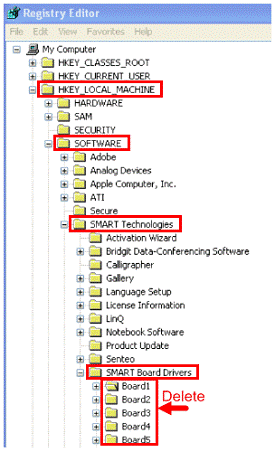
This is directly from SMART "In regards to the SMART Boards orientation being off I would try the following; First delete the previous Orientation settings from the Windows registry. You will need administrative privileges to complete this task. To do this, please first stop the SMART board service in the Diagnostics menu from: SMART Control Panel > About Software and Product Support > Tools > Diagnostics > Service > Stop *Important Note: Be careful modifying the Windows registry. If you modify it incorrectly, you could possibly damage your operating system. Back up the registry before you make any changes, and if need be, have your network administrator assist you. Then open the Windows Registry. Open the registry editor by clicking Start then Run and type in regedit then click OK. Once the Windows registry editor is open: you should back up your registry keys by highlighting My Computer in the Windows registry editor > go to File > Export. A window will appear giving you the option to save your registry. Please save it to a location you can access at a later time if necessary. After you’ve backed up, you can begin making changes. Please navigate to this location: HKEY_LOCAL_MACHINE\SOFTWARE\SMART Technologies\SMART Board Drivers Delete any key entries that have the word ‘Board’, as shown below: Please also check the following location for Board entries as well, if found, please delete them: HKEY_LOCAL_MACHINE\SOFTWARE\SMART Technologies Inc.\SMART Board Software After, please close the registry and re-start the SMART Board Service from: SMART Control Panel > About Software and Product Support > Tools > Diagnostics > Service > Start. Next, please reset the controller (only possible on the SMART Board 600 series); pick up a pen from the pen tray and with the tip press in the blue button on the right side of the board for 5 seconds until the pen tray lights cycle. Following the above, re-orient the board with a 9 point orientation. See if that made any change to the orientation being off." I hope this helps a few people. We are also chasing up the problems with "SMART Notebook Printer" that we have had when using Windows 7 or Windows Vista, incase others are experiencing similar problems where the "printer" starts to not respond.

-
Moodle Uploaded File Permissions Issues
Achandler replied to OutLawTorn's topic in Virtual Learning Platforms
Is it keeping the permissions the file had originally before being uploaded? -
If your boards aren't aligned on one side but they are fine on the other, delete the reg keys and reorientate them fully. A recent SMART update we had made a lot of our SMARTboards go miss aligned (is that the correct expression) but having contacted SMART we followed a process and this seems to have solved all our orientation problems now, even some older unrelated ones.
-
Have you used the smbclient from comman line to make sure the moodle box can connect to the windows shares? If you have and it can then first advice try it with an admin account, this removes permissions errors. Secondly there is an authenication method int he config file I believe that you may need to change to stop that login box appearing.
-
Our backups that run are a moodledata and SQL database backup nightly, then a a full backup of the server monthly. The reason we are on 9.10 was because of another issue with 10.04 when it first released.
-
Packard Bell Easynote Tj68 (MS2273) Fault help
Achandler replied to jonnykewell1's topic in Hardware
Do the fans fire up as soon as you turn it on? If you have just the board and you ahve tried it on an external monitor using the VGA port and get nothing, all it does is power on briefly then turn off again then either the CPU is gone as suggested above (or may just need reseating) or another component on the board isn't a happy camper, whcih may mean dead board and dead laptop. -
We have a Dell R200 Server: Intel X3370 (Quad) 4gb RAM 2x 500gb SATA HDDS (Raided to make 1) It runs currently Ubuntu 9.1 but i've run Moodle on later additions. This server is both our database and webserver in one using the stanadrd MYSQL and Apache setup, we run our whole Moodle site securely (HTTPS). There are 1100 or so users and the most i've ever seen concurrently must be around 50 or so but I havent the time to actually check up. Biggest regret about our setup? I think the drives we got were to small and would have prefered with 2x 1TB or 4 x 500Gb (depending on server size) because the amount of SCORM material that is literally 5 or 6 Gb shocked me. We've had our box running for about 8 months and have used 200Gb (a lot due to SCORM which shouldn't constantly increase in size) but we also dont have all departments using Moodle yet. Hope that helps.
-
Moodle - windows web client (smb)
Achandler replied to _techie_'s topic in Virtual Learning Platforms
We faced the chocie that penfold si talkign about here and decided to go with option 1. Yes i'm quite sure that our Moodle installation runs a little slower then a none SSL one but the benefits of this were that all our sensitive data is guaranteed to be secure. -
As long as the fans on the back are blowing outwards like the CPU fan then it is the right. Is their a blocked cent on the front maybe which is meaning no new "cold" air is being sucked in. Have you checked the PSU fan is blowing outwards to? It maybe that the PSU fan is broken and that one usually blew out most hot air?
-
Can you not request that it is unblocked? We requested it was unblocked and it was, the biggest problem is tracking down the https site it uses to make the calls to unblock it (according to our LEA)
-
Moodle would do it but I don't think it would be worth the time and effort for teacher training. Moodle is very functional and works better for older children I'd expect, I would imagine younger children would benefit from "better looking" solutions. I agree with beeswax I think a normal CMS system would do what you require, its the planning lessons, setting homework and the other more specialised things that make a VLE different to a CMS. Also yes Frog is expensive, impressive to look at but expensive.
-
We've used Go Daddy here (but we have a wildcard), also school's can get a free SSL certificate from a Spanish company (IPSCA), these certifcates take a few days to arrive though and aren't trusted by all browsers as they missed the deadline to get themselves into the browser bundles when they renamed themselves. As its already been stated the process itself is pretty painless, you can put your own self signed SSL in now while you order an SSL. The process of getting an SSl, is pretty much as follows: 1) Choose where you want to buy/ get an SSL certifcate from 2) Create an certificate server resquest and the key file using a guide such as CSR generation Instructions 3) Send off the request to where your buying the certifcate from, a day or so later you should get an SSL sent back that you can then use on your apache server. If you need extra help im sure if you ask here someone will be able to help.
-
Some interesting reading here, we are an academy and we haven't changed from FMS so I have no idea what we're going to do for finance reporting
-
Which version of PHP 5? On the moodle server you can check under Site Administration --> Server --> PHP Info I've looked into it a little more to, on the moodle plugin area, Jon Witts posts this: "OK... So some progress... The problem is with PHP 5.3 not Ubuntu 10.04 specifically. I have added the changes from the patch on smbwebclient's sourceforge page and things seem to be working again. We had to edit class_smbwebclient.php and class_smbwebclient_moodle.php to get the depreciated errors to clear. We are still left with a warning for line 171 of class_smbwebclient_moodle.php though. We have had to set the authentication method to SMB_AUTH_ARG in config_smb_web_client.php If we use domain level DFS shares for the home drives; make sure you use FQDN for your DFS share name in LDAP. I will email Guy the changed files so that he can get them added to a newer version." Although not totally related, he changing the fucntion with the class file to remove the defunct errors. It would appear the client is in need of some work for 5.3. If it helps you I believe that you need to use either preg_split or explode in place of the split function within the php file.
-
What are your running your server on? Also what version of PHP are you using? Im running PHP 5.2 and the split function is apparently removed in 5.3 and above, whether this would stop it working I couldnt be sure, an idea though.
-
Have you been on the moodle page for the plugin and read a lot of the posts, there are alot of fixes and tweaks there that may not have been updated in the latest download. Are you using SSL? If not is the SMB web client told not to use SSL? I think that causes blank windows.
-
If you know the colours of your website, i.e the actual colour codes, then creating the theme suddenly becomes a much much easier task. A Basic CSS file for the moodle theme is both easy to edit and create. Me and the other technician here could certianly help you as we setup out moodle theme from scratch. Send me a pm if you would like.
-
Might seem like a silly question but do you have the correct permissions to see the copies on these drives. We had a case where because the file server permissions on shares were set incorrectly we couldn't view there shadowcopies. For Example Teacher X's home drive, we couldn't open it (user exclusive rights issue originally) so gave ourselves permissions, we then couldnt see any shadow copies of their drive. However if we logged onto the computers as tem and gave them the correct permissions all the copies appeared. Maybe the user you are logging onto the server with has some right just on the server, such as he is a member of he local administrators on the server, sounds like an odd thing to do but i've seen way weirder things.
-
We have about 900-1000 pupils with about 210 Windows 7 Dekstops and about 25 XP Desktops, we also have about 120 laptops (students and teachers total) within the school, about 40 printers(yes that many!) and about 50 projectors. If you worked on a policy of replacing things every 5 years you would need about 25k according to my very rough budget work out for this year. I don't know how much I can say but our budget is higher then that but not vastly.