lafleur1977
-
Posts
263 -
Joined
-
Last visited
Content Type
Forums
News
20th
EduGeek EDIT Conference
Blogs
Everything posted by lafleur1977
-
Thanks for that. I've still not got back to looking at it unfortunately as I've been short staffed for the last 3 months. So far I've imported 20H2 (downloaded from VLSC) and I created the task sequence but I couldn't get the new task sequence to appear on the list when booting into MDT. I was wondering if it was because I hadn't updated Windows ADK & PE on my MDT server - did you update those?
-
I've been looking into caffrey's suggestion of using the upgrade task sequence on MDT. It seems like the perfect option for managing and rolling out upgrades, but I've been really limited on time and haven't managed to get it working yet.
-
 The Head and Governors are seeking to appoint a suitably experienced IT Technician to assist the Network Manager and Senior IT Technician in managing the school's IT Service provision. The candidate must have a strong understanding of networks and have the ability to maintain them. The post would suit an enthusiastic and hard working person with previous experience of working within an IT support environment. The post is full time (37 hours) on a full year contract, payable over 12 months. Holiday entitlement is 25 days plus bank holidays (less than 5 years’ service) or 31 days (over 5 years’ service). The Governing Body is committed to promoting the welfare and safety of young people and all candidates will be expected to provide enhanced clearance from the disclosure and barring service. For the job description and application please click here. Closing date is Noon on Sunday 23 May 2021. For an informal discussion please contact: Network Manager - Lee Timoroksa on [email protected] Proposed Interview Date: 09/06/2021
 -
Would you mind telling me how you did an update task sequence? I've just posted an update to the main thread as I was looking at updating 1809 PC's to 20H2 via wsus. Thanks
-
I am currently looking into upgrading windows 10 for the first time since we finished upgrading all PC's to Windows 10 edu 1809 last year. I read the posts above which has been useful to see how others are managing upgrades, and my thoughts were to setup a new WDS/MDT server for 20H2 going forwards but rather than re-imaging I am looking for a way to upgrade our current PC's (certainly the ones with specific software and hardware in offices etc, could re-image IT suites easily). I have selected Windows 10, version 1903 and later on WSUS however it appears the updates will only apply to 1903 PC's and later. Has anyone else been able to upgrade 1809 PC's to 20H2 via WSUS or a similar method? Thanks

-
https://www3.lancashire.gov.uk/corporate/vacancies/vacancyDetails.asp?id=55627
-
https://www3.lancashire.gov.uk/corporate/vacancies/vacancyDetails.asp?id=55528
-
Sophos XG fails SWGfl Filter Test
lafleur1977 replied to lafleur1977's topic in Internet Related/Filtering/Firewall
Just out of interest, which area of the country do SWGfl originate? I am assuming it means South West...? What filtering do they provide with their internet? Thanks -
Sophos XG fails SWGfl Filter Test
lafleur1977 replied to lafleur1977's topic in Internet Related/Filtering/Firewall
Glad I could share it There is another one too specifically for sophos - sophostest.com and it lists a category called tasteless and offensive (allowed when I chick it) but on the firewall I can't see the category. So your only seeing the first 3 on the swgfl test? Thats odd. I've raised the issue with our ISP anyway, took a bit of explaining to them, and they are looking into it now with Sophos directly. -
Hello, We have a Sophos XG firewall used for web filtering on our network, setup by our ISP recently. I ran a filtering test on https://swgfl.org.uk/services/test-filtering/ which tests the categories being blocked and gives you a result at the end. Unfortunately ours fails on the Offensive Language Filter Test: Strangely on our XG firewall I can't see a category named similarly that would relate. Has anyone else noticed this on their XG? Thanks
-
https://www3.lancashire.gov.uk/corporate/vacancies/vacancyDetails.asp?id=54292
-
I am trying to do this too but when I add the reg key into my GPO its not doing anything. Did you add it as a comp or user GPO setting? Thanks
-
Thanks for this - I had the same problem and adding that into group policy solved it
-
Windows 10 UAC prompt upon logon for standard users
lafleur1977 replied to lafleur1977's topic in Windows 10
Thanks for this - I've now got NetFx3 installing as part of my deployment. I did it slightly differently, extracted the cab files from the features iso, and added them as a package in MDT. I didn't need to use the powershell as the task sequence included a step to apply packages uploaded to the MDT server. Thanks for all your help -
Windows 10 UAC prompt upon logon for standard users
lafleur1977 replied to lafleur1977's topic in Windows 10
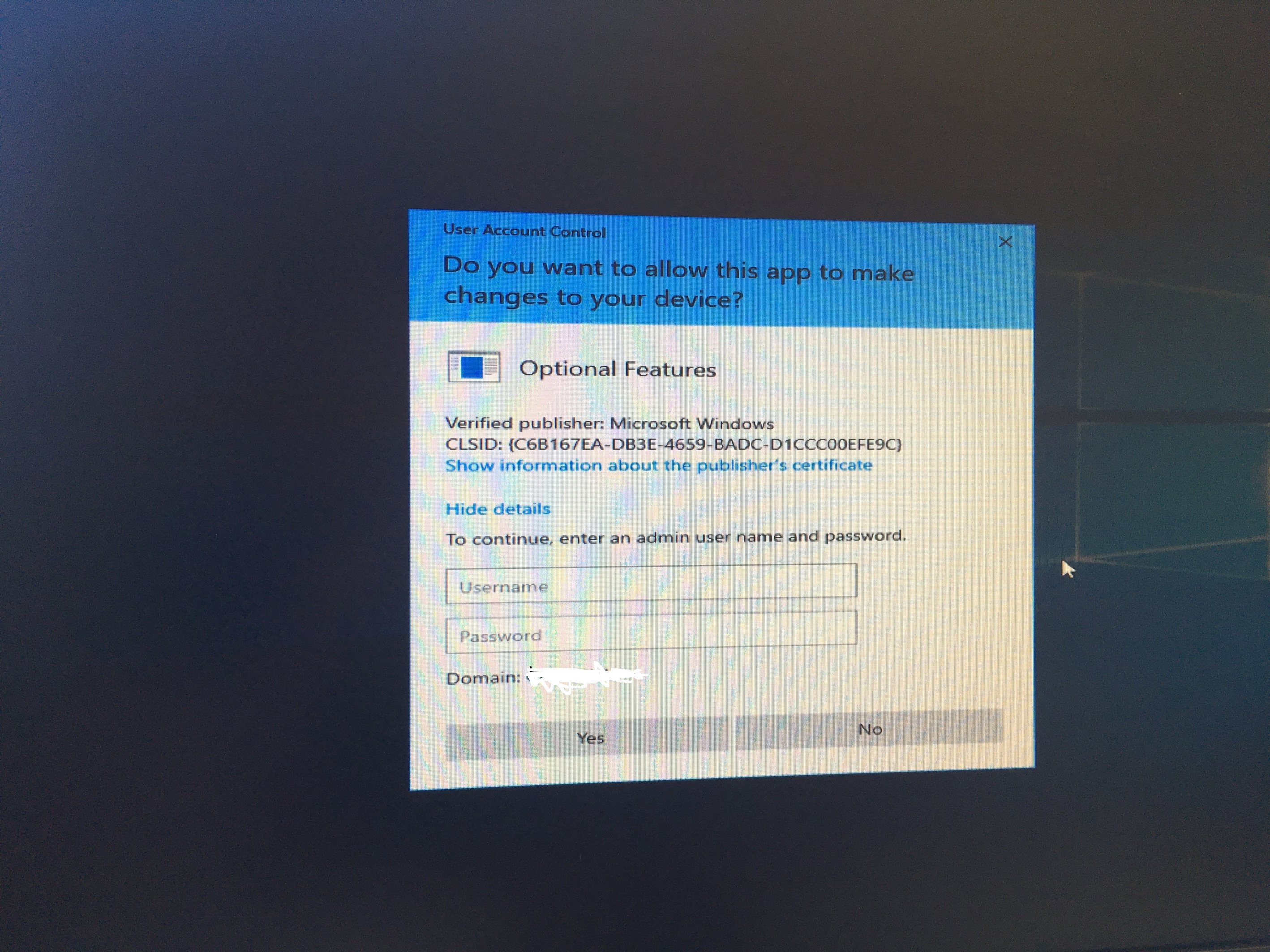
I resolved the UAC prompt that I was originally having and I thought I'd share. I didn't need to install the language packs/features in the end although I did learn alot about that which was very useful. After I had trouble trying to add the features and language packs, I checked around in settings/control panel and could see english uk versions for language packs, features, but I could also see some english US versions trying to install and some english US options selected - the date was in american format for example. I went back to where I set the language settings in the customsettings.ini/rules and added 2 more: SystemLocale=en-GB UserLocale=en-GB I had actually removed these earlier on as I was automating the settings in the initial MDT deployment window, and those 2 settings didn't seem to populate an option. As soon as I added them back in, all the american stuff disappeared and only english UK settings where available in settings/control panel. The UAC prompt for standard users was resolved too. Hopefully that makes sense and helps anyone else in a similar position. Thanks for all your help -
Windows 10 UAC prompt upon logon for standard users
lafleur1977 replied to lafleur1977's topic in Windows 10
Thanks everyone for your help, I will give them a go -
Windows 10 UAC prompt upon logon for standard users
lafleur1977 replied to lafleur1977's topic in Windows 10
Yes, that sounds about the same stage as where I have it. I will have a play around and see what I can work out. I noticed you have an option to enable .net 3.5 - would you mind telling me how you did that? Thanks -
Windows 10 UAC prompt upon logon for standard users
lafleur1977 replied to lafleur1977's topic in Windows 10
Thanks, yes I will have a look at those if you are able to find them. -
Windows 10 UAC prompt upon logon for standard users
lafleur1977 replied to lafleur1977's topic in Windows 10
The language pack I got off VLSC was dated July 2015 which i thought was a bit odd, however the features on demand where dated nov 2018. I have added them as applications in MDT now but they seem to be hanging on installation. Is there a certain time in the imaging process they should install maybe? Thanks
-
Windows 10 UAC prompt upon logon for standard users
lafleur1977 replied to lafleur1977's topic in Windows 10
The DISM step(s) are specifically: Dism /Online /Add-Package /PackagePath=".\Microsoft-Windows-Client-Language-Pack_x64_en-gb.cab" I have downloaded the language pack & features on demand. I got all the files you mentioned from features on demand but I can't find the one for the language pack with the same name. There is a en-gb folder and inside it has lp.cab - is that the same file? Thanks -
Windows 10 UAC prompt upon logon for standard users
lafleur1977 replied to lafleur1977's topic in Windows 10
Thanks for that, I will give that a try although I am just wondering if its easier to switch to english version... -
Windows 10 UAC prompt upon logon for standard users
lafleur1977 replied to lafleur1977's topic in Windows 10
Thanks, I thought it might be something to do with the language as I saw some info about it when googling the error. I've used eng international too. How did you go about adding the features on demand? -
Hello, I am currently working on deployment for windows 10 and so far so good, got deployment working well with MDT and I am deploying a vanilla windows 10 1809 image. I have hit a snag when testing staff/student accounts where they get a UAC prompt when they login. The problem also affects a standard local user too but admin accounts don't receive the UAC prompt. Has anyone had this before? Thanks
-
Windows 10 1903 - update Windows ADK/PE on MDT server?
lafleur1977 replied to lafleur1977's topic in Windows 10
What caused the Blue screens? I'm going with 1809 for now as I realised the xx03 versions only have 18 months support. Albeit we will probably do an upgrade every summer but we would only have a couple of months to test with xx03. I did try 1903 and it worked well in my MDT setup - the brighter interface is much nicer too. I use folder redirection too and thats working well for staff and students. There is just a few window 10 specifics I'm hoping the win 10 group policies will help with but I've not got that far yet. Did you manage to remove the 'people' app? I've got all the other unwanted apps removed but people just won't go away! -
Windows 10 1903 - update Windows ADK/PE on MDT server?
lafleur1977 replied to lafleur1977's topic in Windows 10
Ahh I see. I've attached a screenshot of the one I'm working on for Win 10 Edu, but you can't see much. When you create one it asks you to select a template and I choose the standard client task sequence. It does lots I don't understand but the key thing was I was able to choose an image to deploy, automate some things (it asks you in the wizard to add a product key, set admin pw, etc). The folder that says 'Run Sctipts' I've added which includes a powershell script to remove the unwanted apps and a few cmd scripts to install some exe files such as ccleaner and other generic programs. Where are you up to currently with your deployment?