-
Posts
360 -
Joined
-
Last visited
Content Type
Forums
News
20th
EduGeek EDIT Conference
Blogs
Everything posted by JazzFlute
-

Slow Internet. How do you troubleshoot?
JazzFlute replied to Gongalong's topic in Internet Related/Filtering/Firewall
Co-pilot - To type and explain what i posted probably about 15 minutes in my own words. Copilot took seconds and then just make sure its correct as to your knowledge and post it.... -
Slow Internet. How do you troubleshoot?
JazzFlute replied to Gongalong's topic in Internet Related/Filtering/Firewall
Id definitely contact them and ask them to remote in if possible to do some tests rather than you testing everything as they'll probably spot the issue faster. -
Slow Internet. How do you troubleshoot?
JazzFlute replied to Gongalong's topic in Internet Related/Filtering/Firewall
I do the below as a starting point which can then help diagnose/rule out issues. Ping to 8.8.8.8 (Google DNS) Running: ping 8.8.8.8 -t How to interpret: Stable (e.g. 10–30ms, no drops) → Internet likely fine High spikes (e.g. 100ms+) → congestion / slow connection Request timed out → packet loss / dropouts Constant high latency → general slowness Ping your gateway ipconfig Find your Default Gateway (e.g. 192.168.1.1) ping 192.168.1.1 -t What this tells you: ✅ Local network health (Wi‑Fi / LAN) ✅ Router performance ✅ Why you should compare BOTH This is the key part: Test If problems occur Meaning Gateway ping bad High latency / drops ❌ Local issue (Wi‑Fi, router) Gateway OK, 8.8.8.8 bad ❌ ISP / internet issue Both bad ❌ Likely Wi‑Fi/router overload Both good ✅ Network fine (problem elsewhere e.g. PC/app) ✅ Extra tips (very useful) Test a website name too: ping google.com If this fails but 8.8.8.8 works → DNS issue Use this combo (best quick test) Open 2 command prompts: ping 192.168.1.1 -t ping 8.8.8.8 -t Watch them side‑by‑side → instant diagnosis -
Is it the same model of Wireless adaptor on all the devices its happening to?
-
i3 Processors and Microsoft Security Updates – EOL November 2026
JazzFlute replied to JazzFlute's topic in Windows 11
So many cold calls and emails these days, have a choice of about 10 at least 😂 -
i3 Processors and Microsoft Security Updates – EOL November 2026
JazzFlute replied to JazzFlute's topic in Windows 11
Thanks for message but I have a supplier i use. -
i3 Processors and Microsoft Security Updates – EOL November 2026
JazzFlute replied to JazzFlute's topic in Windows 11
Looking for 16GB Teacher classroom PC,s with 3 outputs/Good motherboard and to last, I belive the jump from 8GB to 16GB is £50 -
i3 Processors and Microsoft Security Updates – EOL November 2026
JazzFlute replied to JazzFlute's topic in Windows 11
Yes, it’s definitely a broad brushstroke. The i3 systems I mentioned in the original post all work well and are still very fast. Replacing them would cost around £500 depending on the specification, or £300 just for a processor upgrade. There doesn’t seem to be much consideration for sustainability from Microsoft here. I have laptops with supported 8th‑gen (and newer) processors that run noticeably slower than these i3 machines. It feels like a huge waste of perfectly good hardware — especially when components such as RAM are already in short supply and memory prices have doubled. -
I'm going for a hot glue stick repair, a touch of Gorilla super glue at the edges if needed, clamped for 24 hours. Ill let you know if it works and add pics.
-
Cheers and will do 👍🏻
-
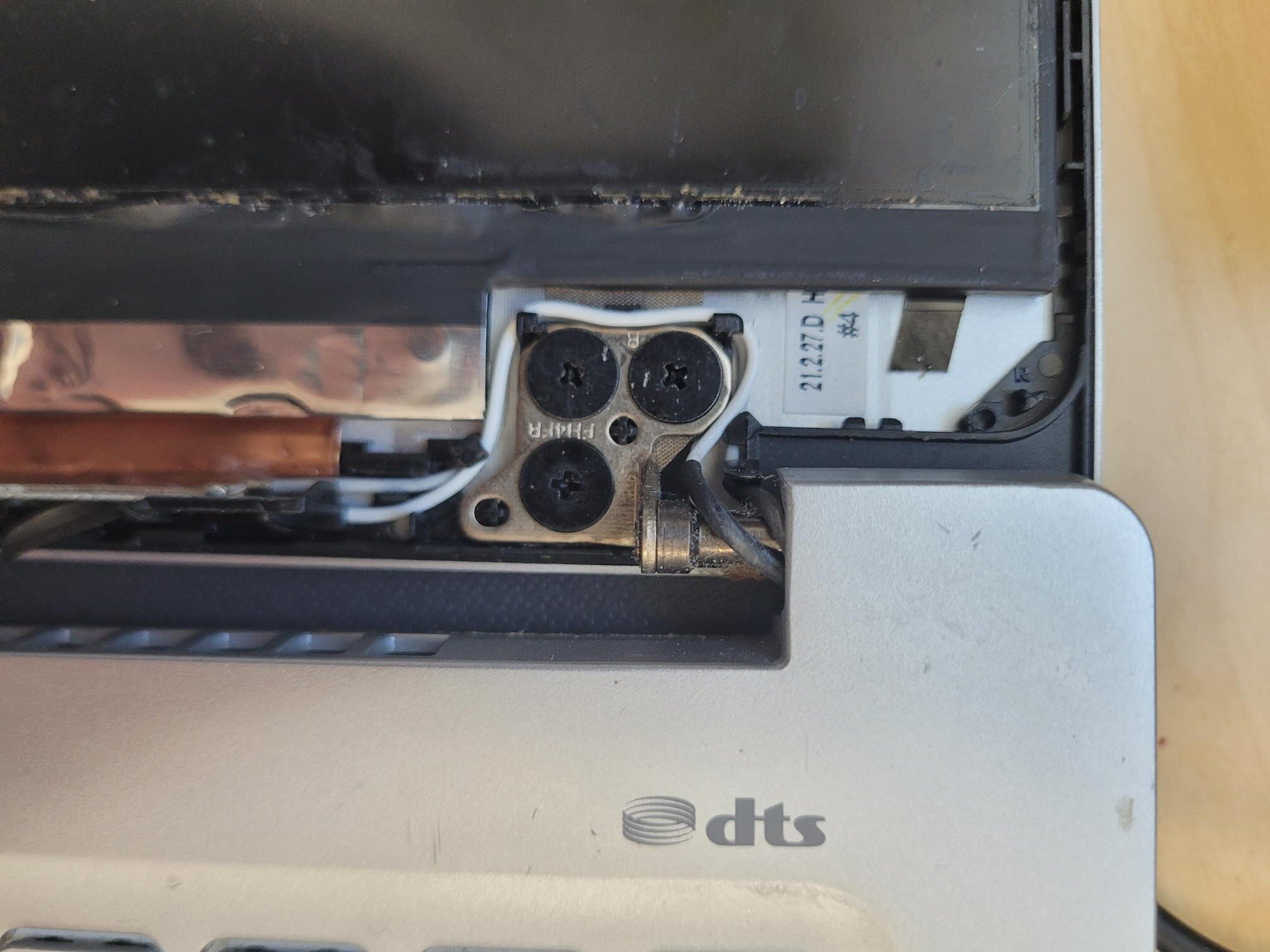
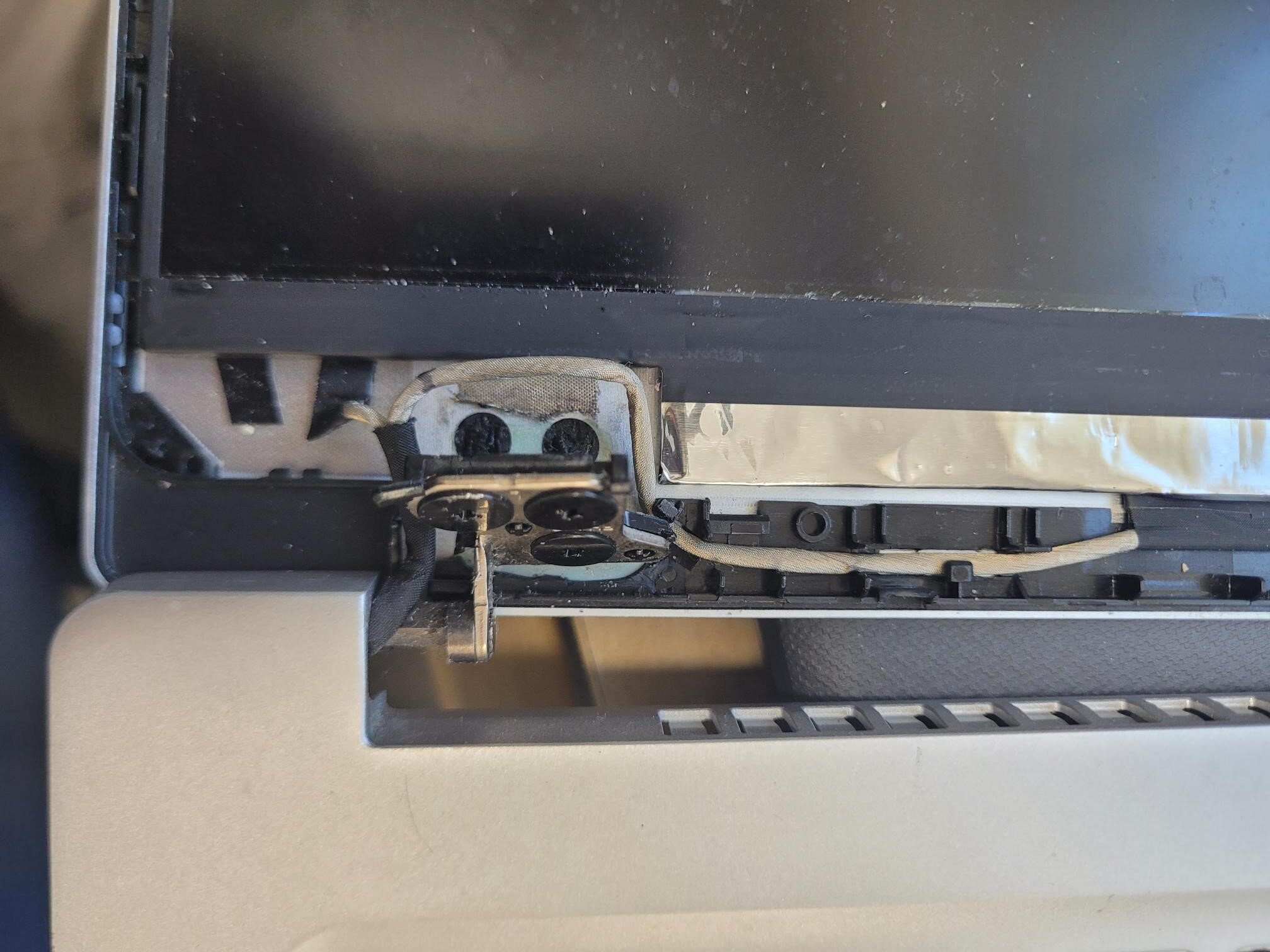
Is the hinge still repaired and working well? I have 2 Acer Swift laptops with hinge failures which are 5 years old but still great fast laptops and have a feeling its wear and tear and ill have a lot more fail soon so going to try the epoxy on one of them soon. Thinking about glueing the hinge back down then using a clamp overnight for it to set? Thinking of using this Gorilla Epoxy 25ml : Amazon.co.uk: DIY & Tools Good Hinge Broken Hinge

-
I’ve just had a look at the net take‑home pay on minimum wage and I’m honestly shocked by how high it is now. It’s definitely closing the gap with roles like this that require extensive job specifications, skills, and responsibilities. You can really see why supermarket and similar jobs are becoming so attractive to people these days. Estimated take‑home pay based on a 37‑hour week minimum wage: Annual take‑home: ~£21,126 Monthly take‑home: ~£1,760.54 That job equates to the below on the starting point, and is only £140 more per month than min wage and you need your own car etc.!!! ✅ Estimated take‑home pay Annual take‑home: £22,832.88 Monthly take‑home: ~£1,902.74
-
i3 Processors and Microsoft Security Updates – EOL November 2026
JazzFlute replied to JazzFlute's topic in Windows 11
yep I definitely need to check official online Microsoft sources instead of Microsoft Co-Pilot Definitely tested the scenario here with 2 PCs with unsupported hardware (processor) with specs below i3 Win11 24H2 - Home or Pro licence: doesn't download updates i3 Win11 24H2 - EDU licence: does download updates (ends Nov 2027 I beleive) -
i3 Processors and Microsoft Security Updates – EOL November 2026
JazzFlute replied to JazzFlute's topic in Windows 11
Yup agree with what you said and definitely need to stop using Copilot and do proper research from time to time 😂 -
i3 Processors and Microsoft Security Updates – EOL November 2026
JazzFlute replied to JazzFlute's topic in Windows 11
So what I now believe to be true is below and security updates will stop OCT 2027 with 24H2 (On 23H2 its NOV 2026). The caveat always being they can pull security updates anytime on unsupported hardware and if that does happen for any reason then it becomes an issue. Important caveat because your CPU is unsupported Your 6th‑gen i3 isn’t on Microsoft’s supported CPU list for Windows 11. This means: Microsoft does not guarantee future feature upgrades (e.g. to 25H2 or 26H1) will install automatically. If you stay on 24H2, you’ll get security updates until Oct 2027. If Windows Update blocks future upgrades on that hardware, you won’t be able to extend support past that date using official means. Microsoft explicitly warns that unsupported hardware installs may lose update entitlement at any time. [learn.microsoft.com] -
i3 Processors and Microsoft Security Updates – EOL November 2026
JazzFlute replied to JazzFlute's topic in Windows 11
Yes, I’m using unsupported hardware (a low‑generation i3 processor), but as I mentioned earlier, I’ve tested this myself. I installed Windows 11 24H2 using the usual tweaks. While running a Pro licence, it wouldn’t download security or feature updates at all. As soon as I swapped the product key to an EDU licence, it immediately pulled the updates down. From what I understand (after a bit of Co-piloting), this only seems to extend security updates by around another 12 months. If you’re saying security updates could last until 2028 on tweaked installations , I’ll need to do some more research on that. That said, because I’ve tweaked Windows to run on unsupported hardware—like many people may have—if Microsoft does eventually stop security updates on unsupported systems, we won’t really have any comeback. I’m just trying to get ahead of the game, so I don’t suddenly end up with no plan if updates stop altogether. -
i3 Processors and Microsoft Security Updates – EOL November 2026
JazzFlute replied to JazzFlute's topic in Windows 11
Reading that though does it mean you have to be on Windows 10 or if you have tweaked your PC's to install Windows 11 then that doesn't apply? -
i3 Processors and Microsoft Security Updates – EOL November 2026
JazzFlute replied to JazzFlute's topic in Windows 11
Anyone else got a low‑generation i3 processor they can try this on? I tested it on two PCs, and neither would pull down security updates while running a Pro licence. As soon as I changed the product key to an EDU licence, security updates downloaded straight away. That said, I’m fairly sure this support still ends around October/November 2026, so it only seems to be a short‑term workaround. Intel i3 Processors – Security Update End Dates Intel i3 Generation Example Models Approx. Age Windows 11 Supported? Security Updates End 4th Gen (Haswell) i3‑4130, i3‑4160 10–11 years No Oct 2025 (Windows 10) / Oct 2026 (paid ESU) 5th Gen (Broadwell) i3‑5005U, i3‑5010U 9–10 years No Oct 2025 / Oct 2026 (paid ESU) 6th Gen (Skylake) i3‑6100, i3‑6300 8–9 years No Oct 2025 / Oct 2026 (paid ESU) -
i3 Processors and Microsoft Security Updates – EOL November 2026
JazzFlute replied to JazzFlute's topic in Windows 11
I think it’s 2026, unless Copilot was lying to me again 🤣 I remember reading about this on a forum a while back, so I tested it myself. I upgraded a PC with a low‑generation i3 processor to Windows 11 using the usual tweaks, running a Pro licence, and it couldn’t download Windows security updates – it just showed “No updates available”. As soon as I changed the product key to an EDU licence, the PC pulled down security updates straight away. However, as mentioned previously, those updates will still end in October, based on the testing I did while it was running the Pro licence. -
i3 Processors and Microsoft Security Updates – EOL November 2026
JazzFlute replied to JazzFlute's topic in Windows 11
Yes this. -
i3 Processors and Microsoft Security Updates – EOL November 2026
JazzFlute replied to JazzFlute's topic in Windows 11
I should probably have worded this better. Microsoft isn’t ending updates for “i3 CPUs” specifically. The issue is that older i3 systems can’t officially move to Windows 11, and Windows 10 security support (even with ESU) effectively ends in October 2026. From my own testing some time ago, once an unsupported PC is “tweaked” to run Windows 11 using a Pro licence, it eventually stopped receiving security updates. However, when I changed the product key to an EDU licence, the machine immediately started pulling down security updates again. That said, those EDU-based updates will also end in November, so it’s only a temporary extension rather than a long‑term solution. Intel i3 Processors – Security Update End Dates Intel i3 Generation Example Models Approx. Age Windows 11 Supported? Security Updates End 4th Gen (Haswell) i3‑4130, i3‑4160 10–11 years No Oct 2025 (Windows 10) / Oct 2026 (paid ESU) 5th Gen (Broadwell) i3‑5005U, i3‑5010U 9–10 years No Oct 2025 / Oct 2026 (paid ESU) 6th Gen (Skylake) i3‑6100, i3‑6300 8–9 years No Oct 2025 / Oct 2026 (paid ESU) -
I’m just wondering how many people are affected by i3 processors no longer receiving Microsoft security updates after November 2026 (or effectively last November if you only had a Pro licence rather than EDU). Normally I have the budget to replace machines entirely, but unfortunately this year I only have enough funding to upgrade the processor. To be fair, we’ve had good value out of these computers – they’re around 9 years old, and we’ve already upgraded the memory and hard drives over the years – but this time there’s only budget available for CPUs. Is anyone else in the same position or planning to do the same this year?
-
Can anyone recommend a reliable Microsoft Licence Reseller?
JazzFlute replied to kwatt's topic in Licensing Questions
Thumbs up for John Levis at Very PC for Microsoft Licensing -
You would have thought if that was the issue either Redstor or your MSP would have known before doing the transfer for something so important I'd be livid!!
-
your post has reminded me though to logon and do a couple of test restores as haven't done any for a while!