KK20
-
Posts
989 -
Joined
About KK20

-
I enabled automatic update once upon a time in the past. Not had any issues so far. (I have just checked properties of AzureADConnect.exe and yes, 2.6.92.0 so it is updating)
-
we had some problems with Action1 holding onto local profiles and in some cases updating user hives of all profiles on the machine - irrespective of last logon time. That meant that GPOs were not seeing these profiles as stale, so not deleting them in line with clearout policy. I ended up going oldskool with delprof2 and the "alternative" local stale detection, not ideal but it worked. Apart from that we pay for the extra machines in Action1 as it keeps other software up to date for us. We let WUFB handle windows updates for feature and quality.
-
Similar setup to you. We use a stack mix of Aruba 2930M and R0M67A with R750 and T750 on unleashed. No issues; no AP dropouts, no need to reboot. Usual complaints of dropouts from some clients but this is usually rubbish NICs in clients. Weak RTL8852CE swapped with AX210 and the issues disappear. I don't run 2.4Ghz though, only 5Ghz. Only two SSID an open Guest and an 802.11x. Do you run channelfly or equivalent? Could that be causing an issue trying to rebalance?
-
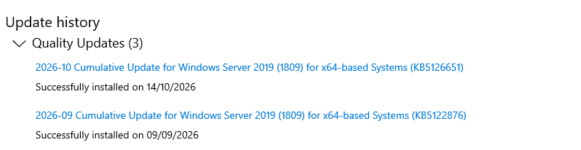
It has yes. My NPS has the mindset of "any update is a security update, sort issues later, better than a zero day exploit" (or veeam rollback if I really need help!)

-
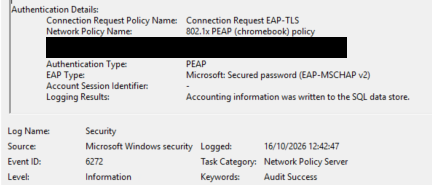
This is a windows update isnt it? At least for us, our NPS PEAP policy is still happily serving 802.11x to our Chromebooks.
-
usually when grids or site layouts go mad, I press F12, see that securly is blocking something, consider adding the "whatever is being blocked" to the allow in securly.
-
if you can SIP configure your phones manually then no reason why not. I have a handful of old Mitel 5320 that were firmware flashed to enable http and sip access, these added to 3cx fine and dandy, they work well enough for a few places we need a simple handset to ring and dial. You may have to dig about in forums to get information on hidden screens or firmware. KX-HDV130s would fall under the same bracket, you can add them manually to 3CX and they are unsupported but should "work". By "work" I mean make calls and receive calls, don't expect phone books and buttons to full function (your voicemail and BLF buttons might work - they do on our 5320) but you will need to set each phone up manually. I would think about getting a cheap supported phone for whatever PBX you choose just to make your life easier, and keep the older ones for edge cases or simple handset areas. Manual phones don't tend to like NAT either, you will need a non routed line of sight to a controller (most wont support STUN etc).
-
This student uses a cloverbook for magnification of text, but types answers. So ironically the paper will not be electronic for reading but will be electronic for writing (legibility). The ipad is an extra. Not sure on one-to-one invigilation. I will look at all those options above and see which ones intune can do easily.
-
Follow up on Migration. JISC EES campus agreement in place with A3 now. Licensing groups shuffle for A1 holders. I use groups to assign licenses to my users. Previously I had an A1 group and an M365 "apps" group to uplift OVS-ES desktop LTSC office licensed users to have 365 apps too. It conveniently coincides that the same users for M365 would also be A3 users for our environment. However, you cannot have sharepoint plan 1 and 2 licensed simultaneously, I needed a quick script change to ensure my M365 group-to-be-repurposed-as-A3 members were NOT part of A1 group. In other words, users cannot be A1 (with sharepoint plan1, exchange plan1, etc) and A3 (with sharepoint plan2, exchange plan2, etc) licensed simultaneously . A1 automatically attached to new campus agreement when older OVS-ES expired. I'm not sure if this is an issue but our A1 licensing was nominally attached to the old OVS-ES agreement in our licensing manager. This naturally swapped to the EES campus agreement and my ability to self purchase more licenses for zero remained active. fresh MAK keys were issued under the new campus agreement. The older OVS-ES no longer activate (as expected when an agreement changes). LTSC, server, W11, all added. My older "I don't use these any more because I no longer have the desktop licensing to support it" M365 apps for desktop licenses also transferred from my OVS-ES to EES campus 3. I am not using these now (they serve no purpose for me with A3). I haven't looked at device based licensing for Office. I believe this is now supported with EES. KMS host server key is now missing. KMS server is still activating KMS clients on my network. I will raise a ticket with MS to have one added, I seem to remember needing to do this on contract renewals previously. Overall worked out at almost the same price for A3 under EES as A1 + M365 + Office + Entra P1 + Intune P1. There was not a lot of saving, but it did end up with more options in other areas such as purview and reporting. Minecraft for education is more of a pain than help as now it is wanted, and now I find how hard it is to bolt down.
-
Can anyone recommend a reliable Microsoft Licence Reseller?
KK20 replied to kwatt's topic in Licensing Questions
I recommend Pugh. I migrated from OVS-ES to Chest JISC and chose Softcat. It was a fiasco dealing with Softcat for Microsoft licensing, your mileage may vary, many people have had successes; even our Softcat marketplace transactions have been brilliant. For your provider, look at a few things first: there is very limited scope to contact Softcat - you have your account manager. Two public facing sales numbers that will only pass you to your account manager. It is seemingly impossible to escalate an issue, or at least my attempts at doing so failed. Balancing this, I would like to point out that we did manage to get our licensing add though. Literally the final day of our OVS-ES expiry. -
I have been asked to provide an iPad for a visually impaired student. This iPad is to have a specific mathematics calculator app that the exams officer is happy with. I am looking at ways to lock this down so it can be used in a public exams. There are no iPads on the system at the moment but I have managed set up ASM and linked to Intune (store tokens and user sync). Since this is a 1-1 ipad, is it possible to kiosk the ipad with purely one app available? Is that something I can do with an intune ipad profile + configuration combo? Or do I need to look at some sort of software can can lock it down further? I do have a whitelist proxy available should it require certain URLs for authentication and logon but would block regular internet access. Not sure where to start on this one to be honest as im not experienced with iPads. Ideas?
-
Googlebooks are here... what do we think?
KK20 replied to ICTDirect_Joe's topic in ChromeOS & Cloud Based OS
Look nice, some nice ideas with phone to screen. HOW MUCH? No thank you, perhaps a half price refurb in six months. -
ChromeOS Flex - School Download Details
KK20 replied to Dos_Box's topic in ChromeOS & Cloud Based OS
identical setup here. The dfe laptops were useless as windows devices but quite workable as chrome flex devices, decent battery life too. -
ChromeOS Flex - School Download Details
KK20 replied to Dos_Box's topic in ChromeOS & Cloud Based OS
I do like flex, simple and works well with PWA. But I do baulk at having inflexible licensing for flex devices - especially when the laptops are effectively scrap anyway. Sure you CAN run them without the upgrade, and for some one-to-one devices this might work out ok. -
Freshdesk - Upcoming but undocumented end of Free plan?
KK20 replied to jthompson's topic in Licensing Questions
They kicked us off last year, so I spooled up an osTicket VM. Fairly painless to setup and it works brilliantly. Tickets are raised by emailing a 365 mailbox so I can testify that this works.