Jamo
-
Posts
1,449 -
Joined
-
Last visited
Content Type
Forums
News
20th
EduGeek EDIT Conference
Blogs
Everything posted by Jamo
-
Can't agree more. I thought we left behind full screen apps with DOS!
-
Isn't this the point though, you can't polish a turd. (Mythbusters excused) throwing 3rd party programs at an OS which isn't built to be that way doesn't fix it, it just masks the problem. I wonder if it will be possible to manage things like that? I know from Windows 7 that MS have done a terrible job of making management tools for the new features. From a business pov this is just a total no go!
-
Its more the direction of travel as you move through your business day. If I open a PDF in a browser and view the PDF, I expect that when I close the PDF I am taken back to where I was before, not to the start screen with many many distractions. It's about losing your train of thought, its not at all what you want when you are trying to work.
-
I am really not! Using Metro IE, opened a PDF, opened in the windows viewer thing in metro. Wanted to go back, closed the PDF program, then it takes you back to the start screen..... ruins your train of thought! Its all go here then click the invisible corner here, drag this to the bottom of the screen, click the start tile. Bah! It is one of the worst UI decisions I have ever seen, which is such a shame as the inner workings seem great, absolutely loving the startup time!
-
 You can't always just use an external DNS if your network relies on internal 'proxy' addresses for instance a Google DNS wouldn't pick up the correct entries for your network and would not work. So you are saying if you use the DNS reported in the Office PCs you can get internet access?
 -
By 'caching was enabled' I mean it was set to 'Only the files and folders users specify will be available offline'. As we have the Make Available Offline bits disabled you would think that Windows wouldn't cache these drives and make them available offline. However Windows 7 is much more intelligent than us and makes the decision for us..............................
-
Caching was enabled on the share, the reason we turned it off was that we didn't want the ability for staff to use the massively shared drive at home and cause conflicts as it would be likely that they would never be resolved. Weirdly we noticed that Windows had decided to sync random files DESPITE setting the options to stop other shares being synced... we only noticed this when a staff member came to us with a drive which only showed the files which were syncing!!! So the drive had disconnected and was 'offline' but the computer was 'online' as such, able to get other shares from the same server and access the internet. What isn't clear so far is if other drives are disconnecting and going into Offline mode without anyone noticing, the shared drive (L:) is obviously quite heavily used so it will be the one people notice.
-
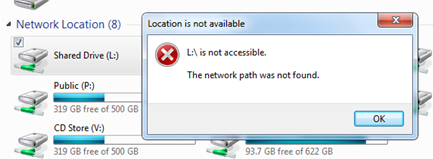
More Details: Ours are all done through GPP and are persistent. Mapped to a 2003 server Screenshot of the error below: It will be connected and then suddenly next time you go to use it you will see the error above. Nothing bar restarting will reconnect the drive. Weirdly the O drive which is on the same server is connected and working fine!!!!

-
Not yet, its such an odd thing, looks like it could be to do with the switch between wired and wireless connections. The fault usually happens when a user 'undocks' the laptop and goes wireless, next time they check they cannot access the connection at all for the shared drive, but can access the other shares on the server. So no DNS, and I have noticed its not just related to the one server either
-
Libraries haven't caused issues here, its just the whole idea behind a redirected documents system which still allows users to save to C: just doesn't seem sensible to me! I know what you mean about the move contents to, but it doesn't explain why it would leave the redundant folders there, when they were never asked for?! Why create them when you know its going to be redirected? Mandatory profiles is the next step I think in logon time reduction, esp over the wireless connections.
-
XP has its annoyances. Windows 7 is definitely better for home users, I have serious reservations for what Microsoft are doing now with regard to enterprise though. Non managed libraries?!?! Totally ridiculous to assume that public folders be accessible by default on machines and with little we can do to lock down the ability to recreate the link to them. Also the link between profiles and user libraries!! Its so annoying that a user is able to browse their profile folder and see two Documents folders, one on the C Drive and one on the network?! Its totally bonkers! I have even used the registry key to hide the user profile location from desktop and explorer, but some programs (Cubase 5) seem insistent that you need to see the profile The logon speeds are pretty rubbish with Windows 7, you can reduce them by ensuring you are mapping to fewer shares and disabling some active setup keys but its still not quite XP speeds just yet. Windows 8 seems to have sorted log on speeds, but has obviously assumed that all workers want to do all day is share their progress on Facebook.
-
We had a look at virtual desktop for this as it would be perfect, own device, but managed system. But unfortunately the licencing is a nightmare, requiring each device, which isn't yours, to have a VDA licence purchased for it even if you have EES or equivalent. Has been parked for now!
-
Its worth saying 'how' the mandatory profile was created. MS no longer support the copying of a user profile to the default profile and instead you have to complete it as part of the sysprep process.
-
Is there already a client occupying the IP in the reverse lookups? The other thing to check is that your DNS proxy account (can be set in the DNS options) has permission to write to the reverse DNS zones.
-
I remember looking at certificates a while back, I just use the computer certificates for wireless authentication, so didn't look too far into the user ones. Is it just that user that gets the multiple certificates? Do you have your renewal period on the certificates set at a really low timeframe? I have 3 certificates attached to my user, which is one for each renewal cycle by the look of it. Use of credential roaming for user certificates is recommended | Space for Claus Jespersen
-
Isn't that due to them getting one certificate per user / per machine? I was under the impression that happened for users if they didn't have a roaming profile?
-
Thats the one!! Nova-T4 promotes the following message: Just remember that your password should be at least 2 characters and no more than 3.
-
Did you perchance just install Windows 7? And it worked in XP with the same users? We had this error and it turned out to be the length of the username and password combination. Basically NovaT uses a really odd method to post to SQL and the string it creates can't be longer than a certain length. 80 chars I believe, which is made up of the %TEMP% path (which in Windows 7 is much longer) and the username and password in Nova-T x2. Its in a weird Capita support article somewhere, anyway the fix is to run with a really short username and password in Nova-T
-
How did you do this? Sometimes the hurdles required to get things working properly are totally mad! Its difficult to know who to blame here, are MS messing up the OEM build as mentioned above, or are capita using a legacy method of resolving the current location? I know that programs I have created can resolve it correctly after an OEM build :S
-
You can't add an account which isn't in a 'trusted' domain to a computer. you could use GPP to do it though? In the working domain you can add a GPP policy to alter groups on the local machine and add network/domain accounts to this
-
I know this thread is ancient, but I am doing something similar and it has to do with the NTFS permissions of the task file itself. find the task you want to run usually in c:\windows\system32\tasks right click and change NTFS permissions of the user or group to Read and Execute The user should then be able to use schtasks /run /tn "NameOfTask"
-
Yeah SIMSLoad is the same here, its just called from a scheduled task, that way you miss out all the UAC prompts on Windows 7
-
Nova-T and the like store their data files on the S: drive as does the SIMS document store. Either way, all methods are valid its up to personal preference. I have an automated system based on timeflags and a scheduled task so its completely automated from the client perspective
-
Right Managed to get around the hurdles in the following way for those who are interested: We have staff as 'Users' of the laptops so no admin rights etc. The Regtool.exe which sibelius uses to check out the licence requires elevation and no amount of prodding will get it to run without. To allow staff users to run the tool you can create a scheduled task which runs 'on demand' with the 'run with highest privileges' ticked. Ensure that the task will run as the 'Group' which staff members belong to in our case Domain\Staff. The tasks action is just set to run the Sibelius EXE. To allow staff to run the task browse to C:\Windows\System32\Tasks\*NameOfTask* and change the security permissions of the task file to Domain\Staff to read and execute. The shortcut to the Sibelius exe can then be changed to: schtasks.exe /run /TN "Launch Sibelius" That will then allow the users to check licences in and out
-
It could be authenticated users, or domain computers on the S Drive that wouldn't allow guest access but would allow computers attached to the domain to work.