psydii
-
Posts
5,195 -
Joined
-
Last visited
Content Type
Forums
News
20th
EduGeek EDIT Conference
Blogs
Everything posted by psydii
-
Have to remove hikvision from network - any alternatives?
psydii replied to pooley's topic in Physical Security
Classified. Need to know. No smoke without fire etc etc. However I've not seen it seriously suggested that remote access and viewing without local authorization is a substantial risk for these devices. If they had we'd all have them isolated by default. Some random bloke outside of UK jurisdiction without a DBS somewhere on the internet can view students who believe themselves to be in a safe environment... that is enough to require the system to be isolated from the internet. What is problematic: we have no way of evaluating how likely that scenario is. Except that even the most recent reporting on this topic does not present a case that such backdoors or behaviours exist: https://www.theregister.com/2023/06/08/uk_government_china_cam_removal/ The threat, I suppose, for each organisation to evaluate is that it is trivial (for the most part) to embbed backdoors into these types of devices (computers), and they are everywhere and sometimes not where they are supposed to be (whomsoever among us has never found a device patched to the wrong port?) They are computers - do you want computers that are trivially backdoored by a potentially hostile entity hooked up to your network, or even in the same building as your network? But how likely is it that they will turn hostile? And what will that impact be on your organisation, its infrastructure and the data you hold? We all are at risk from this kind of shenanigans:https://www.tenable.com/blog/rooting-a-printer-from-security-bulletin-to-remote-code-execution but what if it came as a state-level intervention? Each organisation has its own risk profile, and some organisations may not appreciate their profile in the national security landscape. We saw this through lockdown, schools, hospitals and local government are pretty important pieces of national infrastructure even though they aren't handling 'security marked' communications of central government and agencies. Personally I've never trusted them, so they are isolated with no internet. But again then, so was the previous system. Hopefully (for us) it will be a year or three before anything need to be done with existing installations outside of those handling sensitive data. -
Yeah... since posting above we've had three reports email oddness today, including SPO sharing emails not arriving, and some people not receiving a (non-urgent) all staff email others in their office received.
-
Yeah from time to time. Thought it was just me missing it, but have a had reports from people who are extremely on top of their inbox management. Never repeatable, just this feeling you were sure the email wasn't in the list when you looked the first time. The only people who seem immune are inbox-zero types, but even they report getting the feeling an email pops up in the list that wasn't there when they started grinding down to an empty inbox after a few days away.
-
The ever increasing regulatory burden in education IT
psydii replied to localzuk's topic in General Chat
Some months I spend more time working with lawyers and SLT than I do with systems and servers. -
Have to remove hikvision from network - any alternatives?
psydii replied to pooley's topic in Physical Security
From what I understand, it has been agreed (at committee) that the Procurement Bill 2023 will ban suppliers who are subject to "China's National Security Law" from being involved in any contracts for "public authorities". (a purchase order is a contract, and it would take quite a lot to persuade me that a School or MAT are not "public authorities") This latest turn of events does not require schools (or LAs, or even government departments) to rip and replace existing systems. ....but I think it prudent to plan based on the expectation that day is coming. -
They get an account for the remote access system. This has basically no privileges beyond giving them a path to the server. They get an account to log on to the SIMS server that has local Admin (and therefore SA on the SIMS SQL installation) They have another account which they can push sims to end user devices (this account is a member of local admin on all desktops/laptops). Accounts are only enabled when remote access has been requested.
-
Default Google and Office 365 configurations - how secure are they?
psydii replied to steve_forbes's topic in Cloud Services
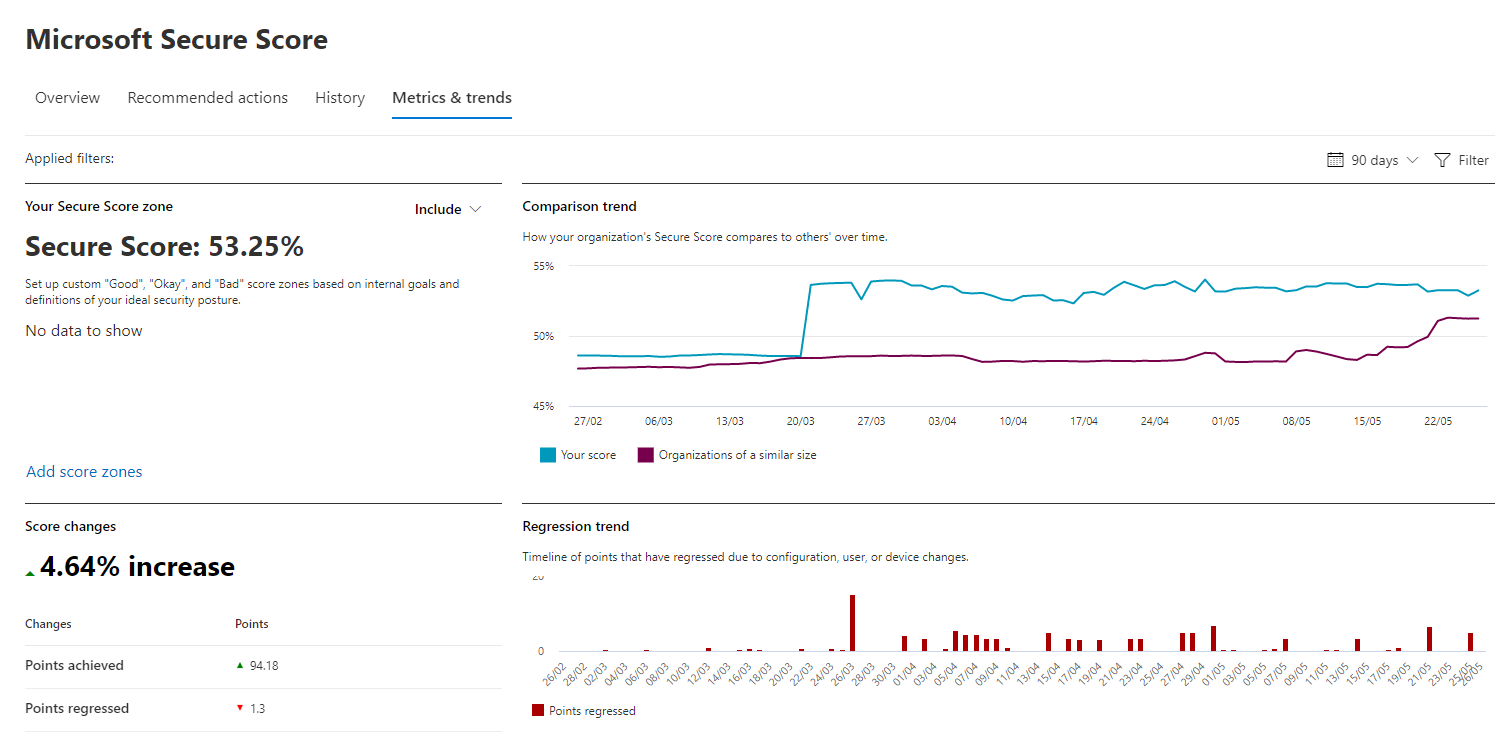
1) Yes 10 years ago. We have tightened many things up. We have E5 and try to improve one or two things every few months. We have hooked 365 and Google Apps, AD, AAD and endpoints into cloud app security/ defender so threats are tracked and alerted upon. Defender seems to mostly handle itself. That said our Microsoft Security Score seems to be holding at a steady level despite gradually implementing recommendations. Obviously there is a balance between a system that is fully secure and one that is usable and fit for purpose. I don't feel that we particularly have a problem walking that line. I'm sure a red team would rip right through us if they tried.
-
Still waiting for something with better cost/performance than the 8GB RX590 I picked up new for £185 in July of 2020. I think we're nearly there... but I'm also trying to keep it well within the power envelope. Perhaps next year.
-
At the low end: The latest N100 Celerons (four efficiency cores only) are alleged to have about the performance of a 2015 era i5 core. Some EMMC is perfectly fine for this use case, don't write it off until you have tried it. The Acer B3's we got during the pandemic were great. The Dells and Asus's were not, despite the headline spec's being the same. The actual chips matter. FWIW IMO, Windows Pro Education and Autopilot support are *essential* to ensuring you are meeting the baseline spec for security and management. Finally, I am not at all sure 8G is a worthwhile spot to go for. Windows does some magic to work well in 4Gb. It stops doing that magic when running in 8Gb so performance between 4/8 is more or less the same, provided you are keeping things to vanilla Windows and web apps only. If 4 becomes insufficient, then 8 will also be insufficient.
-
It pains me to say it, but Network level filtering is ultimately doomed until US/EU legislation prohibits chrome and "vpns". These days you need something on-device, deep-in-the-OS network packet/payload inspection. As a "network manager" it has taken me far too long to come to accept that. Mind you, we have LGfL doing their thing at the network level, and that is good enough that I don't lose any sleep. For on-device we have Defender though MS E5, which is robust enough to keep the worst at bay when devices are outside of LGfL. Looking into LGfL's on device offer this year to beef thing up ahead of a possible 1:1 programme.
-
We have this centered around AMI / Easytrace which is our cashless catering system. They have been able to provide hooks to cascade the card numbers to the other systems. I've hardly touched it in the last ten years - just does the job. I believe that (15 years ago) the initial run of cards were printed by them, but we have two card printers to support the printing of 300-400 cards in the final weeks of each summer break, and for printing cards ad-hoc throughout the year. The card printers need replacing every 3-5 years. The printing of cards is handled by the school office team.
-
Quick test: Miss Bloggs marries her bae. She is now Mrs Smith. Do your tools work for updating her email address and display name?
-
Trouble with Silently configure OneDrive user accounts
psydii replied to AlteredAdmin's topic in Cloud Services
Everything works best if you are on the equivalent of current branch for everything ('Office', Windows, OneDrive) and you don't have roaming profiles set up. Anecdotally, the upgrade process cleans up the users' registry quite effectively. But if this doesn't sort it out, we wipe and reload the PC. -
Despite my spiel above (which is true, from a certain point of view), in practice our OU structure looks a lot like that screenshot. I suspect many of those OUs are more for 'documentation' than 'configuration'. ...and @%1; is right, one gpo for each piece of software, and one gpo per printer deployment (I think the Print Management MMC generates these like this?), and we've already covered drive mapping can be done from a top level GPO/GPP and make use of item Level Targeting.
-
Do keep an eye out on whether they might also be filtering by security group, and how GPP filtering might be in play for example our drive maps appear very near the top of our OU structure, but are filtered by security group. Personally I've always tried to bundle up GPOs and their settings into the fewest objects as reasonable and apply them at the highest point possible in the OU Structure. To do this we align the computers OU structure with the physical deployment of the devices (rooms/departments) and then split people (Users) into Staff / Students OUs , with students subdivided into the Year of Entry (that would be if they entered at the lowest point in the school). We can then use security groups to filter additional GPO Settings based on department membership or role (for we have security groups for every department role in school) for both the computer and the user. e.g. SchoolName_PrimaryDomainPolicy (that sits in the OU that contains all user and computer ous/objects except DCs which sit apart), Then there might be "All Computers", "All Laptops", "All Desktops" applying on the computer OUs, and "All_Users", "All_Staff", "All_Students" Appling to the users' OUs. Then if we have departmental specific configurations, we link GPOs to the relevant OU. If we have policies that need to change based on the user of the computer (for example a member of staff logging on to an IT Suite computer rather than their normal laptop) we would have a "user" policy filtered for the role/departmental group linked to the "IT Suite" (computer) OU which sets the specific user settings that need to vary from the standard user settings from the Users' OU/GPO and enable loopback in that policy. Or putting the OU structure more visually: domain root \ SchoolName \ Computers \ Desktops \ Rooms domain root \ SchoolName \ Computers \ Laptops \ Trolleys domain root \ SchoolName \ Users \ Staff
-
This seems to be a method for doing it: https://www.nucleustechnologies.com/blog/methods-to-restore-exchange-database-to-a-new-server/#:~:text=Steps%20to%20Move%20Database%20to%20a%20New%20Server,restore%E2%80%9D%20with%20the%20following%20command.%20...%20More%20items But, since you've already got it mounted on an exchange server... why move it to the old server (which may well have an underlying hardware problem)? Can you not just use this as a brief stepping stone to Exchange 2016/365?
-
Just seen the other post. Without and Exchange Aware backup, if eseutil doesn't help you'll need to restore the database and log files. If exchange didn't snapshot and correctly truncate the log files during backup (or you have circular logging), you will almost certainly have to use eseutil to get the restored DB into a safe/healthy state. Even if you are able to bring the restored database back into service - it is best practice to migrate all the mailboxes from the restored database to a new one, because using eseutil to repair a db leaves it in a slightly inconsistent state that will cause you more problems down the line. (or so the MS escalation engineer told me at 2am one morning when something similar happened to me). /edit: my actual job keeps delaying me posting - so some of what I've written is redundant, because you've already got there! Best of luck.
-
Oof, a month ago I'd have said call Microsoft and have them hold your hand fixing it. But you're out of support. Take a backup (of the EDB and Log files, don't rely on what VEEAM has at this point), and then use ESUTIL to analyse and 'fix' problems. As soon as it has repaired the DB as best it can, create a new one and migrate everybody off onto the new DB. https://www.codetwo.com/admins-blog/how-to-use-exchange-extensible-storage-engine-utilities-eseutil-tool/ If Veeam does have a recent good copy of mailboxes, it should (as an alternative) be possible to restore the mailboxes to a new DB, loosing only changes that occoured since the last good backup.
-
Word/phrase for asking lots of questions back to be obtuse on purpose
psydii replied to titch's topic in General Chat
to catechise? -
We do.
-
I should stand up sentinel (which with E5 has a 'free' tier) https://azure.microsoft.com/en-us/pricing/offers/sentinel-microsoft-365-offer/ ...but mostly we rely on Defender e5, Azure ATP (defender for identity) and MCAS (Defender for Cloud Apps)
-
PluralSight has some good course for SCCM / Intune, but it is a moving target, they may be 6-18 months out of date.
-
Seen similar. Some combinations of older (Office/MacOS) versions work fine, some don’t. ‘Ltsb’ versions of office are most prone to this, but they don’t hold the monopoly. When everything is current we have the fewest problems.
-
We've got some 8Gb M1s running Logic with no problem. Logic has just landed for iPads. They do not have a lot of RAM. In my experience, the baseline macs seem to have 3-5 years of productive life. The cost of overspecing to extend that life, is often close to the amortized cost of just replacing them every three years.
-
anointed