TwistedHelixis
-
Posts
3,401 -
Joined
-
Last visited
Content Type
Forums
News
20th
EduGeek EDIT Conference
Blogs
Everything posted by TwistedHelixis
-
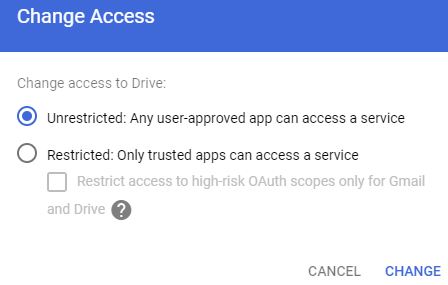
Almost there, got 99% of my settings down now :0) When I go to API > App access control, and restrict Drive or Gmail, I have a couple of options. Restricted: Only trusted apps can access a service or the above + Restrict access to high-risk OAuth scopes only for Gmail and Drive Which should I select so things like "login with google" will still work?

-
Does this also mean I can safely re enable 'apps and extensions' for the Chromebooks as they can only install low risk apps anyway?
-
Ok Thanks :0) Sounds perfect. If I change these to restrictive do you know if they will effect our Spanning Cloud backup in anyway? EDIT - Spanning Backup is not listed on the other tab marked 'Apps connected', so going to assume it will not effect this.
-
Really sorry for all the dumb questions but just found another issue :-( If I block all other apps and extensions (see pic below) G Suite then uninstalls G Docs, Slides and a load of other apps we need from the Chromebook app draw. Do others have this blocked, and if so how do I add back the missing apps we need or do your users use G Docs through the Chrome browser only.
-
You can't allow install of all play store apps on an education account: I don't need to allow the teachers to install the apps just view what apps are available. Anyway my workaround is to pin the web version of the play store as a favourite to the teachers chrome browser, this does let them browse the apps and not install. Surely it should be up to the admin to decide who can see all the apps in the app store and who only gets the whitelisted apps.
-
How do they know what apps to request if they can only access whitelisted apps in the Play Store?
-
They would have browsed the software online and then checked with me, but by default teachers cant even browse the apps in the Play Store. When they open the Play Store they can only see the apps I have whitelisted, so how are they meant to let me know which apps they want, or are you saying they should be able to browse the apps in the Play Store but I have something blocking them in my setup?
-
Yes but I am not a teacher, so how should I know what apps they might need for geography or science etc, only the teachers themselves will know this, but they can't even open the app store on a Chromebook and see all the apps.
-
I am really confused :-( How are staff meant to test new apps for the school if they cant even access the Play Store from a Chrome device?
-
My workaround might be to add this to the staff bookmarks - https://play.google.com/store/apps
-
ignore that, I wasnt signed in Just checked this from my home network and still no Play Store icon. So its not filtering
-
Ohh no, its controlled by our LA, this could take ages to sort out. To make matters worse, I just logged into another school, They don't have any chromebooks and never used the android app store and the app store icon is listed in Chrome browser. Just need all my users to switch domains and I am good to go :-(
-
Ohh OK thanks. Now I need to workout why the teachers don't have the Play App Store listed in their Chrome browsers under the 3x3 dot app section, I am sure they had it at some point.
-
HELP, I seem to have made some error with the apps system. When I logon to my personal (not school) chromebook using a test teacher account, to simulate teachers using their own devices at home and then open the Play app store, I only have access to the one app I setup as an 'Allow app', I don't have access to all the other play store apps. I assume I don't want to block the teachers from having access to all apps in the store, otherwise how will they test and find new apps for class. When I check the teacher OU user settings it lists Additional application settings > Android applications on Chrome devices > Allow an approved set of Android applications to be installed on supported Chrome devices = ON If I disable this, access to the play store is completely blocked How should I restrict the pupils to just the apps we choose but give the teachers full access to all the apps?
-
Just wanted to check - For the apps (including the play store apps) do you apply them at the root OU but have them (not installed) and then in the different user OUs install them, or do you only install them where they will be needed? Was just thinking if they are all listed under the root OU it might make keep things tidy.
-
Its not been avoided by me, just ignored from above. I'm not a member of staff I work for myself, I can explain the best ways of doing things over and over, but at the end of the day these are not my schools. Does that work with SIMS. Also if I go for the web version will all the primary school pupils need their own logins? We don't have any MS licencing agreements. For our Windows 10 licensing we get the educational primary school OEM type of license with the laptops when we purchase them, so the license stay with that device. We only need a server every 5 - 7 years, so just buy that separately, and generally only update office every 7 years, so just get separate licenses for that. I have sat down and worked out the differences between that and one of the MS all in one type license and doing it the way I have works out way way cheaper for the primary school over all those years.
-
Can you delete the profiles via G Suite?
-
All of my primary schools are on Office 2013, but store all their files in G Suite. We actually started using G Suite before 365 or one drive was even a thing but some of the staff have never made the jump to G Docs and still use Word & Excel, including the heads and office staff. So what is the best / cheapest way for me to purchase Office? Could I setup Microsoft 365 at each primary and then get Office for free? BTW I don't really want to talk about getting the staff all using G Docs or all using Office, I'm well aware of the fact they should really be using one or the other, but apart from holding a pitch fork over them and forcing them, this is currently not an option. I am stuck with mixed setups at the moment. As always, thanks for your advice & help in advance.
-
Do we need an apple server to manage iPads
TwistedHelixis replied to TwistedHelixis's topic in Hardware
When you say shared mode do you mean more than one pupil using them as I think they will be shared between different pupils around the school. Does that mean they have to get a Mac mini? -
Do we need an apple server to manage iPads
TwistedHelixis replied to TwistedHelixis's topic in Hardware
Thanks, So what's the process for getting new iPads in DEP, is this something you need to request when purchasing? -
Sorry for my ignorance as I have never set a school up with iPads, but if the primary school does get some do I need some kind of apple server to manage them or can it all be done like Chromebooks through a free web based system.
-
Although I haven't seen any our LA went only with Chromebooks
-
I think you might need to post some shots, I have been going round in circles looking. BTW we have the newsiest version of Smart Notebook
-
Hello, The teacher likes to use extended desktops but on her new Smart (made by smart) TV when she touches the screen, rather than the touch registering on the big TV screen, its registering the touch on the laptop screen and moving things around on that. I have tried to find some king of 'This screen for touch' setting in the smartboard settings but cant. I also tried setting the TV screen as screen 1 in Windows, but this then seems to move all her laptop apps, icons ext over to the TV screen, leaving her laptop screen empty. Any ideas?
-
Well that's a XXXX, one of the reasons (not the only) for us getting Chromebooks was for the android app store, as it has loads of curriculum apps