neonetman
-
Posts
424 -
Joined
Content Type
Forums
News
20th
EduGeek EDIT Conference
Blogs
Everything posted by neonetman
-
We have a number of room mailboxes on the on-premises server of our hybrid exchange (2016). We need to migrate these to O365, however I can't see an easy way to do this. Can anyone help?
-
EXCHANGE Hybrid woes with shared calendars
neonetman replied to neonetman's topic in Enterprise Software
How would I go about migrating the room mailboxes from Exchange 2016 to O365 - whilst I can see migration options for user mailboxes, I don't seem to be able to find an option for room mailboxes? -
Problem with routing certain IP addresses betwqeen Cisco and Aruba
neonetman replied to neonetman's topic in Wired Networks
Thank you all again - I've just added the helper addresses, and everything is working as expected. -
Problem with routing certain IP addresses betwqeen Cisco and Aruba
neonetman replied to neonetman's topic in Wired Networks
Thanks for the help so far.... I think I have it almost there (re-enabled IP routing, and added 0.0.0.0/0 static route). If I have a static IP on devices on the Aruba switch, they will connect fine, however they still can't pick up a DHCP address from our central DHCP server. I've set up a new scope on the right subnet, configuring as per the other subnets, but it's just not getting through -
Problem with routing certain IP addresses betwqeen Cisco and Aruba
neonetman replied to neonetman's topic in Wired Networks
Okay... I've disabled IP routing, and added a default gateway. I can now ping all the switch IP addresses, however any devices connected to the switch are still not able to see anything beyond the switch I'm busy updating firmware to the latest version to see if that makes any difference -
Problem with routing certain IP addresses betwqeen Cisco and Aruba
neonetman replied to neonetman's topic in Wired Networks
For some reason all our switches in school are Layer 3 with routing enabled (was set up long prior to me being here) The static routes on both the core switch (Cisco) and the new switch are in my post, and I think they are right Would disabling IP routing on the HP and using default gateway allow the routing between the different VLans? -
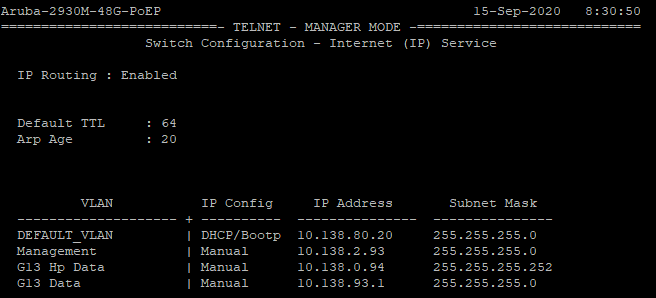
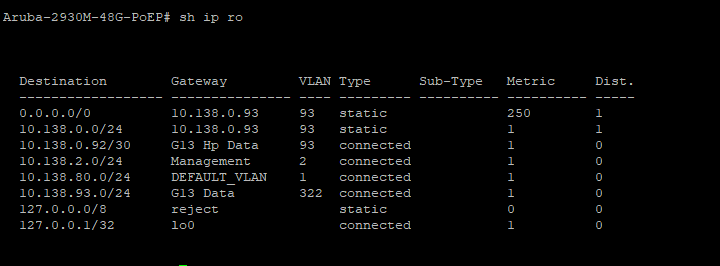
Good morning, I'm busy setting up a new Aruba switch to joing our existing Cisco network. I have set up the 3 Vlans, IP addresses and IP routing on the Aruba switch (see below) I've added routes on the Cisco core switch to point to these vlans:- I can ping 10.138.0.94, 10.138.2.93 and 10.138.93.1 addresses directly on the Aruba, yet from the core cisco, I can only ping 10.138.0.94 I'm assuming this is an issue with ip routing on the Aruba, however I'm struggling to get my head around exactly what I've missed. Can anyone point me in the right direction of where to look?

-
Good morning all, The saga of our hybrid setup continues. We currently have a number of our staff on O365, whilst others remain on premises Exchange. We've now realised that our O365 users can't see the shared room calendars on the on-prem server. Is there a way of ensuring that all users (both on-prem and O365) can see all shared resource calendars? Cheers for any guidance
-
Good monring all, I'm a newbie to Sharepoint, and have inherited the school sharepoint to look after. I'm currently trying to work out how to create a link to add an item to an existing workflow. The user needs to have a link to the submission form, but without being able to see the actual items in the workflow. I'm hoping someone can offer me a quick and easy answer to this edit: I've found the option to use URL/Lists/{list name}/newform.aspx however after you submit, it shows the whole list, rather than returning to the previous page. As this list is confidential, I need the form to return to the previous page after submission
-
I am coming in every morning and finding all our PCs' on in school. As far as I was aware there was no WOL setup, however I'm feeling there must be. Is there an easy way of monitoring for a WOL packet and identifying its' source ?
-
We have a number of users with access to delegated mailboxes (mainly our main office staff who have their own mailbox as well as access to the shared account). Since we've migrated one of these users to Office 365, she has lost access to the the shared on premises mailbox (both through Outlook and OWA) - the mailbox shows up, but they are unable to expand the folders. I have tried removing their permissions from the shared mailbox, however I am now unable to add them back in as they don't appear in the list of available users. I'm (yet again) at a loss, as I daren't move any more mailboxes until we can resolve this issue Hoping you can help Cheers
-
Smoothwall alternatives
neonetman replied to Steveduk's topic in Internet Related/Filtering/Firewall
Thanks Lee, I'm very familiar with both Sophos UTM and SG (having used both in previous roles, and at home) so I envisage the changeover on a technical level will be reasonably smooth. I plan to sell it to SLT based on not just having ther same features, but also the client VPN, mail spoam filtering and encrypted emails as a massive plus - plus the ability to manage their own quarantine. I would also aim to put an iView installation in for the better reporting -
Smoothwall alternatives
neonetman replied to Steveduk's topic in Internet Related/Filtering/Firewall
I'm starting to look at our firewall renewal (due next year). We are currently with Smoothwall, however I'm considering a move to Sophos XG. Has anyone got any decent comparisons or documentation to support the move? I'm happy to do the research myself, however I'm a great fan of not reinventing the wheel if someone has it to hand -
Good morning, and yet again I'm hoping someone can offer some guidance here on the problems we are having with mailbox migrations:- We are running Exchange 2016 CU12 with Office 3465 in a hybrid setup All our services run through Kemp Loadmaster which re-encrypts (this needs to stay in place) We are repeatedly getting this in the log files:- The job has been paused temporarily because the mailbox is locked. The job will attempt to continue again after 6/9/2020 10:26:31 AM. I've set up an alternative URL that can bypass the Kemp, however not sure how to make the migrations use this instead Can anyone help me out, as we are aiming to have our staff mailboxes migrated in time for Monday next week
-
Calendar in Teams not showing for some users
neonetman replied to neonetman's topic in Cloud Services
We are running a hybrid of Exchange 2016 CU12 with Office 365. The mailboxes I've tested were all created in Active Directory on premises, then migrated to Office 365. (in fact all our accounts are created on premises, yet Teams shows a mix of directory statuses, which I can't explain) Despite this, 2 show the calendar (and have directory status online), and the 3rd doesn't show calendar (an d has directory status on premise) Would the CU version on the edge server matter, as that doesn't appear to have been updated to CU12 -
Good afternoon... I have been trying to get the calendar tab to appear for users in MS Teams.. So far, I have:- setup hybrid Exchange, and migrated a number of users over to the Office 365 for email Logged onto some test users and seen the calendar tab is there Logged onto myself and another member of staffs teams, and there is no calendar tab.. Done a compare and contrast of the 4 accounts (all created in AD and synced via AD Connect) The only difference I can see is that the 2 accounts that work are showing a directory status in Teams/Users as "Online", whilst the 2 that don't are showing as "On Premise". Can anyone explain to me why they have different statuses even thought they were created the same way, and even more important, how can I change the directory status to "online" Thanks in advance (yet again)
-
Office 365 A1 plans - exchange online license
neonetman replied to neonetman's topic in Cloud Services
Thankyou that's great - that was the issue... 2 questions leading on from that.. * Could that have been set as the default, and if so how can I change that * Can I bulk-change all users to reset that? Thanks again -
Office 365 A1 plans - exchange online license
neonetman replied to neonetman's topic in Cloud Services
Can you point m to exactly where this is? -
Yet another question regarding our Office 365 hybrid setup..... I've tested moving a member of staff to the Office365 side of the setup, and get a message saying they don't have an Exchange Online license. I've checked their licenses, and they have an Office A1 for Faculty license which should give them this (I know the A1 for students is giving it).. Is there any way my predecessor may have disabled this part of the license when he set it up, as at the time we only had on-prem Sorry for the many posts this last few days, however I'm nearly there now HELP!!!!
-
We are now in the final throes of setting up the hybrid side of our Exchange server. The only issue I think we are still having is that emails are not sending from the Office 365 mailboxes to on premises mailboxes. I've added 2 screenshots below to show the messages stuck on pending, and the detail below that. The IP it is trying to connect to to send messages is our Spam-hero subscription, so I see no reason why emails are not going to it. I'm beating my head against a brick wall trying to resolve it so I'm hoping one of you lovely folks can help:- Thanks in advance for saving my sanity
-
We are currently beginnign the process of moving some of our mailboxes to Office 365 from our Exchange 2013 on prem. I've run the Hybrid Config Wizard, and have a series of problems in the report:- This is the initial one we are trying to resolve at present, but can't work out what the root of the problem is (obviously I've changed the domain):-
-
I have recently set up a Hyper-V cluster, and am trying to set up the logical networks in VMM. I have added a logical network, and and VM network, however when I try to connect a network card to the newly created VM network, it doesn't appear in the list. I've tried copying settings from our existing cluster but am hitting a brick wall on it. Can anyone point me in the right direction? Cheers Iain
-
We've used PRM green tech, however have now moved to Enviro Electric (they provide bins/cages to put the equipment in, and collect when full - much quicker and easier than PRM)
-
We are currently installing PMB opensource library software to trial, however after install the default username and password of admin/admin do not seem to work. I can't find any answers to why this is using GoogleFu, so hoping someone on here can shed some light on it
-
I've recently setup our new blade chassis with the aim of using it for a cluster Hyper V environment. Hyper-V is succesfulylk installed on all 3 blades, and I have set up a VM to host our VMM instance (all good so far) I've added iScsi conections to all 3 hosts, as well as the VMM (still all good) When I try to create the cluster, I get the following error:- I've attached the report file from one of the hosts (which shows no errors). I know there is a warning about a SPF on the netowrking - this is a work in progress Validation Report 2020.02.28 At 07.59.12.zip