coolhands
-
Posts
326 -
Joined
-
Last visited
Content Type
Forums
News
20th
EduGeek EDIT Conference
Blogs
Everything posted by coolhands
-
 seperate houses; dad still has 'parental responsibility'. But how do we stop staff phoning dad inadvertently as you can still see his details. Dad should not be contacted, and the new (mother and pupils address) is not to be given to dad. Anything I can do in sims?
 -
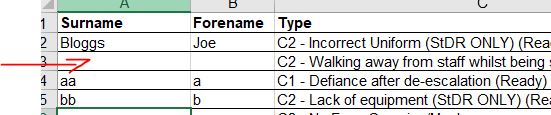
On some saved reports when it is run it outputs a name on each row (if the student has more than 1 item eg behaviour on a certain date). But if i make a new report it always leaves a blank under the first occasion of the student name until the next new student occurs. Is there something I am unaware of?

-
We have a staff data collection sheet downloaded from somewhere that outputs as a RTF and opens in word. My simple question is this - is it possible to email staff their data collection sheet somehow, so they can review it? I'm going round in circles. All staff have their school email in the appropriate field in sims. The report outputs as one long document ie all staff on it on separate pages. Fine if you are going to print them and hand out but obviously it would make sense to email this type of thing. I have got YAMM (yet another mail merge) as I though this would help but then realised it still doesn't help as you would need each data collection sheet saved as separate file in your (google) drive. Which I can't do. Also each one would have to have identifiable file name. we have edulink too - can I do something through that? ok to answer my own question and help anyone else in the future - I changed sims report to output as excel. Then copy that to googlespreadhseet. Use YAMM (an add-on that you have to pay for, free version has fewer daily allowance, it is used for gmail and uses google sheets) to create a mail merge email that puts each field into the email which can be sent to all staff. Each staff member gets an email with their own info in it to check, and can email me any changes.
-
I seem to remember you can edit the file extension name and then see the excel file inside the document. To then copy it and edit to change the Report Template on a existing report. But I can't remember how to see the original excel file actually it might be the zipped version I need to rename? I know i've done this and can't remember edit ok you need the RptDef file (not the zipped version if you've downloaded it from somewhere). Then you change file extension from .rptdef to .zip. Then double click the .zip and inside you will find the original excel file. why is sims so f*ZZZas4sdf**d hard
-
hey I've got this now I'm on office professional plus 2019, but only when 'send'ing the individual reports. Is it the same problem? As it comes up with some warning that macros have been disabled etc so I'm thinking similar prob. Anyone know anything?
-
[sims] Individual Report Template Missing/inaccessible
coolhands replied to RootsSchImp's topic in MIS Systems
FYI just happened to me, the above section worked, no patch required. I had just imported fileset 1606 so don't know if that is coincidence or related as was fine just before half term last week. -
Why can I NEVER find what group to add someone to in order to give them permissions to do something, by using the permissions sheet? Is it just me? I needed someone to be able to add behaviour types, detentions etc Permissions sheet says its under menu 'Behaviour Management' and / or under sub menu 'Maintain Detentions': but like hell is it. it's under what I would describe as Students>Conduct>Detentions so what the heck are they on about? and why does it take me 20 mins to find what I bl*0dy well need? How are you mean to find stuff if none of the words relate to each other? edit: actually the above doesn't work does anyone know which bits of the tree allow to maintain behaviour type?? (need them to make new behaviour types). This is mine: edit edit! I have given them school administrator which works, but nevertheless I would like to know why there is no menu of 'Setups' then sub menu Behaviour type in the tree structure
-
Hi I deleted my tempSimsRpt folder and it should apparently re-generate when you next open sims and run a report. However mine has not. Why is it not coming back? Anything I can do? If I run a report it still works, but I just don't know where this folder is if not in the same place as where I deleted it from. Ite was in "C:\Users\Administrator\Documents" for me. edit: I put it back from the recycle bin. But anyone know how I can follow the instructions below? I followed these instructions: Article: KB0022872 DescriptionWorkAroundSolution [TABLE=class: ng-scope, width: 100%] [TR] [TD]Reporting - Microsoft Excel documents closing when excel reports are run out of SIMS[/TD] [/TR] [TR] [TD]-F1T8F4[/TD] [/TR] [TR] [TD]When a user has a Excel document open and then runs a report out of SIMS that outputs to Excel the original document closes down.[/TD] [/TR] [TR] [TD]See Solution[/TD] [/TR] [TR] [TD]This issue is now resolved with the 7.194 release of SIMS.net. You may find that the issue persists following the upgrade, in the event of this please see below: Ensure SIMS.net is closed. Delete the "tempSimsRpt" folder. This can be found within the users Documents folder or a path similar to C:\ Users \ \ Documents \ tempSimsRpt. Following this when SIMS.net is reopened and a report is run this folder will repopulate. You should now find that previously open Excel documents no longer close when running SIMS.net reports.[/TD] [/TR] [/TABLE]
-
I seem to have screwed up somehow and edited the column labels as per pic. I think it was me cos last week I was editing and moving around reports in Reports>Design reports and this title is one of them. I don't know why it would have transferred to other areas but it is in pupil details when looking for pupils and also, for example, in Templates; find Staff etc Anyone know where I can reset them? Strangely it is in various column headings not just one place.
-
can you see the newsfeed they know about this. But you might need a patch. https://support.capitasoftware.com/csm?sys_kb_id=97e180e71b9714508e4e97de1d4bcb18&id=kb_article_view&sysparm_rank=1&sysparm_tsqueryId=f484dbe7db97d050eb03dbe6f4961903
- 4 replies
-
- 2
-

-
- census
- census returns
- (and 3 more)
-
yes AFAIK you will have to copy the template, record the macro, save the template on your designed report. It is quite fiddly. My sims will sometimes crash or screw up the saved report templates which doesn't help when attempting this. I then panic but fortunately it seems to sort itself out when re-starting. Although I think once I had to reimport the pre-defined reports templates in "C:\Program Files (x86)\SIMS\SIMS .net\PreDefined_Reports_v7194.RptDef" area. So that really puts me off cos I can't afford to break the existing reports! http://www.edugeek.net/forums/mis-systems/38519-edit-excel-output.html
-
[sims] [SIMS] Enabling new class teacher to take their register
coolhands replied to gpjt's topic in MIS Systems
I had similar here, maybe some help: http://www.edugeek.net/forums/mis-systems/201310-assign-sims-roles-staff.html#post1816018 -
I assume you would need to programme a macro to do that, then save that as the associated template with the report.
-
In the Manage User / permissions area if I add a staff member the group 'Learning support assistant' they can't see a student timetable. If I give them (either Registration tutor or Class teacher) they can see the student timetables but also the student address details etc. How can I give a staff member access to view student timetables but not other details?
-
go on put a screenshot up so I can try it! If any use I might then save it
-
I googled it. I put 'capita sims behaviour "location"' & voila!
-
thankyou still helpful 9 years later!
-
try this or some version of. seems to have what you want and you can maybe sort out in excel? anyway, might help.
-
I’m not on sims now, but doesn’t it have ‘name of the subject’ or something? I’m sure it does
-
[sims] Unable to export General Student List to excel
coolhands replied to BTreg's topic in MIS Systems
don't know but if you open excel first then run the report will it work? -
Old thread but replying as might help someone (probably me on the future). Had this said file saved with version 641and you are currently running 640. So wouldn’t upload the file. In our case this was using Remote Desktop to connect with the virtual server, not a satellite installation. Checked server and sims and novat were correctly updated with summer release. Problem turned out to be the R drive was not loaded so it couldn’t find the sims.ini (I think). IT guy had to restate the drives. So check the sims drive is loaded / visible we hadn’t noticed that for some reason it wasn’t there and caused this problem.
-
Jeez I hate this on so many levels but anyway. There doesn't seem to be a way to export the student choices by blocks? so if a subject is in 2 blocks I can't see (from choices reports) which block they've chosen it in. So for me to add them to the correct block in sims (which I'm doing manually) I can't see if they chose the subject in eg Block B or Block D. Is there any way of getting them out with block info? (I won't be using the solution editor)
-
Any problem with this? Ours is currently eg j-smith and they want it to be j.smith. I have tried editing one and seems ok but is there anything I should know?
-
I believe it (Alt curr) can only be done on an individual basis.
-
[SIMS] ATF SEN error - LA and Capita won't support
coolhands replied to mariohi's topic in MIS Systems
just delete the free school meals lines in notepad then. so you can import. Then add FSM info yourself directly later (is it just 1 pupil?)