Mozil.png.06aa1027e9e6bff1530aabaaa15276d9.png)

jthompson
-
Posts
5,685 -
Joined
-
Last visited
Content Type
Forums
News
20th
EduGeek EDIT Conference
Blogs
Everything posted by jthompson
-
KeePass here, since yonks. db file on shared storage with multiple concurrent users being handled well. Never run into any problems. Not using any browser integration other than generic autotype, so we're not currently able to use it directly on a Chromebook. However, with the db file synced to Google Drive storage, it can be accessed via mobile app (KeePassDX and KeePass2Android are both good options on Android). There's an official MSI available, too, which helps with deployment. In fact, we make it (the software) available to all staff, so that they have access to a password manager if they want to use it. KeePassXC is also worth a look. Works with the same db file format as KeePass, so fully compatible, but adds some nice features like T-OTP codes and favicon fetching.
-
It may be that more modest developments like contactless will actually prove more significant to how the wider public moves on in their use of money over the next 10 years or so. At least in this part of the world. Cards, for instance, are massively oversized and overly thick for what they need to be these days, so a move away from that legacy 'standard credit card' format, or features like single-use card numbers, virtual cards, etc. to bring security up to date, are I think where there is still plenty of scope for meaningful modernisation without having people having to take a leap of faith into crypto.
-
Colours look great. I really like your bases. I don't know drukhari stuff well enough to work out how you've kitbashed that one, but it looks like a very different pose from the one on the box!
-

BBC iPlayer signin for schools and colleges?
jthompson replied to Trevelyan's topic in Licensing Questions
After kicking the tyres on the password vaulted app approach, I have to say it works pretty well. The credentials get stored in the Cloud Identity Account Manager Chrome extension, such that subsequent visits to the BBC sign in page will see the extension pop-up and offer the credentials for the user to sign into the site with (similar to how a stored password in Chrome would be). Think you need Enterprise Google to be able to use PVAs, though. -
Not sure exactly why you're encountering the problems, but this might this be a situation where a Managed Service Account would be worth trying. Your problem might be dependant on the nature of the account that you're using. If it's got local admin privileges, Server 2019 may be getting in the way of how you're trying to use it (something to do with Admin Approval Mode?). I know that local admins in 2019 don't have the sort god-level privileges over all drives and files that one might expect, for instance. Never used 2016 so I can't suggest what might have changed for you after the upgrade to 2019.
-
You can never really discount DNS as a cause. I'd maybe try a test of using pure Group Policy options in place of mapping them in a logon script, to see if that makes any difference (User Configuration > Preferences > Windows Settings > Drive Maps. Also, did I mention that you can never really discount DNS as a cause?
-
It seems to have been a good year for bluebells.
-
Computer Naming in admin areas and offices
jthompson replied to kennysarmy's topic in How do you do....it?
Presumably in a multi-org environment, you'd have AD domain names doing some of the work for you anyway in terms of uniquely naming systems? Agree that it's been an interesting thread to watch, and surprised that asset tags are in such a minority. There really is more than one way to skin a cat. -
BBC iPlayer signin for schools and colleges?
jthompson replied to Trevelyan's topic in Licensing Questions
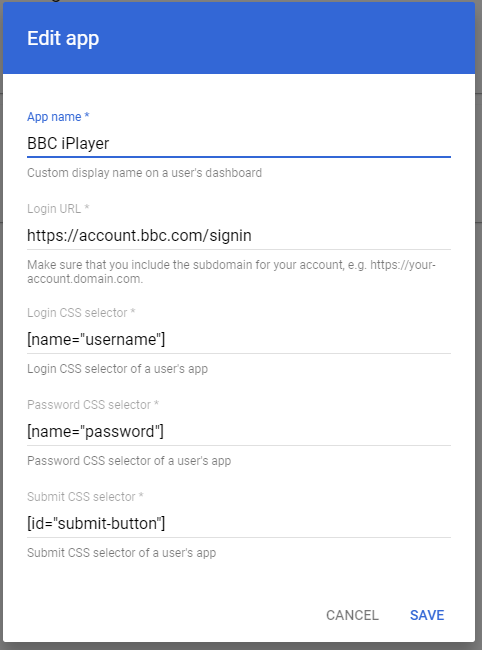
I've been looking into setting up and assigning a password vaulted app in Google Workspace in order to easily give users a seamless login to a shared BBC iPlayer account. Basically, it publishes an app to workspace.google.com/dashboard for users which is preconfigured with iPlayer login credentials of a shared school BBC account. Nobody would need to know or type the credentials, it would just work. I'm thinking that if I can get it to work, I could assign it to teaching staff so that they then don't have to use their personal iPlayer accounts. I can't quite get it to work and I'm hoping that it can be made to work and I've just not quite got the settings right. Has anyone else had a look at doing this? These are the settings I've tried. EDIT: Now working! I hadn't read the instructions closely enough. These are the settings required to get iPlayer to sign in.
-
Installing applications as an end user using admin login details
jthompson replied to SJ98's topic in Windows 10
Running an installer exe locally and elevating to admin via a UAC prompt in order to get it done seems to me to be a perfectly reasonable thing to want to be able to do. Software is sometimes only needed by one or two users, at short notice and not easily deployed remotely. It's sometimes not even installing, just a run-once thing (e.g. GoToWebinar). It's one of the reasons UAC exists in the first place. I don't see why it would be a security risk. I've a feeling that UAC left to its default settings might do what you want (i.e. kick in and prompt for administrator credentials whenever needed). You'll probably just need to do what you're already doing and work through the policies that you have in place in your environment to unpick things. In Group Policy, I believe all of the options linked to in an earlier post are in Computer Configuration > Policies > Windows Settings > Security Settings > Local Policies > Security Options. They all begin with "User Account Control: ". Run "gpresult -h results.htm && results.htm" (as an admin, funnily enough) on a client machine and see which GPOs any of those settings are coming from. -
Chromebook - Enable onscreen keyboard for Ukrainian pupil
jthompson replied to TwistedHelixis's topic in Cloud Services
Google Admin > Devices > Chrome > Settings > Users & browers > [select suitable OU] > Accessibility > Accessibility options in the system tray menu > Set to "Show accessibility options in the system tray menu" That'll negate the need for users in that OU to have to open the cog menu: they can just toggle accessibilty options there in the clock panel. -
May 2022 Windows Updates may cause issues with NPS and RRAS
jthompson replied to free780's topic in Enterprise Software
Interesting. I did think along those lines for a bit, and wondered also about whether another factor was the GPOs we have in place which disable LLMNR, TLS 1.0 and TLS 1.1, and whether that was somehow involved in breaking something. I also thought "it's probably going to end up being DNS", but couldn't see any DNS issues. -
May 2022 Windows Updates may cause issues with NPS and RRAS
jthompson replied to free780's topic in Enterprise Software
Just run a test of doing this and it has worked! Thanks for the tip. In our case, we should be able to deploy this new SSID without needing to run around, as all our clients already had a PSK-based profile deployed to them that they've been falling back on. That's worked out to be a useful contingency as it happens! -
May 2022 Windows Updates may cause issues with NPS and RRAS
jthompson replied to free780's topic in Enterprise Software
No, our clients aren't connecting. Well, they're connecting using an alternative PSK-based SSID that's available, but they're all failing to connect to the 802.1x SSID. When they attempt to connect and fail, we see the following error on the client, in the Applications and Services\Microsoft\Windows\WLAN-AutoConfig event log. Event ID 12013: On the NPS server audit log, it reports a reason code 16 for each failed connection attempt. That's still the case even if I reissue a fresh certificate for the computer. Clients and NPS/DC servers all have the CA cert in trusted root authorities. I've checked the server certs selected for the "Smart Card or other certificate" EAP type in the NPS network policy. Nothing is expired. Not sure what else to check, but I'm fairly sure it's nothing to do with the May updates. We've done some updates across the UniFi kit recently, too, but the timing of that doesn't appear to correspond with when we started seeing the problem. -
Powerpoint now used in spellcheck-disabled exams
jthompson replied to ZeldaVet's topic in Office Software
If none of the available PowerPoint group policy options are doing it, I'd start to have a look at adding deny privileges to any proofing DLL and/or dictionary (.LEX) files for a suitable security group and drop your users into that group as required. -
Google Chromebook Education for Schools setup
jthompson replied to password1234's topic in Cloud Services
The term for adding Chromebooks into your domain, so that they are school-owned and managed devices, is enterprise enrollment. There is a user setting that will allow users to enrol devices into the domain. You will probably only want to grant that ability to your admin account(s), rather than give it to a broad selection of other users. When a Chromebook gets enrolled, it will use up one of your Chrome upgrade licenses. That's irreversible as you can't release that license from the device or transfer it to another one (unless it's a specific case of a faulty device being replaced by the manufacturer). That's why you don't want just anybody to have enrollment privileges, lest they enrol their own personal device and cost you a license. I've found it best to set up OUs such that they contain either users or devices, and not a mix of both. That helps with the mental gymnastics of device settings versus user settings. -
GPO Policies to block showing commands in Start Menu Search
jthompson replied to JoeCav's topic in Windows 10
I believe Start menu search is now inseparable from File Explorer search, since Cortana was separated out from the Start menu for 1903 (or thereabouts). -
May 2022 Windows Updates may cause issues with NPS and RRAS
jthompson replied to free780's topic in Enterprise Software
I'm not sure that my broken 802.1x computer cert connections is due to the May update. The problems that I'm seeing look to have started earlier in the month, before the May updates were installed. Seeing lots of event ID 21 on DCs. I think something in my env is broken, separately from this May update stuff. The few computer certificates that our AD-CS server has issued since installing the update do inlcude the new OID that adds the computer SID into the certificate. DCs and clients all have the certificate of the issuing CA in place, and can't see anything as expired or missing anywhere. Am puzzled. I'm not seeing any of the events 39, 40 or 41 on the DCs, when I'd presumably expect to. They've definitely installed the May updates and restarted. Maybe connections attempts are breaking before it gets to the stage of generating any of those events. -
May 2022 Windows Updates may cause issues with NPS and RRAS
jthompson replied to free780's topic in Enterprise Software
Computer-based certificate WiFi connections broken here. Are other people having that? Our machines are falling back to using a PSK-based connection. I'm assuming that it's since the DCs/CA server did the May update, but I'm not 100% certain. Down the rabbithole I go. -
Yeah, I love AdMech models. The techpriest dominus was the model that drew me back into the hobby after 20 years or so.
-
I've seen a few examples online where they've been painted using a colour shift paint, but those have tended to be ludicrously good portfolios pieces by studio painters. Thankfully, the two colours in the paint I used tie in quite closely with the purple and cyan citadel colours that I used on the rest of the model. More luck than judgement, tbh.
-
Where a browser is required, we tend to install Chrome. In any case, we also have duff proxy settings applied for server admins via GPO, just to avoid accidental browsing.
-
A bit more progress on my 'nids. The genestealers and broodlord from the SC box are now done.
-
I've only ever found that email-based helpdesks get any traction at all with users. YMMV, obvs. They allow for much easier back-and-forth, which I can't really see how you'd do in a task management system like Trello or MS Planner. I use MS Planner a lot, but not as a helpdesk.
-
I think Win+Shift+S is one of the shortcuts covered by the Group Policy setting that disables Win+E and Win+R and some other (but not all) Win key shortcuts. I can't remember which policy setting exactly, but maybe a bug affecting that same subset of shortcuts? If your users are needing a shortcut to invoke Snip & Sketch, you can push out a reg setting via Group Policy to map the PrintScreen button to it. HKEY_CURRENT_USER\Control Panel\Keyboard Name: PrintScreenKeyForSnippingEnabled Type: REG_DWORD Value: 1