-
Posts
2,107 -
Joined
-
Last visited
Content Type
Forums
News
20th
EduGeek EDIT Conference
Blogs
Everything posted by Jaan
-
Anybody seen a new excel sheet that shows the changes from the older 1809 gpos templates to the new current ones please?
-
Just thought i'd ask before i start doing backups Currently 2016 cheers
-
We moved over to Solus recently and we are going to download and deploy our first patch (24579). Back in the day we were told to kick everybody out of Sims before doing a update/patch. Is this still the same when using Solus? I feel this is a stupid question but thought i'd ask anyway...... be gentle!
-

Disable WIFI adaptor via GPO for certain Dell machines?
Jaan replied to Jaan's topic in How do you do....it?
Sorry for the really late reply on this. what does this hardware ID translate to? Is there an easy way to get devcon.exe for windows 10 1809 LTSC without having to install the SDK? Cheers -
Any ideas how we can find out whats been added or removed with the new GPOs? Thanks
-
This is for a off domain 3rd party machine. We normally use GPO to do this. I have a .vbs script that i copy to the machine to map the drive..... it works fine, but i just want to have it hidden when mapped. I've had a Google, and for the life of me can't find a way to map it hidden. Can anybody help please? Cheers 'args = WScript.Arguments.Count Option Explicit Dim objNetwork Dim strDriveLetter, strRemotePath, strUser, strPassword, strProfile ' Values of variables set strDriveLetter = "R:" strRemotePath = "\\computer-name\shared_folder" strUser = "computer-name\username" strPassword = "password" strProfile = "false" ' This section creates a network object. (objNetwork) ' Then apply MapNetworkDrive method. Result R: drive ' Note, this script features 5 arguments on lines 21/22. on error resume next Set objNetwork = WScript.CreateObject("WScript.Network") objNetwork.MapNetworkDrive strDriveLetter, strRemotePath, _ strProfile, strUser, strPassword 'if args > 0 then 'msgbox wscript.arguments(0) & wscript.arguments(1) 'end if
-
Long story short, we've updated to windows 10 and need to add anycomms to the client computers that need it. I'm thinking that as it's already on the sims server anyway, i can just run it periodically with a scheduled task. Can't seem to figure it out though. Cheers WELL COME BACK ALL HAPPY NEW YEAR
-
back up and inplace upgrade for us.
-
We're finalising the clients, still the servers to do to 2019. (Have one 2019 for ADBA) Will prob just do the DCs and Hyper-V hosts to be fair. Touch wood and Good luck!
-
Disable WIFI adaptor via GPO for certain Dell machines?
Jaan replied to Jaan's topic in How do you do....it?
Cheers guys i'll have a look...... the Dells are a consumer grade dell vostro mt 270. I do actually have one in the office that needed a repair, so i can test with that once before resorting to going for a long walk/drive! -
Hi all, Just wanted to reach out ask if anybody would knows how i'd go about disabling a wifi adapter via GPO? We have 100+ of a Dell workstation that has a embedded WIFI adapter installed. Is there a way i can disable the WIFI card in device manager via GPO? I only need to target a particular model of Dell all of which have the same WIFI adapter. I can do this manually of course via local local log in, but i longer term solution would prob be the best. Thanks in advanced.
-
We went from UTM 9 to XG..... we made that jump too soon i feel..... XG wasn't ready for our scenario and maintenance after maintenance release bought one fix and two problems..... we very nearly didn't renew this time. We used Sophos for a long time and we could see it was making (slow) progress....it works well when it works... Things stared to get better the last two MR releases 17.5 GA has just been released which addresses alot of our issues. https://community.sophos.com/products/xg-firewall/b/xg-blog/posts/xg-firewall-v17-5-is-coming-soon?pi353792392=672&pi353792397=2
-
I thought the same thing.... it the only thing i had clicked i'm sure of it.... although maybe i wasn't paying attention. I checked to make sure the auto download wasn't enabled..... which it wasn't.... baffled. My plan was to add the agent to the client manually...... then get it to auto deploy SIMS and discover........
-
Of course! totally forgot about that! thanks again...... i wouldn't have even thought of that! cheers
-
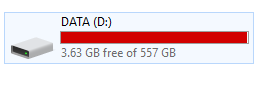
Seems i've ticked "auto deploy" in the solus UI yesterday....... Lucky i only have 10 clients using the agent at the mo..... everything seems fine except one thing..... It's used ALL my disk space on the server! I'm really new to Solus and i'm not familiar with its file structure, which most likely explains my mistake here..... Can anybody point me in the right direction of purging or cleaning this up please?......... or a hug..... that would work.... cheers

-
EDIT: sorry just checked this...... "system" is indeed at both locations with "full control"
-
I'm not sure on the physical location of the file\s (linked docs) in question... would this permission be needed on "D:\SIMS_Root\DocStorage\server-name" on the sims server? (i'm guessing here apologues) The user's home locations already has "system" at the root of the share
-
Again thanks for the help. I do have a service running named "SIMS .net Document Server" @ C:\Program Files (x86)\SIMS\SIMS .net Document Server\DocumentServerService.exe. It running as "local system account"
-
i'm trying to get a affected staff member to my office to test this (i don't have the permission in sims to access reports). It seems that when user A creates a report as a .xml linked document (and is the owner), user B gets an error generated by sims when trying to access that linked doc. They can browse to their N: and access it that way..... but it won't open via sims directly. i must apploiges as i have very limited sims knowledge, so i'm not sure if i'm explaining it well. Does user A need to be using an .xml format when creating reports or should they be using .pdf or even .docx? (Not sure if it's a sims limitation).. Thanks for your response.
-
I should add, that the users seems to get the error generated from sims after running the report. When they manually browse to the folder they can read it fine.
-
Sure have, full permission.
-
Here's mine https://www.johnhilton.co.uk/
-
Just updated to windows 10 on a select few things..... still having this issue..... no idea what is causing this. The user has full permission on their folder. Anybody have a suggestion? cheers
-
Can you provide any more info on this please? Is your wallpaper part of the theme file or separately via gpo? I assume it's something along the line of... Setup on pc as wanted. Export "theme" and save to network location deploy theme via gpo? thanks in advance
-
It's after the mouse or space bar is pressed. We use it as our aup. "Interactive login message" in gpo