-
Posts
2,107 -
Joined
-
Last visited
Content Type
Forums
News
20th
EduGeek EDIT Conference
Blogs
Everything posted by Jaan
-

[ltsb, 1809] How are you guys removing old/stale local profiles Windows 10 LTSB 1809
Jaan replied to Jaan's topic in Windows 10
awesome. Do you have an issues with it? It says on restart, i assume it doesn't do it on shutdown then?...... so what happens during a windows update restart. How many days do you have it set to? Thanks for the response, sorry for all the questions -
Just noticed that a high number of our pcs are showing low disk space. We've now enabled Storage sense (not sure that's going to help us here), but have also identified that most of the bloat is due to ex groups profiles still being on the machines. Back in the day we used delprof.exe (win XP era!). But not sure what the best approach is here. We can manually delete the profiles to circumvent the issue, however i'll looking for a long term solution. Just after any pointers that you guys might have. How are you doing it? In a past era, we'd reimaged the machines every summer holiday..... but there's less of a requirement for this Anybody using this or know if it works?

-
Hi, i just removed and reinstalled the agent and it worked fine........ thought i was going crazy
-
Hi all, I've managed to install Solus on a non domain pc using the extracted install method (from solus). However, although Solus has installed. The icon is red i'm is unable to find/connect the server. The client machine doesn't have the windows firewall enabled at the mo. anybody have any ideas? I think it's because it's not on the domain i'm having issue.
-
DFE Chromebooks and on site web filter issues (SOPHOS XG)
Jaan replied to Jaan's topic in Internet Related/Filtering/Firewall
Looks like us Edugeekers were right....... you start questioning yourself sometimes! however I don't agree that this scenario/issue isn't a "Common problem". ------- Hi Jann, After doing a bit more research I have found out that what I was hoping to do isn't possible. Extensions and Apps are assigned at the user level and can't be controlled at the device level, hence the confusion, it's a bit difficult not having the same environment this side to be able to test with. Unfortunately I am unable to offer any further advice on how you could get around your issue. It's not a common problem where a user would have access to 2 devices with different networking restrictions in place and one of them being imposed through Chrome policies and the other not. Regards Dfe User Support -
DFE Chromebooks and on site web filter issues (SOPHOS XG)
Jaan replied to Jaan's topic in Internet Related/Filtering/Firewall
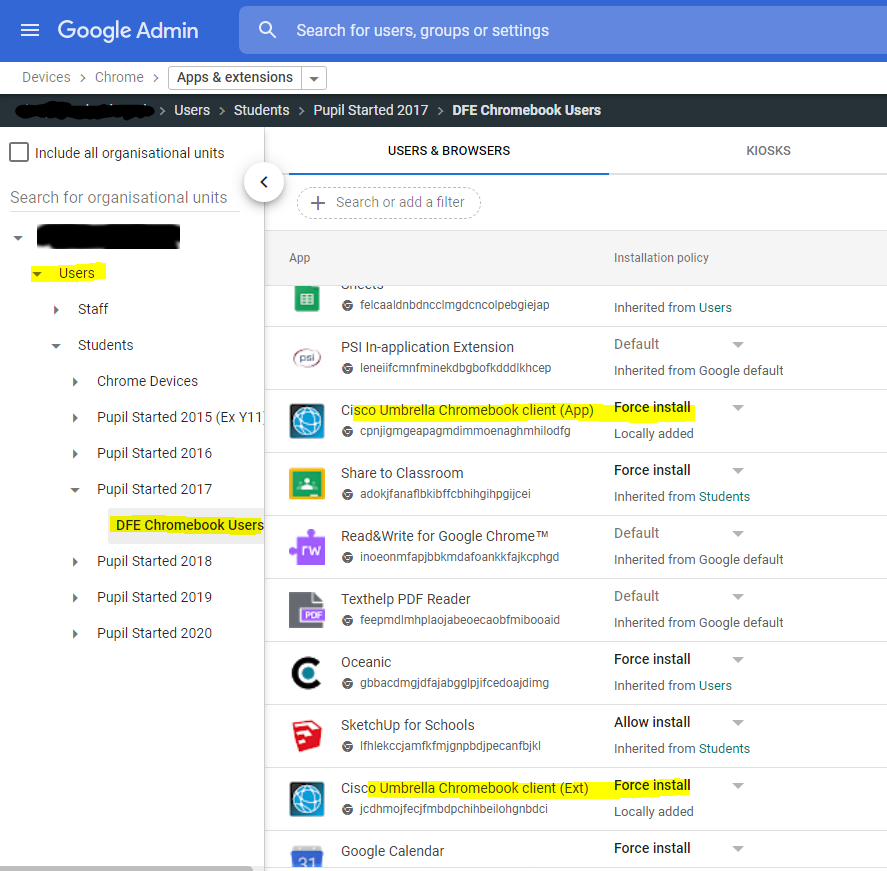
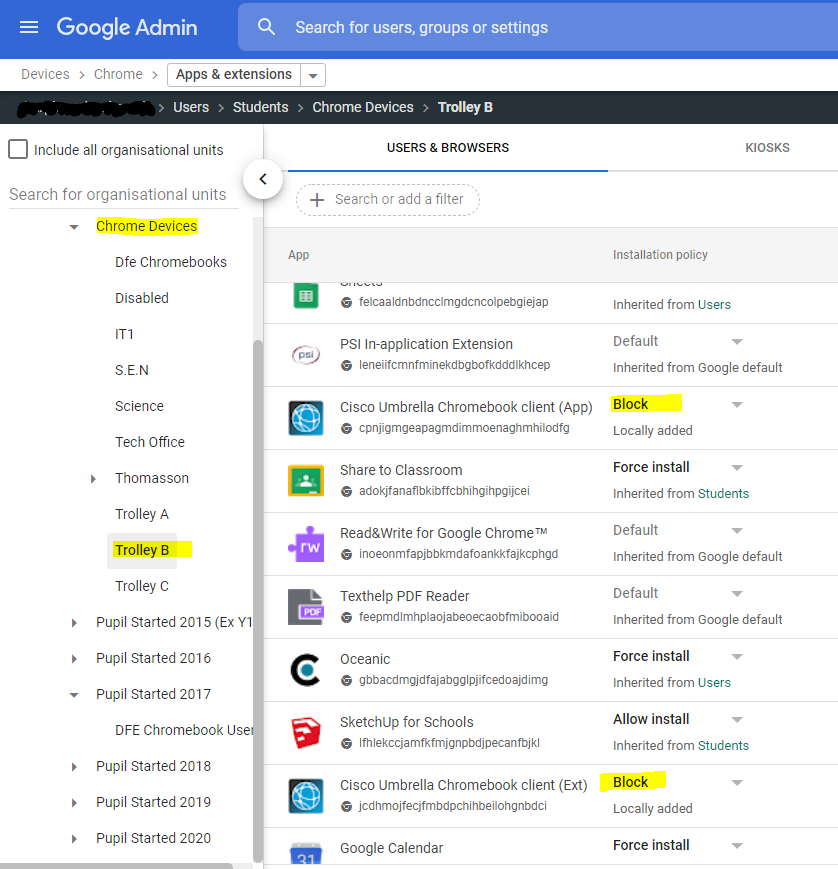
I've tried this again and its defo not working...... If also used chrome://policy to force both user and devices policies to update. Cisco is set to be installed at user level: Then it's blocked at device level; And yet when one of our DFE students logs into one of our onsite chromebooks...... the cisco app is installed and everything goes super slow. I Think the Dfe are wrong.
-
DFE Chromebooks and on site web filter issues (SOPHOS XG)
Jaan replied to Jaan's topic in Internet Related/Filtering/Firewall
Looking at Google documentation https://support.google.com/chrome/a/answer/9037717?hl=en 2. Machine-level cloud policies Apply to Chrome Browsers enrolled in Chrome Browser Cloud Management. Take precedence over OS user and Chrome profile settings made in the Admin console. Are set using the Admin console. So sounds like it might work. I'm gonna give it another go........ -
DFE Chromebooks and on site web filter issues (SOPHOS XG)
Jaan replied to Jaan's topic in Internet Related/Filtering/Firewall
We have 140 of them lol -
DFE Chromebooks and on site web filter issues (SOPHOS XG)
Jaan replied to Jaan's topic in Internet Related/Filtering/Firewall
In fact that's what the Dfe are suggesting. However my after testing i'm still having the issue........ Cisco Umbrella is force installed at User level...... but Blocked at Device level on the school Chromebooks.... It still presents itself to the user on a school owned device. I'll make sure i've not missed anything and ensure the device policy has applied to the Chromebook. ---- Hi Jaan, If you set the Extension to be blocked on the Users settings for the School Chromebooks OU then it should block that extension on the Devices. Please do test and let me know as I can't test it on my side but i have seem this setup like this before. Regards Dfe User Support -
DFE Chromebooks and on site web filter issues (SOPHOS XG)
Jaan replied to Jaan's topic in Internet Related/Filtering/Firewall
My understanding is the same as yours. -
DFE Chromebooks and on site web filter issues (SOPHOS XG)
Jaan replied to Jaan's topic in Internet Related/Filtering/Firewall
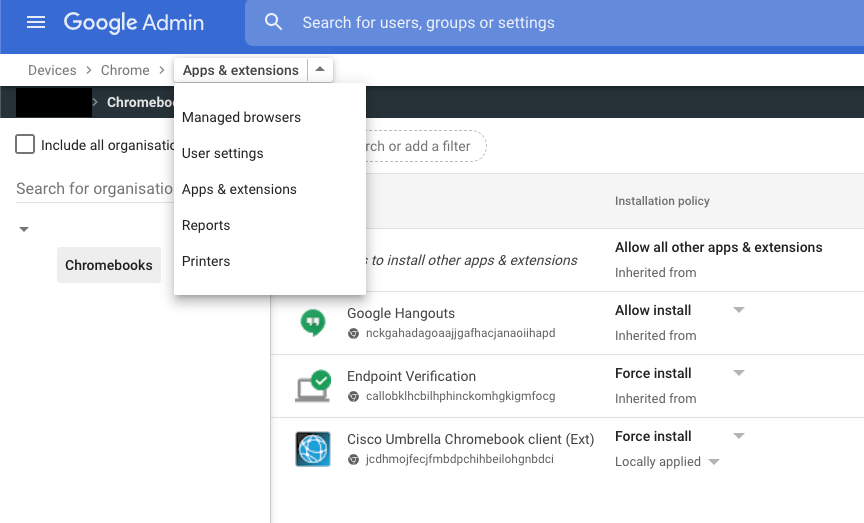
Another reply. Now i'm really confused Hi Jaan, Apps and Extensions have recently moved to a new page and there is no more User apps vs Device apps but simply apps and extensions applied to OUs so if you have an OU for DfE devices and an OU for Schools devices then set the extensions and apps locally per OU as you would like them to apply. And as per my previous response the Extensions and apps will be applied in the order of Device, Machine, User, Browser so if applied at the device level this will take precedence. Regards Dfe User Support
-
Thanks for this...... we had a visit from our LA and i didn't let him leave until he sorted it LOL He did! but was very vague on how he did it Thanks again, it might come in useful for others.
-
DFE Chromebooks and on site web filter issues (SOPHOS XG)
Jaan replied to Jaan's topic in Internet Related/Filtering/Firewall
Still having issues with this. I have reached out to Dfe support and had the below response. (bottom of post) They seem to suggest that the cisco extension should be installed to a device OU not a user OU. However i pretty sure that it doesn't work like that and apps/extensions are purely user OU based. (unless in kiosk mode maybe?). I've also managed to secure a small number of Sophos Mobile licenses and tested that works on the Chromebooks and filters fine both on/offsite DFE chromebooks (once cisco is removed of course). ------ Hi Jaan, There isn't anything we can do in Cisco Umbrella as it is a platform that is used by Hundreds of thousand children around the UK and has been configured to meet the broadest user base with the best level of protection. Chrome policies set in the admin console are applied in the order of Device, Machine-Level, User, Browser, as per this help article, so if you were to put the school's Chromebook devices in an OU that didn't allow the installation of Cisco Umbrella, then regardless of which student used the device Umbrella wouldn't be installed on it. I hope this helps but please don't hesitate to ask if you need any further assistance. Regards DfE User Support -
I agree with above points. I wouldn't consider "spinning rust" anymore. The performance difference is day and night. We use storage spaces here (S2D in a cluster mind). But what if you had 2 ssd in raid 1 for the OS and a set of 4/6/8 SSD/nvme disks in a storage spaces group for the other stuff? Just thinking out loud mind. But i would also add that RAIDs aren't a alternative to good backups, we've had controllers fail in the past which was fun.
-
ABTutor V9 - Disconnecting clients
Jaan replied to Netwacky87's topic in Network and Classroom Management
There was i bug in the last version that affected WOL. It's been sorted in the latest release. We were affected by it. Works now -
[sims] Solus breaks with latest Workstation Patch
Jaan replied to FragglePete's topic in MIS Systems
Managed to get this sorted by following this guide. Had to redeploy the lastest SIMs version (summer) and the lastest workstation patch. I had a different error than what the guide says...... however capita said it would fix the issue...... and it did. https://support.capitasoftware.com/csm?id=kb_article_view&sys_kb_id=79c77d6a1b6bd094676cdb12cd4bcbc5 -
Maybe this? https://www.memtest86.com/
-
DFE Chromebooks and on site web filter issues (SOPHOS XG)
Jaan replied to Jaan's topic in Internet Related/Filtering/Firewall
It's not the DFE chromebook that the user is using. These are onsite chromebooks, where the user has a dfe chromebook at home. As such the cisco umbrella extension is installed against their user profile and then installing on the school Chromebook -
DFE Chromebooks and on site web filter issues (SOPHOS XG)
Jaan replied to Jaan's topic in Internet Related/Filtering/Firewall
I don't have access to it. unless i've missed something in the DFE guides. i suspect this is where the issue lays also -
Hi all, Like most of you in the UK we have received a number of Google Chromebooks from the DFE for our vulnerable students. We use Sophos XG and web filtering on site. We've set the chromebooks up following the guides and have cisco umbrella setup and working. The extension is setup and installed on a user OU in the domain/Gadmin Panel. We started to have reports that the chromebooks around the school were running slow...... on investigation, it was only the students that had dfe Chromebooks (at home) that were affected. The cisco umbrella is installed against a user OU, so when the student logs into a school based chromebook, cisco umbrella is also being installed. This is hugly slowing down the Chromebooks ability to access the internet onsite. If a different user logs into the Chromebook that is not a dfe chromebook user....... no issues. PLugging our onsite Chromebook into our "dirty lan" with a DFe user and there's no issues. cisco umbrella filters the websites. Anybody else experiencing this?
-
[sims] Solus breaks with latest Workstation Patch
Jaan replied to FragglePete's topic in MIS Systems
I've been in contact with our support channel here...... i'll keep you all posted if we end up with a fix. We started to have an issue after applying the latest workstation patch. since then we can't deploy sims, Solus agent and discover deploy and work fine. Sims doesn't. This is the error we get when asking solus to check for updates against the workstation: tried all the standard stuff,removing sims, removing from solus removing and reinstalling the agent blah blah.
-
[sims] Solus breaks with latest Workstation Patch
Jaan replied to FragglePete's topic in MIS Systems
I've "cloned" sims from one PC to another..... however it doesn't seem to be very stable, not sure if that's just bad luck I've submitted a number of support requests via our support channels...... it's all very quiet! -
Hi all, We're looking at ubiquiti as one option for our infrastructure refresh. I just want to know who you guys would recommended here in the UK. I don't have any experience with these suppliers, so just wanted to ask the edu community if there's any in this list you'd recommend. We're looking at a core and edge refresh with the possibility of wifi further down the line if we find it better than our current Sophos Wifi/AP combo. cheers all
-
[sims] Solus breaks with latest Workstation Patch
Jaan replied to FragglePete's topic in MIS Systems
i've removed the machine from solus here, made no difference -
[sims] Solus breaks with latest Workstation Patch
Jaan replied to FragglePete's topic in MIS Systems
yes i have. I've also noted this affects all my machines..... be each has a different agent id number. Must be centrally from the server.