Koldov
-
Posts
5,084 -
Joined
-
Last visited
Content Type
Forums
News
20th
EduGeek EDIT Conference
Blogs
Everything posted by Koldov
-
Thing is on Amazon even the Duracell has a load of reviews saying they got a dud/fake batch... who can you trust these days?! Also see some Duracell as being 'baby-safe' I wonder if the coating may play some part in them not working?
-
Teacher came to the office complaining, so had to revisit this today as the half-term projector clean seems to have kicked off this message being displayed again! Something in the back of my mind was telling me that I'd 'fixed' it before and I seemed to remember the answer was the 'keystone slider'... Guessed I'd posted about it on here and got the answer, but dismayed I hadn't given thanks at the time! Please forgive me, I have now righted that wrong (and fixed the projector... again).
-
Going to make myself look like an idiot (well even more than usual), but even the simple things make me doubt myself! I've never really cared much about brand, but I've just used my last one and want to order some more. Looking on Amazon I can get 20 cheap no-name ones for about £5 or 4 Duracell ones for about the same... Who goes cheap, who goes brand name?
-
 Title kind of says it all, but I have just moved my file shares onto a VM and now I want to remove the 'File Server' role from the original server. Unfortunately it appears Server Manager won't let me remove the role as it says there are still shares on the server. I've stopped sharing all the old staff shares, so I checked and I still have print$ and VBRCatalog. So I deleted the print$ share, but I'm pretty sure I shouldn't get rid of the Veeam VBRCatalog share. Should I use the 'How to Move the VBRCatalog Folder' instructions from Veeam and in-between moving it and re-sharing it, try to remove the File Server role..?
 -
Only posting to start this thread in this forum because mostly iPad users have these cabinets I guess... Looking through some old boxes I found the remote controls for these charging cabinets (Carrier 30 Cart) and the instructions for the 'Eco Safe Charge'. I thought I'd get them set up so I can just walk through and turn them on/off when the teachers forget (every time). However, I followed the procedure and they won't pair... I have to say they've been in this box for quite a few years so they've never been paired, but the battery tag has been in (and they still read +3v), turned the units off and on (yes I did), pulled the battery out and replaced, but neither remote will pair with either of the units.... Do you think either the remotes or the units have 'forgotten' their codes after all this time? Unlikely I know, but... Or did this version not have remote control (I think it did otherwise why send remotes)...
-
This has always been fairly hit and miss, but has previously worked (albeit occasionally with a bit of manual intervention for the odd one or two)... However, I haven't seen this before! Got quite a lot on this half-term so I really wanted to get this done as auto-magically as I could, but I select the iPads and then click the update iOS command and it tells me there are 'no updates available' (which is blatantly untrue). So now I have to manually go round our hundreds of iPads and physically go through the menu to update them all individually. Annoyingly they also have 'Update Automatically' set on the actual iPads themselves, but they never do... I thought about maybe some filtering issue, but they do it without a problem when done manually and Meraki seems to be able to communicate with them for everything else...

-
Also can someone explain how much 'free' space is needed on a volume for Veeam to do a backup? I've had it before and I'm sure I've seen a post on here about it (but can't find it now) where if the volume where the Hyper-V VMs are has very little free space, Veeam will fail... Not sure if that's how it went, but pretty sure I'm remembering correctly... Only now I've got an extra 400GB VM that volume is pretty much full!!!
-
Finally got the guts to pull the trigger on moving the 350GB+ staff shares to a VM!!! I also changed the server from BIOS/MBR to GPT/UEFI (yes it's that old), deleted some old drives/shares and doing all the other half-term jobs, so it's been a busy week so far... I used 'Windows Admin Center' and 'Storage Migration Service', it went OK eventually but it wasn't quite as easy and straightforward as the Microsoft Engineer made it look on his 7 minute video... I moved the server name with the shares so I didn't have to remap everything, so next comes the massive task of changing over everything else (Veeam, FSRM, Scheduled Tasks and trying not to forget turning ABE back on and all those other little things that I've tinkered with over the years - and that I'll only remember about when everyone comes back next week)... Anyway, backups... I was using a hybrid Veeam/WSB set-up where Veeam did the VMs (and one job for the physical Host OS) and then WSB for the shares, all to rotated USB drives for offsite storage (we also have Redstor doing SIMS and some VIP shares). I like how that worked but now the shares are on a VM should I just add it to the rest of the Veeam VM jobs? How easy is it to fire up and pop out a single file that needs restoring (because some teacher deleted it last week and it's really, really important), because WSB was really easy. Do I need to get Veeam to read and 'mount/restore' the whole 400GB VM backup or is there some sort of file browser (might be obvious for some, but I've never used it for file restores).. Edit: If it matters, we are using the Free Community edition of Veeam B&R (so there is no 'Veeam Backup Enterprise Manager')
-
Well, that's annoying... but relevant to this thread, so not going in 'Annoying Things'... I got it to work, unfortunately as it was nearly a year ago I've forgotten quite how! But a while ago somebody mentioned that the 'Job Accounting' wasn't working and 'did I know it can be printed to without a code' (no I didn't because I thought they would have had a way to set this up - even though I knew they couldn't do a straight 'settings' clone from the old Kyocera machines). I think I was so glad I got it to work I moved on to the next thing pretty quickly and didn't look back.... I did research it for a bit every now and then when I had time, but never could Google the right question to get the answers I needed... I don't use these printers and the company that came and installed it didn't mention anything, so I got in touch to ask them. After assurances they would 'look into it' I never heard anything back and even after accosting a couple of engineers (who didn't know how to do it) I was none the wiser... then I was told it's a 'user' configurable setting and therefore not supported under contract and therefore any information would be on a 'best effort' basis! Well, yesterday I was researching how to do something else and found the actual thing I needed! In Lexmark speak, it's not called 'Job Accounting' but 'Configuring Departmental Codes' and isn't in the traditional 'settings' it's in 'Apps > Device Quotas'... This morning I spent a while figuring out how to set it all up ready to implement it and got this... So either they don't know how to do it (unlikely for a 'print' support company) or they know how to do it, but also know they have supplied it without a hard disk so it can't be enabled. I'm sure the previous Kyocera ones came with a hard disk as standard...
-
I've followed a few guides to create my own 'Disk Clean-Up' scheduled task and everything appears to work as expected. However, the task will not stop running.... The process is the usual: Admin CMD prompt cleanmgr.exe /sageset:1 Choose options Create Scheduled task Program/script field type: C:\Windows\system32\cleanmgr.exe In the Add Arguments field type: /sagerun:1 This works and kicks off the Disk Clean-up but then the 'Task' carries on running. I don't think the Disk Clean-up is still running as I can see that start and end in the Disk section of 'Resource Monitor', just the 'Task' doesn't end. It may not be a big deal and there are obviously workarounds like setting it to end the task after 'X' hours, but I don't want to end it prematurely and I'd also like to know what's causing it. Just to say if there are any inbuilt disk clean scheduled tasks they are not doing a great job, as I found 8GB of Windows Update Cleanup...
-
Can someone please remind me how to get this working... I knew it once but forgot... Domain Admin can't access sections of the Settings app? Ah, it's OK I found the workaround again: This issue can be bypassed (not fixed) by editing Security Policy: run secpol.msc Computer Configuration > Windows Settings > Security Settings > Local Policies > Security Options enable User Account Control: Admin Approval Mode for the Built-in Administrator account You will not get the same error anymore. But now elevation prompts are displaying. Any issues with this?
-
Unfortunately I'm a little limited (licensing) in the amount of VMs I can spin up for individual roles... I know the host shouldn't be running anything else, but once I've got the host, this leaves me 2 x VMs for all the other roles so some are going to have to co-exist... added to that 1 of the VMs is a DC (which again is another one that shouldn't have any other roles) and I'm left with one VM for everything else! Not sure how I could split them up any better than I have?
-
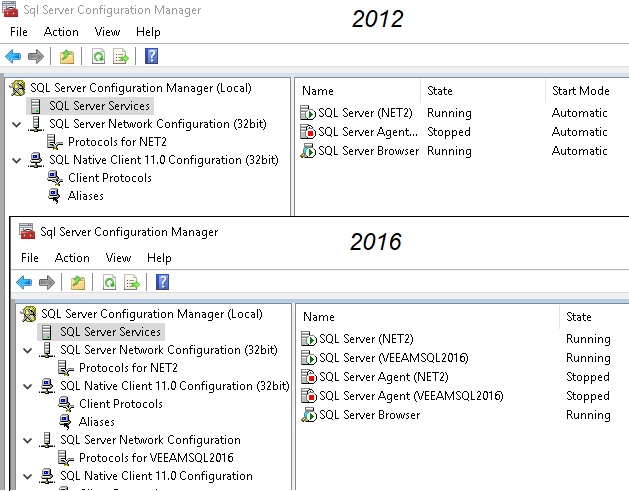
Yeah I looked at the 'Net2 Configuration Utility' but couldn't actually see anywhere it specified 'where' the database was (if that's even the right terminology - which I doubt)... Strangely enough... If I open the SQL Server Configuration Manager (2012) I just see (NET2) If I open the SQL Server Configuration Manager (2016) I see (NET2) and (VEEAM) Unfortunately I don't know what that means...
-
Yeah, it's a sticky one as we're a small school, minimal server (and server licenses), minimal budget, etc. Same old story... SQL is for Veeam and Paxton, so I'm not sure I can do much about it (needing SQL on the host for Veeam to backup the VMs)... is that not right? EDIT: SIMS is on the large VM EDIT 2: I put Paxton on the host for stability/uptime, purely because it was initially on a VM and the VM failed = doors not working... and I figured the host was a little more bulletproof...
-
Having trouble with my memory (no it's not just my age)! I have a VM Host (old tower server with 24GB RAM)... The VMs (and memory allocations) are: VM1 = 8GB VM2 = 4GB VM3 = 2GB So, that's 14GB and I should have 10GB left... Now the server (HOST) also runs the OS and Hyper-V role (obviously), SQL (Veeam and Paxton Net2) and Sophos. The system runs at 99% allocation, 99% of the time and 1 of the VMs is set to shut down overnight and restart in the morning, but quite often it won't start because there's no memory, and one of the other VMs slows to a crawl (set to 'dynamic' memory allocation). To overcome this I've stopped the VM shutting down overnight and set the memory allocation to 'fixed'. Ultimately I know I'm just going to have to buy some more RAM, just wondered if 10GB not enough...? Or does this sound about right? Most of the time I can look through the Task Manager/Processes and don't see anything sucking up huge amounts of RAM (admittedly Veeam can get to a couple of GB though). What does Server2019 OS use roughly, 6GB?
-
I'm not really sure what I'm asking here (probably a really stupid question) so bear with me... A long time ago we had Paxton Net2 installed and more recently we had EntrySign put in. For years Paxton had been on the Business Manager's PC, but due to the need for Paxton and EntrySign needing to communicate Paxton was moved to the server. Paxton got put on a server that was running SQL2012 at the time and as it needed to be done quite quickly I just went with it. Later on I installed Veeam and put on SQL2016... I'm starting now to clean up the servers and uninstall old SQLs, but when I go to uninstall SQL2012 it got to the page where it says do I want to uninstall (drop down list) Paxton Net2... and obviously I don't so I backed out. The question is, what does it actually mean and how do I work out if uninstalling SQL2012 will kill Paxton (and how do I get Paxton to be an instance in SQL2016) if that even makes sense?
-
Junior Librarian 3 on Windows 10 - barcodes do not print
Koldov replied to JonMills80's topic in Windows 10
Yes, you may very well be right and I apologise if my post wasn't helpful (I can't remember that far back)... For the OP if there are any files left from the old install (not sure if you mean you upgraded the machine to Win10 with an upgrade or a fresh install or used a new machine) some have had success copying folders/files from the old to the new (although might not help as you've said your access is limited). On a similar theme, here's a very old post, but you are dealing with some very old software... /forums/mis-systems/185873-junior-librarian-print-new-barcode-labels-error.html -
Haha! No I haven't... I've decided this is definitely a 'half-term' kinda thing! However, I have been testing (read mucked about) on a smaller test set-up and it seemed to work OK, so I am probably going to go with a different approach... I have been shrinking other partitions so I think now I have some space to play with and now I have a cunning plan which is as follows: FORMAT 'DATA1' (D:\) (OR JUST DELETE THE DATA ON THERE - NOT SURE IT MATTERS) - RENAME 'DATA1' TO 'HYPER' SHUTDOWN VMs DETACH HARD DRIVES FROM VMS AND MOVE TO OTHER DRIVES SHUTDOWN THE HYPER-V SERVER MANAGER AND STOP SERVICES USE ROBOCOPY TO COPY THE REMAINDER OF THE VM FOLDER & FILES (MACHINE CONFIGS ETC.) robocopy V:\ D:\ /E /copyall /R:1 /W:1 DELETE HYPER (V:\) PARTITION GIVE THE NEW HYPER DRIVE (D:\) THE LETTER V:\ EXTEND THE NEW HYPER V:\ PARTITION RESTART HYPER-V SERVICE MOVE THE DISKS BACK ADD DISKS THROUGH HYPER-V MANAGER (SO THEY GET THE CORRECT PERMISSIONS) START VMs Once the new Hyperdrive is expanded, this should give me enough space to create another VM to do the FILE SHARES and this in turn will allow me to delete the 'DATA2' partition and expand the Hyperdrive even more, so I can expand all the Hyper-V disks and give them enough breathing room - and for Veeam to do its thing as it complained last time I had zero space left on the Hyperdrive (Hyper V:\).
-
Windows Server: Replacing Server What Best to Do
Koldov replied to talksr's topic in Windows Server 2022
Agreed, well worth looking at the long game and getting it right first time (of course in IT 'getting it right' changes with each new tech advancement and it's not always easy to keep up) and having said that I'm pretty sure I can hear the 'why do you even need a server...? Just move to Azure, Cloud MIS, Cloud Print and Sharepoint' crew on the horizon... not that they're wrong of course, but time consuming to plan, implement and retrain and if your support is limited by time & budgets (or at least what's spent on IT support/training), or there's a lot of SLT pushback it's a slog. -
Windows Server: Replacing Server What Best to Do
Koldov replied to talksr's topic in Windows Server 2022
I have been on a similar journey to you (for quite a while now as I can never seem to find the 'right' way to do it, or the time) plus I'm mostly worried I'm going to mess it all up and lose everything, as I'm trying to do it all on one server and don't have the luxury of just copying the data... Pretty sure everyone is going to say Veeam, imho it has a bit of a steep learning curve, it can be complicated but it seems to do a good job once you've ironed out all the kinks. Also it depends on what you're backing up, where to and what your retention is going to look like. The way I set it up is that everything is in the Hyper-V folder, there are other ways to do it that I've seen (even with VHDs on other drives/partitions) but I think the general idea is that you create 1 x VHD for the OS and then add another VHD for data (instead of just creating 1 large VHD and then partition it inside the Virtual Machine). This can get complicated though as each VM only gets a UUID and each VHD only gets a name so I found pairing up the 'disk' with the 'machine' difiicult... Does anyone put each in different named sub-folder? Sounds good! Unfortunately I only had 2 NICs which I initially had teamed, but split them back up so 1 is for the Host OS and 1 is for the 2 x Hyper-V. I believe you can have 1 Server OS license and this allows you to have 2 x VMs (the caveat is that nothing else but the Server OS and Hyper-V can run on the host). This can get a bit sticky if you have 1 x VM as a DC (which we all know should have nothing else running on it) and then 1 x VM for everything else, which is pretty much impossible depending on what else you have to run (Print, SIMS, File Shares, etc.). Otherwise you might have to think about Datacentre licensing, but others will know more... -
Junior Librarian 3 on Windows 10 - barcodes do not print
Koldov replied to JonMills80's topic in Windows 10
Sorry for the very basic questions, does anyone know if 'Junior Librarian/Micro Librarian/Reading Cloud' and it's are all still basically the same thing under the hood (I presume so as it's Capita/ESS)? As I sometimes see (and personally use) both names interchangeably... If so what is 'LabelPrint'... is it some kind of 3rd party software? Only I thought Junior Librarian/Micro Librarian did an 'OK' job of printing it's own barcodes (forgive me if I'm wrong)... https://resources.microlibrarian.net/Management/WebHelp/US/index.htm?context=2800#:~:text=Click%20Modules%20%2F%20Labels%20%2F%20Generate%20Barcodes,number%20that%20will%20be%20created. Although we use the online version now, I'm sure we used to have the 'on-prem' version and I've never installed anything else on our library computer and it's always printed the barcodes they need as far as I'm aware (I mean nobody has ever said they can't). -
DNS forwarders are the LGfL DNS servers I think (172.30.178.53 & 172.30.178.54) Not sure how to check where the Core Switch is pointing...
-
Yeah I did see this in my frantic research but didn't give it a thorough read as I was in panic mode... I didn't really understand though because even if a switch has a low priority, when it comes up first and doesn't detect any other switches, if it has a little vote, does it not say 'even though I'm a low priority, I'm the only switch so I should be master'... Or will it just wait 'forever' for a higher priority switch to throw its hat into the ring...?
-
Thanks for all the answers, I'll dig into it more when I have the time. However, for the last couple of hours I've been firefighting staff members telling me they have no internet (internal network is fine, they can get to the servers, just not Google etc. so they can't teach). Nothing really to narrow it down as such, it's a bit random.... wired computers, wireless laptops, static and DHCP... I don't know where to start!!!
-
Haha, yes of course but I'm not saying the switches are DHCP (I'm not even sure how to check), just that because they never change and always come up with the same IP doesn't necessarily mean they're static was all.