tben2505
-
Posts
323 -
Joined
-
Last visited
Content Type
Forums
News
20th
EduGeek EDIT Conference
Blogs
Everything posted by tben2505
-
[sims] Names of Class Teachers on Individual Reports
tben2505 replied to tben2505's topic in MIS Systems
Yes I had thought of using another aspect - bit of a pain, though! Cheers -
Hi guys We have a situation where TEACHER A teaches 1 lesson a week of RS, and TEACHER B teaches 2. The reports are written by TEACHER B, but the name pulled through is TEACHER B....we think alphabetically? I'm not sure if there's a way to determine which teacher is pulled through - as we clearly don't want TEACHER A's name against a report written by TEACHER B Is there a way to sort this? Cheers T
-
[SIMS] Best way to print individual reports???
tben2505 replied to ilsley_SIMS's topic in MIS Systems
"Open e-mail attachments and other uneditable files in reading view" - uncheck it. works!! Thanks -
[SIMS] Best way to print individual reports???
tben2505 replied to ilsley_SIMS's topic in MIS Systems
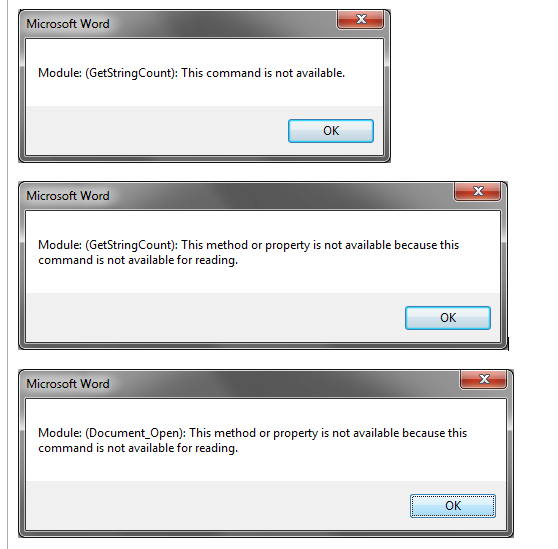
The script works if you click OK to the three error messages it displays for each file:
-
[SIMS] Best way to print individual reports???
tben2505 replied to ilsley_SIMS's topic in MIS Systems
Great - this doesn't seem to work for WORD 2013, though - is this what you use it with? I wonder if anyone knows how to combine all the exported XML files into 1 XML file - this would allow for printing to be done easily, by merely opening the 1 xml file in WORD and then printing - and would make archiving a lot easier, too - say to PDF. Is it possible? Cheers Tom -
[sims] SIMS - Individual Reports: <<ReportSection>> tags not working!
tben2505 replied to ilsley_SIMS's topic in MIS Systems
OK I worked it out - here's what I replied to my own support ticket with: 2 pages per subject were created - each identical apart from the results inserted. This was the issue. If I made the second page different (eg add a " " SPACE after the subject) the report section tags worked perfectly. -
[sims] SIMS - Individual Reports: <<ReportSection>> tags not working!
tben2505 replied to ilsley_SIMS's topic in MIS Systems
I have a similar setup: Page 1: School logo embedded in Header with Pupil Name and Reg Group <Subject Name Attainment and Effort grades Teacher comment < -------page break-------- It is working for some subjects and not others - it's totally bizarre - even removing all report sections and going one by one - SOME will be removed and some will stay - despite their being no results yet (well, not for the kid I'm testing on) Any ideas?! I have to use report sections as opposed to a table as they want a page per subject and quite strict about the layout -
Hi guys, Anyone know if, when a class is shared among 2+ teachers, it's possible to add all names in an individual report? Cheers T
-
Hi Folks In our 6th form, where a student is taught by two teachers, we like to have to reports. However this class is defined only once, say U6-Ma1, which is shared by two staff, say ABC and DEF. When I create the template and assign this class to it - am I right in thinking both staff will access the same marksheet? If this is the case - is there a way of having two separate marksheets - or will that involve duplicating classes in NOVA to accomodate it? I think a workaround is doubling the aspects in these templates, say comment 1 and comment 2, but it's not ideal... Cheers all, T
-
Ah I dind't realise they couldn't see the classes - that's fine I'll add them to the course. Cheers all T
-
Hi guys - sure it's simple - but I can't get my HODs to see marksheets of subjects they are head - eg my science HOD can only see marksheets of classes she teaches, not classes of other science subjects. I've added her as "Head of Dept" in each subject in course manager, and tried "Course Co-odinator there too - but still just her classes... any ideas? Cheers! T
-
Hi folks Does anyone know if this view can be customised at all? With regards to the contact details that are displayed for the pupils - if a pupil has mother and father father both priority 1, it seems to show the contact that appears alphabetically first, though we'd prefer mother. Clicking "See more" lets us see it but just curious if this can be altered. Also we'd like to see the address here - is that possible? Some staff are phoning priority 2s (divorced parent) who doesn't live with the child any more - since all they see is "father" and a mobile number. I'm aware this probably can't be done - but if not - are there any procedures or ways of doing things that you implement to make sure staff contact the correct people etc? Cheers all
-
Thanks @vikpaw, I think we'll go with the "paper" reviews (to the pool!) and see how it works - we just moved from Engage and the one thing I liked there is the review screen, where they can see everything in the one screen then write the HOY/FT comment. Cheers again
-
AFAIK there is no way of staff who are supervising a detention, to quickly see on their detention session if a pupil is absent? My point is, if a pupil has been added to a detention for a day where he is then absent, we want the staff to remove the student from the detention, then add them to another. Is there a quick way for them to see if they're absent in order to do this? There AM/PM mark on the detention screen would be useful Cheers T
-
But Vikpaw - my issue with this is the checking of data - and if a Form Tutor/HOY needs to write a comment - how do they "see" the subject comments/grades in one place to make their judgement? I would much prefer to use AM as Profiles looks too complicated. But for HOYS/Form Tutors to read the whole report to write their comment - that's going to be tricky, no? Cheers! T
-
Hi folks (me again!) We give detentions to all pupils who are late 2+ more times in one week (only AM session). Obviously we need to manually add these kids to the relevant detention - so we need to know who they are. So I'd like to run a report which shows us this - preferably with the details of each session (on per row) and preferably with a total. We'd also like to filter it by year/reg - and obviously session date (which would be the current week). Any ideas!? Cheers T
-
[sims] Run a report afainst a User Defined Group
tben2505 replied to tben2505's topic in MIS Systems
Great - thanks! I think running the report from the Group block first - then adding kids details is useful too as it won't include the name of the group in the report! Cheers all - and apologies fro not finding the earlier thread! -
[sims] Run a report afainst a User Defined Group
tben2505 replied to tben2505's topic in MIS Systems
Yeah I just want to design a report, say pupil addresses, and run it against a UDG. Not sure how to do that...? -
Sorry if I'm missing something - but does anyone know how I can do this, to be able to, for example, prompt at runtime all user defined groups we have created? Cheers T
-
Hi Phil The issue is with InTouch -when clicking "Send Message" we want this member of staff in the Linked Adults - rather than having to click "OK", then going back to find them and add them, clicking "OK" again, then sending the message. Does that make sense? Cheers
-
Hi guys! Does anyone know if there is a way to add other staff to the Linked Adults in SIMS? Problem is, on InTouch we want a senior member of staff added to the linked adults of all our senior kids (he's head of pastoral for Senior Tier) but even though I identified him as a supervisor for the Tier (in the pastoral structure), he won't come up. The Head of Tier does, though. Any way around this? Can be annoying having to manually add him every time in InTouch Cheers All! T
-
Hi guys - sorry for the really obvious question but it' sometimes easier to get clarity on here - We're hoping to use the text function to alert parents of pupils who aren't in school (with N codes) We are keen to know whether, if the parent replies to said text, if that reply comes to the school - and if so to whom? Is it logged against the pupils log also? Cheers all! T
-
Hi all, A bit of a newbie to the rollover stuff - hit a hurdle already. We have added all new kids to SIMS via CTF and I admitted them by going through their respective admission groups and allocated UPNs etc. I have also ran the pastoral groups promotion tool but only 3 year groups have pupils which STAY in the same reg group - so I mapped those to next year and that was fine. However now I need to allocate the pupils to next years reg groups. On Focus > School > Pastoral Structure, where all the reg groups are defined, upon right clicking then "Members" no pupils are shown - only in those year groups of the ones I promoted (and even here the new applicants don't show) Can someone help? Cheers T UPDATE - I WAS Right clicking on the reg group and not the year group to assign the kids - now looks fine!!
-
Hi all, We are moving to SIMS in September and are starting to add cover. We have found a relatively easy way to swap rooms in Cover - for instance if we want to swap rooms of CLASS A and CLASS B in rooms "ICT1" and "501" - we simply show all rooms on cover then swap them over. However, in doing this, we have found a couple of things we'd like to look at: - No cover slip is produced for the individual teachers involved in the room swap, the room changes are only shown on the notice board export. Is this something that can be achieved? How do others ensure staff are aware of room changes? - The room changes are obviously reflected in the teacher's timetable on their home screen, but is it highlighted, like cover is? - It would be nice to add a reason for the swap which can be seen on said printouts, eg "Yellis testing"- is this something that can be achieved? Do other schools have issues with staff asking why they've been moved? I suppose this is a big issue for us as we have room changes every single day - mostly because we have limited space for ICT and have to juggle things around frequently. In addition our MFL orals require rooms regularly. Anyway any advice or tips would be very useful! Thanks a lot guys, T
-
But for example, in 6th form, a head of year would have to look at a marksheets with 20-odd subject's aspects, say 3 each (2 grades and a comment) so the marksheet would extend to potentially 60-75 aspects - did the HOYs/FTs find that OK to check? I would much prefer to use AM as you can combine with in touch, too - but it's the review part that concerns me most... Perhaps I just need more practise and confidence with profiles! Cheers Tom - - - Updated - - - I may have to come and see you! Where's your school?!