Steve21
-
Posts
9,168 -
Joined
Content Type
Forums
News
20th
EduGeek EDIT Conference
Blogs
Everything posted by Steve21
-

o365 Incorrectly disabling\sign in blocking an account - repeatedly
Steve21 replied to mbedford's topic in Cloud Services
Whats the dirsync logs say? It'd tell you what it's updated on the user if it's run something against the account Steve -
If you run (via CMD while dir'd into cd "C:\Program Files\PaperCut NG\server\bin\win"): UserDirAD.exe "enable-debug|enabled-users-only" group-members Y11Students > Y11Group.txt 2>&1 What's the log file say? It should hopefully export the proper errors into that text file Steve
-
this item on our OVS license only has 3 results in google
Steve21 replied to browolf's topic in Licensing Questions
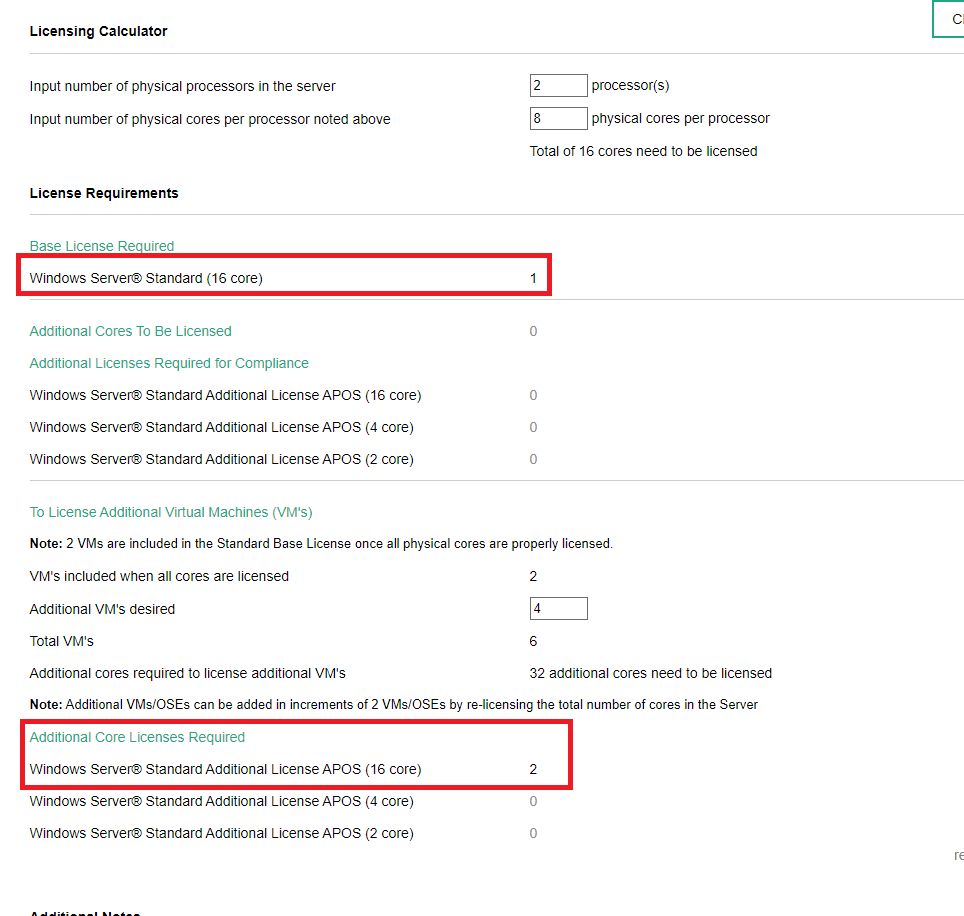
Yep there's too many "support" at MS who don't get it really. Unless you find one of the server guys who actually understand the cores etc If you want to confirm what I said earlier, just use one of the calcs available via Dell/HP etc to check: https://techlibrary.hpe.com/us/en/enterprise/servers/licensing/index.aspx So in your example, 2 CPU (8 cores each) with 6 VM - That's 48core "per HOST" to license if using Standard (e.g. 3x 16 pack): Steve
-
this item on our OVS license only has 3 results in google
Steve21 replied to browolf's topic in Licensing Questions
No because you can't license it that way either As it's 16 min per server. Honestly just sounds like whoever you spoke to didn't have a clue about server licensing Steve -
this item on our OVS license only has 3 results in google
Steve21 replied to browolf's topic in Licensing Questions
No. They're sold in packs of 2 or 16 cores. You bought 1 pack of 16 cores, that's it. Steve -
this item on our OVS license only has 3 results in google
Steve21 replied to browolf's topic in Licensing Questions
That’s one pack of 16 cores, so basically one physical server (up to 2x 8 core / 1x 16 core), and as Standard can only run 2 VMs on it Steve -
this item on our OVS license only has 3 results in google
Steve21 replied to browolf's topic in Licensing Questions
It depends on the specifics in terms of versions etc, but generally: 1 host with 2x 8 core = 16 so 48 to cover 3 hosts If you’re using standard, they only cover 2 vms, so if you need need 6 per host, you either need 16 x 3 per host (eg 16 cores l, and 6/2 vms) Aka 16 cores * 3 hosts * 6/2 VMs (if using standard version) Or 16 cores * 3 hosts (data centre license for unlimited VMs) So sounds like you are a bit off Regarding the OVS it’s not licenses it’s core pack, so you could buy 1x 16 cores, that’s 1 item on invoice but would show as 16 etc Steve -
this item on our OVS license only has 3 results in google
Steve21 replied to browolf's topic in Licensing Questions
Short answer to both of those is take it down the line in this order 1 - it’s a minimum 16 core needed per server 2 - If you have multiple processors it’s 8 min per CPU 3 - if you have more cores in the server they all need covering So whichever of those three is highest normally counts For example, 1x 4 core = 16 2x 4 core = 16 3x 4 core = 24 (min 8 per cpu) 1x 4 core and 1x 10 core (dual cpu server) = 18 (8 min + 10 etc) Steve -
Have you checked the default firewall rules? There’s three that are enabled as soon as you turn RDP on and they wouldn’t show in RSOP as it’s local rules Steve
-
Delprof wasn’t updated to work with Windows 10 properly last time I looked at it (there was the authors blog about it on their homepage) We moved to the Windows GPO to delete profiles and it’s been rock solid since the last MS change to target the old issues with modified dates changing in upgrades. Just automatically clears profiles at start up based on the days old you set in the gpo Steve
-
Good Morning All, Anyone have any particular partners they’ve worked with for a VOIP refresh with Gamma and 3CX? We have a gamma line as part of our old physical pic on an ancient contract before anyone who’s currently here started, and the current supplier is unable to answer any questions regarding the setup and moving to a new system, and Gamma don’t seem to want to discuss this as we aren’t direct with them The ideal plan being moving our Gamma to a new company (so needing to keep the current setup/numbers etc) and going full 3CX/yealink setup Many thanks, Steve
-
this item on our OVS license only has 3 results in google
Steve21 replied to browolf's topic in Licensing Questions
It's the old ProPlus before they changed/renamed it all. If you're running A3 it gives you nothing new so we just ignore it Edit - Just noticed you said you only had a few for MC so guess it's not so ignorable but yes still old ProPlus Steve -
Well if it's only a few groups you deleted easiest would be just search in AzureAD and see which still exists If it's a lot of groups then be lazy and do it like: Connect-AzureAD Get-AzureADObjectByObjectId -ObjectIds 0a86d19b-b386-409a-9872-30033c21d4af etc Steve
-
Change your search term to ^1.1.1.$ does that work? Note that wasn’t a typo add both parts Steve
-
Do Chrome notifications work on your RM CC4 network?
Steve21 replied to David44's topic in O/S Deployment
If you manually browse registry to the key, what's it currently set like in there? It'd either be: HKEY_LOCAL_MACHINE or HKEY_CURRENT_USER depending on what it thinks it's blocking and then Software\Policies\Google\Chrome Steve -
Two things to check, do you have any licenses assigned to the group via azure? As it wouldn’t always delete the group until the license is removed ifndynamic etc Also, on the server do you have the deleted groups moved somewhere that isn’t set to sync in the OU profiles of the sync? As this can upset it sometimes Steve
-
OP said they set their default to block for in/out unless they've added a rule in, rather than doing a standard merge etc, thus probably missing a bit Steve
-
What Ports/rules have you actually done, as most likely you are just missing one in the list, even something silly like it being inbound rather than outbound etc Steve
-
RDP behind gateway etc, nothing insecure about that side of things. We have our own one locked down to logins from us only Steve
-
The fact you said about "Now the VM says I have to restore or continue??" sounds more like you haven't disabled the automatic checkpoints, as I'm assuming that restore comment meant revert or continue In Windows 10 (rather than server) HyperV has automatic checkpoints turned on by default (at least in the newer updates of Win10), if you interrupted the checkpoint merge/deletion when it went to standby it could easily upset secure boot because that's the purpose of secure boot And I'm guessing the boot error was then related to that potentially. Personally would disable both parts on Win10 (automatic checkpoint and secureboot) by default when testing if using Win10 etc Steve
-
Failover Cluster - Extremely Slow (CSV Block size?)
Steve21 replied to tdh1987's topic in Thin Client and Virtual Machines
On your info your physical sector is only 512 on those HDDs rather than the cluster size But don’t forget it could also be things like your raid controller cache, what are you running on that side? Steve -
When did you install .net? If it was recently sccm probably hasn’t run the discovery service to find it, as it’s not the installer that checks but the actual server has a framework check part of it and it only updates on a schedule Steve
-
Populate the Alternate Email/Email Alias in Gsuite with AD Info?
Steve21 replied to JRA's topic in Cloud Services
In GCDS add proxyAddresses to the user account alias attribute and it’ll pull them up Steve -
Ah yeah, ironically it's still updating via Windows Updates with the broken one! Just restarted it and it now lets me see the fix... odd haha Thanks, Steve
-
Does anyone know if KB5009557 has been fixed in the actual update like a re-release? Haven't installed Jan updates yet, and tried it on a test server and once KB5009557 installs there's no OOB update for it showing to install after so wondering if they fixed it for those who haven't installed them yet Steve