Bankesy
-
Posts
686 -
Joined
-
Last visited
Content Type
Forums
News
20th
EduGeek EDIT Conference
Blogs
Everything posted by Bankesy
-
I'm glad I found this post, also looking into offline dictation
-
Good morning all Pretty new to Google Workspace but learning my way around, media department (staff and students) would like to use Google Trends but get an error telling them they do not have access to that service. I've made a security group and enabled Google Analytics but this hasn't fixed it. Top search result for this error suggests enabling Google PartnerDash? Anybody successfully using Google Trends that has any advice for me please? Thanks
-
Thanks everyone for your responses, I've never used VMWare prior to here so maybe I'm just being a bit silly having created a VM but not being able to PXE boot it?
-
Good morning, I've never used MDT in the way that I have inherited it in my current environment, we have a task sequence that installs a reference image and then that reference image is used in another task sequence. I've never had to update a reference image, I know how change the OS for the reference image task sequence and all that but how do I capture it and upload to MDT after? Did I read correctly somewhere that I must deploy it to a VM rather than actual hardware? Thanks
-
Good afternoon all, Probably a better space in the forum for this question but couldn't find where so just wondering how other people are handling staff signing up to ChatGPT. We had a Heads of Department meeting yesterday in which some staff were signing up for the first time and raised queries when prompted for date of birth and phone number. I'm guessing this is just the way things are and both are required? I thought maybe staff would be able to log in using the 'Continue with Microsoft' option but gather we require ChatGPT Enterprise for this? Thanks
-
Good afternoon all, With VMWare is it the case that memory assigned to a powered off VM just instantly becomes available or is there some sort of reclaiming process? For example, VM which was assigned 2Gb RAM is shut down (but not deleted) and never being switched on again so I can just assign that 2Gb to another VM? Thanks
-
@snagrat as I feared @MatthewL it was an AD user who had both an on premise and cloud account and I just didn't think when deleting the cloud side because I was so focused on trying to resolve the issue with mailbox migration. Thanks
-
@MatthewL Oddly enough we moved to Veeam just last week but not for Office 365 backups and isn't that what I would need? Thanks
-
Good afternoon, I think I really messed up here, trying to migrate to 365 I had some issues with some accounts so I ran some commands that I found in another article which deleted the Msol user and then permanently deleted the Msol user but it turns out at least one of them had work in their OneDrive. Is there anything I can do to get it back? Thanks
-
@chaplic Thanks for coming back to me, may I ask for some clarification please? Create a new mailbox with on prem AD -But still just call it Administrator? Or call it something else like " Administrator"? -Guessing it wouldn't allow two accounts of the same name anyway so probably answered my own question there Add a bunch of new e-mail addresses to ex admin mailbox? -Just some literally made up (but sensibly named) ones? As I've typed this out I think I've got the logic, essentially it's moving the existing e-mail addresses for the admin mailbox to a new account so e-mails to those addresses are still received. But I should retain the primary SMTP of the mailbox I create and add in the ex admin addresses as aliases right? Then punt new admin mailbox to the cloud and mail disable old admin mailbox? Thanks
-
Good afternoon all, Currently going through migration from Exchange 2019 on prem to 365 and facing an issue with the built-in administrator account being mail enabled. I understand this account isn't synced from AD\Exchange to cloud automatically and should be mail disabled as part of removing all mailboxes from mailbox databases. But it is used for e-mail, guess the real issue here is why it was ever used for e-mail but that is before my time. Can't migrate it as that just produces a "A recipient wasn't found for "user@domain" on the target. Create a recipient of the appropriate type for this migration on the target and try again." Gather that I cannot create a recipient as that also creates a user but wouldn't that be a duplicate user? Having said that, just noticed the Administrator user doesn't show up in Admin Centre...so the answer is to create an Administrator user with administrator@ e-mail in 365 then mail disable the on-prem Administrator account? Anybody else had this problem? Thanks
-
@Olliedawg Yes it is within Windows Server
-
@JordanT91 But it's not for improvements in data transfer rates?
-
Good morning, I'm hoping that somebody can clarify whether or not I have correctly understood NIC teaming, in my real life example: Got a new server with 2 x 10Gb ports and 4 x 1Gb ports (not using the 10Gb ports anyway because edge switches are only 1Gb). So the 4 x 1Gb could be split into 2 NIC teams right? But that's not making 2 x 2Gb connections is it? The point of NIC teaming is just for redundancy so one of the NIC teams (two cables) would have to go to one switch and the other two to another switch? No point creating two NIC teams and then putting all four cables into the same switch? Thanks
-
For anyone still following this thread: HP support sent me an ISO for burning to DVD which flashed the Intelligent Provisioning to the latest version.
-
@CrootUK Yeah Gen10 also, I think where I went wrong was selecting all the updates at once rather than just the ones it had ticked for me. Thanks
-
Good morning, I applied firmware updates to a brand new HP DL380 via Intelligent Provisioning and now it won't boot back into Intelligent Provisioning, I simply get the attached but do still have access via iLo. I've got a ticket open with HP anyway but just wondered if anybody else had seen this when applying updates this way during setup. Thanks

-

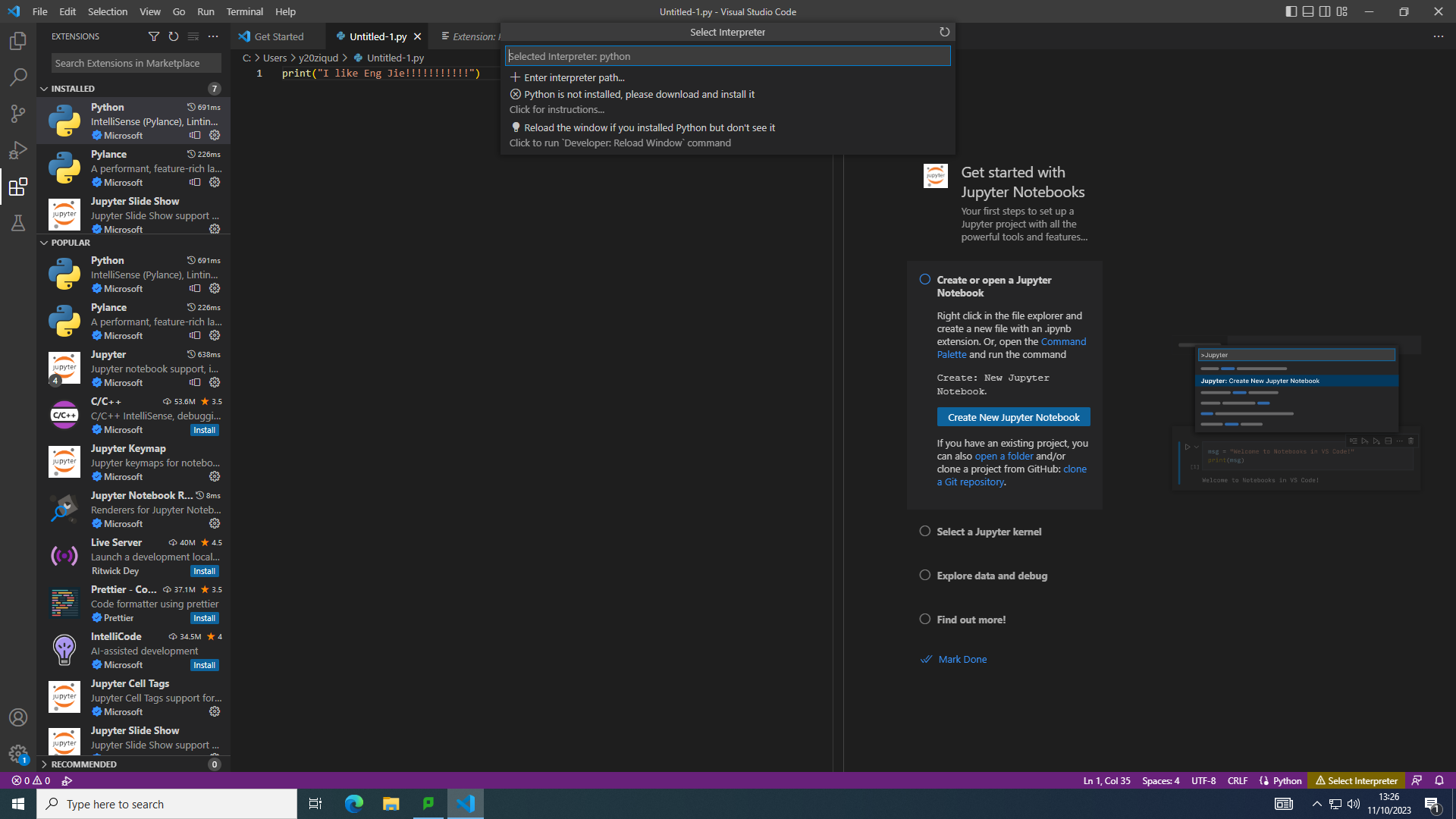
Visual Studio Code - Students can't see Python interpreters
Bankesy replied to JBlue46's topic in Educational Software
@JBlue46 Just got a screenshot of our problem, very similar to yours but not exactly the same.
-
@Net_Man Got there in the end, configured iLo with static IPs including internal DNS then realised my error with the addressing I was giving for the auto-update tool so fixed that and finally had to do this: "Go to the website https://support.hpe.com/hpesc/swd/entitlement-token-service/generate and generate a user token. Save the token in a file named "user_token. txt" to an usb flash drive. Insert the flash drive into the server before the firmware update" Now the Intelligent Provisioning tool detects updates and installs them. Just got to work out how to get Windows onto the thing now and get my head around NIC teaming.
-
Thanks for the info, think it's probably me not understanding network config
-
I've had better success doing it via iLO but then I changed iLO settings from DHCP to static and now I'm back to square one
-
Thanks @ittech2342323 I will check with them but I have been trying for several days to run the firmware updates.
-
Good afternoon all, Probably not quite the right place to post this query but it is server related, have invested in a new ProLiant DL380 Gen10 but during initial setup cannot get it to run the firmware updates from the intelligent provisioning tool. I've managed to configure an IP, network mask, gateway and DNS that it accepts but when looking for the firmware I get: "The firmware repository can not be reached or is currently unavailable. Please verify your network, proxy and system software update URL preferences: Update from HPE Website https://ipupdate.it.hpe.com/ You have no proxy setup. Do you need to setup a proxy? If you need to setup a proxy, navigate to Intelligent Provisioning Preferences on the previous page" We don't use a proxy, can't help but feel there's something I'm missing or that I'm going about this the wrong way. I can't even ping the IP address that I'm giving the server and wonder if I'm supposed to setup a PTR record first but if so what would the hostname be given that I haven't configured that yet? Maybe I'm supposed to get into Windows desktop first, do all config then run these updates? Switch port and VLAN config is fine as far as I can tell. Any ideas appreciated. Thanks
-
Funny enough I started a thread on here this morning asking if anybody had a template policy for the use of AI in schools, got a helpful response on that one: /forums/educational-software/234948-ai-policy.html I used ChatGPT to get a template policy anyway, oh the irony! I know colleagues who use it a lot for PowerShell scripts as mentioned by others here.
-
I would argue it's saying yes in the right way, start super restrictive and open it up with increasing confidence because at the moment it's just anybody can do whatever they want