kennysarmy
-
Posts
6,514 -
Joined
Content Type
Forums
News
20th
EduGeek EDIT Conference
Blogs
Everything posted by kennysarmy
-
First time with a passport in about 15 years! Normally just holiday in this country but on Sunday morning I'm flying to Amsterdam for 3 nights with the family (to Celebrate Mrs KA's 50, and daughter's turning 18 and 21 this year) Anyone got any tips for an inexperienced traveller, anything specific to Amsterdam? Cheers.
-
 I've told the teacher that there is nothing we can do and he'll have to use powerpoint in 4:3 mode rather than widescreen as it appears to be more stable then.
 -
Some guides I've followed in the past: https://blogs.technet.microsoft.com/askpfeplat/2014/08/04/mdt-2013-part-i-mdt-configuration-capture-a-windows-server-2012-r2-base-os-image/ Add .net 35 to task sequence http://blog.thomasmarcussen.com/installing-net-framework-3-5-with-mdt-2013-the-simple-way/ Injecting drivers http://www.edugeek.net/forums/o-s-deployment/120656-injecting-drivers-mdt.html https://emeneye.wordpress.com/2013/01/14/injecting-drivers-based-on-target-computer-model/ Adding drivers to MDT On the new PC run the command : wmic computersystem get manufacturer & Download the drivers Open MDT Create a new folder under Out-of-box-driver -> Windows 10 64 Bit With the same name as "manufacturer" / "model" Import the drivers in to this folder by right clicking the folder Hope some of that helps.
-
[ms office - 2019] Anyone had any luck with Office 2019?
kennysarmy replied to Davida1992's topic in Office Software
https://officedev.github.io/Office-IT-Pro-Deployment-Scripts/XmlEditor.html -
[sims] Script to add student email addresses in to SIMS.net
kennysarmy replied to kennysarmy's topic in MIS Systems
I had a permissions error when I tried with my username - not conclusive I know - but I've most SIMS.net rights and it failed! -
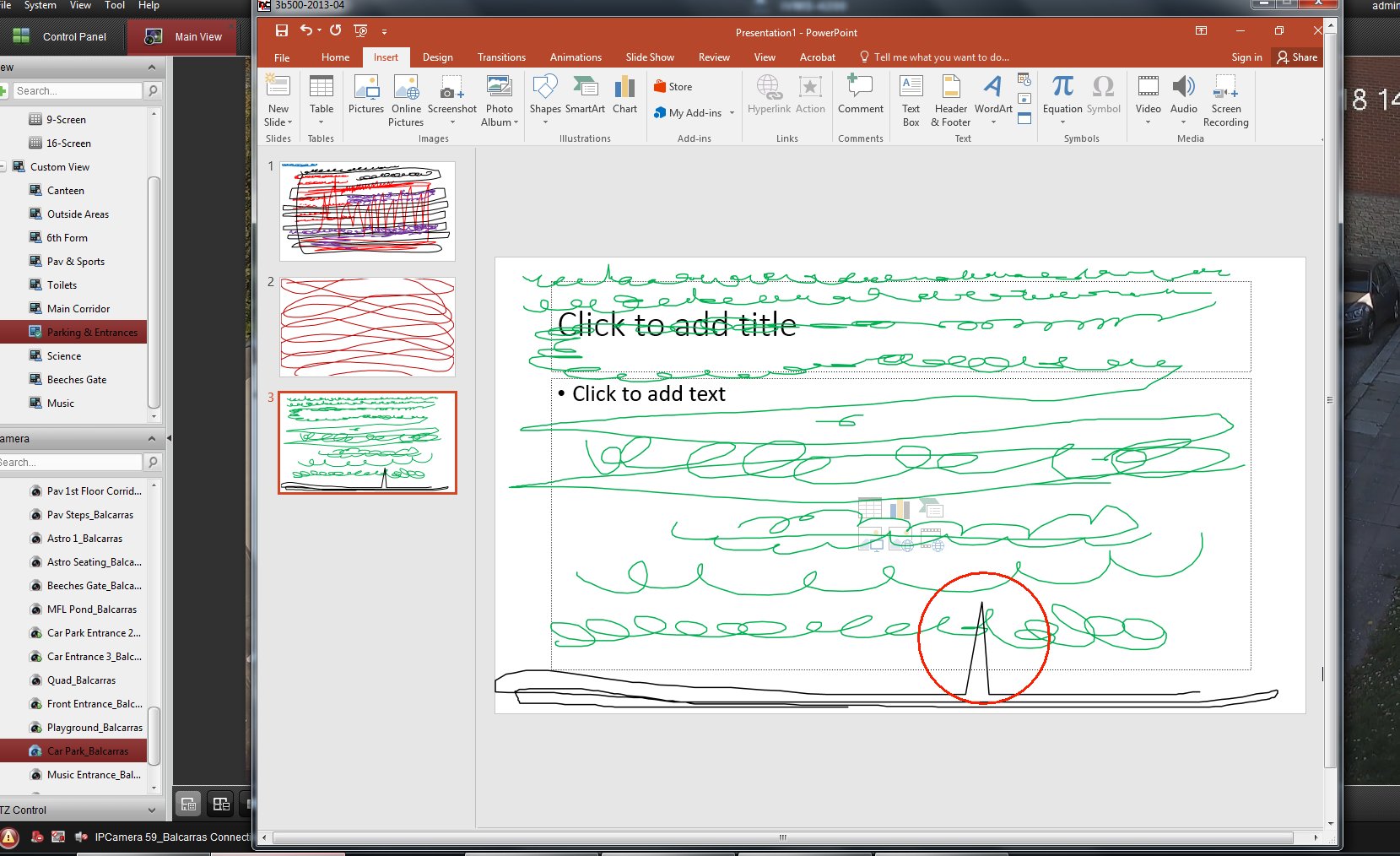
With Office installed the other two apps were fine, but I managed to get some spikes when using Office 2016. I've since re-imaged a PC and installed Office 2010 Powerpoint and I've been unable to get it to spike!
-
And are you able to replicate the issue in any other drawing software WITHOUT Office being installed? I'm testing a build with no Office, and I've drawn in Notebook and Ink2GO on over 50 slides now without issue. Next step is to install Office 2016 and try again on those two apps before launching Powerpoint....
-
Phased out here....apart from on a couple of laptops which won't take it....
-
[ms office - 2019] Anyone had any luck with Office 2019?
kennysarmy replied to Davida1992's topic in Office Software
Seriously? -
[sims] Script to add student email addresses in to SIMS.net
kennysarmy replied to kennysarmy's topic in MIS Systems
For anyone interested: Patch 20343 has been replace with Patch 23212 -
No spike in the CPU. Curiously a new Windows 10 image, with no graphics drivers and Office 2019 - I did 18 slides of scribbling and no issues. I installed the graphics card drivers and two slides of scribbling later I had a spike!!!
-
Hi, Have you tried recreating the issue with a new OS install and no Graphics Drivers installed?
-
BOOM! Admittedly I did not re-image the PC, merely uninstalled Office 2016 then installed 2019....

-
[ms office - 2019] Anyone had any luck with Office 2019?
kennysarmy replied to Davida1992's topic in Office Software
I've created my XML file: and run the command : setup /download configuration-Office365-x64.xml It's downloaded 424Mb of data but the command prompt has n't come back yet - it's been sat (appearing to be doing nothing now for 30 minutes) - is it doing something? Also - I'm guessing I should have changed en-us to en-gb ? -
[sims] Script to add student email addresses in to SIMS.net
kennysarmy replied to kennysarmy's topic in MIS Systems
Success, running using the SA credentials and when everyone was out of SIMS added all the student emails. I then just needed to remove any rogue parent addresses that had got in the system. -
Testing with JUST powerpoint installed - no other options from the media = same issue - - - Updated - - - Definitely. On the list
-
Testing with the 64bit version of Office 2016 = same issue.
-
SW_DVD5_WIN_ENT_LTSB_2016_64BIT_English_MLF_X21-07421.ISO
kennysarmy replied to kennysarmy's topic in Windows 10
Response from Microsoft when I pointed out the KMS Host Key for Server 2019 was downgrading rather than upgrading my host: This is in response to your email regarding Windows Server 2019 Key Management Service (KMS). Thank you for letting us know about this concern. I apologize for the inconvenience this issue has caused you and I will be glad to clarify. Upon careful review, it shows that key ending in JTY8R is indeed a key for Windows Server 2019. Please ensure that you are using the proper corresponding Volume License software and that you are performing a clean installation. If this has been confirmed and if you are still having the same issue when activating this, it is likely due to an issue aside from the product key. For further assistance with this, it will be necessary to reach out to Technical Support as they specialize in this area. You may locate Technical Support for your region in the link below: http://support.microsoft.com/common/international.aspx?RDPATH=dm;en-us;selectassist&target=assistancea If we may be of further assistance, please feel free to send us a message. Thank you for contacting Microsoft. Please note we have closed this case and will not have visibility to any future response. If you need further assistance, please contact us by sending an email to KMSADD. Grace Global MAK|KMS Support Team -
We've tried the latest driver and historic ones from the INTEL site. We've not been able to replicate the issue when testing with no driver installed, BUT, when we deployed a PC in that state to the teacher, he was able to get spikes during his day with a no graphic drivers! The only thing common in ever case of it happening is Office 2016! We might deploy out a PC to the teacher who gets it worse with no Office installed for a day to prove that the issue does not appear in any other writing software...
-
Nothing, bare Windows 10 image. Just trying with the 64 bit version of Office 2016 - - - Updated - - - That's a thread I was posting to
-
Yep...
-
This is from one of our older PC's just taken out of service, Intel DH61CR board, Intel Core i7-3770, 8 GB RAM. Slide size was Widescreen (16:9) - connected monitor to PC is a standard 4:3 iiyama Prolite Office version is 16.0.4738.1000 32-bit It took a few slides but I was eventually able to get a spike!
-
The issue happens with no IWB connected....
-
[sims] Script to add student email addresses in to SIMS.net
kennysarmy replied to kennysarmy's topic in MIS Systems
Thanks, I'll try again later this evening when everyone is off the network. -
[sims] Script to add student email addresses in to SIMS.net
kennysarmy replied to kennysarmy's topic in MIS Systems
Sigh. There is no mention of requiring exclusive use, so I gave it a run with a single student in the CSV....