Sheridan
-
Posts
4,144 -
Joined
-
Last visited
Content Type
Forums
News
20th
EduGeek EDIT Conference
Blogs
Everything posted by Sheridan
-
Ah right, I haven't tried yet. I'm not bothered if they had to click 'Yes' to proceed but they actually are asked to authenticate - so they can enter their password or specify alternative credentials. If they enter their own password it works so I'm sure why it even asks for credentials anyway!
-
That's the weird thing, as soon as I remove the printers policy (which was user GPP with item level targeting) the logins dropped back to normal (8-60 seconds depending if new profile) I spent ages looking through the logs and it just seemed to hang installing printers - not always the same one or model - and only maybe 5-10% of logins did this, but it was enough of a nuisance to have to remove it!
-
I had to drop the GPP user preference method as it was causing random long logins - 10 mins upwards sometimes as it applied the policy I've got a couple of 1809 machines in use, but not enough of them to say printing is more reliable over 1803/1709
-

Google form blocked because of sharing permissions
Sheridan replied to Sheridan's topic in Cloud Services
Nope, never found a way around it - I had to create a separate email account for the user to complete the form. -
We're still getting daily calls about printers not appearing across our 1703-1803 W10 machines. Same old problem where they appear randomly - usually a second login works but not always. We deploy them via computer policies (using the Deployed Printers setting ) and also a machine startup script using the PrintUi method - but we regularly see these errors: "Group Policy was unable to add per computer connection \\server\Printer. Error code 0x57. This can occur if the name of the printer connection is incorrect, or if the print spooler cannot contact the print server." - the printers are correct and online so I know the error is not related to the printers or server. It still seems no method works reliably with printers and 10, so I'm wondering if anyone deployed 1809 enough to get a feel for if its worse/better?
-
We usually see this when the headphones/speaker are disconnected - if a teacher tries to change the volume it pops up with an admin dialogue. Put the 3.5mm cable back in and its fine.
-
Cheers, I'll have a try with that, its only a couple of crusty old programs. Oddly the suppliers (Denford) say they're compatible with W10, but as usual that means 'at home, single administrator user'
-
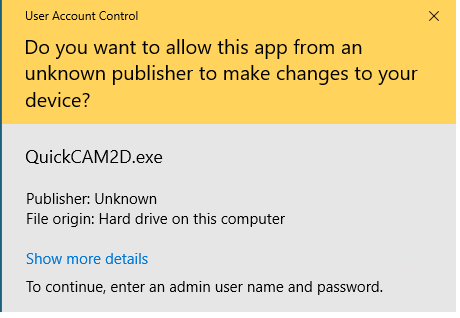
We've got some oldish applicationd from Denford, for a milling machine and they were working OK before we upgraded to W10. Now every time they're run by a non-admin user they get the yellow UAC prompt to enter their credentials to continue (see image) If they enter their (non admin) credentials then the program starts OK - its unsigned so I assume that's the problem. Is there any way to stop UAC from nagging for these apps, there's only a couple anyway and it seems impossible and probably unwise to disable UAC completely.

-
Anyone had any issues with powerapps and their filter? We've got a couple of users who are using powerapps for training resources and when they try to download the template/canvas it just pops up with 'Didn't install' and no more information. I found a list of URLs here https://docs.microsoft.com/en-us/powerapps/maker/canvas-apps/limits-and-config and made sure they're all whitelisted but nothing works. I also tried using the web interface (web.powerapps.com) and it just sticks on the spinning circles when you select a canvas. I can't see anything being blocked on our smoothwall so I'm a bit stuck
-
I'm just wondering how other folks deal with their choice of cloud services, mainly regarding cloud storage etc. For example, if your school has chosen Office 365 do you allow staff to use G Suite, dropbox and the rest? We use GSuite and only allow logins to our domain but prevent access to other cloud services to ensure everyone is using the same thing, as well as to prevent the gradual 'leakage' of resources to god knows how many different cloud providers as it seems everyone has their personal favourite!I know that locking into GSuite annoys some people, but it gives us some tracing and audit over data and its access.
-
Exactly! Although, after 2 years of battling with Windows 10, macos is really starting to appeal.
-
We use the GPO method to say that clicking OK shows your acceptance of the AUP, and use a messaging system to notify of any changes once they’ve logged on. Obviously everyone clicks OK without reading it but there’s only so much you can do!
-
This is the new world, the more we are pushed/pulled towards the cloud and IoT, the more things like this will happen! Just look at all the breaches and downtime’s this last year, probably will get worse before it gets better Back on topic though, I guess trying to use a device marketed for home use in a primary is just a bad idea anyway
-
They use a direct proxy port, which has to be specified manually (council provided so we can't change it) so I guess they're knackered. I'm not sure how much use they'd be anyway - they seem very much geared to home use/automation etc.
-
I know this has been discussed before, but not much recently - one of our primaries has been given a batch of Echo's. I did warn them of the unlikelihood of them working behind the (council) proxy and of potential GPDR issues as well However, for my own satisfaction, is there a way to get them working through a proxy? I've had a look and theres nowhere to specify anything, so presumably the only way is whitelisting via MAC or IP? (that won't fly with the council I bet!)
-
One last attempt before I burn W10 edu and embrace LTSC :-) I've got a captured WIM, mounted it and got the list of apps - I've then tried to remove them from the mounted wim so I can clean it at that stage However, for each app it simply says ' Error 2 the system cannot find the file specified' and the dism log shows this (for bing weather in this case) 2018-12-18 11:35:07, Info DISM DISM Appx Provider: PID=3632 TID=2492 Processing 'packagename' option at index 2 - CAppxManager::ProcessCommandRemoveAllUserAppx 2018-12-18 11:35:07, Info DISM DISM Appx Provider: PID=3632 TID=2492 packagename='Microsoft.BingWeather_4.18.56.0_neutral_~_8wekyb3d8bbwe' - CAppxManager::ProcessCommandRemoveAllUserAppx 2018-12-18 11:35:07, Error DISM DISM Appx Provider: PID=3632 TID=2492 Failed to get staged packages for package 'Microsoft.BingWeather_4.18.56.0_neutral_~_8wekyb3d8bbwe'. - CPackageAdapter::CreateForRemove(hr:0x80070002) 2018-12-18 11:35:07, Error DISM DISM Appx Provider: PID=3632 TID=2492 Failed while initializing package adapter for package 'Microsoft.BingWeather_4.18.56.0_neutral_~_8wekyb3d8bbwe' - CAppxManager::RemoveAllUserAppx(hr:0x80070002) 2018-12-18 11:35:07, Error DISM DISM Appx Provider: PID=3632 TID=2492 Failed to remove package 'Microsoft.BingWeather_4.18.56.0_neutral_~_8wekyb3d8bbwe' - CAppxManager::ProcessCommandRemoveAllUserAppx(hr:0x80070002) The app name I got from the image itself, so how can it not find it when trying to remove it? Its all in the same mounted folder The only thing I noticed is the log says Index 2 - but when I mounted it the index in the original wim file was 1, but there is only one mounted image?
-
We don't use 365, and Office 2019 will probably be the last ever install of office we use. If MS hadn't made the Edu version of W10 such a mess of crap and bugs I would have persisted with it, after 2 years I've given up fighting with their approach and will be deploying LTSC in the next round of updates. We use GSuite so the desktop will be more and more a thin client as they start to use it more.
-
What I found odd as well, is that the client KMS key is the same as the server one in VLSC - however my LTSC 2019 test machine has now just activated! Do MS themselves even know how their licensing works...it seems to be a dark art.
-
MS have got me ragged this week already... I've trying to activate a Server 2019 vm on our new ADBA system - from VLSC I've added the key referred to as "Windows Srv 2019 DataCtr/Std KMS" which seemed to work and shows up as 'VOLUME_KMS_WS19 Channel' in the list. Now, when I add the KMS client key from VLSC (which appears to identical to the one above) and activate the 2019 server, it activate successfully but slmgr /dlv shows it as activated under the 'VOLUME_KMS_WS16 Channel' which I thought was the Server 2016 key? Is that right? It seems wrong to me, but MS licensing is a mess at the best of times. The irony is I'm only doing this to try an activate our LTSC 2019 test box!
-
We do have a custom start layout, but it only has Office on it - gave up trying to get other tiles to work consistently. Its not even consistent across identical imaged PCs - some will work and the apps are remove, most don't work and still show the apps, and a couple still show the apps but the icons aren't rendered properly (i.e just a blue square for solitaire!)
-
Yeah - I ran the scripts to remove the apps, and the registry similar to what you've shown above and a new user still gets the apps (solitaire, gethelp etc etc) We manually updated about 20 PCs to 1803, from a clean working 1703, wish I'd never bothered now as reimaging to LTSC is the only way forward
-
Resurrecting an old thread but I still can't get apps to uninstall on 1803 images Running a powershell for each app:Get-AppxPackage -name "Microsoft.BingSports" | Remove-AppxPackage and then also Remove-AppxProvisionedPackage -Online -PackageName "Microsoft.BingSports" Repeated for each unwanted app - this runs without error, and then running Get-ProvisionedAppxPackage -online shows they have gone, yet every new user login gets this crap again! I'm about to ditch all versions of this for LTSC now, as I can't find a way to remove this stuff reliably once 1803 has gone on.
-
I'm surprised the Chrome templates don't allow this to be disabled, as it could be used more maliciously than just messing around!
-
Anyone found a way of stopping direct commands being run in the chrome address bar? i.e javascript:alert('hi'); or similar?Javascript is enabled for many sites, but we have the usual idiots running single line scripts in there to generate 10000 messages - usually on their mates PC when his back is turned for 1 minute!
-
We have an external catering company and their laptops etc are their responsibility, they're not on our network. We pay them to provide the catering, if they need IT services then they provide them for themselves.