Sheridan
-
Posts
4,150 -
Joined
-
Last visited
Content Type
Forums
News
20th
EduGeek EDIT Conference
Blogs
Everything posted by Sheridan
-
Yeah the Viewsonics display a pin, which the Ipad still asks for - we just now see a black screen after entering the pin
-
Possibly, but its only happened since iPadOS 27! They probably blame Apple, and vice versa
-
Apple Intelligence reporting is switched off by policy
-
Yes, they're 5/6 years old and at the most recent I can find
-
Yes, that works well - I used to use it 'back in the day' in a previous job when we had projectors but we'd have to purchase licenses so probably a non starter here
-
Some of our Staff iPads have upgraded to iPAdOS 27 and we've noticed that Airplay to Viewsonic screen now no longer works - they just get a blank screen after entering the pairing code. The same iPads on 26.6 still work fine Anyone else had any issues like this? The viewsonic boards won't get any firmware updates as they're a few years old so if Apple don't fix it we're a bit stuck
-
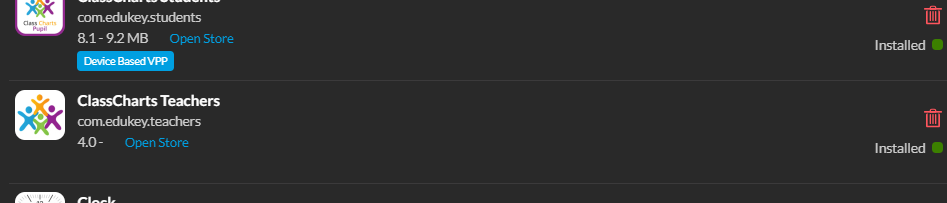
Got an odd one with Mosyle recently. Purchase a free app (classcharts for teachers) in ASM, added it to the profile for our staff iPads. It shows as installed on the ipads in Mosyles, but isn't installed on any of them! In the Apps section of the individual iPads it shows as installed but doesn't show the Device Based VPP like the others - its the classcharts App which I know has been missing from the App store for a while, so is the app or am I missing something, as I've deployed many other apps and they're all OK

-
We have some staff here using ChatGPT (paid for version) but they're seeing regular and seemingly random errors like this one in the screenshot We use Smoothwall but it is allowed - anyone else seeing this behaviour?
-
Remote Management and ssh after boots works and so does disabling filevault! As my main data is on external NAS anyway I might just leave filevault off
-
Cheers - will have a poke around with those and see if thats easier than just switching off filevault
-
Personal Mac question here - my Mac mini is running my Plex server so its headless and tucked away next to the router (as it has to be hardwired to the router because free Plex can't handle MLO wifi - devices that switch frequency confuse it and it assumes your on a different network!) Since the introduction of FileVault I've noticed screen sharing doesn't work after a reboot - I gather this is because the Mac starts in a kind of pre-boot state so when you enter your password it actually unlocks and finishes the boot. This is a nuisance for me as its in an awkward spot to have to lug a monitor/keyboard etc to connect, so is there a more elegant way to do this, or is switching off FileVault just the most effective approach?
-

Annoying shopify/paypal issues
Sheridan replied to Sheridan's topic in Internet Related/Filtering/Firewall
Its a nuisance, I've just been adding https exceptions for the ones that play up - fortuntely for us (and our finance teams sanity) we've covered most of the commonly used ones! -
365 - Delegation and calendar sharing just not working anymore?
Sheridan replied to Sheridan's topic in Cloud Services
Its daft - outlook classic is the one I care least about! I can't understand why it doesn't work in the web version as thats the most used -
365 - Delegation and calendar sharing just not working anymore?
Sheridan replied to Sheridan's topic in Cloud Services
Yeah its weirdly inconsistent as well - on my latest test the 'sharee' can see the calendar properly but only in Outlook classic, and even then only with calendar enhancements switched off! Its such a clumsy mess - 365 has become horrible to manage recently and I pine for my GSuite days... -
365 - Delegation and calendar sharing just not working anymore?
Sheridan replied to Sheridan's topic in Cloud Services
Yeah sharepoint is one way, but the whole idea is that they can see the shared calendar next to their own in Outlook (whatever version! 🙂 ) - it used to work a few years back but its obviously not going to be fixed. Logged a ticket with MS a week ago and they're not come back with anything useful. Shame as it was good when it worked -
365 - Delegation and calendar sharing just not working anymore?
Sheridan replied to Sheridan's topic in Cloud Services
Its definitely a borked option for us, I exported the calendar as a pst, imported it to a test account and then shared it with a specific individual They see an empty calendar. Or nothing depending on which app/web they use. So calendar sharing is useless in 365 as far as I'm concerned as its so unreliable -
365 - Delegation and calendar sharing just not working anymore?
Sheridan replied to Sheridan's topic in Cloud Services
We're all the same domain/time zone - its very bizarre as they can often see the calendar but its blank! -
365 - Delegation and calendar sharing just not working anymore?
Sheridan replied to Sheridan's topic in Cloud Services
I tested this by adding one user (who's already in the main group) individually and its the same for them - calendar shows up but is empty. Its very variable what they see -
365 - Delegation and calendar sharing just not working anymore?
Sheridan replied to Sheridan's topic in Cloud Services
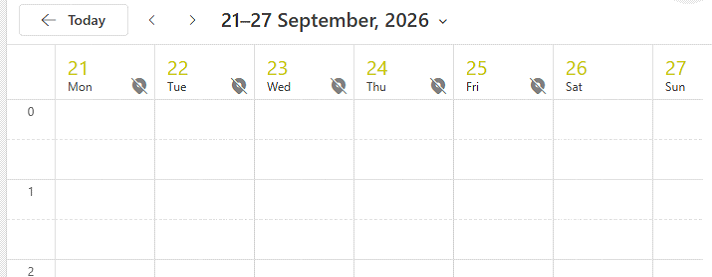
Even when the calendar is shared directly with the user and they can see it, its just blank with a warning they can't change the location (it should have all day events in this week) I think calendar sharing is pretty broken for us
-
365 - Delegation and calendar sharing just not working anymore?
Sheridan replied to Sheridan's topic in Cloud Services
We're using a mix of old Outlook, New Outlook, Web Outlook and Outlook iOS app - and users can have a mixture of results. Even when they see the calendar its blank so its a mess. -
365 - Delegation and calendar sharing just not working anymore?
Sheridan replied to Sheridan's topic in Cloud Services
New app and Web. For example one person can see the calendar fine in the new app, and doesn't see the calendar at all in the web version. Another see's nothing in either, and another see's the calendar in both but it shows as empty! All are in the same group - and thats the group that the calendar is shared with (its an AD synced mail enabled security group) The group is quite static and changes rarely so I don't think its a sync issue, and the loss of beign able to delegate to have a look is a real problem as well -
We seem to have a couple of issues with 365 with things that used to work but no longer do. For example - first issue is a SLT member shares one of their calendars with a group of staff - some see the calendar (but its blank) and some don't even see it at all (in Outlook app and web) So to investigate I assign myself full delegated access to their mailbox (with permission!) so check the sharing - but this doesn't work anymore either. Trying to open any mailbox that I delegate access to just shows the 'Unhandled rejejection: Error: 500:undefined:undefined:undefined' which seems to be permission related. Waiting 24 hours, private browsing, even different PC doesn't rectify this and it fails when I delegate to any mailbox now Both of these used to work fine, and sharing a calendar isn't a complex procedure so not much to get wrong, but I'm at a loss as to why its not working and also why I can no longer delegate access to check Opened a ticket with MS but a week later I've just had the usual 'try private browsing etc' replies....
-
Looks like they've updated their cert as of 15:55! Its now working
-
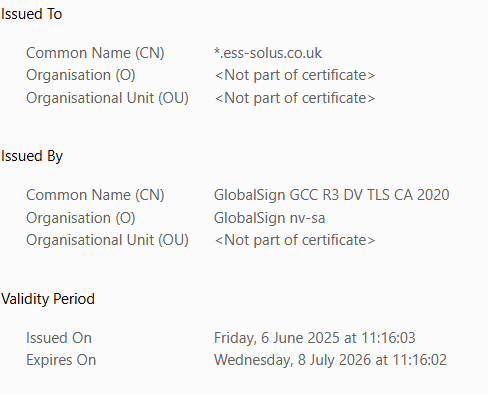
I timed my deployment perfectly to coincide with their certificate expiring!
-
Erm, Maybe ESS should renew their certificates !