browolf
-
Posts
2,293 -
Joined
-
Last visited
Content Type
Forums
News
20th
EduGeek EDIT Conference
Blogs
Everything posted by browolf
-
1600 pupils and heads of year who use their own mailboxes for communications with parents, worked fine for years until 2 are off for a period and no one can access their emails. There's nothing good in office anymore since shared mailboxes are now intended to be archives not working mailboxes and email groups are limited. I have suggested rethinking the whole department as a helpdesk - I reckon this would work pretty well with the free version of freshdesk but I think this idea is a bit far out. This seems like a situation that someone else would have made some software for. Iris parentmail sounds possible but also covers a lot of ground that is being done differently / unrelated to this problem, anyone use this or other solutions?
-

Smoothwall: Realtime webfilter questions
browolf replied to browolf's topic in Internet Related/Filtering/Firewall
Do I need to do "save and restart" with this? -
Have a problem where these esports computers are matching unauthenticated ip block rules instead of the rule we made for the user account the user account rule is who : academic\gaming what: GamingAllowed where: everywhere when: always action: allow it's matching who: unauthenticated ip what: students blocked categories where: everywhere: when: always action: block on the computer, the block page shows an unauthenticated ip but the login page of smoothwall recognises the user. Not sure what to do about this

-
Smoothwall: Realtime webfilter questions
browolf replied to browolf's topic in Internet Related/Filtering/Firewall
I have another question, is it possible to ban youtube on an active directory group of PCs? I can create a directory group mapped to an AD group but it seems that location group on a rule will only accept Ip adresses. I tried adding the group as "who" as it appears in the "available users or groups" list but that didn't work. it would be useful if there was a pinned post for asking little questions that don't need individual posts @ipballe I see there's a closed smoothwall subreddit that you're the mod of, what happened with that? -
Smoothwall: Realtime webfilter questions
browolf replied to browolf's topic in Internet Related/Filtering/Firewall
They show on logged in pc intermixed with authenticated hits. I thought the penultimate column shows all the groups the url match, wouldn't bypass auth appear in this list too? it's like it fell out of the bottom, should there be a block everything final policy? -
What does it mean when an url is status 200 Ok but hasn't activated a specific policy aka in relation to how web filter policies might be set up. There seems to be a lot of hits that register as unathenticated ips even when there's a user logged on, is that normal?
-
adding users to a group smoothwall
browolf replied to browolf's topic in Internet Related/Filtering/Firewall
Got it now thanks. 😊 -
adding users to a group smoothwall
browolf replied to browolf's topic in Internet Related/Filtering/Firewall
The who group i created doesn't show up in the list of "local group" -
adding users to a group smoothwall
browolf replied to browolf's topic in Internet Related/Filtering/Firewall
No just created a new group from this button It's basically an empty container. Could create a group in AD but would still need to add to the container I think
-
Made this policy rule in smoothwall. Sadly 2 of us can't work out how to add people to the who group. Pretty sure I know what the page looks like, just can't find it. Help is no help
-
In web teams, when a student uses "open in desktop app" for a word file in a document library linked to teams. they get a popup that says Open Word? http://Https://teams.microsoft.com wants to open this application (tickbox) always allow teams.microsoft.com to open links of this type in the associated app this seems to be a popup linked to chrome, any ideas how to pre configure this association?
-
Shared Mailboxes in New Outlook (M365 App) have moved into a folder called "shared with me". Can no longer add their inbox to favourites or reference them with rules as far as I can tell and it takes 2 clicks to see if there's new mail. This is a major problem for shared mailboxes like "report a concern" where people have to remember to manually check them. Might have to rethink shared mailboxes altogether. A "helpdesk" for it might be more user friendly actually now that I think about it. Anyone else having this issue?
-
yeah a list/csv. didn't seem like i could export from the pastoral structure
-
How do i construct a report of a list of form groups for the whole school? I spotted one way which is focus student, data field:reg group, which produces the reg group of every student and then do something with excel or python to generate a unique list. I would do this for myself but I'm writing instructions for someone else and it would be easier for them if sims could just spit out a unique list. 🙏😂 Thanks
-
https://github.com/browolf/Powershell/blob/main/bulk-add-users.ps1
-
Our Office365 changed to Microsoft365. The login page for satchel one still shows Office365. is "office 365" still a brand other schools have? Just checking what's what before I ask them to change it. Our IT dept complained that Satchel is confusing when students log on to Microsoft 365.
-
For pupil computers i made it so onedrive gets connected automatically using their login credentials. "Documents" and "Pictures" are automatically mapped to one drive. The problem I have is dealing with "music", "videos" and "downloads" the group policy option "disable known folders" using folder IDs isn't working and trying to redirect the folder using C:\Users\%username%\OneDrive - xxx High School as the root folder produces the error target location is not valid. I can't find any coherent instructions for unpinning them. The worst outcome would be having to redirect them to the user area I was hoping to get rid of. Help!
-
I found this which may be the way https://kb.smoothwall.com/hc/en-us/articles/360002031110-Blocking-or-allowing-a-games-console-through-the-Smoothwall-Filter-and-Firewall
-
Various teachers are badgering us about the possibility of esports or competitive gaming. Now another teacher is trying to organize a fifa event with multiple users. Apparently port forwarding is likely required https://portforward.com/fifa-23/ but is it even possible to manage multiple instances of a game like this behind @smoothwall? Apparently smoothwall doesn't support uPnP.
-
this is my bulk creation script - I'm sure it could be condensed - I've noticed some things. $thisyear = "2022" $inputf = "sims$($thisyear).csv" $output = "$($thisyear).csv" if (test-path -Path ".\$($output)"){ remove-item $output } function Get-Pass { #set arrays of words $colours = @('Wild','Bright','Busy','Green','Blue','Purple','Pink','Clever', "Cold","Happy","Sleepy","Brave","Short","Tall", "Helpful", "Clean", "Cute", "Super", "Sporty", "Silver", "Gold", "Fast") $animals = @('goat','elephant','penguin','donkey','snake','horse','rabbit','shark','mouse','tiger', 'zebra', 'panda', 'cabbage', 'potato', 'whale', 'bear', 'pencil', 'tree', 'fish', "frog", "toad") #make new password $col = Get-Random -InputObject $colours $ani = Get-Random -InputObject $animals return "1" + $col + $ani } import-csv $inputf | ForEach-Object { $password = Get-Pass $securepass = ConvertTo-SecureString -String $password -AsPlainText -Force #write-output "Processing $($_.firstName) $($_.surName)" #remove non characters $pattern="[^a-zA-Z]" $firstname = $_.firstName -replace $pattern $surname = $_.surName -replace $pattern $office = $_.adno #construct username $username = "$(get-date -Format 'yy')$($firstname.substring(0,1))$($surname)" $res = ([ADSISearcher] "sAMAccountName=$username").FindOne() #if use name exists = bad if ($res -ne $null) { #need to find an acceptable username $prefix=2 while ($true) { $testuser = $username + $prefix #write-output ("testing $($testuser)") $res = ([ADSISearcher] "sAMAccountName=$testuser").FindOne() if ($res -ne $null) { #bad $prefix++} else { $username = $testuser break } } } $Displayname = "$($_.firstName) $($_.surName)" #test if CN name exists $res = ([ADSISearcher] "cn=$displayname").FindOne() #if displayname exists if ($res -ne $null) { #need to find an acceptable display name $prefix=2 while ($true) { $testdisplayname = $displayname + $prefix #write-output ("testing $($testuser)") $res = ([ADSISearcher] "cn=$testdisplayname").FindOne() if ($res -ne $null) { #bad $prefix++} else { $displayname = $testdisplayname break } } } #fields $email = "$($username)@schooldomain".ToLower() $homedirectory = "\\pupilserver\share$\$($username)" $samaccountname = "$($username)".ToLower() $error.clear() try {New-ADUser -name $Displayname ` -AccountPassword $securepass ` -AccountNotDelegated $false ` -Description "Year starting $($thisyear)" ` -DisplayName $Displayname ` -EmailAddress $email ` -GivenName $_.firstName ` -Surname $_.surName ` -HomeDirectory $homedirectory ` -HomeDrive "Z:" ` -PasswordNeverExpires $false ` -SamAccountName $samaccountname ` -UserPrincipalName $email ` -Office $office ` -path "OU=Azure,OU=pupils,DC=school" ` -enabled $true ` -scriptPath "pupilscript.bat" } catch { write-output "Error adding $($firstname) $($surname)" Write-Output $error exit } #adduser to 365 students $error.Clear() try { Add-ADGroupMember -identity "365Students" -members $samaccountname } catch { Write-Output "Error adding user to 365Students" } #adduser to allstudentsecurity $error.Clear() try { Add-ADGroupMember -identity "allstudentsecurity" -members $samaccountname } catch { Write-Output "Error adding user to allstudentsecurity" } #adduser to allstudentTeam $error.Clear() try { Add-ADGroupMember -identity "AllStudentTeam" -members $samaccountname } catch { Write-Output "Error adding user to AllStudentTeam" } #create folder $User = Get-ADUser -Identity $samaccountname $homeshare = new-item -path $homedirectory -ItemType Directory -Force $acl = Get-Acl $homeshare $FileSystemRights = [system.Security.AccessControl.FileSystemRights]"Modify" $AccessControlType = [system.Security.AccessControl.AccessControlType]::Allow $InheritanceFlags = [system.Security.AccessControl.InheritanceFlags]"ContainerInherit, ObjectInherit" $PropagationFlags = [system.Security.AccessControl.PropagationFlags]"InheritOnly" $AccessRule = New-Object System.Security.AccessControl.FileSystemAccessRule ($User.SID, $FileSystemRights, $InheritanceFlags, $PropagationFlags, $AccessControlType) $acl.AddAccessRule($AccessRule) try { Set-Acl -Path $homeShare -AclObject $acl } catch { write-output "Error creating $($homeshare): $($error)"} If (!$error) {write-output "$homedirectory created"} Write-Output "Name: $($_.firstName) $($_.surName),Username:$($username) Password:$($password) Email: $($email) " $userOBJ = New-Object -TypeName psobject -Property @{ 'firstname' = $_.firstName 'surname' = $_.surName 'username' = $samaccountname 'password' = $password 'email' = $email #'form' = $_.form 'cclass' = $_.cclass } $userOBJ | Export-Csv $output -Append -NoTypeInformation }
-
It's working in that I brought a laptop home and the client says connected but only the w: mapping to the pupil server works. I can ping the pupil server and the dev server but no domain controllers or the sims server 🤔 What is the problem here?
-
[closed] bug/error: Can't upload zip file
browolf replied to browolf's topic in EduGeek.net Site Problems
It worked. Thanks :-) -
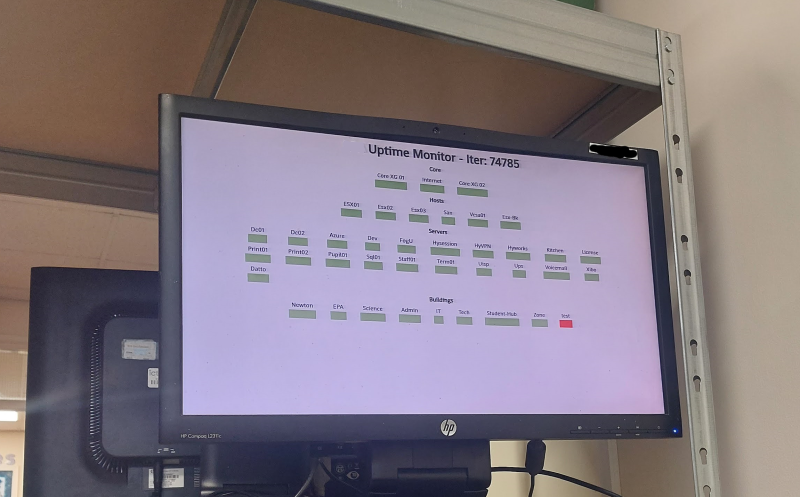
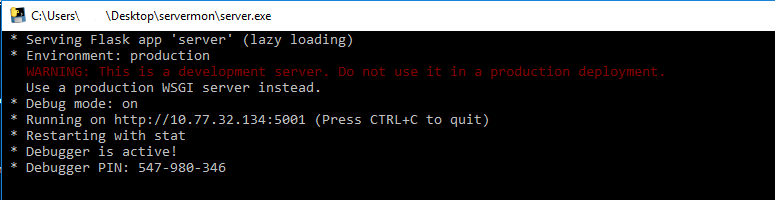
As a follow up to my previous post (http://www.edugeek.net/forums/coding/229802-python-infrastructure-monitor.html) I've compiled the files to run as an exe file with an external config file so it can be used with no knowledge of python. The config file is a python file but just needs editing in a text editor. You can add more things but the format needs to stay consistent. Like if you miss out a comma the program will have an error but it should indicate where the problem is. You can change the html file bearing in mind the content gets inserted at {{ htmlstr|safe }} I found if you edit the file in a proper editor it rearranges the formatting of {{ .. }} which breaks it. The most import thing is the ip in the config file needs to match the computer running the program. I haven't tested it on devices with multiple IPs or access to different vlans so I don't know what will happen there. Ours looks like this: When the program works it looks like this: Please try it out and see how it goes. servermon-exe.zip
-
[closed] bug/error: Can't upload zip file
browolf replied to browolf's topic in EduGeek.net Site Problems
Still no. I can upload jpgs so upload works for other files. -
I've been trying to upload a zip file of a program I made that I think would be useful. It's only 9.5mb but it's not working in the upload section. Is this related to the http issue?