petben
-
Posts
671 -
Joined
-
Last visited
Content Type
Forums
News
20th
EduGeek EDIT Conference
Blogs
Everything posted by petben
-
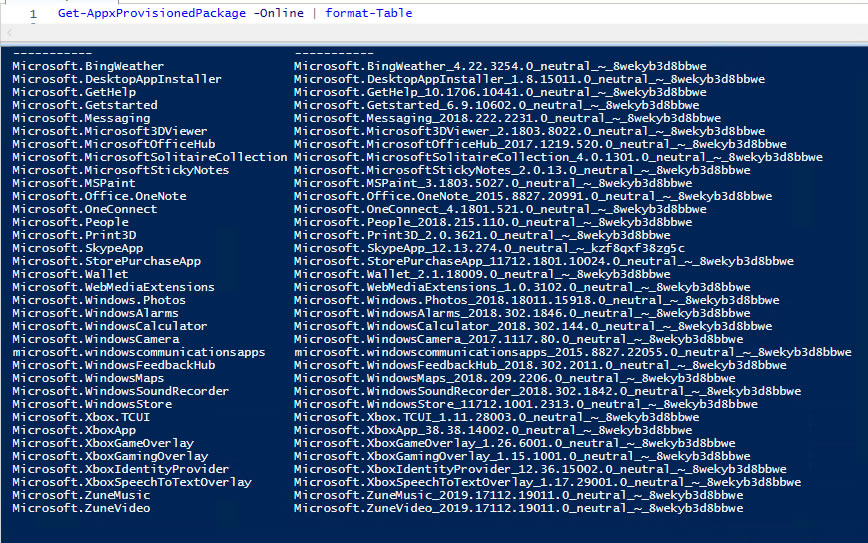
these are my current Apps from a Fresh 1803 install, should I also keep the Microsoft.StorePurchaseApp, or any others?

-
someone else has suggested: # keeping calculator Get-AppxProvisionedPackage -online | where { $_.DisplayName -ne "Microsoft.WindowsCalculator" } | Remove-AppxProvisionedPackage -online what do you think? I don't want all those apps appearing in the start menu but otherwise...do I care..?
-
In the past I have removed various All User Apps from Windows 10 using: Get-AppxPackage -AllUsers | Remove-AppxPackage This does leave a load of Xbox, Zune etc junk that I think MS want (force) you to keep. Just recently the Sysprep part of MDT has been failing with 'Failed to remove Apps for the current user 0x80073cf2'. There is an MS article about this which suggests a fix per App, but I kind of feel this will get more tricky as Windows move more towards Apps. What should I be doing for our images? I have just read "Sysprep has an additional provider that's added in Windows 10 and Windows 8 to clean Appx packages and to generalize the image." maybe removing Apps is not necessary at all?
-
thanks, we cant block PowerShell.exe because the logon scripts need it and they run as the user.
-
do you find that when you set the default to 'disallow' the shortcuts (.lnk) files are blocked? We can not get shortcut files to be blocked no matter what we do.... Thanks
-
we cant block PowerShell.exe because the logon scripts need it and they run as the user. Students can do all kinds of stuff in PowerShell. chazzy2501 can you please elaborate on how your SRP are setup, you seem to have fixed this on your network? We are concerned that machine SRP will get in the way of admin user. Thanks
-
we already do that, so a student brings in a shortcut to powershell on a USB stick (say Drive E: ), software restriction policies already dictate .lnk files are blocked from E:\ but the shortcut still runs....
-
We need to find a way to prevent students running shortcuts from various locations. Software Restriction Polices seems like the answer, which we already use for .exe etc, and .lnk files are there by default, but shortcuts (which definitely have the .lnk file extension) still work. Thanks for any ideas.
-
Do u use small basic? Thx
-
OK so how can they run Small Basic then? when you save it saves as an .exe, which I am sure you dont allow running from user documents, then if they click 'Publish' (which is what we currently tell students to do on our win7 machines) it opens in the default browser, which isn't IE in Windows 10?
-
I was kind of set on using Edge but Small Basic needs Silverlight, which only works in IE....anyone customised Small Basic somehow? I have read a rumour there is a Small Basic update coming that doesn't need Silverlight.
-
Hello, going to roll out Win10 this summer and trying to decide whether to push Edge as default browser, IE has been used by staff for ever but it seems to make sense to use Edge. I so far cant see any of our esystems that don't work with it, then surely MS will deprecate IE at some point? Any thoughts? Thanks
-
I am trialling Cubase 9 elements to install at school on win10. Installed as Admin all OK but logging in as any other user I find none of the VST Instruments show up. I also notice that the .vstsound files are located here - C:\Users\administrator\AppData\Roaming\Steinberg\Content\HALion\VST Sound, obviously not going to work for anyone else logging in. There must be a way to install for all users...?
-
Thanks, the Veeam file copy job looked good, could centrally manage all the jobs, but unfortunately it doesn't delete files in the destination that don't exist in the source, so the backup folder would grow endlessly.
-
Veeam paid is £30 each machine and we need 50...quite a bit annually. Final thought, simple simple. On each client running 3 robocopy mirror commands running daily, weekly and monthly to completely different folders, but then enable data dedeuplication on the destination volume to save all that space from errr... duplicated data..
-
We will be backing up Lightroom libraries on one set of PCs and some video editing projects on others, neither of which works over network storage. I wonder if I could configure windows backup via GPO...I really had hopes for Veaam but it’s not what we hoped.
-
Thanks, Veaam endpoint has been rebranded as Veaam Agent I think. A few forum replies from Veaam support mention how the export/import isn’t supported in the free version but things could have changed I guess. Robocopy is a bit old school I agree...mmmmm what to do?
-
Thanks Steve, I was going to use free yes for the workstations. Paid for VMs if all goes well. Export config is ok but import fails, it is only supported in the paid version I think, getting frustrated with Veaam really. Any other ideas for local storage to server backup with some retention? Robocopy is fine but will only single copy backup, then overwrite, a bit dodgy.....
-
I tested the paid for and got disillusioned with its limitations, as it was £30\year each (need 50 licenses) I thought I would give the free one a go. I am creating a separate backup repository for the free agents to backup to.
-
actually I think the powershell command are only available if the Backup and Replication software is installed... so I am guessing I need to configure a workstation with the free agent and export the config somehow, then import to other machines with the agent installed? any help with ideas\commands would be great. thanks
-
Hello, I am going to try the free VEAAM agent to backup C:\FolderName on 30 x Win7 workstations, can anyone advise on the Powershell commands I can use to: Create the back jobs (this can run at startup) Run the backup jobs (this can run as a scheduled task) Send a report of status of backup jobs I know there is load of VEAAM help and there seems to be a bejillion commands available..but if someone can point me in the direction of the right ones that would be great. Thanks
-
Thanks, I’ll look at DPM for VMs. With the Veaam option can you suggest the product I need, there’s quite a few. - hyper v backup (we have 2 mirrored hosts) running 20 VMs all of which need backing up - 3 x physical servers, 40 x windows 7 where I def need to see backup situation from the single backup server, so that’s 50 x full endpoint licenses. This sounds mega expensive.... Thanks
-
Hello, we currently use DPM 2016 for files and folder backup from our file server, 30 days retention, it’s OK ish and cheap but.. - restore is slow as hell, displaying the folder list for each days backup takes 5 mins plus. - since DPM 2016 end user recovery has gone - I’m still using windows backup for both hyper v servers and physical servers (wbadmin command line) So the Q is do I go back to DPM 2012 to get features and speed back or move to VEAAM for all backups? Will VEAAM Be an affordable option for 20 virtual servers images? And will it provide central management to backup local storage on 40 windows 7/10 workstations? Thanks
-
Thanks I looked at that, what a mental graphic in the bottom pane eh? With all these suggestions I cant find one that doesn't offer to view\scan all my network drives that are hidden by GPO. Pete
-
I have read that by design Modern Backup Storage is enabled if you install DPM 2016 on Server 2016. End User Recovery is not supported if using Modern Backup Storage. Can I turn Modern Backup Storage off so End User Recovery will work, or what is the recommended method to get End user recovery to be available to my users in a DPM 2016/Server 2016 setup?
-
- 1
-