petben
-
Posts
671 -
Joined
-
Last visited
Content Type
Forums
News
20th
EduGeek EDIT Conference
Blogs
Everything posted by petben
-
I stopped the auto login by removing the last action of the task sequence which was also a 'Restart', I cant remember if that was already there or I put it there, it now solely relies on the FinishAction to restart at the end.
-
The computers still have not restarted and applied 1903 update. they get turned off every night but in the morning the same message is in update settings.. 'Your organisation will restart your device at 12:26 to finish updating windows' Although this time changes all the time, I looked before 12:26 today and after, and nothing has happened. Please see screenshots attached of GPO. Any advice most gratefully received, I need to end this story really.. Thanks screen.docx
-
When we image a win10 1903 computer using MDT2013 the following happens: Task sequence goes through, installs apps, joins domain etc and gets to its last step which is 'restart' The computer then reboots and tries to auto log in as local administrator but fails with incorrect password. Note We definitely don't want it logging in as local admin The local admin password it tries is correct anyway It has already logged in as local admin a few times during the task sequence anyway The MDT rules have FinishAction=REBOOT The HKLM reg key for AutoAdminLogin is set as 0. Why is it trying to log in...?
-
I have made a few changes Specify deadline before auto-restart for update installation - Enabled Active Hours - 8:00-17:00 I've delayed auto shutdown to be 19:00 to allow the updates to apply. Se what happens....
-
Hey computer expert, can you please post all your windows update settings? I feel there will be other settings that I need to get right related to auto restart and scheduling etc..? Thanks
-
Ok, had you left yourself logged in or just on the login box? Could you please post a few screenshots of your win update GPOs? Active hours GPO, and Are you using option 4 to download and schedule? Thx
-
are you on 1903? still happening?
-
mmmm, we really want the other way round, so the update doesn't apply if someone is logged in, but does if it is just at the login screen. I was thinking this should be simple. I am surprised there's not a "download update and install at next reboot" option, so the next morning when the computer is turned on the update applies...
-
This looks interesting. https://social.technet.microsoft.com/Forums/en-US/f75df0a5-7594-4ba9-9dbb-0476d5223b35/windows-10-pc-did-not-restart-after-it-set-schedule-from-the-gpo?forum=winserverwsus I’d also be interested if you can get the 1903 update applied using a startup script. Setup.exe /auto upgrade /dynamicupdate disable /quiet I can never get it to run at startup..
-
I have set the 1903 feature update to install to a test computer group. The update downloads OK and if I log in it says: 'We're all set for the restart you scheduled at......' (see screenshots) each workstation seems to have a different date and time, despite being all turned on at the same time and identical settings, and the update/restart only seems to apply if I manually select 'restart now' in Windows Update I have a number of Windows Update GPO settings, something must be missing. Has anyone successfully deployed feature updates via WSUS with no user or admin action on the workstation? Thanks update screens.docx
-
I found no pattern, reason or fixes for this, completely random. I ended up a few months ago making Windows Photo Viewer default for images, and waiting for 1903 to see if it fixes generally. I haven't looked at it since 1903 has been released...
-
yes when logged in that command line works and 1903 update starts. we use many many startup scripts and they all work
-
Running this when logged in updates the OS: "\\server\share\Windows_10_1903\setup.exe" /Auto Upgrade /DynamicUpdate Disable Running as a startup script does not do anything. Any ideas? Thanks
-
Hello, we have a test Intel NUC 7th Gen, just for testing. I have applied our MDT image (adding the NUC drivers first to deployment share) the image applies but on first boot it errors: 'The Boot Configuration Data for your PC is missing or contains error' \EFI\Microsoft\Boot\BCD 0xc000000f I have reset BIOS to default secure boot is off Any ideas? Thanks
-
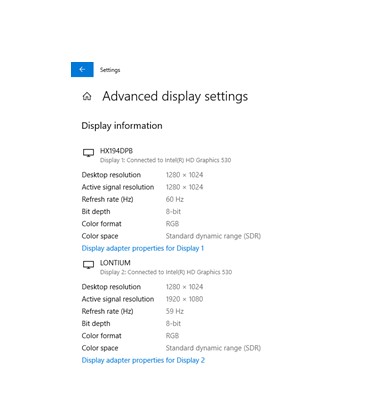
I have put a startech Display Port to VGA converted onto a test classroom and the projector is showing the wrong resolution. It should duplicate the display of the computer - 1280 x 1024 but it is showing as 1920 x 1080. In advanced display the settings are as screenshot, the 'Active System Resolution' is wrong. Any ideas?

-
OK thanks, are your projectors up to 5m away over the VGA?
-
Hello, we are now looking to buy PC's with no VGA out but still inevitably have a lot of rooms with VGA cabling kits. Can anyone recommend a proven converter from HDMI/Display Port to VGA suitable for up to 5m VGA runs? Thanks
-
Hello we (not me) want to enable MFA on our Office365 mail. We use an onsite AD that syncs to Azure. we have the bog standard OVS free user licenses from MS. Although the function to enable MFA is there in the admin console I would like to exclude internal IP addresses which doesn't seem to be there. Am I missing something the menus and interface changes so often. Thanks
-
WDS with MDT. Litetouchx64.wim hangs loading files
petben replied to petben's topic in Windows Server 2016
Hey mullet_man, our UEFI computers image fine but older computers now are like this: - F12 boot - The litetouchpe_x64.wim loads - The Grey 'Windows deployment services' window opens (it should now do the 'processing bootstrap settings' and prompt for credentials) - BUT it goes to an empty command window.. attached photos. any ideas? Thanks
-
WDS with MDT. Litetouchx64.wim hangs loading files
petben replied to petben's topic in Windows Server 2016
Hey mullet_man, you saved the day. awesome. Why MS don't have some kind of alerting system where you can sign up for email alerts on chosen products I don't know.. thanks dude -
WDS with MDT. Litetouchx64.wim hangs loading files
petben replied to petben's topic in Windows Server 2016
Thanks, I think it says a general message about possible hardware changes. The MDT server has 4489881 installed but not 4489882, the article starts talking about 4489882 but then people’s replies change to 4489881. I can def try unchecking the ‘Enable Variable Windows Extension’ -
I had a working WDS MDT environment for a few years and now it’s broken. Can’t think of anything that’s changed... F12 boot a client It gets the IP of the MDT server (WDS is on the same server) It finds Lite Touchx64.wim and says ‘loading files’ but the progress bar doesn’t move and it fails. The OS imported to MDT is win10 1809 and all the LAN drivers are added in MDT but I don’t think it’s even getting to MDT? What is it trying to do at this point? I’ve tried restart server and completely regenerate boot image from MDT, then import it to WDS but no luck. Any ideas?
-
Thanks for all the replies, I used this to convert to xml, then copied pasted the xml into a group policy. https://www.runecasters.com.au/reg2gpp set file associations for jpeg etc. PhotoViewer works fine! Thanks again
-
Thanks, that looks good, how can I import a reg file of many keys into a GPO?
-
My Photos app is broken sporadically across many workstations, until a fix is found I need to install something free/deployable/modern looking, that can do simple opening/editing/printing of jpegs. I've looked at irfanview but it loooks very dated. any other suggestions? Thanks