robyholmes
-
Posts
2,548 -
Joined
Content Type
Forums
News
20th
EduGeek EDIT Conference
Blogs
Everything posted by robyholmes
-
I've still got an open case with Pearson. I'm told second line support are 'Looking into it'. The issue is badly configured sub domains which are being used for marketing tracking for links. Domain is of thd business who sent you the email, but the hosting and SSL certificate is of the mass email/marketing firm. I'm guessing that they ask for a sub domain to be created with the name servers pointing to marketing firms hosting. Smoothwall catches it as its just every domain along the redirect path. Chrome doesn't seem to do this, it skips past a bad domain and checks the last one. If that's good it allows the redirects. Smoothwall is more strict than Chrome or Edge, who are fudging it really for a better user experience.
-
Loctite is key on these, they get a lot of abuse with being slammed, push, kicked you name it.
-
S2D Failover Cluster - Storage Pool IO Error
robyholmes replied to robyholmes's topic in Windows Server 2022
Yes thats right. The 1Gbps links are teamed and spread across two core switches. -
S2D Failover Cluster - Storage Pool IO Error
robyholmes replied to robyholmes's topic in Windows Server 2022
Sorry for the delay. Looked up our NICs and we have the following: S2D Cluster Links: HP Ethernet 10Gb 2-port 530FLR-SFP+ Adapter Hyper-V & Management: HPE Ethernet 1Gb 4-port 331i Adapter -
Google Chrome - Block Files but allow PDF Viewer
robyholmes replied to robyholmes's topic in Windows
I think I already tried putting that in the allow list, or putting files://*.html (And .htm) in the blocked list, but it either blocks all files, or nothing. -
S2D Failover Cluster - Storage Pool IO Error
robyholmes replied to robyholmes's topic in Windows Server 2022
A huge shout out and thank you to @Tefters who gave up his evening last night to go on a wild 'Hunt the Microsoft issue' expedition, which at one point was looking like the backups were going to get a 'Full Function Test'. However we kept at it and by late last night everything was back in a healthy state. We thought the first host, HOST-A which had the IO Errors was the issue, but found later on that this server was in fact fine, the second host wasn't communicating with it. As this one was running the cluster the IO Error was between it, and the disks on Host A. Had some windows update problems as well, which do appear to have caused the issue, but which one we're not sure. So for now the servers have updates pause, mainly to give me chance for my stress level and heart rate to drop back down to normal. Easter they'll get a good going over. Amazing of @Tefters to provide such fantastic support to myself, along with suggestions from others in this thread. Thank you very much! -
S2D Failover Cluster - Storage Pool IO Error
robyholmes replied to robyholmes's topic in Windows Server 2022
Backups are happy via Veeam still. We do have some VMs not backed up, mainly test machines, MDT builds etc. No vender support per say as these are refurb servers, but they are under warranty (ICT Direct) -
S2D Failover Cluster - Storage Pool IO Error
robyholmes replied to robyholmes's topic in Windows Server 2022
Huge thanks @Tefters! If you want to PM me to arrange a remote session I'm more than happy to do that. -
S2D Failover Cluster - Storage Pool IO Error
robyholmes replied to robyholmes's topic in Windows Server 2022
No I didn't. I removed it from the Failover Cluster Manager UI. Running that command now doesn't work as the node is already gone. Running Get-PhysicalDisk on the working server shows all the drives, including those from the other removed server. With the IO Error shown again. -
S2D Failover Cluster - Storage Pool IO Error
robyholmes replied to robyholmes's topic in Windows Server 2022
The node isn't shown Failover Cluster Manager. If I look under Storage>Pool>Physical Disks, all the disks including those from the removed server are shown (But without an enclosure or slot number) If I look under Exclosures, only the remaining servers enclosures are shown. Powershell running the Get-ClusterNode command only shows the one HOST server now, which is correct. -
S2D Failover Cluster - Storage Pool IO Error
robyholmes replied to robyholmes's topic in Windows Server 2022
Yes they do: It's why I keep thinking the disks aren't talking to the OS/Cluster. So it doesn't know they have gone, or are back etc. Especially as it's all of them at once. HP Smart Storage tool however is reading them just fine.
-
S2D Failover Cluster - Storage Pool IO Error
robyholmes replied to robyholmes's topic in Windows Server 2022
The status on the drives without a chassis shown, is 'Lost communication'. The status on the drives with the chassis shown is 'IO Error'. -
S2D Failover Cluster - Storage Pool IO Error
robyholmes replied to robyholmes's topic in Windows Server 2022
I've removed the server from the cluster, it's gone from the Enclosures list in Failover Cluster Manager, but the disks are still present but with no enclosure shown (Which makes sense). In Server Manager>Storage Spaces however it's now showing double the amount of disks for the failed server when I view the Storage Pool, as shown here: I restarted the affected server, which is when the drives appeared twice. I'm thinking I might be best leaving it for a abit, see what it shows later. I'm worried about removing the disks for the pool now it's showing them twice.
-
S2D Failover Cluster - Storage Pool IO Error
robyholmes replied to robyholmes's topic in Windows Server 2022
Well that's it. That's not really something I want to be dealing with as well. I'll look to remove the host then, then re-add and see what happens. See if it'll even let me remove it in this state. -
Hi, It seems our students are managing to download HTML games (Either in school or at home), then opening them in Edge or Chrome. Something we can't block via the web filter, as it's just a local file. I can block this via Chrome & Edge ADMX using the 'Block access to list of URLs' and entering 'file://*' but this blocks being open to view downloaded PDF files. I can't seem to find a way to allow this, or say just block local .htm or .html files? We can't block the files being stored as we're using OneDrive for storage, so no central storage. Any ideas? Rob
-
S2D Failover Cluster - Storage Pool IO Error
robyholmes replied to robyholmes's topic in Windows Server 2022
I've tried removing the disks from the pool, but it won't allow it as it's already degraded. I'll try removing the server itself from the pool. The other thought I had, was do I try physically move the disks from HOSTA to HOSTB (Working Host). It has bays to allow this and looking up, it should be supported in Storage Sense. That way I'd know if the disk/s came back online, that the disk was fine. Just risks upsetting the other host. -
S2D Failover Cluster - Storage Pool IO Error
robyholmes replied to robyholmes's topic in Windows Server 2022
Still no look with uninstalling KB5034129 (01-2024), DSIM doesn't see it as installed. Control Panel>Installed Updates>Uninstall an update does show it as installed, but won't remove it. It's install date is today so it's showing it due to the rollback. I'll try another restart to see if that helps. Ran a cluster validation check. A number of warnings mainly about a VM that's offline (Expect) and that this one host/node is paused (Which I did so it didn't keep trying to move VMs to it). The network was in a error state, but this is because the network drivers are different between the servers. This is expected as I updated the drivers on this HOST to try and solve the IO error. The cluster is still communicating over the LAN & Cluster link so I think this is safe to ignore for now. I can't update the other host now anyway as it'll kick all VMs offline. The Storage Spaces area of the Validation report is all green, not even a mention of half the drives being in a warning state. So that's good isn't it. This is the thing, it didn't show these drives being in a warning state. I only found one because the other host wasn't able to restart for windows updates because it couldn't move the VMs to the first Host. EDIT: Another restart still no luck with uninstalling update. Drives all still show IO Error. Looking more and more like it's a full OS re-build. -
S2D Failover Cluster - Storage Pool IO Error
robyholmes replied to robyholmes's topic in Windows Server 2022
Well uninstalled KB5034770 (02-2024), restarted. Problem remains. Nothing appears to have changed either. It's now showing KB5034129 (01-2024) can be uninstalled, but when I try and uninstall it, it get gives me 'An error occurred, uninstall failed'. I'm guessing it doesn't want to roll back two updates worth. -
S2D Failover Cluster - Storage Pool IO Error
robyholmes replied to robyholmes's topic in Windows Server 2022
@Tefters - Sometimes a solution is staring you right in the face, rolling back the update would make sense to try wouldn't it! I'll give that a go especially in light of gybe78 post. Checked device manager, all drives are showing fine and not reporting any errors. The only errors I can find in Event Manager are deep down in StorageManagement-PartUtil which is reporting 'Failed to get disk properties'. History only goes back to 26th Feb for this. The last windows updates installed on the 20th so can't be sure it's linked with that. I have however found errors in another event log now, FailoverClustering-StorageBusClient which on the 20th February 2024 at 00:16, right when Windows Update was installing the 2024-02 Cumulative Update @gybe78 You might be on to something, but as you can read above, it appears to be the 2024-02 Cumulative update, not the 2024-02 one. I'll uninstall it and see what happens. The other host is likely sat waiting to install the same one right now. -
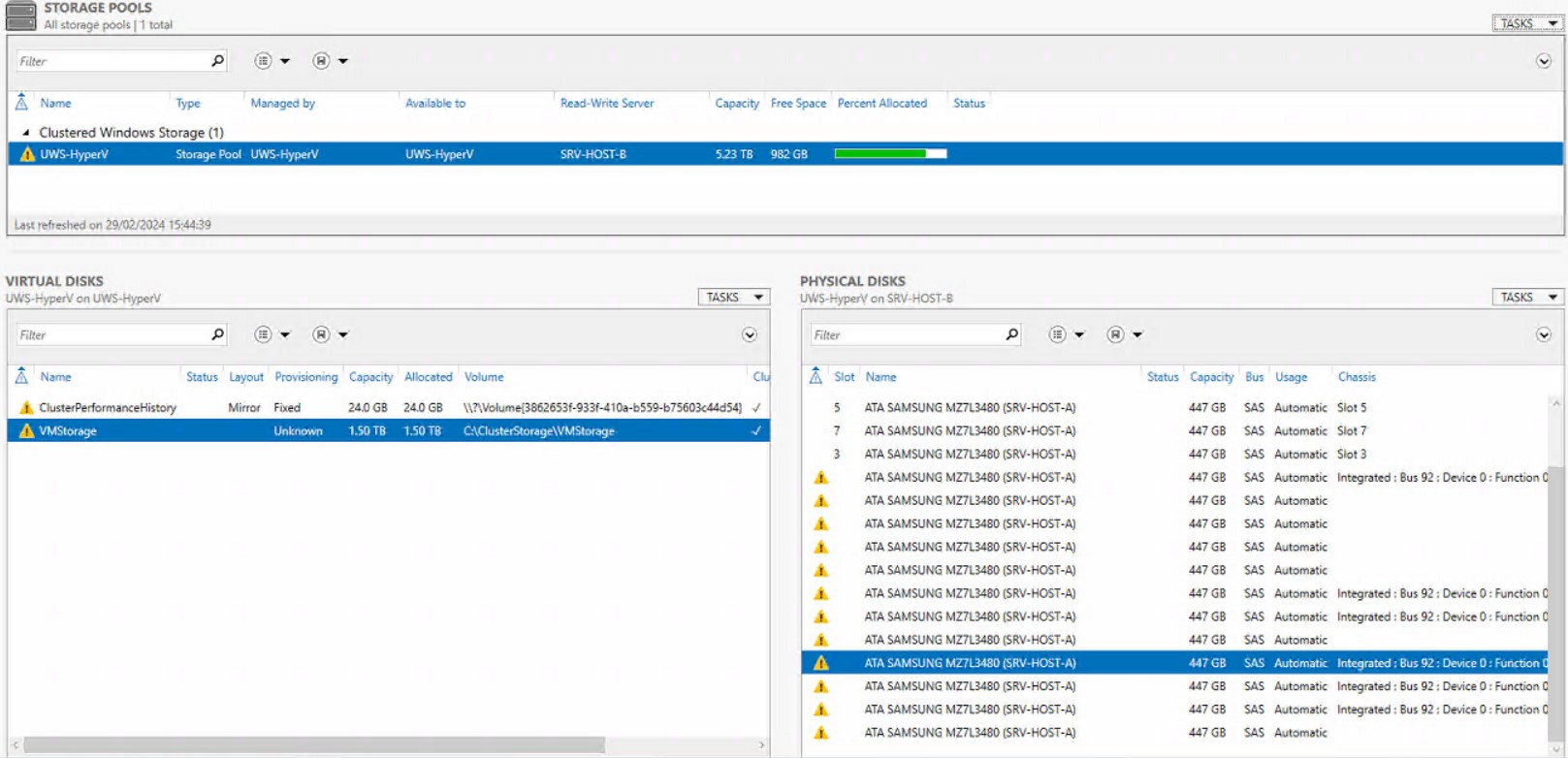
Just managed to attach in image in my thread, thanks @ZeroHour
-
S2D Failover Cluster - Storage Pool IO Error
robyholmes replied to robyholmes's topic in Windows Server 2022
Screenshot now attached (Thanks ZeroHour)
-
Hi @ZeroHour I'm getting the same message when I try and upload today. Tried in Chrome & Edge, same error as above. Cheers
-
Hi All, I've found one of our two Hyper-V S2D Cluster nodes is showing all of it's storage disks (SSDs) as in a IO Error state. The drives have a warning all of them on this server. VMs are running on the other server currently and won't migrate to the affected server. What's odd, is when I looking this error on this Microsoft page, it seems to imply the issue would only affect a single disk, and yet it's affecting all Storage Pool disks on this one server. There are 8 disks in each server, two are running the OS (RAID1) and 6 are in the storage pool. It's all these 6 that have this error. https://learn.microsoft.com/en-us/windows-server/storage/storage-spaces/storage-spaces-states#drive-health-state-warning Things I've tried so far are: - Restart - Reset Disk & Repair Virtual Disk (As shown in the above Microsoft guide) - Update server Drives & Firmware (But not the drives themselves, I can't get hold of the firmware for them) - Pull a drive out when in the OS - This is interesting, HPs Smart Storage tool shows it gone, but the Storage Pool does not. After a restart with the drive still out, Storage Pool still shows it with the same error, but the chassis / enclosure slot is blank. Inserting the drive again when in the OS doesn't change anything (Other than HP Smart Storage), a restart again returns the drive slot, but with the same error. - Tried to remove one drive from the storage pool, but this can't be done as the pool is in an unhealthy state so it won't allow you to remove it The server was purchase from ICT-Direct, with which it's still under warranty. They've have a look if they can get the firmware for the drivers but can't find it either. The drives are Samsung 7L34800, MZ7L3480HCHQ or PM893 I understand. Which seems to be a OEM drive so Samsung don't publish anything for it. HP's SUM updater doesn't see them either. We use cluster aware updating and I think this server has installed an update, restarted and then done this. The other host is waiting to restart but can't because it can't migrate the roles. I'm worried it might have the same issue once it's restarted. I'm not seeing much in event viewer for this either, these bits around but nothing that gives me anything via a google search. Google is also turning up very little other than the Microsoft link above (Plus a Lenovo copy of it) when I look up the IO Error for Storage Spaces. I was hoping to upload a screenshot of the drives and the error message, but it seems today is not my day and I'm getting a Failed to upload error. Help? Thanks, Rob
-
[ms office - o365] Microsoft Publisher - EOL 2026
robyholmes replied to thimon's topic in Office Software
Be interesting to see the reaction to this news you'd think even if they wanted to retire it they would offer an upgrade path to something else. -
Now that is smart! Good thinking.