Rawns
-
Posts
3,862 -
Joined
-
Last visited
Content Type
Forums
News
20th
EduGeek EDIT Conference
Blogs
Everything posted by Rawns
-
@synaesthesia @MrMat Just thought of how it's installing from me but no one else! Are you running it with the exe? I remembered that I install it using the MSI files that have been extracted from the EXE as we install via a script using CentraStage. Maybe something in the EXE checks the O/S and throws a wobbly. You should be able to open the exe in 7-zip and extract the MSI files to install it successfully on Server 2012: SSCERuntime-ENU.msi SSCERuntime-ENU-x64.msi SOLUS3DeploymentServerDatabaseInstaller.msi SOLUS3DeploymentServiceInstaller_x64.msi SOLUS3DeploymentServiceInstaller_x86.msi SOLUS3DeploymentServerUIInstaller_x64.msi SOLUS3DeploymentServerUIInstaller_x86.msi On SupportNet, Phil Neil says 3.6 is expected to be release COB on August 9th.
-
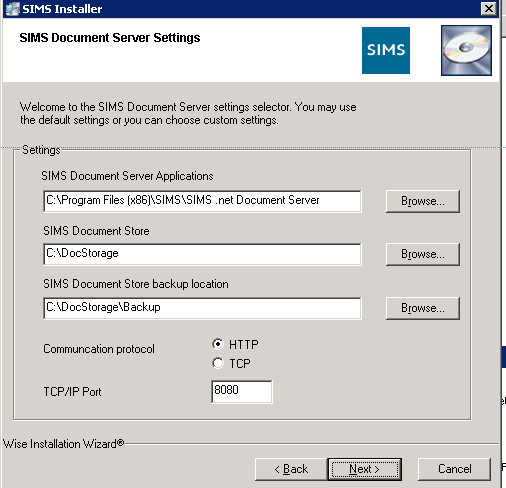
I'm not quite sure what you mean. You run SIMSInst.exe and choose the "This computer will be used as a SIMS document server" option. Point the SIMS folder and SIMS Setups folder to their respective locations and then set up your DMS: The SIMS Document storage path is where your DMS files will be kept, the default location is C:\DOCSTORAGE. It automatically creates the full folder tree during install (C:\DOCSTORAGE\\\) Usually, you would have copied the folder over already from the old server to this location. The folder that is named after the computer once copied gets renamed. Once installed, in SIMS .net, go to Tools | Setups | Document Management Server and update the computer name in there too so it points to the new server. Once done, save and test. if it comes back as passed, your DMS will be working.

-
On the old server, the doc storage would be stored somewhere like C:\DOCSTORAGE\\SIMS2008\SIMS Once copied to the new server, the needs changing to the new server name. Unless you know exactly whats current and are happy to sort it out, I would copy the complete folder. Better to be safe than sorry. Yes, run SIMSINST.EXE from the setups option and choose "This device will be a SIMS server. The SIMS.INI is in the Windows directory on every SIMS/FMS workstation. If the entry in the SIMS.INI file for the Setups folder location points to the old servers UAC path (\\\SIMSAREA$\SIMS\SETUPS) rather than the mapped drive (S:\SIMS\SETUPS), you'll need to update this on every workstation. FMS is almost the same. Detach the DB, copy across, attach to the new SQL instance on the new server, install the FMS client on the server and test. If you point FMS directly to the server than a redirect, you will need to manually update the FMSConnect.ini files on all of your FMS workstations.
-
BBC News - Eve players stage giant online space battle This is cool. Any Geekers a part of this awesomeness?
-
One of my mates hooked me up with beta access to this on the weekend. Needless to say I spent more time than was healthy playing it! I loved Payday: The Heist and it was great fun playing with mates, however you just could not help and compare it to L4D in certain aspects. Payday 2 is nothing but a huge improvement on the first one. The missions are more fun and there are more weapons! You can now actually use the money you steal on heists to buy more weapons, upgrades, attachments, gadgets, masks etc. The missions are great fun too with some of them being "multi-day" missions where they are spread out from between 2 and 7 days (ie: "levels"). What's really cool is that the later day missions get easier or harder dependant on how "ninja" you got through the first day's mission. If someone has beta keys, bug them for access. It really is a great game and worth trying!
-
On iOS go for: Infinity Blade 1 and 2 Superbrothers: Sword and Sworcery EP Plants Vrs Zombies Badland Worms 2: Armageddon Broken Sword: Directors Cut Broken Sword: The Smoking Mirror Borderlands Back to the Future Walking Dead Eufloria HD GTA III iBomber Defense Pacific Jungle Style Pinball Max Payne Minecraft South Park Who Wants to be a Millionaire Trainyard Wild West Pinball The Deep Pinball
-
Not at all. Personally, I think SOLUS2 worked a treat and it still does at the schools that use it. Sure, it can't manage discover upgrades, but for SIMS and FMS, it works like a dream. Some clever CentraStage scripting means additional databases get upgraded too. Our upgrade record was 3 days for SIMS and FMS in 270 schools which included mopping up of the odd failure. I cant see SOLUS3 ever managing that.
-
If SOLUS3 is progress, then I want no part in IT. If you want me, I'll be living as a hermit on a small island off Scotland and you can contact me with smoke signals....
-
You may be interested to know that if a user does have/leave SIMS .net open when the upgrade goes though on the workstation, the upgrade will actually complete successfully after a reboot, hence SOLUS3 returning the result of "Update successfully installed". It's a bit of a grey area because like you said, if you look at the agent info for a device and look at the version of SIMS .net, it will still show the version that has been left open, rather then the version that will be applied after the user reboots their device. But if you do see this, tell the user to reboot their workstation and when they try SIMS again, it will be working.
-
Not likely for an "access denied to the remote machine" error. It's the authentication stage it fails on when trying to install the agent, it's the login details it does not like. Why, I don't know.
-
Ahhh, your after the actual tools? It's the 10th item in the Capita News Feed list, posted 9th July2013. Try this link to the actual news post: http://support.capitaes.co.uk/user/detail.asp?params=%91%D5%CB%DD%E5%F3%9D%D7%E3%DE%D9%EF%99%C4%E6%E5%A0%C8%DD%E5%A9%B5%C7%E2%E8%D3%DA%D7
-
See my OP:
-
Another back peddle from Microsoft... BBC News - Xbox One to welcome indie games makers says Microsoft
-
Bingo. There's your problem right there. @Ashm - No good once SOLUS3 is in place. The setups folder becomes obsolete and is not updated. Check to make sure ALL of your SIMS clients are defined within the SOLUS3 SIMS Client channel, otherwise they won't get SIMS upgrades. Also make sure they show as 'Online' in the UI. Keep aneye out for any communication error messages. Also, are you on the latest SOLUS3 release? I know when SOLUS3 gets put in a school, its a monster to get working, god knows I've spent many an hour pulling my hair out and cursing Capita over getting SOLUS3 working. However, running the SIMSApplicationSetup.exe from the Setups folder when your on SOLUS3 is a bit of a 'dirty' fix. The setups folder won't be around forever and I'm supposed that if you have SOLUS3 in school, you still get the upgrade via SOLUS2 too. It's upgrades like this that highlight issues with your setup, the environment, or SOLUS3 itself. Will running the SIMSApplicationSetup.exe get you up and running quickly? Yes. Will it help long term in making SOLUS3 more reliable for future upgrades? No. If you make changes to your environment, you'll only have to wait to the next upgrade to see if the changes have had any impact in deployment success. I've come to terms with the fact that no matter how much I wish for it, Capita will not be binning SOLUS3 and everyone will at some point have to get it in place no matter what. Take these opportunities to learn and correct your environment to ensure the next upgrade does not hurt as much.
-
This. Is. Awesome! http://www.youtube.com/watch?v=HqYAyBNk16A
-
My bad, forgot to update the thread! My router got a bit hot last night and hung. Also rebooted my media centre and forgot to fire it back up. Server should be back.
-
Hummm. DNS/IP set up correctly? Ping one of the devices by name, then ping the IP address it returns with -a switch to resolve the IP to DNS and make sure that the returned hostname is correct.
-
Wraps work really well too. Also, scatter some slow cooked onions on them. Or even better, buy a pot of the crispy onion bits and use them. So much quicker and just as awesome.
-
Are the \\\admin$ shares accessible?
-
I love supernoodles. I load them in pitta breads with chopped sausages, sweet chilli sauce and mayo.
-
Spaghetti, baked beans, chilli sauce, onion, sausages and grated cheese. http://2.bp.blogspot.com/_Iel3IXJ_g7A/RzNgm8dFpcI/AAAAAAAACwU/Gb0q9sdwJgM/s400/French%2520Chef_resize.gif
-
Are these devices all on the domain? Usually that error comes up when trying to install the Agent using domain credentials when the (usually) laptops are not part of the domain.
-
Only if you look at the details of the deployment does show as failed. The reports you pull out from SOLUS3 at a site and LA level will simply show this deployment as being "partially successful". I disagree. In no way is this a partially successful deployment. The Discover client was not installed on the only device I targeted. Yes it downloaded the package, but that's neither here nor there. If I deployed to 2 devices and one got Discover successfully and the other did not, then I would class that as being "partially successful".
-
it did deploy download the package successfully, but if that's the reason it shows as being partially successful, that's rubbish! I'm of the opinion that Discover failed to redeploy against that one device, therefore the status of the deployment should be Failed and nothing more. You don't get manual installers say "Hay, I was partially successful because I extracted the components but couldn't install the program!" If it failed, it failed!