albertwt
-
Posts
289 -
Joined
-
Last visited
Content Type
Forums
News
20th
EduGeek EDIT Conference
Blogs
Everything posted by albertwt
-
 Hi All, I'd like to upgrade my existing Exchange Server 2007 Std. SP1 + RU 3 into the latest Service Pack 2, but I'm confused and not sure if it can bring more benefits than harm :-( when i click on the Windows update, It only shows: Microsoft .NET Framework 3.5 Service Pack 1 and .NET Framework 3.5 Family Update for .NET versions 2.0 through 3.5 (KB951847) x64 Microsoft Exchange Server 2007 Rollup Update 9 Should I go ahead with the SP2 directly after the .NET Framework install ? I also and always heard that there will be something broken after applying the patch to Microsoft Exchange Server, Can anyone share your experience here please of what to do after the SP2 install ? [I'm pretty sure that there is something won't work as expected :-|] and of course if the upgrade is failed, I'll redeploy this server backup from Symantec Backup Exec System Recovery 8.5. Cheers, JJ
 -
Cannot query External host IP from new DNS Server + DC
albertwt replied to albertwt's topic in Windows Server 2000/2003
Hi Sorry for the late reply due to the weekend activity :-0 I've just found out that the Subnet mask for the NewDC01 was 255.255.255.0 it is supposed to be 255.255.254.0 >_< after I changed it then i can use the NSlookup query on test host :-) one problem still remains though it's the Broken delegation, what is that actually means ? -
Hi All, I've just promote this NewDC01 serve which act as Domain Controller + Global Catalog and DNS, from the DNS console, i can resolve simple and recursive query. from this server cmd prompt i can perform nslookup successfully to the world and internal host. However when i use this NewDC01 IP address as 1st DNS in my computer, it failed for the external ? the following is the DCdiag /DNS result: Domain Controller Diagnosis Performing initial setup: Done gathering initial info. Doing initial required tests Testing server: Default-First-Site-Name\NewDC01 Starting test: Connectivity ......................... NewDC01 passed test Connectivity Doing primary tests Testing server: Default-First-Site-Name\NewDC01 DNS Tests are running and not hung. Please wait a few minutes... Running partition tests on : DomainDnsZones Running partition tests on : ForestDnsZones Running partition tests on : Schema Running partition tests on : Configuration Running partition tests on : Domain Running enterprise tests on : Domain.com Starting test: DNS Test results for domain controllers: DC: NewDC01.Domain.com Domain: Domain.com TEST: Forwarders/Root hints (Forw) Error: Forwarders list has invalid forwarder: 139.130.4.4 () Error: Forwarders list has invalid forwarder: 203.50.2.71 () TEST: Delegations (Del) Error: DNS server: DCDNSExchange01.Domain.com. IP:10.2.2.4 [broken delegated domain Domain.com.Domain.com.] Error: DNS server: DCDNS01.Domain.com. IP:10.2.2.3 [broken delegated domain Domain.com.Domain.com.] Error: DNS server: NewDC01.Domain.com. IP:10.2.2.34 [broken delegated domain Domain.com.Domain.com.] Error: DNS server: RemoteDC01.Domain.com. IP:10.1.2.13 [broken delegated domain Domain.com.Domain.com.] Summary of test results for DNS servers used by the above domain controllers: DNS server: 10.1.2.13 (RemoteDC01.Domain.com.) 1 test failure on this DNS server Delegation is broken for the domain Domain.com.Domain.com. on the DNS server 10.1.2.13 DNS server: 10.2.2.3 (DCDNS01.Domain.com.) 1 test failure on this DNS server Delegation is broken for the domain Domain.com.Domain.com. on the DNS server 10.2.2.3 DNS server: 10.2.2.34 (NewDC01.Domain.com.) 1 test failure on this DNS server Delegation is broken for the domain Domain.com.Domain.com. on the DNS server 10.2.2.34 DNS server: 10.2.2.4 (DCDNSExchange01.Domain.com.) 1 test failure on this DNS server Delegation is broken for the domain Domain.com.Domain.com. on the DNS server 10.2.2.4 DNS server: 139.130.4.4 () 1 test failure on this DNS server This is not a valid DNS server. PTR record query for the 1.0.0.127.in-addr.arpa. failed on the DNS server 139.130.4.4 DNS server: 203.50.2.71 () 1 test failure on this DNS server This is not a valid DNS server. PTR record query for the 1.0.0.127.in-addr.arpa. failed on the DNS server 203.50.2.71 Summary of DNS test results: Auth Basc Forw Del Dyn RReg Ext ________________________________________________________________ Domain: Domain.com NewDC01 PASS PASS FAIL FAIL PASS PASS n/a ......................... Domain.com failed test DNS ========= DNS test . . . . . . . . . . . . . : Failed [WARNING] Cannot find a primary authoritative DNS server for the name 'NewDC01.Domain.com.'. [ERROR_TIMEOUT] The name 'NewDC01.Domain.com.' may not be registered in DNS. [FATAL] Could not open file C:\WINDOWS\system32\config\netlogon.dns for reading. [FATAL] Could not open file C:\WINDOWS\system32\config\netlogon.dns for reading. [FATAL] No DNS servers have the DNS records for this DC registered. Redir and Browser test . . . . . . : Failed List of NetBt transports currently bound to the Redir NetBT_Tcpip_{4EF94F59-3AC4-49D2-B273-AD028AAB3211} NetBT_Tcpip_{E3EBCC79-1D85-4CDF-AE17-9B57770C1CFF} The redir is bound to 2 NetBt transports. List of NetBt transports currently bound to the browser NetBT_Tcpip_{4EF94F59-3AC4-49D2-B273-AD028AAB3211} NetBT_Tcpip_{E3EBCC79-1D85-4CDF-AE17-9B57770C1CFF} The browser is bound to 2 NetBt transports. [FATAL] Cannot send mailslot message to 'DOMAIN*' via browser. [ERROR_INVALID_FUNCTION] and the cmd prompt history list: C:\Documents and Settings\Administrator>ping vcenter Pinging BackupServer.Domain.com [10.2.2.5] with 32 bytes of data: Reply from 10.2.2.5: bytes=32 time<1ms TTL=128 Reply from 10.2.2.5: bytes=32 time<1ms TTL=128 Reply from 10.2.2.5: bytes=32 time<1ms TTL=128 Reply from 10.2.2.5: bytes=32 time<1ms TTL=128 Ping statistics for 10.2.2.5: Packets: Sent = 4, Received = 4, Lost = 0 (0% loss), Approximate round trip times in milli-seconds: Minimum = 0ms, Maximum = 0ms, Average = 0ms C:\Documents and Settings\Administrator>nslookup DNS request timed out. timeout was 2 seconds. *** Can't find server name for address 10.2.2.34: Timed out Default Server: UnKnown Address: 10.2.2.34 > vcenter Server: UnKnown Address: 10.2.2.34 DNS request timed out. timeout was 2 seconds. *** Request to UnKnown timed-out > NewDC01 Server: UnKnown Address: 10.2.2.34 DNS request timed out. timeout was 2 seconds. *** Request to UnKnown timed-out > Any kind of help would be greatly appreciated. Thanks.
-
Promoting Windows Server 2008 R2 as DC + DNS in 2003 AD Domain
albertwt replied to albertwt's topic in Windows Server 2008 R2
M25man, Thanks for your reply, I really appreciate your efforts in sharing your experience here. Cheers, AWT -
Promoting Windows Server 2008 R2 as DC + DNS in 2003 AD Domain
albertwt replied to albertwt's topic in Windows Server 2008 R2
Hi iTech, So in this case i should move all FSMO role from the Exchange Server into the new Server C ? previously it was configured separately like that but then when the server gets rebooted, the Exchange Server cannot send and receive email ? and the users disconnected. -
Finally, The following trick actually works for me 1. Backup the following regkey: HKLM\Software\Microsoft\EventSystem\ 2. Erase the regkey HKLM\Software\Microsoft\EventSystem\{26c409cc-ae86-11d1-b616-00805fc79216} an below 3. Reboot. 4. Verify that things are working by running vssadmin list writers vssadmin list providers. and then in the services.msc list of services snap ins, make sure the following services are Started Automatically: 1. COM+ System Application 2. Distributed Transaction Coordinator 3. Volume Shadow Copy 4. VMware Physical Disk Helper Service Automatically but not started: 1. Microsoft Software Shadow Copy Provider 2. VMware Snapshot Provider now the backup is all working great C:\Documents and Settings\Administrator\Desktop>vssadmin list writers vssadmin 1.1 - Volume Shadow Copy Service administrative command-line tool (C) Copyright 2001 Microsoft Corp. Writer name: 'System Writer' Writer Id: {e8132975-6f93-4464-a53e-1050253ae220} Writer Instance Id: {eac0c7b4-0b79-4ffa-a337-7639c2ade112} State: [1] Stable Last error: No error Writer name: 'SqlServerWriter' Writer Id: {a65faa63-5ea8-4ebc-9dbd-a0c4db26912a} Writer Instance Id: {e5d27b6e-d2d9-4030-a1aa-dc4fa16fa2a9} State: [1] Stable Last error: No error Writer name: 'COM+ REGDB Writer' Writer Id: {542da469-d3e1-473c-9f4f-7847f01fc64f} Writer Instance Id: {020e45b1-9f51-4ba5-9b77-fa004cb160f4} State: [1] Stable Last error: No error Writer name: 'MSDEWriter' Writer Id: {f8544ac1-0611-4fa5-b04b-f7ee00b03277} Writer Instance Id: {8998da01-9ab4-456b-895a-f3b1f24cbc73} State: [1] Stable Last error: No error Writer name: 'WMI Writer' Writer Id: {a6ad56c2-b509-4e6c-bb19-49d8f43532f0} Writer Instance Id: {122a3930-b259-4cad-99d4-b67c8f9f7b89} State: [1] Stable Last error: No error Writer name: 'Event Log Writer' Writer Id: {eee8c692-67ed-4250-8d86-390603070d00} Writer Instance Id: {eaaa7cbf-b9fa-4ccb-8b2e-16c849fd825d} State: [1] Stable Last error: No error Writer name: 'Registry Writer' Writer Id: {afbab4a2-367d-4d15-a586-71dbb18f8485} Writer Instance Id: {3e16d785-e69e-4460-854e-e19aaedf1db8} State: [1] Stable Last error: No error C:\Documents and Settings\Administrator\Desktop>vssadmin list providers vssadmin 1.1 - Volume Shadow Copy Service administrative command-line tool (C) Copyright 2001 Microsoft Corp. Provider name: 'Microsoft Software Shadow Copy provider 1.0' Provider type: System Provider Id: {b5946137-7b9f-4925-af80-51abd60b20d5} Version: 1.0.0.7 C:\Documents and Settings\Administrator\Desktop>pause Press any key to continue . . .
-
Terminal Server Gateway deployment best practice
albertwt replied to albertwt's topic in Windows Server 2008
Hi RSoP Finally I was able to access the Webserver that I want from the internet using Terminal Server Gateway, here's what I did: on Terminal Server Gateway (open ports 53, 88, 389, 135, 139, 3389, after that only open port 443 to the external and to the webserver): 1. Join the TSG server into the domain 2. go through the steps in [ame=http://www.youtube.com/watch?v=x_0oeiCTTfU]YouTube - Windows Server 2008 - Installing Terminal Services[/ame] 3. TS_CAP_01 settings: Requirement tab: select password for the authentication add BUILTIN\Administrators group Device Redirection tab: Enable device redirection for all devices 4. TS_RAP_01 settings: User groups tab: *make the same members as the previous CAP_01 setting* Computer group tab: select Allow users to connect to any network resources --> because of this now i can secure RDP to the webserver. Allowed ports tab: select Allow connection through any port --> and this one as well. 5. Export the certificate as (whatever).cer and then this must be imported into the Trusted Root CA on the client workstation. on the DMZ Webserver (open only on port 443 after going through this steps) 1. join the webserver to the domain 2. go to system properties | Remote tab and click on Allow connection from computers running.... 3. click on Remote users button and add the same user as the previous one in the TSG group (step 3 and 4) on the client: 1. import the certificate from the TSG.domain.com into the trusted root CA location (click on browse and select the folder). 2. run mstsc (remote desktop application) 3. General Tab: computer: (webserver IP address) --> due to the no DNS available. username: Webserver\Administrator Advanced Tab: select Connect and don't warn me. click on settings: select use these TS Gateway server settings: Server name: TSG.domain.com Login method: NTLM click on OK then connect by supplying the local admin password. -
Hi All, I'm looking and wondering if there is any backup solution which capable of doing backup from my iSCSI SAN into the ESXi local datastore that can be automated with the support of file level restore ? the VM is having a RDM LUN so i need to be able to restore a single file in case the VM failed or the RDM LUN got corrupted. Any idea or suggestion in how to do it please ? Thanks.
-
Hi All, I'm about to do the Domain Controller + DHCP and DNS role transfer from Windows Server 2003 Std. R2 SP2 into Windows Server 2008 Std. R2 SP 1, is there anything that i should be careful about ? Here's the current AD Domain details: Domain Functional Level: Windows 2000 Native (since there is Samba Server) ServerA: DC + 1st DNS + DHCP (this will be decommissioned) - Windows Server 2003 x86 R2 SP2 ServerB: DC + 2nd DNS + All FSMO Role + Exchange Server 2007 SP1 - Windows Server 2003 x64 R2 SP2 I'm afraid if there is any incompatibilities in running Windows Server 2008 R2 with Server 2003 then I could not restore the Server A from backup image (Acronis True Image backup). Any kind of help in how to run Server 2008 R2 as a DC in Windows 2003 domain side-by-side would be greatly appreciated. Thanks, Albert
-
To All, After fiddling around with new clean install VM of the same OS. Now the following tricks working without uninstalling the VMWare tools support for VSS. The reason why I'm doing this again is that I feel uncomfortable in removing the VSS snapshot provider support in VMWare tools: 1. Backup the following regkey: HKLM\Software\Microsoft\EventSystem\ 2. Erase the regkey HKLM\Software\Microsoft\EventSystem\{26c409cc-ae86-11d1-b616-00805fc79216} an below 3. Reboot. 4. Verify that things are working by running vssadmin list writers vssadmin list providers. and then in the services.msc list of services snap ins, make sure the following services are Started Automatically: 1. COM+ System Application 2. Distributed Transaction Coordinator 3. Volume Shadow Copy 4. VMware Physical Disk Helper Service Automatically but not started: 1. Microsoft Software Shadow Copy Provider 2. VMware Snapshot Provider now the backup is all working great :-) This is the solution that i tried around myself without uninstalling the VSS Provider support in VMWare tools. See th following KB URL: http://kb.vmware.com/selfservice/microsites/search.do?cmd=displayKC&docType=kc&externalId=1009073&sliceId=1&docTypeID=DT_KB_1_1&dialogID=38752513&stateId=0%200%2038754922 Hope this can be a blessing for all of you. Kind Regards, AWT
-
Hi All, I'm having problem in the VSS Writer, when i execute the command "vssadmin list writers" it shows nothing and generate three times of the following attached error message: Event Type: Error Event Source: VSS Event Category: None Event ID: 12302 Date: 23/09/2009 Time: 9:07:14 PM User: N/A Computer: WIN2003X64_VCBP Description: Volume Shadow Copy Service error: An internal inconsistency was detected in trying to contact shadow copy service writers. Please check to see that the Event Service and Volume Shadow Copy Service are operating properly. For more information, see Help and Support Center at http://go.microsoft.com/fwlink/events.asp. Data: 0000: 2d 20 43 6f 64 65 3a 20 - Code: 0008: 42 55 45 43 58 4d 4c 43 BUECXMLC 0010: 30 30 30 30 37 32 39 32 00007292 0018: 2d 20 43 61 6c 6c 3a 20 - Call: 0020: 42 55 45 43 58 4d 4c 43 BUECXMLC 0028: 30 30 30 30 37 32 31 39 00007219 0030: 2d 20 50 49 44 3a 20 20 - PID: 0038: 30 30 30 30 31 38 36 34 00001864 0040: 2d 20 54 49 44 3a 20 20 - TID: 0048: 30 30 30 30 34 30 30 38 00004008 0050: 2d 20 43 4d 44 3a 20 20 - CMD: 0058: 76 73 73 61 64 6d 69 6e vssadmin 0060: 20 6c 69 73 74 20 77 72 list wr 0068: 69 74 65 72 73 20 20 20 iters 0070: 2d 20 55 73 65 72 3a 20 - User: 0078: 57 49 4e 32 30 30 33 58 WIN2003X 0080: 36 34 5f 56 43 42 50 5c 64_VCBP\ 0088: 41 64 6d 69 6e 69 73 74 Administ 0090: 72 61 74 6f 72 20 20 20 rator 0098: 2d 20 53 69 64 3a 20 20 - Sid: 00a0: 53 2d 31 2d 35 2d 32 31 S-1-5-21 00a8: 2d 32 36 36 31 30 30 31 -2661001 00b0: 30 38 37 2d 33 36 35 37 087-3657 00b8: 37 32 31 38 31 32 2d 33 721812-3 00c0: 32 32 32 33 39 31 34 36 22239146 00c8: 32 2d 35 30 30 20 20 20 2-500 This makes the backup of my Windows Server 2003 x64 Std. Edition to failed using VCB v1.5 snapshot. Creating snapshot of Virtual Machine Cannot create a quiesced snapshot because the create snapshot operation exceeded the time limit for holding off I/O in the frozen virtual machine. I've installed the VMWare tools and make sure that the VSS service are all ON FYI: this is clean install Windows, nothing in it apart from VMWare tools the latest version from ESXi 4 Any kinds of help would be greatly appreciated. Thanks.
-
Hi All, I'm having problem in backing up Windows Server 2003/2008 x64 Edition, Even after VMWare tools re-install and restart the VM I've make sure the following services was started and set as automatic running before reinstalling VMWare tools with COMPLETE options: COM+ System Application Distributed Transaction Coordinator after restart then I've turn the following services on and set as automatic running as well: VMware Snapshot Provider Volume Shadow Copy then i got the same error message: Cannot create a quiesced snapshot because the create snapshot operation exceeded the time limit for holding off I/O in the frozen virtual machine. and here it is in the Windows VM event viewer log: Event Type: Error Event Source: VSS Event Category: None Event ID: 12302 Date: 21/09/2009 Time: 1:23:31 PM User: N/A Computer: RSA01 Description: Volume Shadow Copy Service error: An internal inconsistency was detected in trying to contact shadow copy service writers. Please check to see that the Event Service and Volume Shadow Copy Service are operating properly. For more information, see Help and Support Center at http://go.microsoft.com/fwlink/events.asp. Data: 0000: 2d 20 43 6f 64 65 3a 20 - Code: 0008: 42 55 45 43 58 4d 4c 43 BUECXMLC 0010: 30 30 30 30 37 32 39 32 00007292 0018: 2d 20 43 61 6c 6c 3a 20 - Call: 0020: 42 55 45 43 58 4d 4c 43 BUECXMLC 0028: 30 30 30 30 37 32 31 39 00007219 0030: 2d 20 50 49 44 3a 20 20 - PID: 0038: 30 30 30 30 31 35 38 34 00001584 0040: 2d 20 54 49 44 3a 20 20 - TID: 0048: 30 30 30 30 32 34 31 36 00002416 0050: 2d 20 43 4d 44 3a 20 20 - CMD: 0058: 43 3a 5c 57 49 4e 44 4f C:\WINDO 0060: 57 53 5c 73 79 73 74 65 WS\syste 0068: 6d 33 32 5c 64 6c 6c 68 m32\dllh 0070: 6f 73 74 2e 65 78 65 20 ost.exe 0078: 2f 50 72 6f 63 65 73 73 /Process 0080: 69 64 3a 7b 37 30 37 34 id:{7074 0088: 31 41 41 33 2d 35 42 38 1AA3-5B8 0090: 39 2d 34 43 44 43 2d 38 9-4CDC-8 0098: 38 32 31 2d 34 35 45 45 821-45EE 00a0: 41 42 31 37 37 41 35 30 AB177A50 00a8: 7d 20 20 20 20 20 20 20 } 00b0: 2d 20 55 73 65 72 3a 20 - User: 00b8: 4e 54 20 41 55 54 48 4f NT AUTHO 00c0: 52 49 54 59 5c 53 59 53 RITY\SYS 00c8: 54 45 4d 20 20 20 20 20 TEM 00d0: 2d 20 53 69 64 3a 20 20 - Sid: 00d8: 53 2d 31 2d 35 2d 31 38 S-1-5-18 any kind of help would be greatly appreciated. Thanks, AWT
-
OK, Thanks for the reply. Sounds like I'm on the right track, but instead i shall criss-cross the Ethernet cable into two switches in the middle for the redundancy matters. HP Procurve 1800-24G model# J9028B is the only switch that i have available as spare, it has 24 ports which is more than enough for the deployment as in the diagram I posted before.
-
here it is the final deployment plan according to the best practice of iSCSI SAN deployment for VCB backup. In the diagram, i put the Backup proxy Server on both iSCSI network and the production. I also put the HP Procurve 1800-24G model #J9028B in the middle between the ESXi and the SAN as oppose to the current deployment which is direct connection from the SAN to the ESXi. the switch in the middle is the one who connects between the iSCSI network path between the ESXi and the SAN and the Backup proxy. See the color difference, each color coded line represents the different IP address. Any comments regarding this would be appreciated. Cheers, AWT

-
Thanks for the reply Andy, Hm... now I begin to thinking If i should be using VCB -SAN mode for the backup, I think I must redesign the deployment diagram attached by joining the Backup server in the same subnet as the SAN and one LAN cable into the production network ? cmiiw.
-
Hi All, I'm looking for your suggestion and advise in utilizing the empty unused Local SATA-II datastore for my VM. I've got the following ESXi 4.0 build 164009 and a valid license of vSphere Essentials license, therefore I could use VCB but the problem is that using NBD from the SAN into the backup server is way too slow :-| it took 55 hrs to fullbackup the whole 1 TB VMFS partition (D2D over 2 network subnet). and now I'm thinking that rather than using backup solution Is it possible to clone the VM on the fly to more than 2 datastore like clustering service fault tolerance? (in this case to local datastore and the SAN_VMFS) in case there is a failure in the SAN, the VM can run off the Local Datastore, well it doesn't have to be realtime though. or perhaps there is a VCB backup that can copy the VM from he SAN VMFS into the local datastore vmfs ? that is also possible. Note: The reason why I chose this configuration is that direct connection from the SAN into the ESXi servers without anything in the middle, this can eliminate the single point of failure caused by the Switch and also provide redundancy. each color in the iSCSI network is different IP subnet by itself. from the ESXi into the production network i put two cable connected to two different ports and then add those pNIC into same vSwitch for failover Any kind of comments will be greatly appreciated. Thanks
-
Unable to add domain resources in Windows Server 2008 TSG role.
albertwt replied to albertwt's topic in Windows Server 2008
To All, Finally I was able to access the Webserver that I want from the internet using Terminal Server Gateway, here's what I did: on Terminal Server Gateway (open ports 53, 88, 389, 135, 139, 3389, after that only open port 443 to the external and to the webserver): 1. Join the TSG server into the domain 2. go through the steps in [ame=http://www.youtube.com/watch?v=x_0oeiCTTfU]YouTube - Windows Server 2008 - Installing Terminal Services[/ame] 3. TS_CAP_01 settings: Requirement tab: select password for the authentication add BUILTIN\Administrators group Device Redirection tab: Enable device redirection for all devices 4. TS_RAP_01 settings: User groups tab: *make the same members as the previous CAP_01 setting* Computer group tab: select Allow users to connect to any network resources --> because of this now i can secure RDP to the webserver. Allowed ports tab: select Allow connection through any port --> and this one as well. 5. Export the certificate as (whatever).cer and then this must be imported into the Trusted Root CA on the client workstation. on the DMZ Webserver (open only on port 443 after going through this steps) 1. join the webserver to the domain 2. go to system properties | Remote tab and click on Allow connection from computers running.... 3. click on Remote users button and add the same user as the previous one in the TSG group (step 3 and 4) on the client: 1. import the certificate from the TSG.domain.com into the trusted root CA location (click on browse and select the folder). 2. run mstsc (remote desktop application) 3. General Tab: computer: (webserver IP address) --> due to the no DNS available. username: Webserver\Administrator Advanced Tab: select Connect and don't warn me. click on settings: select use these TS Gateway server settings: Server name: TSG.domain.com Login method: NTLM click on OK then connect by supplying the local admin password. -
Unable to add domain resources in Windows Server 2008 TSG role.
albertwt replied to albertwt's topic in Windows Server 2008
thanks for replying back to my topic, I'm now in a stuck and ready to redeploy the server again from scratch. OK, Yesterday the consultant can login to the website https://tsg.domain.com/ts/en-US/default.aspx and click on the RDP icon but somehow he got timed out during the RDP connection process ? and myself as well from mu home internet connection, but It is working just fine from my company internal network. this problem drives me crazy already for the past 2 days. :-( -
Unable to add domain resources in Windows Server 2008 TSG role.
albertwt replied to albertwt's topic in Windows Server 2008
if i tried to access the TSG server from the internet using IP address as i haven't register it yet, is that possible to causing the problem ? should i use FQDN in this case for all of my settings ? -
Unable to add domain resources in Windows Server 2008 TSG role.
albertwt replied to albertwt's topic in Windows Server 2008
Hi Ric, Do i need a terminal service server in this case ? I thought that by just deploying TSG in the DMZ i can securely publish the Web Server to the world ? This web server will be managed by a consultant overseas for the web content and some programming stuff and it is not published to the internet. up to this point, in the TS Web Access, the consultant can login to the website https://tsg.domain.com/ts/en-US/default.aspx but when he click on the Remote Desktop icon that i publish he connect to the TSG not to the Web server ? thanks for the assistance and looking forward to solve this problem soon. -
Unable to add domain resources in Windows Server 2008 TSG role.
albertwt replied to albertwt's topic in Windows Server 2008
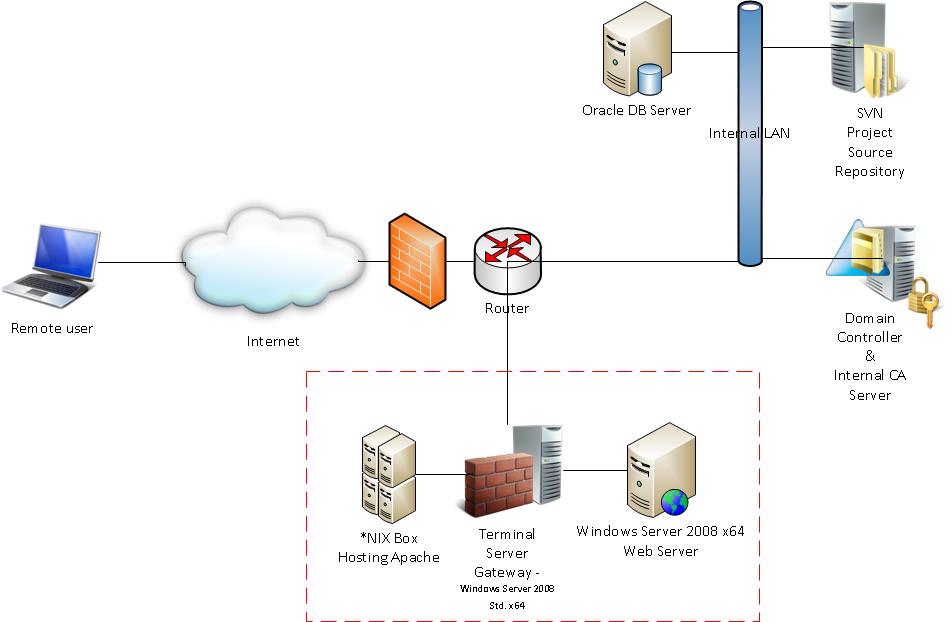
This is the picture of what I'm doing now, at the moment I'm inside the local network and would like to publish the Web Server 2008 which is located same in the DMZ is it correct that i should 1. publish the TSG.domain.com through the world using port 443 2. create self signed certificate from TSG.domain.com and then give that to the client. 3. setup the TS CAP and TS RAP 4. the client install the SSL cert on the trusted Root CA, 5. the client access remote desktop to TSG.domain.com. 6. once the client logged in, he/she must remote desktop again into the webserver cmiiw ? can anyone shed some light here please ? Thanks for all who reply to my thread.
-
i've successfully deployed the TSG in my DMZ and now I'm confused in configuring Windows Server 2008 Std x64 to serve as my Terminal Server Gateway, from the URL: Q. How can I install and configure Terminal Services Gateway? you can actually select the AD domain, but in my case the Location can only select the local machine ? Any kind of help would be greatly appreciated. thanks.
-
Virtual Machine backup strategy
albertwt replied to albertwt's topic in Thin Client and Virtual Machines
Hi DMcCoy, That is quite interesting article, by doing so the Backup server which is serving as the BE 12.5 Media server is sitting in two subnet (oneis Production LAN and the other is iSCSI). and then expose the VMFS LUN to the backup server for -SAN mode backup instead of NBD ? Correct me if I'm wrong ? with my current design i tried -SAN mode it failed as my ESXi servers directly connected with the SAN. thanks for the reply. -
Virtual Machine backup strategy
albertwt replied to albertwt's topic in Thin Client and Virtual Machines
To tmcd35, Thanks for the sharing mate, i really appreciate it. 22 hours meaning that the backup yes overwritten in a matter of 2 days (as the expiring i set into 2 days). To DMcCoy, I did that already as the option in my BE 12.5, here it is the layout of my current network setup. the purple arrow (which is the NBD mode backup to the backup server is running very2 slow around 243 MB/minutes according to the Backup Exec result log. (To backup 800 GB LUN it takes 55 hours.) for the VM which has got RDM partition attach into it, i can just make it a virtual mode so that the VCB v1.5 can do the snapshot and quiesce the EXT3 Filesystem. The reason in using the NBD mode to transfer the VM backup is that to make the backup process to run faster without encryption but it turns out to be slower that what i thought, if anyone got a better solution in using SAN mode or even HotAdd mode please share your comments and suggestion here. Note: The network between iSCSI SAN andthe 2x ESXi servers are different subnet (see the color coding) Blue cylinder indicates NTFS partition while the Black cylinder indicates the VMFS
-
Virtual Machine backup strategy
albertwt replied to albertwt's topic in Thin Client and Virtual Machines
Hi There, Thanks for the reply, because my current one is very slow to backup all of the VM from the SAN ---> ESXi servers ---> the network ---> Backup server it took 22 hours to backup the whole lot, so it is practically fullvm backup every day with the VCB and Backup Exec 12.5 without rest :-o I wonder if that is good way to do it ?