-
Posts
359 -
Joined
-
Last visited
Content Type
Forums
News
20th
EduGeek EDIT Conference
Blogs
Everything posted by JazzFlute
-
That's terrible really that you not got access to back ups you thought you had. I use Redstor and can't fault it myself but seems like one of your your MSP's has probably messed it up.
-

Schools Broadband Internet Issues
JazzFlute replied to JazzFlute's topic in Internet Related/Filtering/Firewall
I always fess up and blame a power surge 🤷🏻♂️🤣 -
Schools Broadband Internet Issues
JazzFlute replied to JazzFlute's topic in Internet Related/Filtering/Firewall
Gotta say been fine at my school well apart from when i just restarted a switch accidentally and knocked half the school offline for 2 minutes🤣 -
Smoothwall inappropriate Sponsored adverts
JazzFlute replied to Sheridan's topic in Internet Related/Filtering/Firewall
Got to add Copilots answer too 😂 Are YouTube videos appropriate for classroom use? Sometimes — but with caveats. YouTube is a commercial platform, not an education‑first service. Even when the video itself is suitable: Ads can be unpredictable Suggested videos can be inappropriate Thumbnails and titles can be unsuitable for a classroom Comments (if visible) can be problematic Google themselves are clear that YouTube does not guarantee age‑appropriate content, even for “educational” videos. [support.google.com] So: ✅ There is excellent educational content on YouTube ❌ The platform itself is not designed to be classroom‑safe Why you see inappropriate ads or content Ads are served automatically and can change per device, account, or time Ads are not vetted for schools Suggested videos are driven by algorithms, not curriculum relevance Even Restricted Mode does not block all unsuitable content [k12usa.com] This is why something may appear fine one day and inappropriate the next. Can you control YouTube in school? ✅ You can limit risk ❌ You cannot make it “fully safe” Here are the realistic controls available: 1. YouTube Restricted Mode (recommended minimum) Restricted Mode: Hides comments Blocks age‑restricted videos Filters content Google’s systems flag as inappropriate But: It is algorithm‑based It does not guarantee classroom‑appropriate content [k12usa.com] Schools using Google Workspace for Education can enforce this centrally via the Admin Console. [support.google.com] ✅ Useful ❌ Not foolproof 2. Approved / allow‑listed videos (best practice) With Google Workspace for Education, schools can: Set YouTube to “approved videos only” Allow specific videos or channels Block general browsing entirely [support.google.com] ✅ This is the safest YouTube option ❌ Requires admin setup and staff planning 3. Ads – can they be removed? Realistically: Ads cannot be reliably removed without: YouTube Premium (paid), or Third‑party ad blocking (often against school policy) Schools should not rely on ad blockers, and downloading videos is not legal under YouTube’s terms. [support.google.com] ✅ Some reduction possible ❌ No guaranteed ad‑free solution without cost or policy risk 4. Why videos “work at home but not at school” This usually happens because: School filtering overrides personal settings Restricted Mode is enforced at network/device level Ads or suggested videos are blocked by safeguarding filters This is expected behaviour, not a fault. Recommended safer alternatives If safeguarding and reliability matter (and they do in classrooms), consider: Oak National Academy BBC Bitesize Khan Academy Paid platforms with education licensing Curated video libraries within learning platforms These avoid ads, algorithms, and safeguarding issues entirely. Bottom line (plain English) YouTube is not designed for classrooms You cannot fully control ads or suggested content Restricted Mode helps but does not guarantee safety Approved‑video‑only access is the safest YouTube setup For consistent, safe lessons, non‑YouTube platforms are better -
Smoothwall inappropriate Sponsored adverts
JazzFlute replied to Sheridan's topic in Internet Related/Filtering/Firewall
Like a previous post said there uncontrollable and its like chasing your tail with it and soon they will be embedded into videos with no control over. best push away from it now and educate staff on what YouTube is there for or you'll just get blame for what IT cant control. Most popular inappropriate adverts i see are underwear/risque clothes but everyone's offence level is staggered so what's offensive to someone is ok to someone else. I think if its best set to kids/safe mode then that is the best you can do if inappropriate ads are coming through. -
Smoothwall inappropriate Sponsored adverts
JazzFlute replied to Sheridan's topic in Internet Related/Filtering/Firewall
I think a lot of education staff need a better understanding of how YouTube actually works. It isn’t really there to provide safe educational content – it’s a commercial platform designed to make money through adverts, sponsors, and the content it pushes. There also seems to be a belief that IT can download videos from YouTube, when legally we obviously can’t. Because of that, staff need to look at alternative resources or choose different content that’s suitable and compliant for their lessons. It’s so tiring when videos won’t play at school but “work fine at home”, and you end up explaining why for the umpteenth time before they tell you how their lesson has been spoilt. -
Schools Broadband Internet Issues
JazzFlute replied to JazzFlute's topic in Internet Related/Filtering/Firewall
Fingers crossed all good this morning, good speed test results, no packet losses so hopefully fixed.....anyone having issues? -
Schools Broadband Internet Issues
JazzFlute replied to JazzFlute's topic in Internet Related/Filtering/Firewall
I have very little confidence in the information being provided or in the status updates. They are unclear and feel like a “word salad,” with no definitive problem identified or clear resolution. As of Friday’s update, the issue was reported as found and fixed, yet we are now on Monday experiencing exactly the same problems. -
Schools Broadband Internet Issues
JazzFlute replied to JazzFlute's topic in Internet Related/Filtering/Firewall
I don’t believe there has been any update where an admission of fault has been acknowledged. The issue has consistently been described as a third‑party problem rather than anything at the ISP’s end. I understand that best practice and future guidance recommend internet redundancy, but this raises an important question: where is the redundancy at ISP level? The physical line itself appears to remain up, yet failures are repeatedly attributed to third parties. If that is the case, what resilience exists on their side? I can tolerate one or two days of disruption at most, but a full week — now extending into a second — is simply not acceptable. At this point, I have made the decision to move away as soon as possible, contract or not. The impact of having no internet connection is now significant. It affects almost every aspect of school operations, including teaching and lessons, safeguarding, registration, meals, supply staff, examinations, SATs practice, and online assessments. Probably the worst day yet as its solidly down if there is such a thing with just a bit of uptime for me to rant on here 🤣 -
Schools Broadband Internet Issues
JazzFlute replied to JazzFlute's topic in Internet Related/Filtering/Firewall
At least its not 100% i suppose 🤷🏻♂️
-
Schools Broadband Internet Issues
JazzFlute replied to JazzFlute's topic in Internet Related/Filtering/Firewall
Yup, its not fixed.....up and down again now everyone's logging on in schools -
Schools Broadband Internet Issues
JazzFlute replied to JazzFlute's topic in Internet Related/Filtering/Firewall
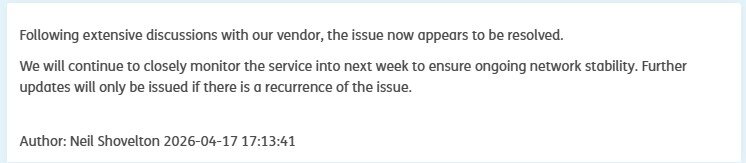
This mornings update 🤷🏻♂️Im going home 😥
-
Schools Broadband Internet Issues
JazzFlute replied to JazzFlute's topic in Internet Related/Filtering/Firewall
Friday after schools close update thinking all the problems are over?
-
Schools Broadband Internet Issues
JazzFlute replied to JazzFlute's topic in Internet Related/Filtering/Firewall
I’ll be glad when today is over. I’m not sure which is worse in practical terms: constant drop‑outs making the service unusable all day, or just pulling the lead altogether and sending everyone home. I suspect it’s going to be a long weekend, and I’m not confident this will be fixed by Monday, when demand will inevitably spike again at registration time. Today has been the worst day all week — and for quite some time, if I’m honest. -
Schools Broadband Internet Issues
JazzFlute replied to JazzFlute's topic in Internet Related/Filtering/Firewall
100% agree with this. At the end of the day all we can do is move away when contracts are up. Only thing that has stopped me the last few years is the config/whitelists etc in the background already done with SBB on my network and having to start afresh with new provider but you have to take the jump sometime as cant keep putting up with this as every return to term you dread what's going to happen. -
Schools Broadband Internet Issues
JazzFlute replied to JazzFlute's topic in Internet Related/Filtering/Firewall
For some reason this makes me feel better knowing we are all in the same boat now 🤣 Today is bad and unusable, best test out there is listen to your radio station of choice and you can tell when the internet drops when the radio goes off. Not had a song play all the way through today as of yet its been that bad! -
Schools Broadband Internet Issues
JazzFlute replied to JazzFlute's topic in Internet Related/Filtering/Firewall
There last update last night seemed like a plausible "fix" but obviously not. 5 days of constant fluctuations and downtime at the most busiest/important times for school is not very good at all. No matter how much you try and explain to Headteacher, SLT etc. its the ISP's fault there's still an expectation that we can try and fix it ourselves and we bear the frustration of all staff. -
Schools Broadband Internet Issues
JazzFlute replied to JazzFlute's topic in Internet Related/Filtering/Firewall
Same problems again today, everyday since being back after Easter -
Schools Broadband Internet Issues
JazzFlute replied to JazzFlute's topic in Internet Related/Filtering/Firewall
Yes, it happens at the same time every day, with degraded service continuing throughout the day. Most schools now rely on VoIP, so when the connection drops it significantly affects the running of the school and communication with parents. Previously, when the issue was just “no internet,” there were sometimes workarounds in classrooms. Now that the phones also go down, it has become a much larger and more disruptive problem. Surely i would have thought they knew what changes they made in the Easter hols to either roll back or identify quickly which change they made that is the problem but obviously not as 4 days on the trot now experiencing the same issues. -
Clipchamp licence not appearing for faculty.
JazzFlute replied to kennysarmy's topic in Educational Software
I imagine like my test yesterday it will work for some students mainly because of the built in windows Clipchamp app (free) and then it will fallback to not working as it realises the account hasn't got the proper license. I gave up on Clipchamp months ago and pushed out a CapCut package instead (free version) for our students and staff for video editing which is a bit more industry standard too and simple to use for both KS2 Primary and Secondary -
Schools Broadband Internet Issues
JazzFlute replied to JazzFlute's topic in Internet Related/Filtering/Firewall
Yeah same again today as last 2 days. Done some troubleshooting for them and hopefully they'll find a fix today but Internet came back up quicker today and hopefully fingers crossed will be stable for the rest of the day then fingers crossed for in the morning again.. -
Schools Broadband Internet Issues
JazzFlute replied to JazzFlute's topic in Internet Related/Filtering/Firewall
just updating that issue still not resolved and its been up and down all day with slow speeds when the internet is working. -
Clipchamp licence not appearing for faculty.
JazzFlute replied to kennysarmy's topic in Educational Software
Copilot response which makes sense as to why it initially works for Students with A1 licensing when i tried earlier but will soon fail. Only solution is A3 + licenses. You said: why does Microsoft Clipchamp app let me login with a student Office A1 and Microsoft Apps for students licenses but doesn't let me logon to Clipchamp with the same licenses but faculty versions Copilot said: Copilot This behaviour is confusing, but it is expected once you look at how Microsoft has split Clipchamp by license tier and by app surface. Below is a clear, plain‑English explanation of why students can sign in but faculty often can’t with the same “A1-style” licensing, and why the Clipchamp Windows app behaves differently from the web experience. 1. Clipchamp is not included in Office 365 / Microsoft 365 A1 (faculty or student) Microsoft Clipchamp editor is only licensed for Education A3 and A5, not A1 — for either students or staff. Microsoft explicitly states: So from a licensing point of view: License Clipchamp editor entitlement Office 365 / M365 A1 (Students) ❌ Not licensed Office 365 / M365 A1 (Faculty) ❌ Not licensed Microsoft 365 A3 / A5 ✅ Licensed 2. Why students appear able to log in anyway (but faculty can’t) This is where the Windows app + web fallback causes confusion. Students often succeed because: The Clipchamp Windows app is bundled with Windows 11 If Clipchamp editor entitlement is missing, the app may: silently fall back to a personal/free Clipchamp experience or allow limited sign‑in before blocking editing/export This behaviour is documented as an entitlement “edge case” where login succeeds but features are gated later.microsoft+1 Faculty fail more often because: Faculty accounts are more likely to be: AAD‑restricted blocked from personal services subject to stricter Conditional Access When Clipchamp checks the CLIPCHAMP service plan, faculty A1 accounts return Disabled, which causes an immediate sign‑in block instead of a fallback.microsoft So: Students → soft‑fail → app opens Faculty → hard‑fail → “not available for your account” Same license, different enforcement path. 3. The Windows app ≠ the web version Another key factor is that Clipchamp’s Windows app is just a PWA wrapper, but it authenticates slightly differently than the browser version. Microsoft confirms: The desktop app can fail even when the web version works Authentication sometimes breaks when: SSO is enforced entitlement provisioning is incomplete the service plan is missing (A1 scenario)clipchamp+1 That’s why you may see: ✅ Student sign‑in via the app ❌ Faculty sign‑in via the app ✅ Same faculty account works at microsoft365.com → Clipchamp (sometimes, read‑only) 4. Why Microsoft does this (the design reason) Microsoft intentionally limits Clipchamp editing to A3/A5 because: It replaces Stream editing It integrates with OneDrive + SharePoint It stores projects in tenant storage It includes AI features tied to higher SKUs This is documented in the Clipchamp service description and Education license tables.microsoft+1 5. What actually fixes it (and what doesn’t) ❌ Things that won’t fix it Reinstalling the app Clearing cache Switching browsers Reassigning A1 licenses ✅ Things that do fix it Assign Microsoft 365 A3 or A5 to faculty who need Clipchamp (Even one A3 license instantly resolves the issue)clipchamp Or: Use Clipchamp personal accounts (not recommended for staff) Or: Disable the Windows app and avoid the confusion entirely for A1 tenants 6. TL;DR A1 does not include Clipchamp editing — for anyone Students sometimes appear to “work” due to fallback/free behaviour Faculty are blocked more consistently due to stricter entitlement enforcement The Windows app makes the problem look worse than it is A3 or A5 is the only correct fix -
Clipchamp licence not appearing for faculty.
JazzFlute replied to kennysarmy's topic in Educational Software
They've definitely updated the App as it includes "CoPilot" now as before it was just labelled "AI" how you could create videos. Just tested creating making a video with student account with the CoPilot prompt and it worked fine and was quick. -
Clipchamp licence not appearing for faculty.
JazzFlute replied to kennysarmy's topic in Educational Software
Ignore everything I've said regarding the staff license lol as just realised i signed in with my google account (it was cached 🤣) Still works with the student licenses as explained though so not sure why staff have no access/license for it 🤷🏻♂️