password1234
-
Posts
138 -
Joined
-
Last visited
Content Type
Forums
News
20th
EduGeek EDIT Conference
Blogs
Everything posted by password1234
-
[2004, 20h2] File explorer search box not working in a certain OU
password1234 replied to nikaso's topic in Windows 10
had the same issue with a few machines I had to end up downloading and installing windows latest update which fixed the issue https://www.microsoft.com/en-gb/software-download/windows10 -
DfE Connecting the Classroom project funding
password1234 replied to password1234's topic in Wireless Networks
Yup for this particular school they need around 3 extra Data points installed in various classroom, this got approved as well using CAT6 Standard Other schools we have submitted bid for getting Fibre connection installed from main building to mobile classrooms (Awaiting outcome of that) Only thing they would not fund is replacing existing CAT5 Cabling with Cat6 unfortunately, but we will have to just work with what is given -
DfE Connecting the Classroom project funding
password1234 replied to password1234's topic in Wireless Networks
Had one school get approved to the value of around £15k for around 8 AP's + Licensing + Switches + Associated Install Costs Using all Meraki Equipment - this was one of the smaller schools we support Just have more paperwork to fill in now to get everything submitted -
Yeh its one of those schools that already had documents saved locally and its one of those where "They dont want to change their ways of working" Bit of a struggle, but thats another discussion altogether! May try onedrive actually good suggestion!
-
Hi Guys Setting up a new domain / server 2019 (Host + VM for DC, VM for Data) for a small infant school, their old server they had was a bit messy left by the old provider so we got them a brand new sever and plan to create a brand new domain and start everything from scratch Its a very small school probably around 70 pupils and around 9 teachers + 2 admin staff My question is about Roaming Profiles + Folder Redirection + Offline Files (For their Home Folders only) Can never get this working correctly, so we thinking of just scrapping the Folder Redirection (With other schools we would normally Redirect Documents > to their Home Folder) and thinking of just leaving Documents folder and everything else locally Teachers use the same laptops all the time, likewise with admin staff remain static Just curious how do you guys setup this? do you guys use folder redirection? or do you just leave everything as it is?
-
DfE Connecting the Classroom project funding
password1234 replied to password1234's topic in Wireless Networks
We queried about replacing the existing Cat5 Cables at the school with Cat6, they said they wont be funding for this, and they will only fund for Cat 6 Cabling required for new data points for access points. They wont replace any existing cable unfortunately or for hard wired devices. - we tried asking them that and they told us that -
DfE Connecting the Classroom project funding
password1234 replied to password1234's topic in Wireless Networks
We are opting for Cisco Meraki MR56 Access Points and for Switches MS390 We have also put in bids to get extra data sockets installed in some of the classrooms which does not have any data points there, and also some schools made a bid to get Fibre connection installed to mobile classrooms outside the main buildings, with new data points and cabs. Meraki Deals we got quotes 10 years for the price of 5 Years Quotes we have got back so far ranging from like £20-£100k (Including everything support costs seems to be the bulk of the costs!) and these are mainly for Small Primary / Junior / infant schools we support with around 8-15 APS and some schools with a single switch and others with multiple How much the DFE are willing to approve per school is yet to be known, we did have a meeting with dFE they were a bit tight lipped about budget per school when we questioned if there was a limit to all we got from them is "Whatever is needed will be considered" and the solutions are a real overkill in terms of requirements for small schools. We too been using Unifi but does not cut the chase with the DFE, so we opted for Meraki ones -
DfE Connecting the Classroom project funding
password1234 replied to password1234's topic in Wireless Networks
Has anyone submitted figures to DFE yet and got accepted? We have just about got our figures from suppliers today and have started to submit them Some of the quotes we have got back are around £30k in total for the entire project (new data points/new switches/access points/licensing etc.) for a small primary school (half of the costs are support costs though cisco and l2 support) Just curious if anyone got it approved and if so if they mind sharing what cost range they submitted -
DfE Connecting the Classroom project funding
password1234 replied to password1234's topic in Wireless Networks
Purchasing via meeraki direct is not possible right? they only do it via resellers? correct? -
DfE Connecting the Classroom project funding
password1234 replied to password1234's topic in Wireless Networks
Yes same with us as well, their Requirements are really an overkill especially for small primary / infants school, but if that's what they want not really complaining We are thinking of going with Cisco Meraki AP and Switches and also they maybe willing to fund for extra Data points to be installed in classrooms for additional Access points and even Fibre connection between main building and some of the schools that have mobile classroom units. They have said to go for Tier 1 Supplier. Have you managed to source out a Tier 1 Supplier to get quotes for the equipment, we have tried to reach to Cisco meraki they just seem an age taking time to get back to us! -
DfE Connecting the Classroom project funding
password1234 replied to password1234's topic in Wireless Networks
I think Schools that were eligible for LFFN programme (Mainly for rural schools) a few years back are being contacted directly by the DFE for this new programme -
Hi Anyone participating or eligible for the DFE funding for the connecting the Classroom project? Where DFE are willing to fund Access points / brand new switches and improving the schools wireless infrastructure Only a handful of schools are eligible for this. All the schools we support handful out of a many (Primary/Infant) schools have all been accepted Their requirements are Wifi 6 access points across all the schools and min 2.5GBS switches (Overkill switches for small infant/primary schools) and they all need to have a minimum of 5 year warranty attached to them! but if they willing to fund it and its free money happy days! Just wondering if anyone is taking part in this?
-
[sims] Script /Method to Uninstall SOLUS 3 Agent From Clients?
password1234 replied to JRA's topic in MIS Systems
Its not a firewall issue this perhaps? Check this post here http://www.edugeek.net/forums/mis-systems/221280-sims-firewall-login-issue.html#post1895354 Worth running this script on one of the machines then see if that makes a difference -
How are you installing SIMS? Is it Manually or are you pushing it out Via SOLUS? We use the following Script you could try running this on a workstation that is having an issue (Copy and paste and save as a .bat file) and run as administrator or copy the below to Command prompt on the affected machine and see if that works we had a similar problem to what you are describing Reason 0 is due to SIMS not being able to see the Server where it is installed from so its a firewall issue for sure Try that see how it goes! netsh advfirewall firewall add rule name="Solus 3 DS" dir=in action=allow protocol=TCP localport=52965 netsh advfirewall firewall add rule name="Solus 3 DS" dir=out action=allow protocol=TCP localport=52965 netsh advfirewall firewall add rule name="Solus 3 Agent" dir=in action=allow protocol=TCP localport=52966 netsh advfirewall firewall add rule name="Solus 3 Agent" dir=out action=allow protocol=TCP localport=52966 netsh advfirewall firewall add rule name="Solus 3 Agent UI" dir=in action=allow protocol=TCP localport=8739 netsh advfirewall firewall add rule name="Solus 3 Agent UI" dir=out action=allow protocol=TCP localport=8739 netsh advfirewall firewall set rule group="windows management instrumentation (wmi)" new enable=yes netsh advfirewall firewall set rule group="Windows Remote Management" new enable=yes netsh advfirewall firewall set rule group="File and Printer Sharing" new ENABLE=Yes
-
You got the SOLUS Firewall Script to run?
-
Redstor - also have facility to backup SIMS/FMS Database from the software! Pricey but really good
-
Hi Got a primary school we look after only 2 admin staff work there so they are using a P2P server to run SIMS off, Too expensive for them to down the route of buying a Dedicated box They want the teachers to access SIMS in the classroom, was thinking initially of using SOLUS but they have around 7 classrooms and it may cause performance issues on the P2P server (Currently running w10/8GB ram) Does anyone know if Teacher app would work better? Rather than Pushing the full SIMS client to the class machines, Heard its lightweight and just runs off using the API? Anyone have any experiences?
-
Hi all. We look after alot of primary and infant schools across the county Lot of them still running server 2008 looking to get them all to 2019 over the next year Do you guys prefer doing a DCpromo or build a brand new domain from scratch? then redo all the policies and everything else from scratch These schools are small around 10 desktop pcs and like 20/30 laptops plus a few admin machines Any one have preferences?
-
Hi Quick question probably something Easy We have 2 Sites at the moment for the same school around 10 miles away We have setup a site to site VPN Connection and all seems fine so far Setup is as following Site 1: Main School Site, Server 2019 with a DC (own DNS Server, with DHCP, AD etc) and File Server, APs Its IP Range is 10.100.x.x Site 2: Second School Site just a few class rooms, no servers just a router and 3 Wireless AP (Unifi AP) its IP Range is : 10.101.x.x On Site 2: we are able to Ping workstations and access the Server From Site 1 and Remote desktop on to servers and workstations okay but only via IP address, if we try accessing it via hostname then does not work Unifi Console is able to see the 3 APs at Site 2 so thats all showing correct I'm i missing something out here? DNS possibly? do we need to configure the access points in any particular way or just change stuff on the DNS on site one?
-
Hi All Is anyone using Backup Assist Software and backing up to Portal USB Hard Drives? School we have currently using RDX Tapes, they can be quite pricey per tape and the school is in need of higher capacity backup drives Was exploring the possiblity instead of using RDX tapes, why not backup to a portable USB Hard Drive instead be much cheaper Does anyone use this method? or does anyone know if it works succesfully?
-
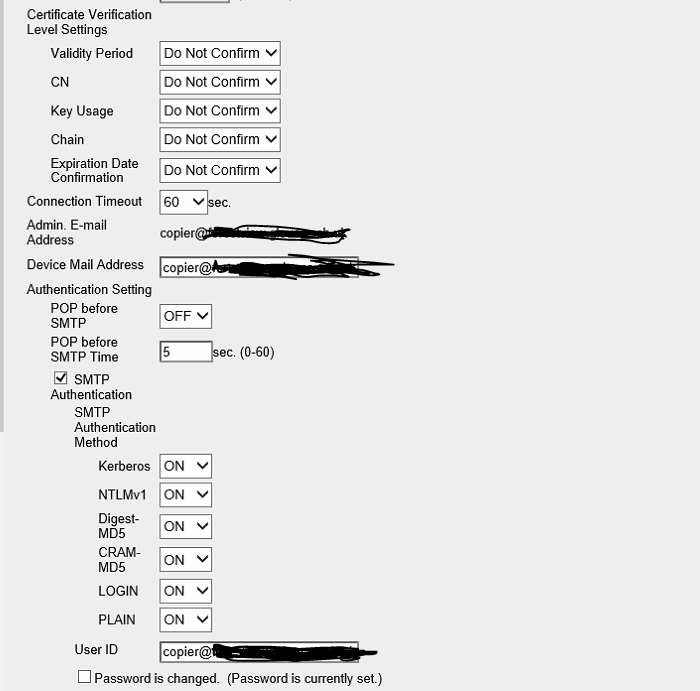
this is whats it set to at the moment the email not sure what you mean by <> ??

-
Hi Does anyone here have Konica Copiers with Scan to Email facility using Office365 Have a school here all of a sudden it has just stopped working with no explanation whatsoever and no one has made any changes Just wondering incase microsoft has changed something their end? The school is using SWGFL as their provider everything else works fine, printing etc just Scan to email has stopped Wondering if possibly anyone with a similar setup can send screenshots (Obv with details blurred out) as to how their How its setupNamely in pagescope underSecurity > Device Certificate and SSL Settingsand also NEtwork > Email setting > SMTP SetupAlso followed konicas documentation and that still dont work!
-
Hi all Recently did some server migration for school Set as below Admin.domain (an admin server for admin users Old server was 2008 so we installed a new server dc promod it to 2016, both servers are still online and we plan to demote the old one soon both running as dcs currently and admin machines are fine Curriculum.domain (curr server for students and teacher) running 2012 Both servers can speak to each other we have established trust Now all of a sudden after migrating the admin server to 2008 a 2016 by dcpromo on the curriculum server under dns we now see 2 dns server One called Curr-server The other Curr-server.domain name Both with identical records Now the biggest problem we have is that none of the student machines that sits on the curriculum network can logon says cannot logon to domain Any ideas why duplicate dns entries will all of. Sudden appear on the curriculim side? Surely work done on the admin migration should not have affected thing All on the same IP range Anyone have any ideas?
-
Thanks The only thing is the way they login is that they login locally first to their laptop using cached credentials then they initiate the VPN connection once fully logged in (they need to login to RM portal and initiate the VPN from there) Will what you suggested still work about GPO being updated? Will check out the slow link detection option thanks!
-
Hi All School have signed up to RM SSL Connect VPN, works a treat and staff are able to remotely connect to the schools network from home However we have one issue at the moment, currently one of the drives is set for Offline Files, so when they get home and connect Via VPN and go to their network drive only the offline files are showing stuff and issue is here some of their staff broadband are so bad they having to use mobile 4g to connect so so sync is not ideal Right clicking the drive the status shows as a CSC-Cache drive Does anyone know how to get around this problem? ISsue at the moment is that for the users due to group policy that has been picked up and stored on their laptop they are unable to disable offline files I've disabled offlien files via group policy on the server however it means they will need to pop into school and do a gpupdate to get the new policy, not ideal for all the staff at the moment Any suggestions for work around? The way they login on their work laptop is login as normal, go to the RM launchpad screen and connect to the VPN via RM Portal