ICTNUT
-
Posts
1,433 -
Joined
Content Type
Forums
News
20th
EduGeek EDIT Conference
Blogs
Everything posted by ICTNUT
-
You will get your login information by Monday the 14th. The reason for the delay is that we have just commissioned new servers and will be decomissioning the old ones so your helpdesk will be going onto the new servers this weekend. This was not planned until the end of January but we had an offer on servers we could not let pass
-
Have replied Not yet found a small problem with adding sensors, will have this fixed and should be up this weekend ready for all to install Monday
-
Hi Ben, Wel done, yes you did get yourself a helpdesk (hosted) although the email address you provided seems the email are bouncing back, any ideas? We need you email address in order to send out details of your account.
-
I will use direct links from now on
-
Ok here we go the second of six free helpdesks up for grabs. Click the link ( Shopping Basket --- OP Software Online Store ) and hit the checkout button, fill in your details and the helpdesk is yours, thats all there is to it. We will post up the lucky winner when we get them.
-
Will be available for download tomorrow - 8/12/2009
- 306 replies
-
- 2
-

-
- network monitor
- server monitor
- (and 1 more)
-
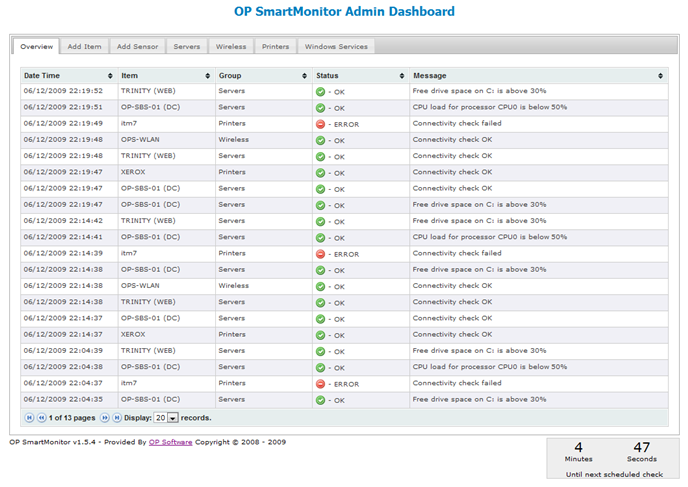
In previous versions the status page is what carried out the checks hence you had the loading icons while the check was being performed this also meant that the user accessing this page had to be a member of the admins group otherwise the page did not display as it should and checks did not happen. As we had many requests for this page to be made available to all we move the checks to the admin area which means as long as the admin area is left open the check will be done, close the admin area and no checks. This is the only way to do this without the need for client agents to be installed and we wanted this to have a much a zero footprint as possible. If you look at the screenshot attached to the update post earlier you will see the new layout with the countdown on the bottom right.
- 306 replies
-
- 1
-
-
- network monitor
- server monitor
- (and 1 more)
-
Yes, have replied
- 306 replies
-
- 1
-
-
- network monitor
- server monitor
- (and 1 more)
-
Yes the add service issue you had is resolved. The other issue you had with no icons appearing on the status page was most likely down to permissions but as this has been changed and the status for each item is now being pulled directly from the database this should no longer present itself to anyone.
-
Hi Guys 'n' Gals, Thought I would post an update just to let you know where we are. v1.5.4 is almost complete and ready for release and what a release this is: - Issue surrounding adding new items has now been resolved - Issue surrounding adding services has now been resolved - Added ability to monitor disk space based on % free, if this drops below a set value an alert is raised - Added ability to add additional groups - Added ability to monitor CPU Load based on % load, if this goes above a set value an alert is raised - Added abiltiy to monitor Memory Utilisation based on % free, if this goes below a set value an alert is raised - Added ability to define on a per item basis the number of failures a sensor must have before notification is sent out (Email) - Added ability to pause / resume scheduled status checks - The main status view page is now available to anonymous users, no login required - The status of monitored items is now logged to the database, this will allow for reporting at a later date (Uptime, mean failures etc.) - The checking functions have been greatly streamlined - There is now a nice overview tab for admins accessing the admin area, this is always the default tab to load and shows the last 250 entries. - Checks are now known as sensors, so you add an item to be checked first then you add a sensor to the item. - The status checks are now done in the admin area which mean this must remain open for the checks to complete, a countdown is shown to the next scehduled check, moving betweens tabs does not affect the countdown. I want to have this out as soon as but I need to update the install instructions as there is now no need to provide domain admin details within the settings.asp which improves security. The downside, yes there is one, is that given the high level of changes made to both files and the database I will not be providing a direct upgrade from v1.5.2 to v1.5.4 therefore I would suggest you setup a second site for v1.5.4 and once you are happy it is all setup as required shut down your v1.5.2 site. Feedback as always greatly apreciated.

-
Well done you ! Yeah you did add a second one but that has been sorted so a new invoice will only show the one helpdesk with a balance of £0.00 Your helpdesk will be fully operational and ready to use by close of business 7/12/09 Remember you have to be in it to win it, simply follow us on facebook or twitter and as soon as we post the link get clicking
-
Over the next few weeks (ending 10th Jan 2010) we will be giving away one free helpdesk per week. This will be done via our FaceBook and Twitter pages. Simply put we will be inserting a link into one of the posts made on FaceBook and Twitter each week. This link will provide the user the ability to purchase our hosted helpdesk for free. But you have to be the first person to use it! If you are too late then the link will state it has already been used! No purchase is required to qualify all you have to do is keep an eye on our FaceBook and/or our Twitter page. We will post the link simultaneously to both sites so you do not need to follow us on both (but you can if you want to!). We are doing this as a thank you to the edugeek.net community for supporting us over the last 3 years, christmas is on its way and BETT is just around the corner. To maximise your chances of obtaining a free hosted helpdesk it is recommended you either follow us on Twitter an/or you become a fan on FaceBook and whenever you see a link you click it! Terms and conditions Offer is open to new customers only, existing customers do not worry we have something special for you in the new year Offer is open to education and non-profit organisations only. The helpdesk is provided free of charge for 1 year and includes all support and upgrades during this period.
-
No remove is not broken, at the moment if you add a service you will need to close then reopen the service window for the change to be visible, simply clicking on the remove icon next to the service will remove it.
-
The add item button currently works from the 1st tab only, this is being fixed When adding services for checking you select a service the click add it appears to do nothing, the service is being added to the list however confirmation of this does not happen - this has been fixed The above are the only 2 outstanding issues and a new version will be released as soon as possible.
-
Looks to me like you have the same problem as Edu-IT. Did you remember to remove the tick from the anonymous access checkbox when setting up the site in IIS? NOTE: If you did remove the tick and when you access the status page you should get prompted for your network username and password, these must be that of a user that has admin rights on the domain due to the way WMI works on Windows Servers.
-
Do you get the status page loaded with the items you have added for checking? Do you get the checking image while the check is being performed?
-

Importing Content into Moodle Problem
ICTNUT replied to barney's topic in Virtual Learning Platforms
IIRC the default max upload size for PHP is 64Mb but this can be over ridden by moddle in the latest version to anything upto the MAX PHP size so you may not be able to upload that much anyway. You could also be chewing all the resources on the server, open a command sessions on the server, assuming server is linux, and run TOP, then do the upload this should be obvoius if the server is being overwhelmed. -
Did you remember to remove the tick from the anonymous access checkbox when setting up the site in IIS? This looks like a permissions error to me
-
I have fixed this but I have also found another couple of niggles at the same so I am fixing those and plan to release an update tonight. When adding an item in the meantime you can select the group via the drop down list no need to add as X and then update to change to Y
- 306 replies
-
- 1
-
-
- network monitor
- server monitor
- (and 1 more)
-
As long as server-001.domain.internal is the server hosting SmartMonitor then this is correct.
-
This is now set in the settings.asp file along with a host of other stuff to, like email notifcations etc.
-
@Mullet_Man: I can confirm that the add new item button only works on the servers tab. I have tested this and items added are being added correctly. Looking at fixing this over the weekend and will post a fix up then for it.
- 306 replies
-
- 1
-
-
- network monitor
- server monitor
- (and 1 more)
-
I'll look into it and get back to you as soon as
- 306 replies
-
- 1
-
-
- network monitor
- server monitor
- (and 1 more)
-
Anon access to the status page is on the way however this will be a while as we are concentrating on the next release of the helpdesk which will have SmartMonitor integrated with it.
- 306 replies
-
- 1
-
-
- network monitor
- server monitor
- (and 1 more)
-
@Big_Dave: Did you say you did not take the tick out of the Anonymous access box when you created the site? This is required as the site uses impersonation based on the user who accesses the monitor, at the moment there is no anonymous access to the status display.