DanHamilton
-
Posts
63 -
Joined
-
Last visited
Content Type
Forums
News
20th
EduGeek EDIT Conference
Blogs
Everything posted by DanHamilton
-
I had a plan to just go away for Christmas and pay for the majority, although now there has been a change of plan I literally am clueless about Christmas...
-
HDMI Over Ethernet Adapter Extends HDMI Connections Up to 98 Feet, Saves Money http://www.amazon.co.uk/DisplayPort-HDMI-Converter-Adapter-Male/dp/B0027HYK7S/ref=sr_1_6?ie=UTF8&qid=1446821328&sr=8-6&keywords=display+port+to+hdmi
-
deploy a new font to all computers help
DanHamilton replied to northeast_technician's topic in Windows Server 2012
Follow this tutorial to deploy font files via GP: Deploy Font Files via a GP (Group Policy) | The-IT-Blog -
All seems to be up; Apps Status Dashboard Logged in fine this morning too @ https://admin.google.com/
-
http://www.amazon.co.uk/Cisco-WS-C3560-24PS-S-802-3af-Catalyst-Switch/dp/B001B3WF9Y/ref=sr_1_1?ie=UTF8&qid=1446713918&sr=8-1&keywords=Cisco+3560+POE+24+port Refurb?
-
[ipad] Meraki Silent Install Apps
DanHamilton replied to MrFrostmaul's topic in Mobile Devices & Tablets
Didn't quite understand what you meant sorry. All the iPads here are supervised so we can properly lock down the iPads. Main ones being students can't change the; name of device, wallpaper or set a passcode. Each iPad is setup with the schools logo as the wallpaper and device name is shown on the front for easy reporting if there is ever an issue or an app missing from an iPad -
Yes please do expand.
-
Look for a jumper on the motherboard.
-
As much as it is a lot of setting up, assigning each iPad it's own email will be your best bet.
-
Hi all, Just wanted to ask whether you have updated your Macbooks, iMacs etc to OS X Capitan or if you are holding off to let it age and stabilise slightly before doing so? We have upgraded one room with a trolley of laptops to OS X Capitan and had 0 issues reported so far. Thanks, Dan Hamilton
-
[ipad] Meraki Silent Install Apps
DanHamilton replied to MrFrostmaul's topic in Mobile Devices & Tablets
To silently install apps make sure every device has been assigned an owner. If all of your iPads have a separate email address this will work perfectly (this is how we have it set up). [email protected] [email protected] etc etc Each device has its own email address assigned and Meraki mirrors this. Then once you have assigned the device in Meraki to an owner with the same email used on the iPad, you can enter the VPP section of Meraki (Systems Manager > MDM > VPP). In the VPP section of Meraki you'll see 3 tabs, licensed applications, user management and recent activity. In the User Management section, add all of your device email addresses so each iPad device is it's own user. Go on to iPad1 and login to the email address that receives the email. (We have it setup so each email address goes to an iPadAdmin email address to make things easier). Accept the VPP invite on the iPad and you'll be good to go. You can set up your users with tags and have that automatically push apps. From this point onwards you'll be able to silently install applications (the pop up message to install each app is very aggravating!) -
MDM Driving me crazy... Apple Configurator 2 & iBoss
DanHamilton replied to DanHamilton's topic in Mac
I see, that has obviously caused this confusion. Thank you. We had the call with Apple yesterday, just waiting for it to be activated Then I can take the next steps in the setup. -
Give this a try: https://support.office.com/en-us/article/Share-it-Embed-an-Excel-workbook-on-your-web-page-or-blog-from-OneDrive-804e1845-5662-487e-9b38-f96307144081
-
MDM Driving me crazy... Apple Configurator 2 & iBoss
DanHamilton replied to DanHamilton's topic in Mac
As I said in my previous post I am new, the IT administrator I work with thought it was setup. The account used to login @deploy.apple.com had no options to enroll into the DEP program, no options anywhere regarding it so I guess it wasn't setup with the account, not too sure... Anyway I've enrolled the new account with DEP, Apple will review it within 5 days apparently. Hopefully it's sorted soon, I wanted to do a lot throughout half term. -
MDM Driving me crazy... Apple Configurator 2 & iBoss
DanHamilton replied to DanHamilton's topic in Mac
Thanks a lot, you've provided me with lots of very helpful information. Those options aren't there so I am going to try to enroll a new account in the program. - Hopefully that provides a quick fix. I already have the cert from iBoss ready to upload and create the virtual MDM server. Can't believe we didn't have DEP set up here before. (I'm new) I'll update once all works out. -
MDM Driving me crazy... Apple Configurator 2 & iBoss
DanHamilton replied to DanHamilton's topic in Mac
Then I am also confused, I haven't been able to get any further because of the options that are not showing (or I am looking in the wrong place somehow, I don't know) I am in general need of support setting it up. -
MDM Driving me crazy... Apple Configurator 2 & iBoss
DanHamilton replied to DanHamilton's topic in Mac
Bump...Still stuck with this one. -
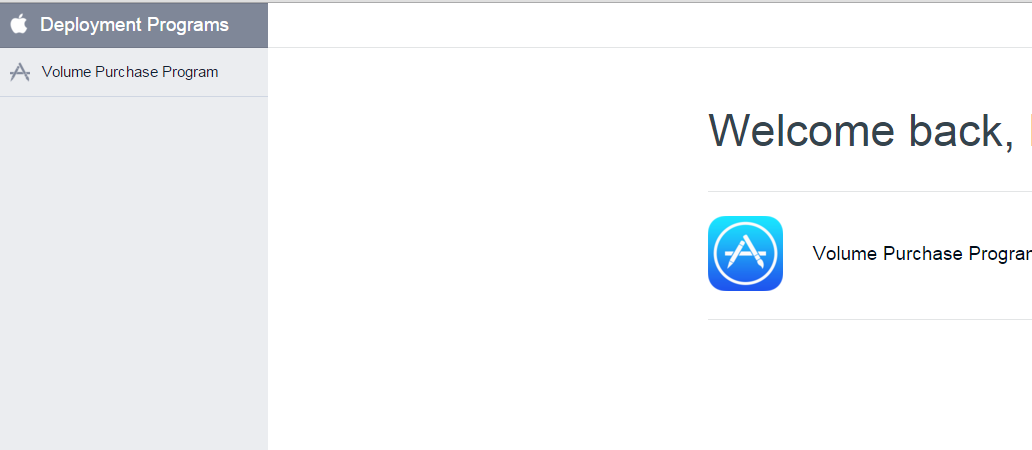
Hi, Yet another MDM thread... One hurdle after another. Over at: http://deploy.apple.com there is NONE of the options talked about here https://www.apple.com/au/education/docs/DEP_Guide.pdf Which makes the instructions in the iBoss settings panel also unusable... What I am trying to do is link iBoss with Apple Configurator 2 and allow them to work together (instead of currently against eachother...). I need the devices to be "supervised" so that I can make the most of the settings/restrictions available to supervised devices, such as; -Ability to stop users from setting a passcode -Changing the wallpaper My devices are now "supervised", after 3 attempts of trying to set it up with Apple Configurator. The Apple guide I linked above (https://www.apple.com/au/education/docs/DEP_Guide.pdf) talks about having settings on the left panel, where as mine looks like the image below. Any help/guidance will be greatly appreciated. Thanks, Dan

-
Hi, I am trying to configure the Apple Push MDM SSL Certificate for iBoss. - I have set it up with Meraki in the past and haven't had any issues. After requesting the certificate, uploading it to Apple, downloading the cert and uploading it to iBoss I am given the error below. Has anyone got any ideas as to why this is occurring?
-
Meraki MDM Free VS Enterprise/Paid
DanHamilton replied to DanHamilton's topic in Mobile Devices & Tablets
Confirmed: Only differences between free and paid version is, access to support. -
Meraki MDM Free VS Enterprise/Paid
DanHamilton replied to DanHamilton's topic in Mobile Devices & Tablets
Seems to be exactly the same as mine, you have an extra tab on the end though...guessing that says Samsung? -
Meraki MDM Free VS Enterprise/Paid
DanHamilton replied to DanHamilton's topic in Mobile Devices & Tablets
According to the call I just had with Cisco, the only benefit of paying is receiving support when it's needed and obviously being able to register over 100 devices. You are probably on the "new" version...if the "new" version even exists. All seems quite odd to me. I've sent back an email for a price quote also asking for this to be cleared. -
Meraki MDM Free VS Enterprise/Paid
DanHamilton replied to DanHamilton's topic in Mobile Devices & Tablets
Are your settings the same? / Are there more for you? We are using the legacy version that, "doesn't get updated"...yet we get to try the beta page for the profiles...
-
They released it before you could reset student's passwords...
-
Meraki MDM Free VS Enterprise/Paid
DanHamilton replied to DanHamilton's topic in Mobile Devices & Tablets
I have now contacted sales to get a quote. Thanks, any other features you notice, would be great to know