Planehazza
-
Posts
323 -
Joined
-
Last visited
Content Type
Forums
News
20th
EduGeek EDIT Conference
Blogs
Everything posted by Planehazza
-
Urgh, ignore me. Of course, immediately after posting this, one final page refresh would resolve it...
-
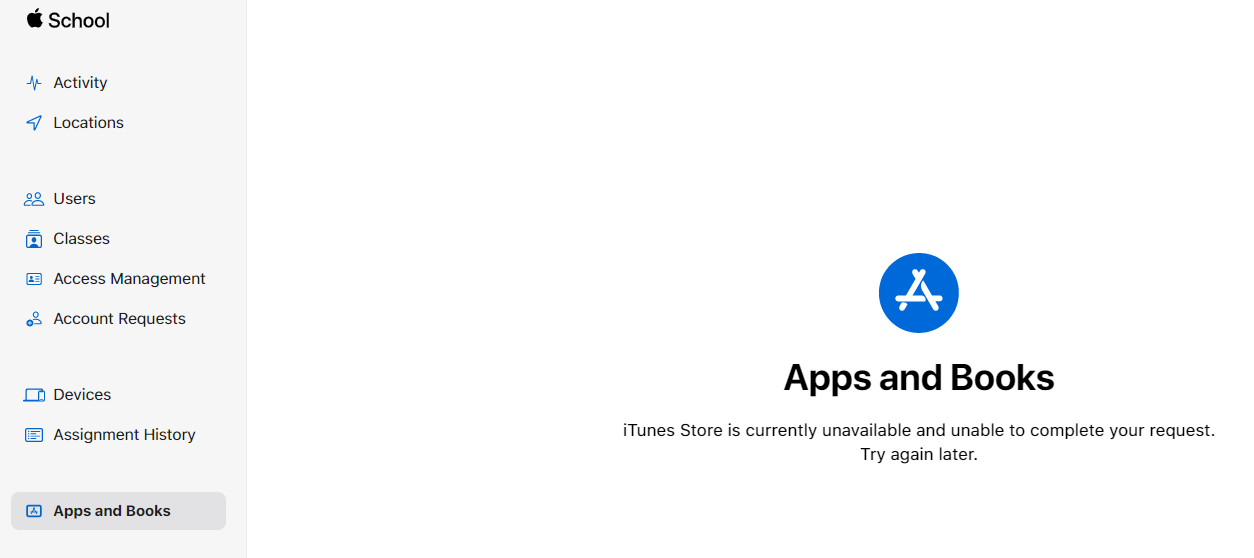
Trying to go into ASM Apps and Books this morning but getting the following error: Anyone else getting this before I try and speak with Apple?

-
[ipad] Lightspeed - Prevent removal of remote management?
Planehazza replied to Planehazza's topic in Mobile Devices & Tablets
Skim reading that in between speaking with SLT, I believe I have that set up already. I have Lightspeed MDM applied all devices in ASM automatically, but that doesn't work, so I have to apply that before they appear in Lightspeed (obviously). However, in the Lightspeed DEP section, and root group level (so applies to all devices) I have it set to automatically apply the lightspeed built enrolment profile, but it doesn't work. When I save it on that pop up page, then go back to the list of devices, they still say 'empty' and don't show the profile. I either have to select and apply one by one or use the mass apply button. I'll read that link as soon as I can and I'll get some images to show what I mean if it still doesn't work for me. Thanks! -
Dude, I'm stupid. I didn't know until now you could apply setup and prepare steps to a blueprint. It makes total sense now too.
-
Thanks,all, I'll knock shared devices on the head for now, but it is probably going to crop up again in at least one of our primaries. They're keen to roll out Google Classroom on them and want the Year 3-6 pupils signing in to Google with individual accounts - I have plenty of experience of this nightmare where the onus is on the user to sign out of accounts on the device. The best option is sign in solution on the iPads itself, so I may need to investigate federated accounts between ASM and Google Workspace... sigh. Yes, I feel your pain. PE came up to me once with a bunch of first gen iPad minis from about 2010 (they were old anyway) - "need these setting up with XYZ". Never seen them before supervised by a device that no longer exists and had personal iTunes accounts of former employees. Into the bin they went. Some went the office museum! Yeah I looked at the griffin docking station mentioned earlier but I would get approval for a £600 device for setting up iPads that are eventually destined to be decomissioned most likely Thanks for that. I hadn't actually had a chance to look into it in depth but I wondered if Blueprints would be the answer. I haven't 'had' to use them in a few years now so hopefully this will speed up the process...
-
Yup. Will get them trained up next week. Will have to get approval from my NM for their lightspeed accounts but am sure it'll be fine. We're a Google school and have many chromebooks so I'm hoping we won't be purchasing any more iPads to be honest. Now I need to research shared iPads and getting staff to sign in to them rather than a simple PIN to unlock etc. Any tips? [emoji23]
-
Lightspeed Smart Relay Agent - IOS
Planehazza replied to Tefters's topic in Mobile Devices & Tablets
I presume your support case is at least partially responsible for this, so thank you.
-
[ipad] Lightspeed - Prevent removal of remote management?
Planehazza replied to Planehazza's topic in Mobile Devices & Tablets
"The harder way" will be the case here. Because the devices are anything between one and six years old and well before our IT service, we do not know where they were purchased so I cannot go back and retrospectively ask the reseller to port them to our ADE (DEP). So, I'm putting them in ASM via AC2 and, as you say, there is the 30 day grace period that I've forgotten about (I recall reading this on the ASM guides now). That must be it, as the 'removable (by user)' option is 100% ticked on the DEP enrolment profile in Lightspeed. It's a shame the auto MDM feature in ASM based on device type seems to be useless... I have iPads, MacOS etc all set to Lightspeed MDM and yet I still have to assign MDM manually once it appears. Same goes for Lightspeed's auto DEP profile. That doesn't work either -
[ipad] Lightspeed - Prevent removal of remote management?
Planehazza replied to Planehazza's topic in Mobile Devices & Tablets
Just to confirm the lockscreen message
-
Thanks all. It's bittersweet. I'm glad to know I'm doing it right but it's a shame that, as I sort of knew from the start, I'd have to go via AC2.x one way or the other. I need to find a a way to batch automate this. Surely I can find some apple script or AC2 process that detects a new unsupervised ipad, wipes it then prepares it... If not, I shall task the IT minions. I'll get a decent powered USB hub. Should speed things along a bit.
-
So I'm working my way around Lightspeed MDM trying to get to grips with it. Getting there slowly, but missing something obvious that I can't see... How do I stop users from leaving remote management via General >VPN & Device Management > Lightspeed MDM Profile? I can't see any sort 'root profile settings' so assumed perhaps it was something set at the DEP profile level? I'm 100% sure that 'Removable (by user)' is NOT checked when I built the DEP enrollment profile
-
This is what I thought too and have emailed the people that might know. The iPads will have been purchased 5+ years ago before the trust was fully established. It's a weird situation and I won't bore you with details, but it's highly unlikely I'm going to know the simple information of where these were purchased Oh and don't get me started on Lightspeed MDM. Granted, I'm biased, as I've gone from several years' experience with Meraki to only a couple of hours with Lightspeed, but man it's nasty. Nothing makes sense, but, it's very different to Meraki, so hopefully my way of thinking will adapt...
-
So I've changed jobs recently and have moved to another trust. To my sheer delight (not) I have discovered they have abut 500 iPads across the school. The previous IT didn't use ADE (DEP) etc and all was done through AC2 and Lightspeed MDM. I now need to bring these all back in and wipe them and set them up afresh on our network. I'm using AC2 to 'enrol' them back up to Apple School Manager ADE rather than using AC2 to directly supervise them. Either way, I have to plug these devices into the Apple Mac Mini from 2012 one by one to update and add them to ASM ADE. Just wondering what ways you've employed to speed up this process? I know way back in the day Apple Server was used to do it over the Internet, but I'm familiar with this process. Will the USB ports of the Mac Mini be beefy enough to use a powered 16 port USB3 hub to tackle a few at once? Or is this just going to be too much one one USB port? TL;DR - what is the best way to quickly update iPadOS and 'enrol' ~500 iPads into Apple School Manager Automated Device Enrolment so I can hand them over to Lightspeed MDM? P.S. Some might wonder why I'm using ADE at all given how many I have. I'm trying to remove the future need for the Mac Mini entirely so that any future purchases are made through Apple or a reseller and automatically appear in ADE ready to be enrolled into Lightspeed. Cheers! Harry
-
I recently left one academy trust to join one as they took ICT support in house away from the local authority. I died a little inside when I was greeted by dozens of these horrid little Geo 1Es at the new schools having dealt with them at my last place (thankfully my ex colleague had dealt with the majority of them). In my new role, we're basically saying no to these in their native format; they're garbage and teaching staff know this. Has anyone had any luck running ChromeOS Flex on them? Do they behave any better?
-
On a related note, how do you get people to NOT keep all their work and files in OneDrive and keep them in SharePoint instead? I'm sick of people saving all their stuff in OneDrive instead of the departmental SharePoint; it goes against the whole concept of collaborative work and I'm dreading the day our 'one man departments' leave and we'll have to faff about moving files from one OneDrive to elsewhere instead of them just being readily available in that Team. I assume it stems from lack of policy and training, but believe me when I say it's not for the lack of trying on my part...
-
This is what I'm constantly recommending but getting this place to take us seriously and value our advice is... not happening.
-
We've moved from local file shares to SharePoint for hosting of teaching/lesson resources. We're hitting a lot of backlash with teachers where they're adamant they 'have to download their files' to not mess up the original. If you have departments sharing PowerPoints, what is your model/solution for making versions of these masters differentiated for top/bottom sets etc? I try to recommend a top level SOW folder and other folders that teachers own with their versions, but instead they refuse to adapt and keep downloading and wasting space on local file servers. Just wondering how you have approached this when in similar situations? Getting the backing of SLT and advising more assertively is a real struggle here.
-
Forgotten Apple School Manager Details
Planehazza replied to Planehazza's topic in Mobile Devices & Tablets
Yeah I've just been on their chat and was told to use their number 0800 107 6285. -
We were setting up Apple School Manager for one of the schools a while back and we've stupidly forgotten the details for the admin accounts. Is there a way that Apple can reset the details via another DNS proof of ownership etc?
-
Assigning a security group to Sharepoint site
Planehazza replied to maxrebo's topic in Cloud Services
Please can you share how you managed to get teachers to engage? Our emails aren't read, Tech tips teams messages aren't read. IT helpdesk FAQs aren't read. We can't get the school to understand the importance and value of training sessions they've already paid for. I've tried hosting tech tip sessions, a casual open event where staff drop in and can learn how to use features in Teams, SharePoint, Office, Forms etc - not one staff member showed up. It's so frustrating. -
Assigning a security group to Sharepoint site
Planehazza replied to maxrebo's topic in Cloud Services
Great read, thanks. Makes me feel better about myself and our adoption. Staff are very reluctant to change here, and I'm doing my best to reassure and train people where possible. We've had things online for a while, but it's still a moving process with some people still trying to use the local T drive. We've not moved away from local H drives yet, but people are naturally moving to OneDrive. I just wish people would not hog resources; a file does not belong to a person, it belongs to that role. IMO, only holiday/TOIL/Appraisal stuff etc should exist in OneDrive; all other stuff should be in a SharePoint site. We back up Cloud stuff too, on a p per GB basis, so everyone is restricted to 100GB instead of the default 1000GB, and we've hard restricted local H drives to 15GB. That, hopefully, will keep reducing until they're all but gone. Realistically, we'll limit it to a downloads folder and I hope that downloading severely drops as we educated people on sharing files and 'open with desktop app' features (don't get me started on the amount of people that "hate being forced to use office on the web" 🤦♂️) -
Assigning a security group to Sharepoint site
Planehazza replied to maxrebo's topic in Cloud Services
Make sure you use the SharePoint migration tool to move the data, rather than manually uploading multiple files through the browser. -
Sharepoint for Staff drive and Iamcloud Drive mapper
Planehazza replied to maxrebo's topic in Cloud Services
Some good info here. We've got the OneDrive client set to Files on Demand etc via GPO and I'm trying to get the SharePoint libraries to sync via the same tool using a login PS script. I'm struggling to get the script to launch for the end user, but I'm not convinced I want to go any further with automating this anyway, looking at the size of some departmental doc libraries. I might just tell HoDs how to use the Sync button and leave it to the end user to set up if they wish too. -
Got it working nicely, but Microsoft stipulate an "eight hour window" for load balancing. Does anyone know if it's possible anyway to speed this up? https://docs.microsoft.com/en-us/onedrive/use-group-policy I wonder if there's a reg key I can tweak if it's handled by the sync tool itself?
-
Disabling AADC Synced Distribution Groups
Planehazza replied to Planehazza's topic in Enterprise Software
That's what I thought too. I've obviously not tried hard enough with the cmdlets.