ITJS2015
-
Posts
349 -
Joined
-
Last visited
1 Follower

About ITJS2015

-
It looks like going from 4 networks to 8 networks doesn't give me the flexibility to extend with no reserved IP. So i think i would possibly need more for this to leave so reserved if when or need to increase.
-
Iv always been in environments where they are separated and for security that they cannot try and connect to other devices.
-
Thats what i though about needing more IPs and doesnt look enough to be honest. Iv worked off /22 and its given me this off 1000 IPs. I do not like have 4 vlans for student laptops as we have nearly 400 when i think it should be at least 2. what do you think to this. Will it work ? i dont think its the best setup for 1000 IPs 192.168.0.0/25 192.168.0.0 - 192.168.0.127 192.168.0.1 - 192.168.0.126 126 192.168.0.128/25 192.168.0.128 - 192.168.0.255 192.168.0.129 - 192.168.0.254 126 192.168.1.0/25 192.168.1.0 - 192.168.1.127 192.168.1.1 - 192.168.1.126 126 192.168.1.128/25 192.168.1.128 - 192.168.1.255 192.168.1.129 - 192.168.1.254 126 192.168.2.0/25 192.168.2.0 - 192.168.2.127 192.168.2.1 - 192.168.2.126 126 192.168.2.128/25 192.168.2.128 - 192.168.2.255 192.168.2.129 - 192.168.2.254 126 192.168.3.0/25 192.168.3.0 - 192.168.3.127 192.168.3.1 - 192.168.3.126 126 192.168.3.128/25 192.168.3.128 - 192.168.3.255 192.168.3.129 - 192.168.3.254 126
-
Thank you for this link its really useful. My question back to you is what is the /21 and the / 24 mean ? Is this table above what you would go off what iv provided above ? Your table looks like there more thank 1000s IPs
-
Good Morning I am wondering if anyone could help me to get familiar with how to setup multiple vlans. Currently we have a 1000 IP addresses and we have a flat network with our LA using fortinet filtering. Basically I want the following to be done - Staff Desktops Student Desktops Staff Wifi Student Wifi Tvs Student Mobile devices Staff Mobile Devices Printers CCTV Door Access WIFI APS - Not sure if that is needed ? To be honest i am not sure if i would need that many Vlans creating but this is just an example . So tell me if i am wrong would we need 2 iP addresses for Broadcasting and a gateway for each vlan ? If that was correct could someone give me an example table going off the following 192.168.1.1 -192.168.4.254 , I know its just over 100 IPs but if someone could show me and example that would be appropriated.
-
Do you have a example task seqence command line for your batch file?
-
What would be you command line for running the batch file with the xcopy command inside ? - - - Updated - - - What would be you command line for running the batch file with the xcopy command inside ?
-
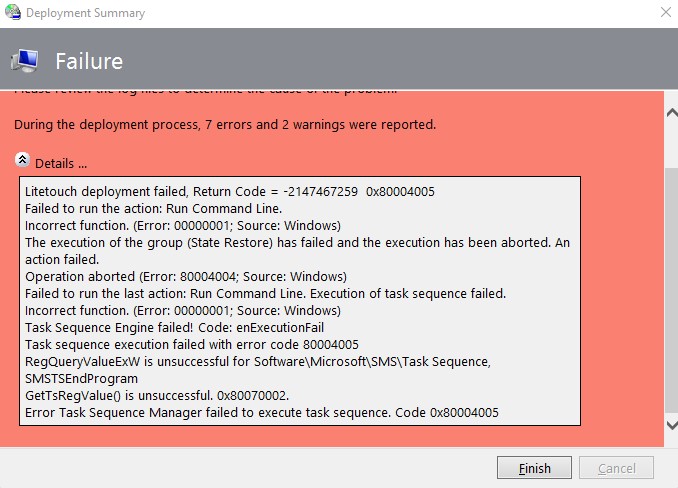
To Anyone who is an MDT expert I am trying to use a task seqence for robocopy to copy programs into a path director such as C:Program Files (x86). It does work with the task seqence cmd.exe /c %scriptroot%CopyPrograms.bat but i get errors with the following in the attached file. I have googled error codes an it does mentioned about network discovery needs to be turned on. It works fine when you manually run the batch file on the device itself. If anyone can help i would really appriciate it. Thanks

-

[mdt] Question about MDT & Windows 11 Support.
ITJS2015 replied to AlteredAdmin's topic in O/S Deployment
I can confirm WDS is not support to capture windows 11 Images. #THANKSMICROSOFT -
Hi Since i have upgraded to windows 11, my mapped drive to sharepoint has stopped working. I found out when i copied the url link from internet explorer work for me when i accesses sharepoint but soon as i logged in to sharepoint with edge and copied the url to the mapped network drive it keeps prompting me with credentials. Never had this issue with IE but it seems that the edge settings doesnt work. I have accepted the URL in the trusted sites. Would anyone be able to help with either a powershell script or batch file ? I have tried to use net use T:\\URL \persistent \:yes still no luck Can anyone help Thanks
-
Its a well known issue with updating sims which causes issues with CPOMS and Wonde. Its the only current fix by restarting you servers straight after your upgrade or after hours. I have been doing it for a while and its just remembering to do it.
-
I have just recently had an issue with XPorter software communicating with a 3rd Party called CPoms. Basically to cut a long story short the connect.ini had not been updated in the xporter folder. I would recommend you double checking that first.
-
I am not sure if i am correct on saying this but is there something called WMI for hyperV connections ? I had issues which my local Host could not see the connections on my server manager when i tried to used the Teaming on the NIC. I used a WMI powershell script which deleted the unknown connections and removed the VMS from HyperV but it didn't delete the VHDX. Once i restarted the local server and created a new VM with the existing VHDX both of my DC and FS servers where working fine. I am not saying that you should do this but it something which you could try as a last resort but out of hours. I hope you get this sorted quickly
-
Are your NIC cards Teamed on your local server ? I have disabled your Vms NIC card and enabled it again.
-
We are connecting our severs to the switches via Cat6 cable but our NIC cards are only up to 1GB. Not sure if it will hold 10gb but i would have to check. Do you think linking the core and the edge switch via fibre is the correct way or should i keep them separate ports on our council switch ?