Sale_El
-
Posts
118 -
Joined
-
Last visited
Content Type
Forums
News
20th
EduGeek EDIT Conference
Blogs
Everything posted by Sale_El
-
Stop Override on static bookings unless admin?
Sale_El replied to Sale_El's topic in Home Access Plus+
Ok after adding the groups again correctly it is now working, thanks so much for your help nick, that command is very useful. -
Stop Override on static bookings unless admin?
Sale_El replied to Sale_El's topic in Home Access Plus+
hey Nick, sorry for the delay, when i put a teacher in there i get ["Authenticated Users","Domain Users","Users","Office_Users","Non_Teaching_Users","Printing Sixth Form","All Users","Webprint","Liveregister"] looks like teacher_users are not there? -
Stop Override on static bookings unless admin?
Sale_El replied to Sale_El's topic in Home Access Plus+
I have pretty much copied your recommendation into the relevant places, going to this link just gives me a white page with ["Authenticated Users"] and nothing else. thanks -
Stop Override on static bookings unless admin?
Sale_El replied to Sale_El's topic in Home Access Plus+
Hey Nick, Thanks for the help here, unfortunately its still saying unauthorised for teacher users. -
Stop Override on static bookings unless admin?
Sale_El replied to Sale_El's topic in Home Access Plus+
Hi Nick thanks for the reply, thanks for pointing me in the right direction, i noticed that teacher_users were admins so i have changed this, but when teachers log in now they get an unauthorised error? Here is the code; -
Hey all, Does anyone know if there is a way to stop a group of users overriding the bookings of statics and other bookings apart from an admin user? Seems like all our staff can just override anything they want. our resources look like this; About to roll the booking system out but its useless if everyone can steal each others slots! thanks in advance
-
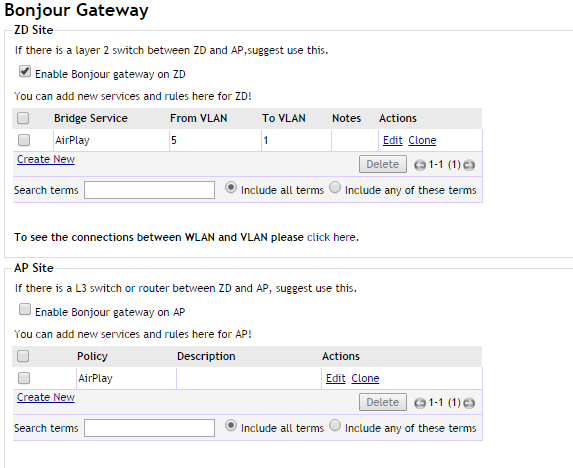
Hello MrJDH, The issue i had was that my ZD Ethernet ports were not trunked on the right vLANS, make sure they are tagged on all the vLANS you are trying to cross. Also the setup can be confusing in the ZD. Go to bonjour gateway in the ZD, tick the top tickbox (ZD manages it) then have your FROM vLAN be your computers/ATV's etc. Your TO vLAN should be your wi-fi check out my picture and note that vLAN 11 is my Staff BYOD and the vLAN 8 is the student wi-fi for iPads. I hope this helps.

-
I could really use some help with this, ive like got everything ready to go it just need to iron out this one issue of single sign on. i figured out that the SSO i was experiencing was anonymous authentication of some kind and not sso at all which is no good for booking system etc. I just cant figure out for love nore money what is happening. I have put the changes in again as per the video and now i am back to stage one of getting the unauthorised 401 error, i don't understand why the credentials are not being sent through? When i access it from an external connection i get the same issue, same error etc so its not even like its trying to login... I havn't changed anything in the Kerberos.aspx am i meant to? If so, what am i meant to put in there. I am still confused about where i am meant to put in the IP addresses of my network. There must be an SSO God out there somewhere that can help me with this... Please Sal
-
resolved temporarily by creating a background with a line at the top
-
I have reverted back to how it was before i even started doing this and now i've noticed that the SSO works with IE, it signs in with my HAP user from AD, is this usual behaviour? Or am i meant to be able to see my username? Also when this user logs in i receive a error about Padding, possibly related? Page: mscorlib Padding is invalid and cannot be removed. System.Security.Cryptography.CryptographicException: Padding is invalid and cannot be removed. at System.Security.Cryptography.RijndaelManagedTransform.DecryptData(Byte[] inputBuffer, Int32 inputOffset, Int32 inputCount, Byte[]& outputBuffer, Int32 outputOffset, PaddingMode paddingMode, Boolean fLast) at System.Security.Cryptography.RijndaelManagedTransform.TransformFinalBlock(Byte[] inputBuffer, Int32 inputOffset, Int32 inputCount) at System.Security.Cryptography.CryptoStream.FlushFinalBlock() at System.Security.Cryptography.CryptoStream.Dispose(Boolean disposing) at System.IO.Stream.Close() at System.IO.StreamReader.Dispose(Boolean disposing) at System.IO.TextReader.Dispose() at HAP.AD.TokenGenerator.ConvertToPlain(String token) at HAP.MyFiles.API.Drives() at SyncInvokeDrives(Object , Object[] , Object[] ) at System.ServiceModel.Dispatcher.SyncMethodInvoker.Invoke(Object instance, Object[] inputs, Object[]& outputs) at System.ServiceModel.Dispatcher.DispatchOperationRuntime.InvokeBegin(MessageRpc& rpc) at System.ServiceModel.Dispatcher.ImmutableDispatchRuntime.ProcessMessage5(MessageRpc& rpc) at System.ServiceModel.Dispatcher.ImmutableDispatchRuntime.ProcessMessage31(MessageRpc& rpc) at System.ServiceModel.Dispatcher.MessageRpc.Process(Boolean isOperationContextSet) at System.Security.Cryptography.RijndaelManagedTransform.DecryptData(Byte[] inputBuffer, Int32 inputOffset, Int32 inputCount, Byte[]& outputBuffer, Int32 outputOffset, PaddingMode paddingMode, Boolean fLast) at System.Security.Cryptography.RijndaelManagedTransform.TransformFinalBlock(Byte[] inputBuffer, Int32 inputOffset, Int32 inputCount) at System.Security.Cryptography.CryptoStream.FlushFinalBlock() at System.Security.Cryptography.CryptoStream.Dispose(Boolean disposing) at System.IO.Stream.Close() at System.IO.StreamReader.Dispose(Boolean disposing) at System.IO.TextReader.Dispose() at HAP.AD.TokenGenerator.ConvertToPlain(String token) at HAP.MyFiles.API.Drives() at SyncInvokeDrives(Object , Object[] , Object[] ) at System.ServiceModel.Dispatcher.SyncMethodInvoker.Invoke(Object instance, Object[] inputs, Object[]& outputs) at System.ServiceModel.Dispatcher.DispatchOperationRuntime.InvokeBegin(MessageRpc& rpc) at System.ServiceModel.Dispatcher.ImmutableDispatchRuntime.ProcessMessage5(MessageRpc& rpc) at System.ServiceModel.Dispatcher.ImmutableDispatchRuntime.ProcessMessage31(MessageRpc& rpc) at System.ServiceModel.Dispatcher.MessageRpc.Process(Boolean isOperationContextSet) and another error that keeps popping up which i wonder if anyone has seen before? An error occurred in Home Access Plus+ Page: HAP.Web.API.MyPic Creating Directory Search and Searching for then current user Using filter: (&(objectClass=user) (sAMAccountName=HAP)) Found 1 results, processing 1st result Found 0 thumnbnailPhotos Anyone know what SSO doesnt work in chrome?
-
Hello all, When i am not logged into my HAP the lovely blue at the left side is nicely flush to the top, when i log in there is a 3-4px gap at the top, i am editing the basestyle.css to be able to make the announcement background be the same colour so we can get it all looking nice but the logon name button on the right is flush at the top but everything else has this gap. My screenshot explains a bit better! could anyone point me in the right direction in the basestyle.css (if that is the right place) there ths 4px gap is hiding, been though it three times trying to find it. I need to move the announcement up and the blue on the left up. Also can anyone point me in the right direction where i can customise the colours etc of the login name bit on the top right? Any help appreciated! Sal
-
Hey mate, have you done the URL redirect that nickbro said? I have had a bit of a nightmare getting mine to work but now it does, it still says /hap at the end but you just need to type https://yourschool.co.uk then it redirect to https://yourschool.co.uk/hap one thing that tripped me up with the redirect thing was that i was applying it to the HAP application folder under the default site rather than the default site itself... Try this once you have it installed as per the Microsoft Article. Click default site Click HTTP Redirect Tick Redirect requests to this destination Type your full path of HAP i.e https://hap.yourschool.co.uk/hap - make sure you have an A record for DNS also Tick the other two boxes set status code to 302 PS if you are running anything else as the default site this will redirect it to the HAP server so beware if you have any other sites on your IIS server. Sal
- 11 replies
-
- 1
-

-
- hap+ v10
- home access plus
- (and 1 more)
-
Hey All, Trying to implement the SSO from this video. all i am getting now is this on all users; 401 - Unauthorized: Access is denied due to invalid credentials. You do not have permission to view this directory or page using the credentials that you supplied. In the video it said about editing the kerberos.aspx but didnt really say what we need to do with it? Not sure if thats important? Also the code in the applicationhost.config was different from mine which i am not sure if it is related... but when i only changed the files that were stated in the video i recieved a 500 error. when i copied them just as the video has it written i now get this error. bellow are the codes in their before and after state. this gave 500 error This gives current error I have seen a few threads about SSO and the reverse DNS appears to be thrown around a lot but i am not 100% sure what needs to be done there, i have added the hap servers ip into the reserse lookup zone and added an A record in the forward lookup, not sure if more needs to be done here? Finally, i am unable to find any decent documentation on where this code is meant to actually go; it has been mentioned it goes before the but i have tried before after and in the one of them breaks the site and the others do no change. I really want to get this working as it has potential to be awesome but i am really struggling. Any help greatly appreciated. HAP version 10.5 IIS 8.5 Windows 2012R2 Sal
-
so no special ports or anything are used for uploading, just 443?
-
Hey Nick, The file i am trying to upload is just 900k but i have implemented this fix and tested, internally it uploads a 350mb vmware installer fine. Externally it still doesn't upload anything. Sal
-
Hello all, I had 10 installed and noticed a few changes to the MyFiles module in the updates so I've upgraded to 10.5. We have a smoothwall UTM running which i think may be the issue as internally it is working fine. when we upload any file externally the file fails after around 2-4 seconds saying the upload failed, after doing the JSON Debugging, it didnt reveal much, only that the connection was aborted (see excel for the log). Is there any port forwarding that needs doing to get it through the smoothwall? Currently the url is on a reverse proxy with multiple other IPs and the smoothwall handles the different traffic so i wondered if a more basic port forward is needed. i have attached the windows problem recorder also if that helps. This problem happens on Firefox, Chrome and IE11. Any help greatly appreciated, any more information needed please ask. Sal HAP JSOD.xlsx Issue with off site uploads.zip
-
we have a dot hill and it doesn't support de duplication which is annoying, apart from that it seems to be alright... I havnt had an issue in 2 years so i cant really comment on the support. i would recommend getting a model with de duplication if they are available. Sal
-
currently ATV is on VLAN 5 and ipay on 1 and the ruckus rule is attached.
-
the ZD goes into our core, the access link is tagged on all wireless vlans and untagged on vlan 1 (same as AP's) core fibres all trunked on wireless vlans so the core does all the routing between the vlans. I have checked that setting and it is not ticked. i don't know what else would drop the packets, all our AP's go into HP switches that are connected via fibre to the HP core which in turn is connected to the ZD thanks for the replies
-
They way ive set it up is all the vlans are tagged on the AP ports and untagged on vlan 1 all trunks are set correctly @FN-GM i am aware of the issues and i have only recently inherited the site, until now the whole network was running on a flat vlan 1! Thanks for making me aware i still have a lot more work to do ;-)
-
Problem: unable to connect Apple TV and ipad over vlans unless they are both on the same vlan as the AP's The network: Ruckus ZD 3000 Version 9.8.0.0 Build 373 plugged into core. Vlan 1 - (main scope 10.18.144.x /22) Vlan 5 - (visitor wifi 172.17.12.x /24) Vlan 10 -(BYOD wifi 172.17.32.x /20) Apple TV ipad AP's and ZD are on Vlan 1 but pushing out the vlans based on SSID. when apple TV is on vlan 1 and ipad is on vlan 1 airplay works. problem is this causes authentication with our smoothwall to be an issue, so no one can get on the web. Tried ipad on vlan 5 and ATV on 1 this caused ipad to not show the airplay icon. configured Bonjor gateway on the ZD to see airplay traffic from vlan 1 - 5 and vice versa... did it from the ZD and when that failed did it from the AP one and that didnt work either. Finally, connected the ATV to vlan 5 and the ipad to vlan 5 and i am still unable to see the airplay icon. Is there something i am doing wrong, it is very strange when they are both on the same network but still unable to see the multicast packets. Any help greatly appreciated. Sal
-
Aweseome, thanks chaps, Service Schedule... it all makes sense haha.
-
Hello, i have read in a previous thread that timed access was due to arrive in version 9, we are currently running 9.8.0.0 build 373 on our ZD 3000. i cant for the life of me find timed access anywhere, does it actually exist? what i am trying to do is turn off our SSID's broadcasting over night. thanks Sal