dfergusson
-
Posts
127 -
Joined
-
Last visited
Content Type
Forums
News
20th
EduGeek EDIT Conference
Blogs
Everything posted by dfergusson
-
Microsoft is building a Chromium-powered web browser that will replace Edge
dfergusson replied to Arthur's topic in IT News
Our Redirected Start Menu is kept under ProgramData that has default write access for users, I've now change this for the Start Menu to be Read only for Users. -
Microsoft is building a Chromium-powered web browser that will replace Edge
dfergusson replied to Arthur's topic in IT News
I wouldn't of mind if it only pinned websites to the taskbar, shame that it also adds to the start menu as well. Anyways I've put a work around to stop this, so going to test this further after half term to make sure it not broken anything else. Seem when you do a "pin to taskbar" within Edge that it create a folder in our redirected Start Menu called Programs, and through this it adds pinned website in Start Menu for our students. I've changed the permission to the Shared Start Menu to be read only, so student can't write to it, which from my quick test so far now stop this website being pinned to Start Menu. -
Microsoft is building a Chromium-powered web browser that will replace Edge
dfergusson replied to Arthur's topic in IT News
Because the function pins websites to the Start Menu as well, and as we use Shared Start menus I'm sure you can image what will happen next -
Microsoft is building a Chromium-powered web browser that will replace Edge
dfergusson replied to Arthur's topic in IT News
Apologies for the confusion here, I wasn't referring to pinning Edge itself to the task bar. But more importantly about blocking access to pin any website from within Edge to the Taskbar and the Start menu. Please see attached screenshot below on how you do this within Edge.
-
Microsoft is building a Chromium-powered web browser that will replace Edge
dfergusson replied to Arthur's topic in IT News
Does anyone know how to disable "pin to taskbar" feature within Edge? -
What setup did you go with Mosyle and active directory?
-
Did you get resolution to this issue?
-
[1903, au] Edge (Chromium) Group Policy Settings
dfergusson replied to kennysarmy's topic in Windows 10
Just heads up that their's been an update to Edge Policies that you can download, this is to go along with Edge Chromium 80 release -
What error are you getting? we had a recent issue with our iPads not working with Google Classroom App and was down to SSL Inspection.
-
YouTube restricted mode blocking videos
dfergusson replied to xicor's topic in London Grid for Learning (LGfL)
How come you can't use a G Suite Account? we have both Office 365 and G Suite Accounts. -
Is that listed under the same GPO?
-
Papercut issue _ about to walk out of my job!
dfergusson replied to MrWu's topic in Enterprise Software
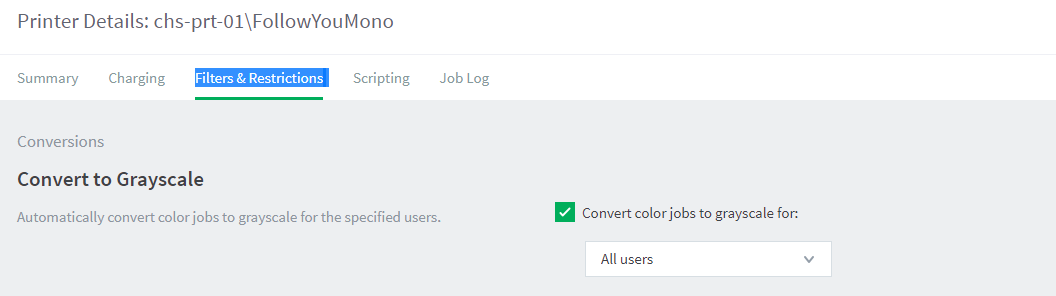
Really depends on how you want to set it up and how many colour devices you have and how many mono only. Papercut give you endless options. We gone with FollowYouMono as default, If staff/student want to print in colour then they have to choose the FollowYouColour queue. This way it reduce our costs so we not printing everything in colour and student don't waste all there credits. If you have only one followyouQueue for both colour and mono, then you want that setup this virtual printer as: This is a color printer (use standard detection) Then on your B&W Printers set it as: This is a grayscale printer (disable color detection and charge all jobs as grayscale) And on your Colour Printers "This is a color printer (use page-level detection)" Of course this won't stop people printing unnecessary colour on your colour printers. Like printing emails that have blue text as example. It is also important that each psychical printer is setup correctly within Paper cut and cost you charge for the device. It this cost that end user get charged. As example, you could charge 2p for a4 mono on Followyoumono, but then set your reprographics printer to charge only 1.5p a4. So when I print to Followyoumono the dialogue on my computer tell me that it going to cost me 2p, but when I go to reprographics printer and release my job I'm only charge what that device is setup and in this case i'm only charged 1.5p. -
Papercut issue _ about to walk out of my job!
dfergusson replied to MrWu's topic in Enterprise Software
Yes if you got dedicated FollowyouMono virtual queue "This is a grayscale printer (disable color detection and charge all jobs as grayscale)" And also you can set the following for FollowyouMono. Also On your B&W printers set "This is a grayscale printer (disable color detection and charge all jobs as grayscale)" For our FollowYouColour Virtual Queue we have this is set to "This is a color printer (use standard detection)" For our Colour Copies we have this set "This is a color printer (use page-level detection)" More info on these setting here: https://www.papercut.com/support/resources/manuals/ng-mf/applicationserver/topics/printer-color-detection.html
-
Papercut issue _ about to walk out of my job!
dfergusson replied to MrWu's topic in Enterprise Software
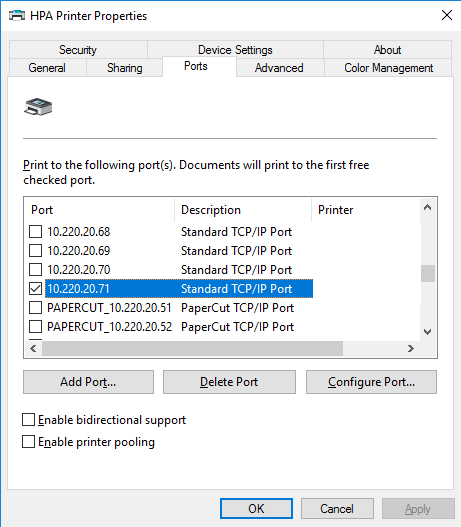
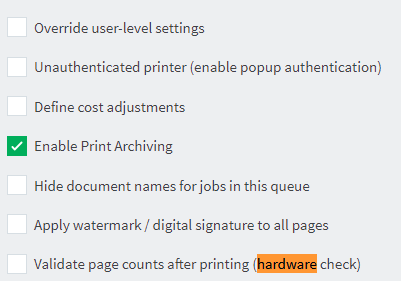
These are some changes I would recommend making, we had recent issue with Papercut printing and these solved all of our issues. That port for follow me queues are all set to Nul: Unchecked Enable bidirectional on all printers including Followyou Unchecked Enable Advanced Printing Features for all printers including Followyou (Located under Advanced Tab under printers properties) If you are using Papercut Port, change them to Standard TCP/IP Port So example of when we had Papercut ports and moved back to Standard Ports For Papercut, under Printers: unchecked Validate page counts after printing (hardware check) for all printers Ensure that Enable hold/release queue is only enabled for Follow you queue (Virtual) unless there reason why it set to physical. I hope the above is of help.
-
Papercut issue _ about to walk out of my job!
dfergusson replied to MrWu's topic in Enterprise Software
No, unless you set that you have setup Hold/Release Queue Settings on physical printer queue under Papercut, Printers by mistake?
-
Papercut issue _ about to walk out of my job!
dfergusson replied to MrWu's topic in Enterprise Software
Something you might also want to enable for your Follow You Virtual Queues under Papercut, Printer, is enable "Hide document names for jobs in this queue"
-
Papercut issue _ about to walk out of my job!
dfergusson replied to MrWu's topic in Enterprise Software
This is how our is setup for our Follow You Queue I also noticed that you have Papercut TCP/IP Queues, check if you have Hardware checking enabled under Papercut printers. If you are using Hardware check, be worth you updating to version below to fix Hardware Checks enable crashing. 13 September 2018 - PaperCut MF 18.2.5 (Build 46226) This is a Maintenance Release for 18.2 and contains the following changes: Fixes: Windows Print Provider: Fixed an issue that could cause the Print Provider to crash when Hardware Checks are enabled (since 18.2.4). Admin web interface: Fixed missing translations for Find-Me Printing configuration.
-
Papercut issue _ about to walk out of my job!
dfergusson replied to MrWu's topic in Enterprise Software
Here are thing you can check to improve Papercut Printer reliability. For uses with Follow You Queues https://www.papercut.com/kb/Main/SetupNulPortOnWindows Other Printer features that you can disable https://www.papercut.com/kb/Main/EnableAdvancedPrintingFeatures https://www.papercut.com/kb/Main/FixingPrintSpoolerCrashes -
Papercut issue _ about to walk out of my job!
dfergusson replied to MrWu's topic in Enterprise Software
What port have you set for follow me queue? -
Papercut issue _ about to walk out of my job!
dfergusson replied to MrWu's topic in Enterprise Software
What queue are you showing in screenshot? is that a follow you printer queue or normal printer queue? -
Papercut issue _ about to walk out of my job!
dfergusson replied to MrWu's topic in Enterprise Software
On your print server, bring up printers, right click on one of printers and click on properties and then click on ports. Under description will tell you if it a Papercut TCP/IP port or Standard TCP/IP Port -
Papercut issue _ about to walk out of my job!
dfergusson replied to MrWu's topic in Enterprise Software
What version of Papercut 18.2.? And what ports are you using on the printers, Papercut TCP/IP or Standard TCP/IP If you are using Papercut TCP/IP do you have "Validate page counts after printing (hardware check) enabled? -
Arthur are you also syncing Network Printers as part of your UE-V Windows Settings?
-
This policy is disabled by default on Workstations. Computer Configuration > Policies > Windows Settings > Security Settings > Local Policies > Security OptionsDevices: Prevent users from installing printer drivers = Disabled
-
[LTSB, Enterprise] Unattended.xml seemingly ignored?
dfergusson replied to Memhave's topic in Windows 10
Yes SCCM does all this and a lot more, not free but well worth the investment. The software take time to setup so not something that easy to try and would also need to extend active directory schema. SCCM integrates and take over WDS and WSUS and manages Microsoft Defender More info on this here https://www.microsoft.com/en-gb/cloud-platform/system-center-configuration-manager-features- 14 replies
-
- 1
-

-
- answer file
- enterprise
- (and 3 more)