Pete10141748
-
Posts
1,421 -
Joined
-
Last visited
Content Type
Forums
News
20th
EduGeek EDIT Conference
Blogs
Everything posted by Pete10141748
-
@smitho1990 They are called Vericool - VeriCool - School Reception
-

Opensource or cheaper alternative to Dreamweaver
Pete10141748 replied to zag's topic in Educational Software
I've not used it to teach but personally I like NetObjectsFusion Download NOF page WYSIWYG editor that builds the HTML for you but you can edit it as HTML if you want to, or a mixture of the two. In terms of teaching/learning it might be quite powerful to create something using drag&drop technique and then be able to look at the HTML that is used to actually achieve what you did and match the two together. -
We have a badge system in my school. All staff are supplied with a photo ID card (made by me so I keep track of exactly who should have one and who is waiting) with their name and school logo on it, with a big STAFF label on the bottom of it. This is put into a card holder and word around the neck using a blue lanyard that also has "STAFF" written all over it. All visitors sign in to the touch-screen register system in reception (that we staff also use), but visitors have a sticker printed from the system automatically which has their name, car registration and "VISITOR" written on it. This is stuck onto a card and put into a card-holder with a red lanyard with "VISITOR" written all over it. Although we are quite large (around 100 staff) we all know most other staff at least by face if not name, and if we see anyone with a STAFF badge/lanyard that we don't know we do an ID challenge anyway, better safe than sorry. Anyone not wearing a badge at all is to be challenged without fail, and unless the circumstances are exceptional no visitors are ever left alone anywhere in the school either.
-
The Stereotype of Tech Support & Coffee - True?
Pete10141748 replied to Rawns's topic in General Chat
Don't drink tea or coffee, maybe have 1 cup a week at home if the gf makes one and it takes my fancy. Drink about 6-8 pints of water a day, and about half a pint of cranberry juice with my breakfast, keep a few Red Bulls and/or Rockstar Cola's in my mini-fridge in case I feel my mind going drowsy in an afternoon and need a boost. Stuff like robinson's (the juice you dilute with water) gives me migraines for some reason so got used to drinking plain water years ago. -
When I started here were only 2 other men working at this school, one teacher who wore a suit (well shirt & tie anyway) and one TA who wore sports gear (jogging bottoms and hoodies etc) so I just balanced myself in the middle of the two, wearing smart trousers and shirt but no tie, usually a v-neck sweater as well; smart, but not suit smart. However my suit trousers (which were not cheap!) soon got pummeled into oblivion from crawling under desks, crouching at PC towers, and gluey/sticky/paint-covered hands of the younger children! So now I wear Dickies work trousers, hard-wearing and packed with handy extra zipped pockets for screwdrivers/batteries/usb drive/whatever else I might need on a job, shirt and either jumper or zip-up fleece if it's nasty weather like today. And it's proved a valid point today too, after moving 24 very large printers I have scratch marks, dust and toner all over my trousers, if they had been suit trousers those would have been destroyed by now. It's strange through, no-one in this place really seems to pay much attention to what staff wear. The Head is always kitted out in very smart dresses, tops, skirts, boots and jackets. The deputy's follow suit although not quite as smart. The male staff either wear shirt&tie if they are a TA or the school's PE Staff kit if they are PE, the female staff seem to just wear whatever they want. I'll be honest and say that sometimes I've caught an eyeful of cleavage and seen a few skirts which seem a bit too short to be professional...... but then the staff who wear those ain't bad looking so I'm not going to complain! lol
-
These are just what I needed this afternoon, thanks for posting them guys
-
When I started I got nothing. I swear, NOTHING. I had to 'borrow' the Head's laptop when I found it logged in just to get the proxy server details to get online. Then I had to bug the ict co-ord until he remembered the password for the 1 server the school had, and when I got on it I found it wasn't doing anything anyway! If/when I leave here I will be providing the next NM with the "Red Bus" document, so a lot of it is in nice simple terms in case someone with less techy experience needs to admin the network for a bit. I reckon it's close to a "Gold" standard. ---------------------------------------------------------------------------------- Red Bus document – contents Username and Passwords for all Administrator accounts (local on servers and all network) including any special accounts needed for software (such as our SophosUpdate account) and any local machines still present on the network Internet access details (proxy settings and port settings, descriptions of each one) Email address / login details for the helpdesk / VLP email accounts and guide on how to use them (probably already created as simple “How To” for staff) Log in details for any sites (accounts on Argos, Amazon, BT Business Direct and so forth) and internal hosted stuff like Espresso, Exchange, HP/Cisco hardware manager software etc Contact details for all preferred suppliers (email, phone, fax and names) together with either a brief history of recent purchases, or sufficient reasoning as to why they are preferred Network diagram, with accompanying server names and locations, switch IP addresses and locations, type of cabling between each switch/server and WAP locations Server info including hardware specs, RAID, serial number, warranty info, IP addresses if static, roles, mapped drives+purposes, anything not ‘standard’ about their configuration Backup plan/details, disks/tapes and instructions on the current policy on backing up Switch info including spec, number of ports, port diagram, serial number, warranty info, IP address List of software with license information and if not kept in the school safe, paper licenses to go with it. Electronic copies of licenses (scans) of the original documents, all security keys/passwords required for installation of software and notes on anything that is not ‘easy’ to install Hardware audit; details of all hardware including digital cameras, scanners, printers, PCs, laptops, projectors and so on. Serial numbers, warranty info, hardware spec’s, who it is assigned to/which room it is installed in, repair history Details about any area/s of the network that are not standard, any that have particular problems recurring, issues outstanding or any other projects that are currently underway Details of profiles, if roaming, how to set up, permissions, folder structures, Win XP/Vista/7/Other OS builds, imaging instructions and build procedures Quick “how to” troubleshooting guides for the common problems experienced to let the new person/s hit the ground running Telephony details if using VOIP system Library software login details, how to add new books, remove books, print reminders etc. if part of the job (at the moment it’s part of mine) Timetables of the school day with any recurring needs for equipment to be moved/permanent bookings for equipment Any and all paper-based filings done ---------------------------------------------------------------------------------- Of course, on the cover it will have big bold print that says "Abandon Hope all ye who Enter Here"
-
RM Slate vs iPad - any experiences and/or thoughts?
Pete10141748 replied to Pete10141748's topic in General Chat
ARGH! So after looking into makes&models, asking for prices, posting here etc. I then get pulled into a meeting and am told that the funding the school was going to receive to buy all this nice new equipment has been cut by 50% and things like iPads and netbooks are now off the table It's so annoying; the funding was supposed to be spent by August of last year, but because the SMT dithered about and kept changing what they wanted to buy, quotes taking ages to come back from the LEA/supplier, the the old Head not explaining to the new Head what the school's plan for ICT was and the new Head changing everything all over again means we have now ended up missing out on £40k+ of spending power for ICT devices Thanks for all the responses though, I shall keep them for if/when the subject comes up for discussion again. -
RM Slate vs iPad - any experiences and/or thoughts?
Pete10141748 replied to Pete10141748's topic in General Chat
Yup, those are the things that draw me to it more than the iPad at the moment....... but am still open enough to have someone/something change my mind! -
Hello fellow EduGeeker's My school is looking into different forms of 'mobile learning' beyond laptops, and the Head really likes the iPad. Now, I have several issues with the iPad that I won't rant on about here, suffice to say I don't think they are the most appropriate of the tablet-PC variations on the market. I've looked, several times, at the RM Slate. It seems to offer so much more than the iPad and for less cost. An adviser from the LEA stated that the total cost of ownership for iPads is less because of the apps being 'cheap as 59p', however as much of our mainly-used software is site-license already I see it from the perspective that the Windows 7 RM Slate can run everything we already have, whereas the iPad we are going to have to pay for each iPad to have each app. Seems more expensive to me! The biggest difficulty in deciding is that no matter how many times I've asked no-one in SLT seems to be able to give me an answer to the question "What EXACTLY do you want the [tabletPC] for? HOW are you going to use it to teach? WHAT is it going to need to do / run / display?" and so on. So what I'm really asking is, based on experiences of using iPads and/or RM Slate in either personal or professional capacities (but without bias as to "iPad has X app but Slate can run Y flash-based software), do any of you have suggestions, comments that could waive one product into favour or even a horror story to stay away from one of them? Thanks in advance guys! Pete PS Apologies if this is a rehash of topic/s already started but I figured it would be good to try and get some up-to-date experiences
-
My results You scored 61/100 for economic capital. Your financial resources are about the same as the average person in the UK (who have taken the test). You scored 60/100 for social capital. Your social network is about the same as the average person in the UK (who have taken the test). You scored 100/100 for cultural capital. Your range of cultural interests is broader than 90% of the people in the UK (who have taken the test).
-
[pics] Worlds Geekiest Your Mum joke
Pete10141748 replied to featured_spectre's topic in Jokes/Interweb Things
LMAO! Brilliant! -
Build a PC (software) without spending a penny - what would you do?
Pete10141748 replied to GREED's topic in General Chat
But that would mean ordinary users actually learning something new [gasp!] and new things are scary! -
I use Tumblr. and am very happy with it. You can add as many webpages as you like, thousands of free themes to choose from or you can use HTML to code your own from scratch, you can link it to your Facebook / Twitter account, RSS feeds. Best of all it's free, and no adverts!
-
We break up tomorrow - guess how many Xmas cards I have got ?
Pete10141748 replied to mattx's topic in General Chat
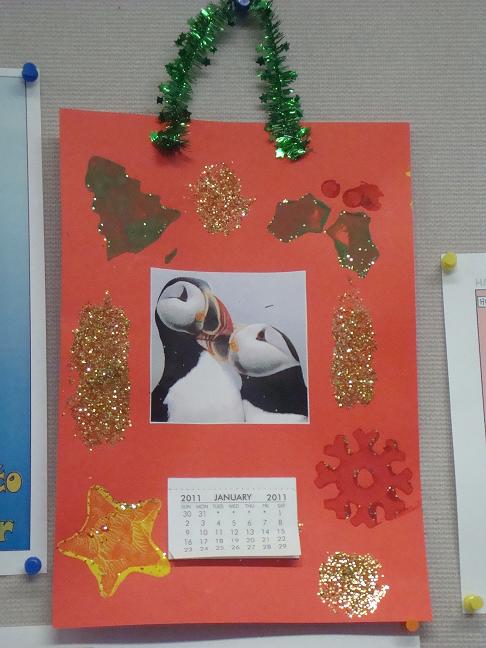
So far I've been given; 5 cards, a tin of Heroes from Admin (for being "their Hero" giving them minimal downtime despite huge server changeovers happening in the middle of the term, not my bright idea I might add!!!!) a big box of Roses chocs, a cookie & a cake (made by the pupils) and this rather festive calendar made by a couple of Year 2 pupils from Puffins class!
-
Today I recieved an email asking me to "fix a problem with MicroSoft Orifice" Maybe breaking Bill Gates' jaw would work?
-
Staff here are unable to run any installations for themselves. We used to let them change their screensaver but they mostly just turned them off, which when they leave their projectors on all day long is not a good thing! So now they are all set to be the smart bulb saver and can't be changed. They can change their background picture as most use topical pictures of their class name picture (ducklings, puffins, wolves etc) They can get to the control panel but not access all things (can't get to Add/Remove programs, can change the power options and so on) From my POV I deny access to the things that they do not need; it makes sense to not allow them to install whatever they want because that also means I spend far less time sorting out botched installations, removing things that shouldn't be there or re-doing settings that they had no need to change in the first place. Give them access to what they need to teach, they don't need to be administrating their computer though, that's your job!
-
Now you've got no excuse for not getting an iPad....
Pete10141748 replied to tech_guy's topic in General Chat
I'm still not getting one! -
They took out the Red Ring LEDs and replaced them with 1 LED in the center of the power button; So now it's RLOD - Red Light of Death!
-
The RROD was a problem with the earlier models of the Xbox where is would heat and cool each time you used it and eventually the Graphics Chip would fail or the boards inside would crack due to the 'cold solder' joints expanding and contracting when heating/cooing (mainly the heating though). You can buy additional fans to attach to the back of the Xbox but it makes a hell of a noise and hasn't really proved to prolong life that much. The newer models (the Elite mainly) were much better but it still happens now and then to consoles if they are used for a prolonged period regularly (my Elite RROD'd during a summer holiday, but I had spent about 7 hours each day for nearly a week using it! lol) The newest model (the 250b slimline) should not have the problem, as now if it is overheating it will flash up an error message on the screen and shut itself down automatically and won;t turn back on until it has cooled enough to be safe to use again. If that happens a few times in a short space of time then you need to find a better ventilated place to put the console!
-
An iPad..... [waits for the Apple Fanboys to attack]
-
FS-C5300 is the model we currently have here. It's been very reliable so far, and Kyocera offer a Universal Print Driver that works with any model of their printer now so it's easy to get installed and shared Thanks to those who have shared their info already; is there any way (either on here or via PM to me) you can tell me the kind of cost you are getting (ie how much per mono page, how much per colour page, how much per year to lease the printers etc) as this is what the Bursar is mainly concerned about - local companies charging us higher rates than someone else but as we've never done a lease before we have no real idea which companies to look at anyway!
-
Does anyone here lease their printers? If so, what company do you use and what sort of costs do you pay? I am looking to lease 24 colour printers for classrooms and have been quoted by a few local firms for the project, but the Bursar would like to get a much broader idea of who other education establishments use for their leases. Cheers!
-
The IT co-ordinator runs the school website here (one less job for me to do, huzzah! lol) and uses Wordpress St. Matthew's Primary School Doesn't seem to difficult at all to set up.
-
My experience with this is, it's a losing battle. Refuse to copy the CD for them, they'll find someone else to do it (either in school or at home). Tell them they can't play DVDs at the end of term and you're likely to get you head bitten off. If they ask you to do something that you know it illegal, you should refuse. If they get uppity about it, go to your line manager and tell them you are being asked, or even pressured, into committing an illegal act that not only could land the school in trouble but also personally affects you, and that is why you refuse to do it. If the Head of the school orders you to do it, well, I'd go over their head to the Governors and tell them what was happening; any person who is directing you to perform illegal acts should not be running a school!