Garacesh
-
Posts
16,316 -
Joined
-
Last visited
Content Type
Forums
News
20th
EduGeek EDIT Conference
Blogs
Everything posted by Garacesh
-
Got my box today (well, actually, got it Friday, but was off sick, so opened the box today), some really useful items in there, thank you VeryPC
-

Coronavirus: General discussion (see opening post for rules)
Garacesh replied to Dos_Box's topic in General Chat
Had my first vaccine today. I have absolutely no idea why I was called in for it, I'm only 30 with no long-standing medical issues, but I'm not gonna kick up a fuss about it. -
Oops, should've updated this thread. Turns out it was a combination of that (why does the Windows Firewall warning go away, if the firewall is still blocking stuff? ) and 'Log on as a service' permissions. So I'd fix one issue, it still wouldn't work, so I'd undo the fix and try something else..
-
There's definitely some e-peen from getting a competitor to wear your socks. GGWP
-
Huh. I'm guessing those are capital I's?
-
SQL Server service running account The logon account for the SQL Server service cannot be a local user account, NT SERVICE\ or LOCAL SERVICE. You must configure the SQL Server service to use a valid domain account, NETWORK SERVICE, or LOCAL SYSTEM. This has been actioned and the SQL Server ($InstanceName) service is operating as a networked account. I have even tried setting all the other SQL services to use this account, too, and even tried making that account a domain admin. SQL Server Tcp Port Configuration Manager primary site and central administration site require SQL Server Tcp is enabled and set to Static port. In SQL Server Configuration Manager, under SQL Server Network Configuration / Protocols for $InstanceName, TCP/IP is enabled, and TCP Port is set to 1433 under the IPAll section. IPAll's Dynamic Ports option is blank. I have event tried setting this on all of the 4 above interfaces (IP1, the fe80 ipv6 address, IP2, the server's current ipv4 address, IP3 ::1 and IP4 127.0.0.1) Google tells me what I'm doing is right, but these prerequisite checks still constantly return Failed
-
I, too had heard this.. I hear there's around 50 shades, and then another 50 that're allegedly darker.
-
Nyet, but shall drop a pm now
-
I tried it a few times on my phone, where it didn't look like it was submitting (the form flashed, then reappeared rather than getting the 'submitted' text), then I did it on pc and it apparently worked, an hour later I still had no confirmation, saw the quoted post and have resubmitted again. Just being transparent, and all that. Not trying to swindle all the boxes, I promise!
-
90% would be great, but in reality I'm expecting a 25-30% unreturned/damaged/otherwise unfit. At least, if nothing else, we'll have plenty of spare parts. I hope you're all comfortable frankensteining dead laptops together
-
Coronavirus: General discussion (see opening post for rules)
Garacesh replied to Dos_Box's topic in General Chat
I've been saying similar about our kids here. As soon as they find out testing isn't mandatory, and they will find out, they're gonna back out of testing. They'll over-blow the mild discomfort (gagging and/or sneezing) as "MISS IT MAKES ME THROW UP!" and refuse to take it. And they will still be allowed in the building. And then the virus will spread. And we'll be sending 70, 80, 100 kids, or entire year groups home again. We'll be right back to where we were before Lockdown 2.0 because hey, guess what, 80% of bodies in the building aren't vaccinated yet. -
If you were selling a list of mugus, which would you do? Pad it out with numbers you know are active, even if the chance of a successful scam is nil, or remove those and curate a smaller, but more accurate and reliable list? If all you care about is making quick, eazy dosh, it's the latter. The former is only useful if you plan to stay in business and build a reputation - and a reputation is what these companies want to avoid. That's why they change their fake name so much, or bounce between different kinds of scams.
-
It's pretty well-known that these scam call centres buy and sell lists all the time. Jim Browning usually shows a (redacted) file every now and again that shows the extent of how they're managed.. Names, numbers, emails, whether the person was scammed or not, how much for if they were, go2assist/teamviewer/etc password to their machine.. They've also been known to set up shop in legit offices after-hours and running things like a 'proper' company.. CCTV, payroll/commission, etc. It's not uncommon to have them be really well-organised.
-
See, I might be wrong, but if they care, they know my phone is active because it rang. And chances are they don't care, they're just calling random numbers, or +1 each time depending on how many 'customer service advisors' they have. So I might as well answer. Like pseudo-scambaiting. Even if I only keep them on the line for 30 seconds, that's 30 seconds more than if I'd have just dropped the call.
-
Phone call from 07506 745 052 (though most likely a spoofed or hired number).. Apparently my social security number (since when did we have those?) has been compromised (what does that even mean?) on the Wesh border (wut?) Press 1 to speak to someone or legal action will be taken. Oh no! I guess I'd better do that, then.. I got put through to a wonderful lady who gave me a very stereotypically English name for someone with such a thick Indian accent, though if we're being fair, I guess that's not outside the realms of possibility. I cut her off mid-opening-spiel to say I knew she wasn't anything to do with the government, and asked who she was really. All I got back was blblllbbbblblblllllblblbllbl tongue-wagging gibberish, before she hung up. Shame, really, I'd have liked to have questioned her about why she's scamming people and if she's really happy with her career. Ah well. Number reported and blocked.
-
I unearthed an old QNAP TS-420U and, since we have no on-site backup device (we are doing offsite, but nothing local) I've been trying to rig this up as a backup device. Now, I want the QNAP to pull backups, rather than having the file server push them. That way, should any nasties get onto the network, there's a lesser (though still non-zero) chance of the backups getting, for example, encrypted by ransomware (as long as we notice and turn it off), but I just can't get the QNAP to access the shares. However, try as I might I just can't get it to operate over anything other than SMB1 The file server has the SMB1.0/CIFS File Sharing Support feature added, though SMB1 is disabled via the registry keys. Running Get-SmbServerConfiguration on the file-server returns (amongst other things) EnableSMB1Protocol : False EnableSMB2Protocol : True If I SSH onto the QNAP and run the smb2status command, it returns: [~] # smb2status smbd (samba daemon) Version 4.4.16 smbd (samba daemon) is running. max protocol SMB 3 enabled. The account credentials I feed the QNAP box are domain admin credentials (as it's the same account that does full-vm Veeam backups) and yet it just will. not. work. If I change the IP address to point at the old file server, success. Only difference? Windows Server version, and running Get-SmbServerConfiguration on the old one returns EnableSMB1Protocol : True I was under the impression that server initiating the connection would always to try and negotiate the highest SMB flavour first, then drop down if the other end couldn't support it? So it should be using SMB3. But every test I run results in failure..
-
Shot in the dark. but are you using the Always wait for the network at computer startup and logon GPP?
-
Got to the end of Discovery Season 2, I guess that explains how they retcon the Spore Drive (amongst other technology that I shan't elaborate on coz spoilers ) The Klingons are becoming considerably more Klingon-y too, which cures part of my gripe from Season 1. Really enjoying it now. Even if there are some reeaally outlandish things (Control.. Voq..)
-
Hmm, it's possible I've misconfigured something then, but I'll not derail any further. I appreciate your response!
-
I use iMazing on Windows. £30 a year for 2 seats (2 seat minumum) with education discount (£50 without) and does basically everything Configurator does. Only gripe I've found so far is that it doesn't automatically apply profiles and certificates, you have to do those manually on the iPad. But you can still build a profile, put everything in it, then flag it as unremovable or password protected, it just adds about 30 seconds extra work per device. Configurator is the better option, I'd say, but if you don't got an Apple device to run it on, and don't fancy spending a grand on a macbook, this is an adequate solution. Edit: Also free trial that has most of the functions unlocked (You can't supervise with the trial tho) so you can have a bit of a play before you commit.
-
[Office 365] Live Event Presenters can't see the Q&A chat?
Garacesh replied to Garacesh's topic in Cloud Services
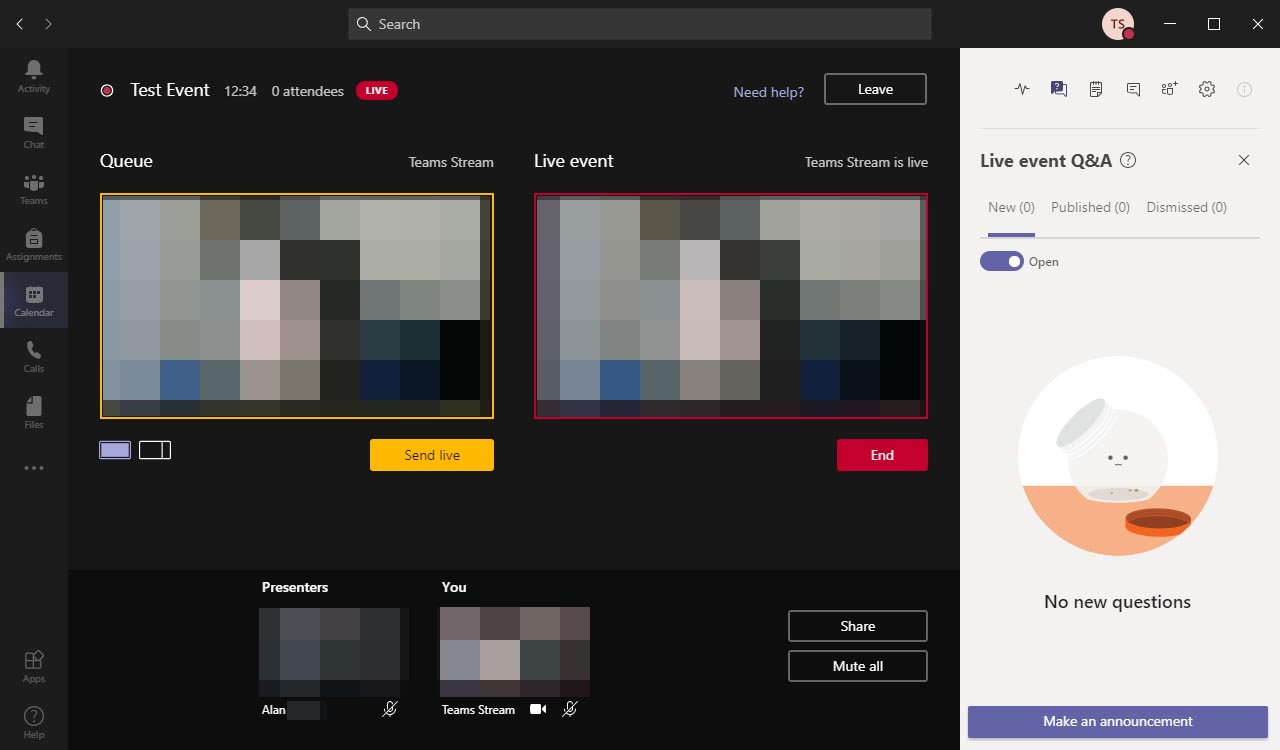
So, so far, all I've been able to pin it down to is that it's a device-specific problem, not an OS issue. Turns out when creating the Live Event you can select Presenter or Producer now. Producer gives you the full two-feed window with the option to send folks live that we're all accustomed to, Presenter gives them the alternate UI where their own camera feed is (mostly) full screen and they just have a tiny live window in the bottom right. Create the event, invite 2 regular accounts, set them both as Producer instead of Presenter.. Signing in as user A (A1 license, not primary host) on my full-fat windows tablet (Surface Pro 2) does not get the Q&A chat Signing in as user B (also A1 license, not primary host) on the laptop I've nicked from the stash downstairs, Q&A chat. Swap accounts, user B on the tablet, user A on the laptop, same result. Laptop has it, tablet don't. But both devices are full-fat Windows 10 (Pro vs Enterprise), both with the latest version of Teams (1.3.00.24755) -
[Office 365] Live Event Presenters can't see the Q&A chat?
Garacesh posted a topic in Cloud Services
What it says on the tin, really.. I have Live Event, and when I set it up, I add other teachers as a presenter. When they join the event, they can't see the Q&A chat, only the primary chat (that all of the named participants can see but the attendees can't) I have a feeling this has something to do with a difference between Producer, Organiser and Presenter but it still seems really bloody stupid. This is what Teams looks like for the Producer, Organiser account (that has the A3 license to host the live event) And this is what it looks like for the other members in the Event Group (Presenter) I tested this earlier today, and I put it down to the other presenter using Teams on a Mac, but now I'm at home writing up documentation and getting screenshots, and my Windows 10 (full-fat, none of this S rubbish) tablet doesn't have it either. Except, earlier today, when we had the issues, I had the A3 account invite my own account into the stream. My own (A1) account got the 'full' experience (the first screenshot above) and could see Q&A. So I know, somehow, it's possible? What gives? Is there a way to fix this? Or are we just going to have to ghetto it and have whoever is manning the Producer, Organiser/A3 account copy-and-paste all the questions into the private chat?
-
Coronavirus: General discussion (see opening post for rules)
Garacesh replied to Dos_Box's topic in General Chat
Where those eduhobnobs at? Also: Name a non-solid organ? All of the organs on this list sound pretty solid to me. -
And how long have you been working in Education? Welcome, newbies!
- 4,289 replies
-
- 2
-

-
- assistance
- background
- (and 2 more)
-
Oh! They said nothing about that to me, but I assumed you had 365 as part of an OVS agreement like we do. Sorry