nLinked
-
Posts
168 -
Joined
-
Last visited
Content Type
Forums
News
20th
EduGeek EDIT Conference
Blogs
Everything posted by nLinked
-
We sometimes allow tech support companies to RDC into our Windows computers to fix problems. While they RDC in (we have an RDP Gateway) the physical computer obviously goes into 'lock' screen so we can't see what they're doing. Is there any software that can either record that session into a video, or allow us to view their session remotely even though they are the ones currently logged in? Edit: Well there's observeit express but even though I have IIS installed it still says it can't find a default site... It's all there!
-
Simple centralised folder size viewer for staff?
nLinked replied to nLinked's topic in Network and Classroom Management
This looks really interesting, thanks! -
Thanks all for your replies. We've managed to fix it, it was related to the VLAN not appearing when doing show ip route. The solution was to create the VLAN in this way: switch# configure terminal switch(config)# vlan 202 switch(config-vlan)# name wirelesstablets switch(config-vlan)# state active switch(config-vlan)# no shutdown show ip route (to confirm)
-
On the Cisco switch if I do show ip route, I can immediately see all the VLANs in a list but not the 202 one. This must be the problem so it's probably a routing issue as you say. But I thought we did add the VLAN. Going to have to look at commands for getting our 202 vlan into there...
-
Thanks, you're right, none of those pings are successful! None.
-
OK just tried this and although it connects to wifi fine with the static IP, pings are failing to the DHCP server (the DHCP server does accept pings normally and I can ping it from a wired workstation fine).
-
Thanks for your reply. We do seem to have that in our config below: interface Vlan202 description WIRELESS_TABLETS ip address 172.16.202.253 255.255.255.0 ip helper-address 172.16.100.1 ip helper-address 172.16.100.2 ip helper-address 172.16.100.3 ip helper-address 172.16.100.40 ip helper-address 172.16.100.44 ip pim dense-mode standby priority 110 standby name WIRELESS_TABLETS standby 202 ip 172.16.202.254 standby 202 priority 105 standby 202 preempt We also have: interface GigabitEthernet11/5 description ***WiSM_1_WLC1*** switchport switchport trunk encapsulation dot1q switchport mode trunk no ip address no snmp trap link-status no cdp enable channel-group 202 mode on ! interface GigabitEthernet11/6 description ***WiSM_1_WLC1*** switchport switchport trunk encapsulation dot1q switchport mode trunk no ip address no snmp trap link-status no cdp enable channel-group 202 mode on ! interface GigabitEthernet11/7 description ***WiSM_1_WLC1*** switchport switchport trunk encapsulation dot1q switchport mode trunk no ip address no snmp trap link-status no cdp enable channel-group 202 mode on ! interface GigabitEthernet11/8 description ***WiSM_1_WLC1*** switchport switchport trunk encapsulation dot1q switchport mode trunk no ip address no snmp trap link-status no cdp enable channel-group 202 mode on That all looks right to me unless I'm mistaken? I have noticed we have the following for another VLAN but not for VLAN 202. Do you think we'll need it for 202 too?: interface GigabitEthernet11/9 switchport switchport access vlan 201 switchport mode access no ip address no snmp trap link-status no cdp enable
-
On our Cisco WLAN Controller web interfaces, in Controller > Interfaces, I have made a new interface with these settings: VLAN Identifier 202 IP Address 172.16.202.1 Netmask 255.255.255.0 Gateway 172.16.202.254 Primary DHCP Server 172.16.100.3 Secondary DHCP Server 172.16.100.2 Port: LAG I've also made a new WLAN and assigned it to the above interface. I have saved changes. But our wireless devices, although they seem to authenticate with the WLAN fine, they always get stuck on "obtaining DHCP address", so it seems the WLAN Controller isn't pushing out DHCP addresses to our devices. We do have a DHCP scope for the above in Windows Server 2008 R2 and everything there seems fine. If I connect a device with a static address (e.g. 172.16.202.10), it will connect. Stuck on what to do
-
Thanks, Nick! It is working!
-
Hi Nick I'm on the step "Change provider="XML" to provider=" SQLConnectionString"", but my web.config (in root) doesn't have "Change provider=" in there at all. A search for that returns nothing, also a search for "tracker" gives nothing. I'm sure I haven't deleted them...
-
Managed to add it in! Followed this first to add the user, then it automatically added itself to the permissions for step 3 of the doc for login tracker.
-
A little stuck on step 3 of the doc where you need to add user IIS APPPOOL\$apppool$. Hvae seen some posts here from others who have had the same issue. For me on IIS 7 it doesn't find any user with IIS APPPOOL. Or HAP. Neither locally or on the domain. However, when initially setting up HAP, I did have to run "icacls C:\inetpub\wwwroot\Hap /grant "IIS AppPool\HAP":(RX)" to create a HAP user. That worked fine for folder permissions. But I can't search for the same user in SQL Mgmnt Studio, it just doesn't locate. Is there anything I can do?
-
Great to hear! I've just found your video here for SQL. Will give it a go!
-
Is there any way to log which user logs in from outside the school and a date and time in any other way other than the Logon Tracker? I believe Logon Tracker is only for monitoring LAN logins so it requires a client-side install.
-
Planning a staff discussion forum for interdepartmental discussions. Centrally hosted (phpbb). Trying to weigh up benefits. If your school runs one, how much is it used and what do staff use it for?
-
[sims] What is the best way to make parent SLG accounts?
nLinked replied to nLinked's topic in MIS Systems
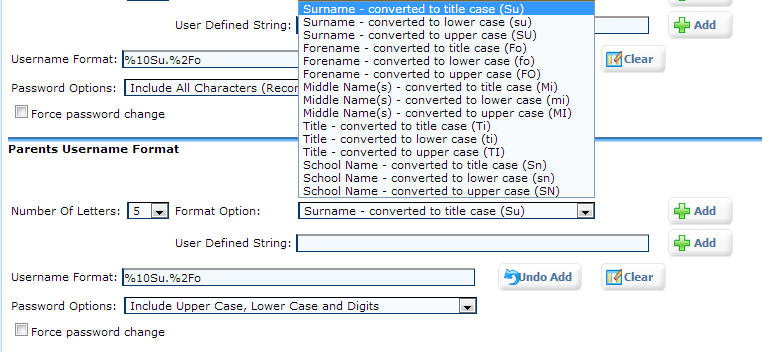
In SIMS ADP I can't see any way to add a student's username into the parents username format. All I see is this: http://i.imgur.com/JIhzN.png
-
Before we provision parents through SLG in order to make their accounts, we want to know what is the best username format to use in order to help identify and organise parents better in AD. The default username format in SLG ADP is: %10Su.%2Fo That will result in a username such as: Surname.Fi But how can we have it so we know which student the parent belongs to? Otherwise some parents may have similar names. Is there a unique SIMS ID we can add to the username so we can find whose account it is in case the parent loses the login? And if there is, how do I add it to the username format or an automatic description in AD?
-
Looking for a tree file size viewer like WinDirStat, but want it hosted centrally. It should do the scan daily on a specified share that we have, but allow staff to access a webpage to view the results so they can see themselves what is using most space and help to maintain space in their central share. Is there anything like that? As a bonus, let them see a tree of their own N drive too (My Docs) but not other drives.
-
If we use this for students who will access shared drives from home, is there a way to analayse what load this brings to the server where HAP+ is hosted, or who and when they logged in? Lets just assume many students used it at the same time from home and I want to somehow monitor this load.
-
We use uniFLOW for student printing to photocopiers. Does anyone know how we can give students access to a page such as the one on page 2 here so students can reset their own PINs? I've looked on IIS but that page doesn't seem to be there.
-
No joy
-
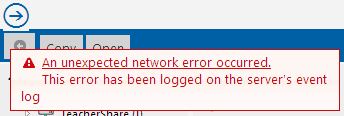
Strange, we have a drive mapped in HAP+ where the user has Windows permissions to about half the folders inside. But if I double-click a folder where they shouldn't have perms, I get the attached error.
-
Hi Similar question for this error message: "An unexpected network error occurred. This error has been logged on the server's event log" This error comes when I am logged in as a user who tries to access a folder in a drive but my user doesn't have permissions on that folder. Will I need to change this message in the source in order to edit its wording? It's just that the error might make users think there is a problem when it's just the way their permissions are in that particular share.
-
Thanks. I've noticed it in the page source if I right-click on the web page and do View Source. Is there any file I can edit that source with?
-
Thank you