burgemaster
-
Posts
1,005 -
Joined
Content Type
Forums
News
20th
EduGeek EDIT Conference
Blogs
Everything posted by burgemaster
-
Hi Tom, We have serveral staff who are testing Office 2013. This needs Kerberos Auth (Setup on port smoothwall:1080). Main staff/Students use NTLM (smoothwall:3127) The head wants to use an application that smoothwall support could get working on friday (ticket open) so they said as a temp solution put them on port smoothwall:801 to bypass smoothwall. So we need 3 x different proxy ports assigned. Would this be easier through smoothwall? would assigning port 801 even be possible through smoothwall?
-
"The isInNet(host, pattern, mask) function returns TRUE if the host IP address matches the specified pattern. The mask indicates which part of the IP address to match (255=match, 0=ignore)." Just read up after reading your post, i didnt know that subnet is tell it which part to match Thankyou!
-
Hi, We need to put a few computers on a different proxy port. We have two proxies, so everyone apart from these few IPs would go through Proxy A and the ones listed in the pac file would be on proxy B ? I was looking at the code: function FindProxyForURL(url, host) { if (isInNet(myIpAddress(), "10.10.10.0", "255.255.255.0") return "PROXY [Proxy Address]:[Port]"; else return "DIRECT"; } But isnt that ip in that command above an IP Range? Is there a way to limit just one or several individual IPs to have a different proxt port? Thanks in adavce
-
[ms office - 2013] What's so great about Office 2013?
burgemaster replied to enjay's topic in Office Software
Office 2013 school mini trial: We have rolled out Office 2013 to a selection of Admin Staff and teachers for a test period. This is an update from Office 2007.. so quite a difference for them... Their have been some positives.. in-line editing in outlook, Powerpoint features. BUT... mainly negatives In outlook they are finding the view of the main windows and also the calender unclear and Counter-productive They have all begged to have their colourful and clear outlook 2007 back. They have all reported that Everything is so much easier to distinguish One thing i could help them do was set the background theme to black (or grey?) this at least gave windows and areas in outlook a border so that areas could be distinguished. This is instead of the whole page being white with text plonked on top. On older spec machines the load times was also significantly slower than 2007. Also when in outllook to switch between calender and mail lagged. It required the authentication mode to be switched from NTLM to kerberos, apart from Java not supporting Kerberos this was not too bigger point. So mainly its been a negative review from our staff members. Its not really whether they like it or prefer it that counts but that it will slow down their workflow that matters. -
Direct connection to exchange instead of cached exchange mode? Disable with the office ADMs
-
When running the sysprep.cmd anyone is getting "“mysysprep is not recognized as an internal or external command” as I was with 64bit win7 sp1... You need to add the following to "path" in "Environmental variables" ;C:\Windows\System32\Sysprep

-
Thanks for this, but want select the xml on the wds server and not sysprep and then capture. I have added all the schools drivers into install.wim so one image will install to any machine.
-
Ive seen that there are several guides to modifying the sysprep file after you have captured the image and then run a VBS script or similar, or use mysysprep2 to get the image to prompt for computer name.. but i want to select the XML for each image using the option on the properties on the WDS server. After all these years is this possible yet?
-
ive patched together a VB MACRO to do this through running it in outlook... If anyone can please convert it to a VB Script that would be amazing!! Sub RemoveDeadFolders() 'Edit the folder names. Add more folder names as needed.' RemoveFavoriteFolder "Inbox" RemoveFavoriteFolder "Unread Mail" RemoveFavoriteFolder "Sent Items" End Sub Sub RemoveFavoriteFolder(strFolderName As String) ' Purpose: Add a folder to Favorite Folders.' ' Written: 6/18/2009' ' Author: BlueDevilFan' ' Outlook: 2007' Dim olkPane As Object, _ olkModule As Object, _ olkGroup As Object Set olkPane = Outlook.Application.ActiveExplorer.NavigationPane Set olkModule = olkPane.Modules.GetNavigationModule(olModuleMail) Set olkGroup = olkModule.NavigationGroups.GetDefaultNavigationGroup(olFavoriteFoldersGroup) olkGroup.NavigationFolders.Remove olkGroup.NavigationFolders.Item(strFolderName) Set olkPane = Nothing Set olkModule = Nothing Set olkGroup = Nothing End Sub Private Sub Application_ItemSend(ByVal Item As Object, Cancel As Boolean) End Sub
-
Thanks mate, but in the end I found out that when a folder is "excluded from roaming" it actually deletes the server copy of that folder in the roaming profile when they log off. But... If appdata is redirected to the NAS server means it doesn't get copied to the machine on logon, that will definitely reduce logon times.
-
The following script below is used to add 5 public folders to everyones Outlook. All working well apart from it has been requested that the three default folder "Inbox,Unread Mail, Sent Mail" be removed from this list? Looking and searching I am hoping that the command is DeleteFavoriteFolder but im un-sure? was hoping something as simple as: DeleteFavoriteFolder = "Inbox" but my limited coding skills have failed. Can anyone please assist? (Script only works with Outlook 2007, i have a 2010 script if you require) Const olPublicFoldersAllPublicFolders = 18 Dim olkApp, olkSes, olkFolder Set olkApp = CreateObject("Outlook.Application") Set olkSes = olkApp.GetNameSpace("MAPI") 'Change the profile name on the next line' olkSes.Logon "Outlook" 'Change the folder name on the next line. Repeat the next two lines for each folder you want to add.' Set olkFolder = olkSes.GetDefaultFolder(olPublicFoldersAllPublicFolders).Folders("Head's Notices") olkFolder.AddToPFFavorites Set olkFolder = olkSes.GetDefaultFolder(olPublicFoldersAllPublicFolders).Folders("Daily Bulletin") olkFolder.AddToPFFavorites Set olkFolder = olkSes.GetDefaultFolder(olPublicFoldersAllPublicFolders).Folders("Weekly Tutor Focus") olkFolder.AddToPFFavorites Set olkFolder = olkSes.GetDefaultFolder(olPublicFoldersAllPublicFolders).Folders("Rewards & Sanctions") olkFolder.AddToPFFavorites Set olkFolder = olkSes.GetDefaultFolder(olPublicFoldersAllPublicFolders).Folders("Urgent Staff Notices") olkFolder.AddToPFFavorites 'Change the folder name on the next line. Repeat the next two lines for each folder you want to add.' Set olkFolder = OpenOutlookFolder("Public Folders\Favorites\Head's Notices") AddFavoriteFolder olkFolder Set olkFolder = OpenOutlookFolder("Public Folders\Favorites\Weekly Tutor Focus") AddFavoriteFolder olkFolder Set olkFolder = OpenOutlookFolder("Public Folders\Favorites\Daily Bulletin") AddFavoriteFolder olkFolder Set olkFolder = OpenOutlookFolder("Public Folders\Favorites\Rewards & Sanctions") AddFavoriteFolder olkFolder Set olkFolder = OpenOutlookFolder("Public Folders\Favorites\Urgent Staff Notices") AddFavoriteFolder olkFolder olkSes.Logoff Set olkApp = Nothing Set olkSes = Nothing Set olkFolder = Nothing WScript.Quit Sub AddFavoriteFolder(olkFolder) ' Purpose: Add a folder to Favorite Folders.' ' Written: 5/2/2009' ' Author: BlueDevilFan' ' Outlook: 2007' Const olModuleMail = 0 Const olFavoriteFoldersGroup = 4 Dim olkPane, olkModule, olkGroup Set olkPane = olkApp.ActiveExplorer.NavigationPane Set olkModule = olkPane.Modules.GetNavigationModule(olModuleMail) Set olkGroup = olkModule.NavigationGroups.GetDefaultNavigationGroup(olFavoriteFoldersGroup) olkGroup.NavigationFolders.Add olkFolder Set olkPane = Nothing Set olkModule = Nothing Set olkGroup = Nothing End Sub Function OpenOutlookFolder(strFolderPath) ' Purpose: Opens an Outlook folder from a folder path.' ' Written: 4/24/2009' ' Author: BlueDevilFan' ' Outlook: All versions' Dim arrFolders, varFolder, bolBeyondRoot On Error Resume Next If strFolderPath = "" Then Set OpenOutlookFolder = Nothing Else Do While Left(strFolderPath, 1) = "\" strFolderPath = Right(strFolderPath, Len(strFolderPath) - 1) Loop arrFolders = Split(strFolderPath, "\") For Each varFolder In arrFolders Select Case bolBeyondRoot Case False Set OpenOutlookFolder = olkSes.Folders(varFolder) bolBeyondRoot = True Case True Set OpenOutlookFolder = OpenOutlookFolder.Folders(varFolder) End Select If Err.Number <> 0 Then Set OpenOutlookFolder = Nothing Exit For End If Next End If On Error GoTo 0 End Function
-
Of course! Works perfectly
-
This VBS script below detects when Outlook.exe is loaded and then triggers another script to load. It currently works perfectly but... if outlook is closed and then re-opened the script runs again. Could someone please advise how it could be modified to close after it detects outlook and launches the script. Somehow get it out of the loop? Thanks in advance Set objShell = CreateObject("Wscript.Shell") strComputer = "." Set objWMIService = GetObject("winmgmts:\\" & strComputer & "\root\cimv2") Set colMonitoredProcesses = objWMIService. _ ExecNotificationQuery("Select * from __InstanceCreationEvent " _ & " Within 1 Where TargetInstance ISA 'Win32_Process' AND " & _ "TargetInstance.Name = 'Outlook.exe'") Do While True Set objProcess = colMonitoredProcesses.NextEvent objShell.Run "cscript.exe C:\Scripts\Test.vbs" Loop
-
105 FTE = £3507 per year
-
Hi, Yes, sorry I did mean EES when I mentioned "School Agreement", as I thought that EES was the replacement and it had just been renamed.
-
Sorry I meant last as long as xp has in total , Xp will be 12 years old 2014, so to break even on cost with select, w7 will have to last till 2018 for us and till 2022 to rival how long xp has lasted us. I think by 2018 plenty will have changed. And paying out around 15k (select) for just win7 and stay on office/exchange 2007 wouldn't make sense. But if we were happy with office 2007 and win 7 till 2020 we would have made quite a saving. But again can't see that happening!!
-
Can anyone see Windows 7 lasting as long as XP? It would take roughly 3.5 years to break even. That would be with us still using office 2007 in 2018 !!
-
Thanks for all these, all good points. Think I have everything covered We currently have a select agreement meaning £0 a year for last 8 years, if we move up to win7 etc we will be paying roughly 4k annually from then on. Just wanted to make sure I wasn't missing something before I advise governors in the request for the on going funding. Thanks again
-
I've seen that some large companies still use ms software way after the official support has ended.... In case I've missed something, can anyone please assist with points of why we shouldn't / can't use XP after April 2014 in our school??? I don't want to say "we can't" and then someone say well actually xxxxx still use xxxxx etc Thanks in advance.
-
Thanks for all the help! It worked great. Last question! So say we have: default vlan - school network vlan1 - cameras, vlan2 - guest wifi How do we administer them all without have 3 network cards? router? Could I be pointed in the right direction please im sure there is a simple solution.
-
I will do that first thing, I just tagged ports remotely and lost connection to both switches from home so will do it first thing. Thanks
-
Just realised that you can actually set that port 48 to "tagged" in both of the VLANs at the same time! Thanks, hopefully this will work in the morning!
-
Thanks Gueff will read this in the morning, i have had enough to today, i will be dreaming on VLANS and ports later! Does it matter that we are using a straight network cable between switches and not a crossover cable or minig`s and fiber cable or something like that?
-
thanks for the replies. I have been doing all the config from telnet. There is a whole section on "Trunking". Are you saying that I turn off the trunking on port 48 and just simply "Tag" port 48 on both switches? this is what we tried originally and it didnt work We then followed some guides and they pointed us to the trunk settings in the config. How do you "Tag a port to a each VLAN??" We only have ONE port in then camera VLAN so how do we tag port 48 (connects the 2 switches) into this VLAN ? if we add it into the vlan and tag it, it is then a 2nd port which is part of that VLAN and we then cant ALSO "tag" it in the default vlan? (as we need both VLANs traffic to go through this port 48) We can only have one port used for the connection between switches as these are all fiber links. Thanks again, confused. Maybe we need to completely erase the switches and start from scratch.
-
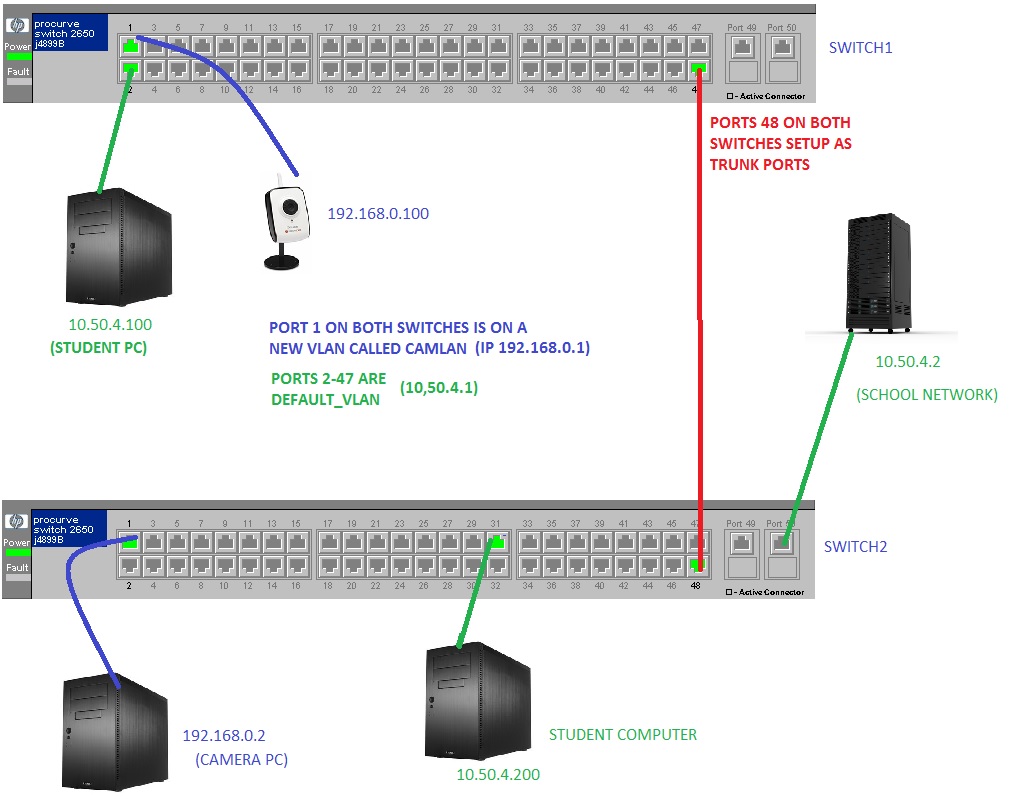
Can anyone please help. We have a test switch setup and we are trying to setup a very simple VLAN using two HP 2650 switches. We have created a VLAN using just one port (port 1) on each of the switches. These VLANS called "CAMLAN" have a separate address range to the network (192.168.0.1 on switch 1 and 192.168.0.10 on switch 2) The rest of the ports are as normal part of the DEFAULT_VLAN (ip 10.50.4.20 on switch one and 10.50.4.30 on switch 2) We want to connect the two switches together so that BOTH vlans use the same single port for traffic. So we setup port "48" on both ports as a "trunked port" We just cannot get the switches to connect and traffic travel between them, e.g from the network I cannot ping the student PC (ip 10.50.4.100) and from the "Camera PC" (ip 192.168.0.2) we cannot ping the IP camera (192.168.0.100) Can anyone please suggest what we are doing wrong?